
roctop
roctop is a lightweight terminal monitor for AMD ROCm GPUs. It gives you a
live, keyboard-driven view of GPU health, memory pressure, utilization, history
graphs, and the processes currently using your accelerators.
It is built for busy ROCm machines where you want the quick feel of top,
but with GPU details that are easier to scan than raw rocm-smi output.
Demo
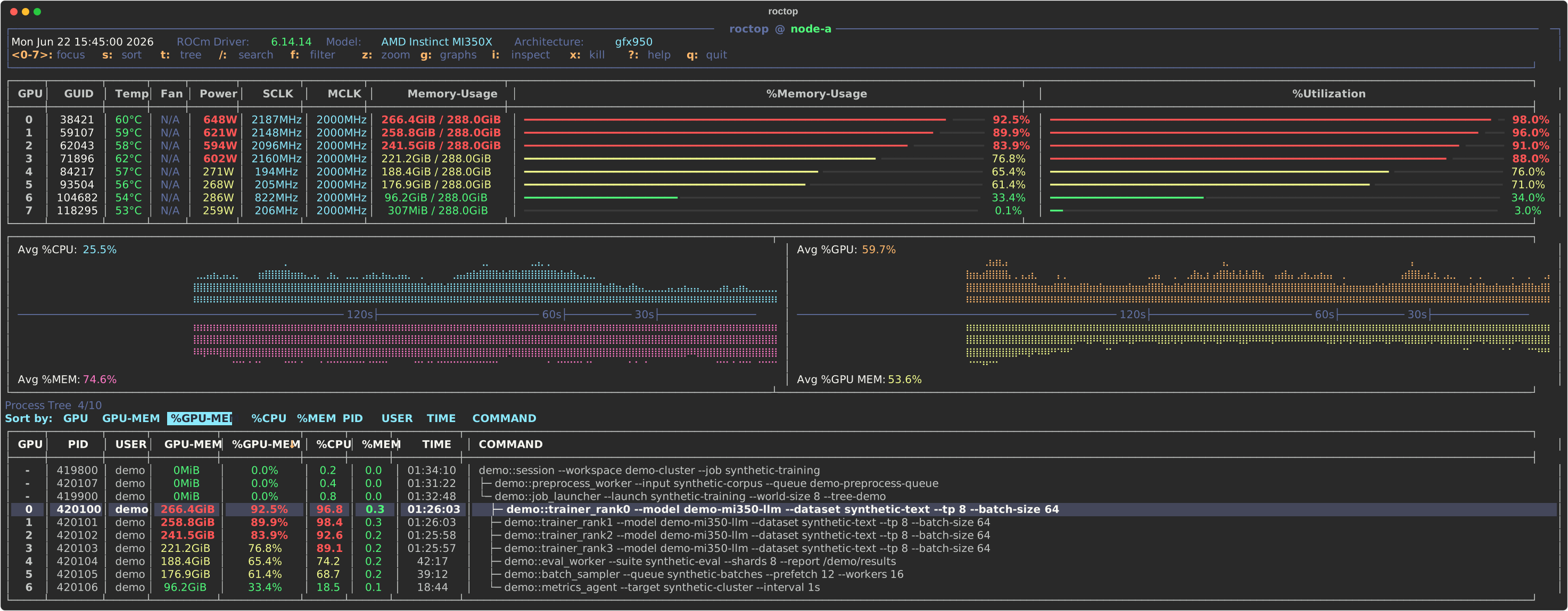
The demo uses synthetic data. Process names, users, PIDs, paths, and metrics are placeholders.
Highlights
- Live Rich terminal UI for AMD GPUs.
- Compact per-GPU table with model, architecture, GUID, temperature, fan, power, clocks, VRAM usage, and utilization.
- Host and GPU history graphs for CPU, system memory, GPU utilization, and GPU memory pressure.
- Process table with GPU index, PID, user, GPU memory, host CPU/memory, elapsed time, and wrapped command lines.
- Interactive search, filtering, sorting, GPU focus, table zoom, process tree navigation, and process inspection.
- Confirmation flow for SIGTERM/SIGKILL actions.
- Scriptable
--onceand--jsonmodes.
Requirements
- Python 3.10 or newer.
- ROCm command-line tools on
PATH. rocm-smiis required for GPU snapshots.amd-smiis optional and used when available for richer GPU/process details.
roctop is designed for Linux ROCm systems. On machines without ROCm tools it
will fail fast with a clear command error.
Install
pip install roctop
From source:
git clone https://github.com/nrhevu/roctop.git
cd roctop
python3 -m venv .venv
.venv/bin/python -m pip install -e .
.venv/bin/roctop
Usage
Start the live monitor:
roctop
Common commands:
roctop --interval 0.5
roctop --once
roctop --json
roctop --version
python -m roctop --once
Options:
--interval SECONDS   refresh interval for the live view, minimum: 0.05, default: 1.0
--once               render one terminal snapshot and exit
--json               print one normalized JSON snapshot and exit
--version            print the package version
Live Controls
j/k or Up/Down       move process cursor
PgUp/PgDn            move process cursor by page
0-9                  focus a GPU, when that GPU index exists
s                    open sort menu
t                    toggle process tree
z                    zoom process table
g                    toggle GPU graphs
,/.                  pan graphs older/newer
r                    reset graphs to live
/                    search processes
n/N                  next/previous search match
f                    filter processes
i                    inspect selected process
Space                select or deselect process
x                    open kill confirmation
Esc                  close graphs/menus or clear active filters
?                    open or close help
q or Ctrl-C          quit
Tree mode:
p                    jump to parent process
h or Left            jump to previous sibling
l or Right           jump to next sibling
Menus and popups:
h/l or arrows        move sort/kill menu selection
Enter                apply selected sort or kill option
y                    send SIGTERM in kill confirmation
j/k or Up/Down       scroll help or process inspection
h/l or Left/Right    page help or process inspection
Esc or q             cancel menus
Data Sources
roctop combines several local data sources:
rocm-smi --jsonfor core GPU state and ROCm driver information.amd-smi static --jsonandamd-smi metric --jsonfor extra model and metric details when available.amd-smi process -G --jsonfor GPU process memory when available./proc,ps, and container metadata for process command, user, runtime, CPU, host memory, ancestor, and container context.
Collection is intentionally tolerant. If optional process or detail commands are missing, slow, or malformed, the live monitor keeps rendering the best available snapshot.
Development
Create an editable install:
python3 -m venv --system-site-packages .venv
.venv/bin/python -m pip install -e .
Run tests:
.venv/bin/python -m unittest discover -s tests
Run local checks against the current machine:
.venv/bin/roctop --once
.venv/bin/roctop --json
Refresh the synthetic demo asset:
skills/roctop-demo-svg/scripts/generate_demo_svg.py
License
MIT. See LICENSE.
1 maintainer

Metadata
1 maintainer
Release files for roctop 1.0.0
For a detailed explanation of source distributions (sdists) and built distributions (wheels), please see the package formats documentation.
Source distribution (sdist)
| File | Size | Uploaded | |
|---|---|---|---|
| roctop-1.0.0.tar.gz | 93.3 kB | Details |
Built distribution (wheel)
| File | Interpreter | ABI | Platform | Reset |
|---|---|---|---|---|
| roctop-1.0.0-py3-none-any.whl | Python 3 | none | any | Details |
Total release size: 149.0 kB
Release files / roctop-1.0.0.tar.gz
| Download URL | roctop-1.0.0.tar.gz |
|---|---|
| Size | 93.3 kB |
| Tags | Source |
|
SHA-256 checksum How to use checksums |
afb0f040925536f9fc05cd24928ba7a3dcaffc244dfef7d62940ef960148200e
|
|
BLAKE2b-256 checksum How to use checksums |
d0faf5d99c5f74991dbd7d4b85edd1841141d37b48d3df65d45c1d12b43bb8ad
|
| Upload date | |
|
Uploaded using Trusted Publishing? What is trusted publishing? |
Yes |
| Uploaded via |
twine/6.1.0 CPython/3.13.12
|
Provenance
Provenance describes where a file came from. On PyPI, provenance is shared via attestations, which provide a verifiable record of the build or publishing details. View details, limitations and caveats.


PyPI Publish Attestation
PyPI verified that this artifact, at this checksum, originated from the publisher listed below.
Signed by GitHub Actions, verified by PyPI on Jul 14, 2026.
Transparency logRelease files / roctop-1.0.0-py3-none-any.whl
| Download URL | roctop-1.0.0-py3-none-any.whl |
|---|---|
| Size | 55.7 kB |
| Tags | Python 3 |
|
SHA-256 checksum How to use checksums |
b41c0951104b29f5c4e01d184cd9e3452151d7c3ca917590a20853f71a5d193b
|
|
BLAKE2b-256 checksum How to use checksums |
dbb71dbe4ba2e68531a31a3bc1e851adb24abd9457ad0ef4b500d0fbdc6d3a42
|
| Upload date | |
|
Uploaded using Trusted Publishing? What is trusted publishing? |
Yes |
| Uploaded via |
twine/6.1.0 CPython/3.13.12
|
Provenance
Provenance describes where a file came from. On PyPI, provenance is shared via attestations, which provide a verifiable record of the build or publishing details. View details, limitations and caveats.
PyPI Publish Attestation
PyPI verified that this artifact, at this checksum, originated from the publisher listed below.
Signed by GitHub Actions, verified by PyPI on Jul 14, 2026.
Transparency log













