
A lightweight Rich terminal monitor for AMD ROCm GPUs.
Verified details
These details have been verified by PyPIProject links
GitHub Statistics
Maintainers

Project description
roctop
roctop is a small AMD ROCm GPU monitor. It shows GPU VRAM usage,
utilization, type, temperature, fan, power, clocks, live system/GPU graphs,
and GPU processes in a refreshing terminal UI.
Demo
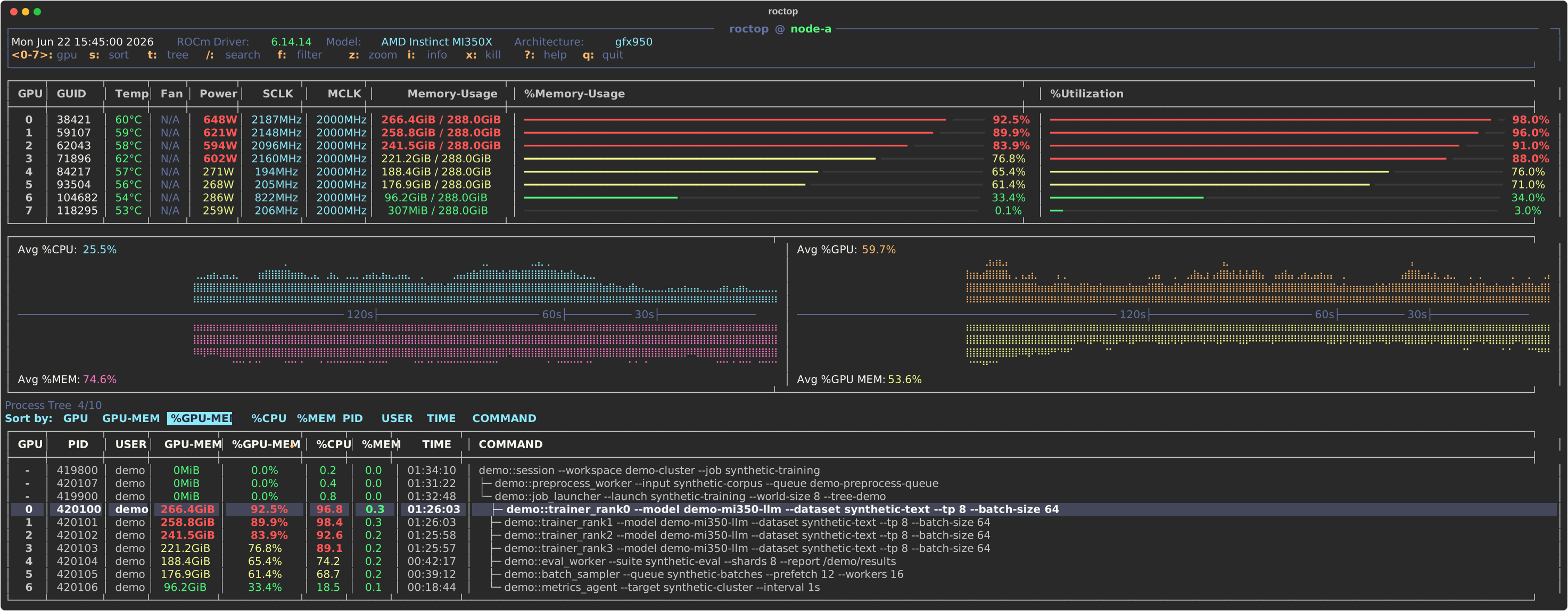
The demo is rendered from synthetic data; process names, PIDs, users, and metrics are placeholders.
Features
- GPU overview: compact table for every ROCm GPU with GUID, standardized model, architecture, temperature, fan status, power draw, SCLK/MCLK clocks, VRAM usage, and utilization.
- Readable utilization bars: memory and GPU utilization are shown as inline bars with percentage labels and threshold colors, making idle, busy, and saturated devices easy to scan.
- Live history graphs: split graph panel tracks average host CPU, host memory, GPU utilization, and GPU memory usage over the recent refresh window.
- Process visibility: process table shows GPU index, PID, user, GPU memory, GPU memory percent, host CPU/memory percent, elapsed runtime, and full wrapped command lines.
- Interactive process navigation: move through processes with
j/kor arrow keys, page through long lists, toggle process tree view, keep the selected process visible across refreshes, and sort by GPU, memory, CPU, PID, user, time, or command. - Popup details and help:
iopens selected process details from the current snapshot and/proc, while?opens an in-app keybinding reference. Both popups support arrow keys andh/j/k/lnavigation. - Safe process actions:
xopens a high-contrast confirmation menu with Cancel, SIGTERM, and SIGKILL choices, plus status messages for missing processes, permission errors, and other failures. - Robust data collection: combines
rocm-smiGPU snapshots,amd-smi processprocess memory data, andpsprocess metadata, with fallbacks when process-specific data is missing or malformed. - Script-friendly modes:
--oncerenders a single terminal snapshot,--jsonprints normalized snapshot data, and--intervalcontrols live refresh cadence.
Install
roctop expects ROCm command-line tools on PATH: rocm-smi is required,
and amd-smi is used when available for richer per-process memory data.
From PyPI:
pip install roctop
Build from source:
git clone https://github.com/nrhevu/roctop.git
cd roctop
python3 -m venv .venv
.venv/bin/python -m pip install -e .
export PATH="$PWD/.venv/bin:$PATH"
Usage
roctop
roctop --interval 0.5
roctop --once
roctop --json
roctop --version
python -m roctop --once
Live Controls
j/k or Up/Down    move process cursor
PgUp/PgDn         scroll processes
s                 open sort menu
t                 toggle process tree
p                 jump to parent process in tree view
h/Left, l/Right   jump to previous/next sibling in tree view
/                 search processes
n/N               next/previous search match
f                 filter visible processes
i                 show selected process details
x                 kill selected process with confirmation
?                 open/close help
q or Ctrl-C       quit
Popup Controls
j/k or Up/Down      scroll help or process info
h/l or Left/Right   page help or process info
? or Esc            close help
i or Esc            close process info
h/l or arrows       move sort or kill menu selection
Enter               apply selected sort or kill option
y                   send SIGTERM in kill confirmation
Esc or q            cancel menus
Project details
Verified details
These details have been verified by PyPIProject links
GitHub Statistics
Maintainers


Download files
Download the file for your platform. If you're not sure which to choose, learn more about installing packages.
Source Distribution
Built Distribution
Filter files by name, interpreter, ABI, and platform.
If you're not sure about the file name format, learn more about wheel file names.
Copy a direct link to the current filters
File details
Details for the file roctop-0.3.3.tar.gz.
File metadata
- Download URL: roctop-0.3.3.tar.gz
- Upload date:
- Size: 59.8 kB
- Tags: Source
- Uploaded using Trusted Publishing? Yes
- Uploaded via: twine/6.1.0 CPython/3.13.12
File hashes
| Algorithm | Hash digest | |
|---|---|---|
| SHA256 |
07a42ead1f6e2ae867ef38ee645d7f37eea3f825db026bfb1fe32caf9f98b136
|
|
| MD5 |
99e81dd9467fc4fc35a8e9ae7afde63a
|
|
| BLAKE2b-256 |
9bcc56bb4c47fa692f245c8c57c6edf4b43fc1a5a67d167166fe454f8c540a2b
|
Provenance
The following attestation bundles were made for roctop-0.3.3.tar.gz:
Publisher:
build_whl_and_publish.yaml on nrhevu/roctop
-
Statement:
-
Statement type:
https://in-toto.io/Statement/v1 -
Predicate type:
https://docs.pypi.org/attestations/publish/v1 -
Subject name:
roctop-0.3.3.tar.gz -
Subject digest:
07a42ead1f6e2ae867ef38ee645d7f37eea3f825db026bfb1fe32caf9f98b136 - Sigstore transparency entry: 1949774946
- Sigstore integration time:
-
Permalink:
nrhevu/roctop@471dcd6f0212607267e40008fb12fc29889ed905 -
Branch / Tag:
refs/tags/v0.3.3 - Owner: https://github.com/nrhevu
-
Access:
public
-
Token Issuer:
https://token.actions.githubusercontent.com -
Runner Environment:
github-hosted -
Publication workflow:
build_whl_and_publish.yaml@471dcd6f0212607267e40008fb12fc29889ed905 -
Trigger Event:
release
-
Statement type:
File details
Details for the file roctop-0.3.3-py3-none-any.whl.
File metadata
- Download URL: roctop-0.3.3-py3-none-any.whl
- Upload date:
- Size: 37.5 kB
- Tags: Python 3
- Uploaded using Trusted Publishing? Yes
- Uploaded via: twine/6.1.0 CPython/3.13.12
File hashes
| Algorithm | Hash digest | |
|---|---|---|
| SHA256 |
22ea0092fe1cbcdb02aa60d080835e72629d81d3f5825f2caeb38b9e91f99a8f
|
|
| MD5 |
467a91bfc84a4f6d9ed8ab089dcaa94e
|
|
| BLAKE2b-256 |
4f5cb152dbcdcf22d133c7fe58b0bda4acccabd104efd67eab78081c71467f6c
|
Provenance
The following attestation bundles were made for roctop-0.3.3-py3-none-any.whl:
Publisher:
build_whl_and_publish.yaml on nrhevu/roctop
-
Statement:
-
Statement type:
https://in-toto.io/Statement/v1 -
Predicate type:
https://docs.pypi.org/attestations/publish/v1 -
Subject name:
roctop-0.3.3-py3-none-any.whl -
Subject digest:
22ea0092fe1cbcdb02aa60d080835e72629d81d3f5825f2caeb38b9e91f99a8f - Sigstore transparency entry: 1949775089
- Sigstore integration time:
-
Permalink:
nrhevu/roctop@471dcd6f0212607267e40008fb12fc29889ed905 -
Branch / Tag:
refs/tags/v0.3.3 - Owner: https://github.com/nrhevu
-
Access:
public
-
Token Issuer:
https://token.actions.githubusercontent.com -
Runner Environment:
github-hosted -
Publication workflow:
build_whl_and_publish.yaml@471dcd6f0212607267e40008fb12fc29889ed905 -
Trigger Event:
release
-
Statement type:






