
roff
python-based cli to convert markdown to the roff (man-pages) format
Installation

pip install roff
pip install roff[front-matter]  # support for front-matter to configure roff
pip install roff[images]  # support for images
pip install roff[images-svg]  # support for svg-images
pip install roff[watch]  # support for rendering and auto-reloading a manpage while writing
[!TIP] After the installation you should be able to see roff's manpage with
man roffor the file format information withman roff.5.
Usage/Execution
For more details inspect the manpage (
man roff.1) to see all commands with their options.
For the common usage you can create a template markdown file with the roff template subcommand and then convert it to the roff-file-format with roff convert.
roff --help
roff template command.1.md
roff convert command.1.md
man ./command.1
Additionally, if roff[watch] was installed, you can run roff watch to see the rendered file that automatically re-renders if the file-content changes.
# shell 1
$ roff watch command.1.md
# shell 2
$ nano command.1.md
$ vim command.1.md
Additionally, if your project uses python argparse.ArgumentParser then you can start quicker by using the roff from-parser command instead of roff template.
This works almost like the template command, but fills most of the fields.
[!WARNING]
from-parserwill import the parser from your specified file/module. Which means that the code will be run! Use with care!
$ roff from-parser --root src/ --output prog.1.md myprog.__main__:parser
File Format
For more details inspect the manpage (
man roff.5) to see all file specifications.
roff uses markdown as the file format. It supports all commonmark markdown features (h1 is reserved for the head).
Additionally, roff brings 1 own markdown-feature, the inline-command!
By prepending your inline-code with a $ sign it gets recognised as an inline-command and rendered in a more special way.
$`command subcommand [--arg value] file...`

[!TIP] Use
roff template command.1.mdto get a pre-filled markdown file as a starting point.
Configuration
Roff has multiple configuration options for a more customized experience.
Details about these options can be inspected via the manpage (man roff.1).
These options are only needed for a fine-tuned experience. For most users roff should work out of the box.
Example
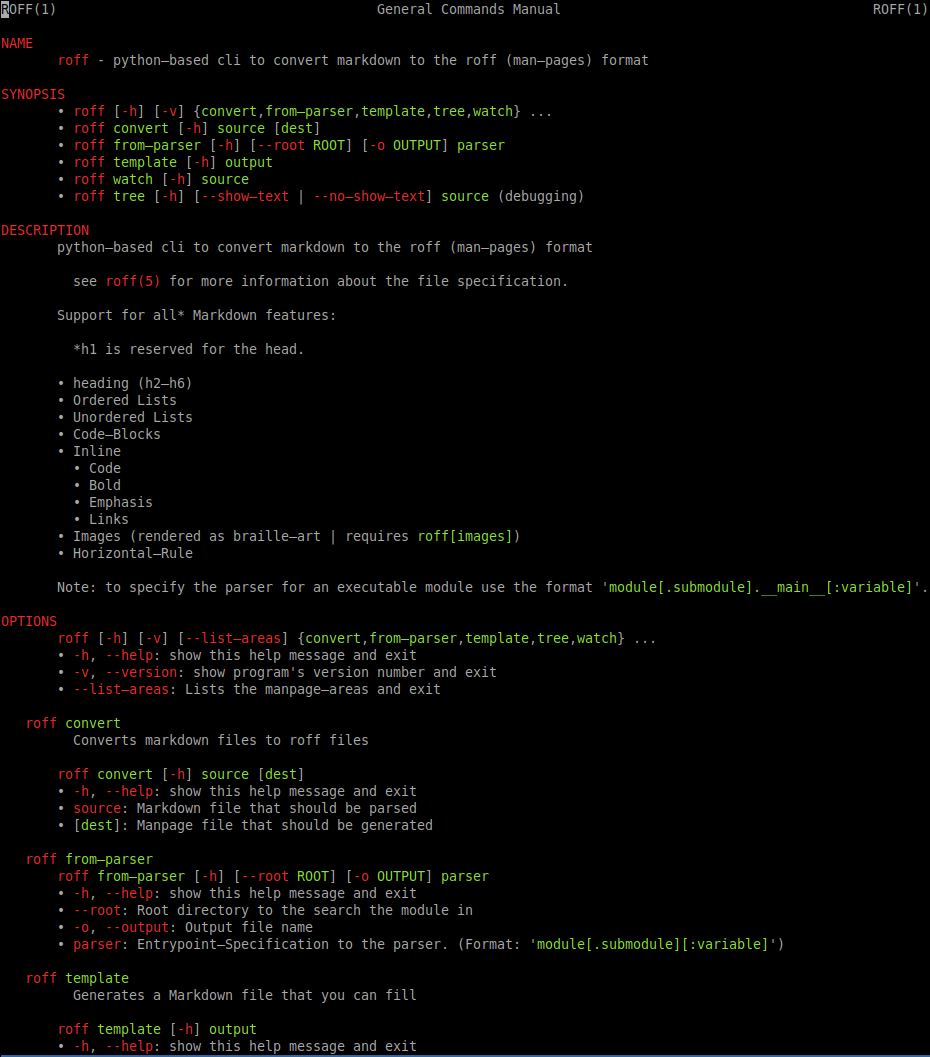
The following image shows the manpage of roff itself.
(The manpage-content might be slightly outdated but still shows what roff can do)


Release files for roff 0.8.0
For a detailed explanation of source distributions (sdists) and built distributions (wheels), please see the package formats documentation.
Source distribution (sdist)
| File | Size | Uploaded | |
|---|---|---|---|
| roff-0.8.0.tar.gz | 30.8 kB | Details |
Built distribution (wheel)
| File | Interpreter | ABI | Platform | Reset |
|---|---|---|---|---|
| roff-0.8.0-py3-none-any.whl | Python 3 | none | any | Details |
Total release size: 64.5 kB
Release files / roff-0.8.0.tar.gz
| Download URL | roff-0.8.0.tar.gz |
|---|---|
| Size | 30.8 kB |
| Tags | Source |
|
SHA-256 checksum How to use checksums |
757f19b88f7679607ed7f629c1f100d78eb32f027a4d19914ced987a8c5940b8
|
|
BLAKE2b-256 checksum How to use checksums |
4d3bcf316c982c2068c3a380015c5a05b9b73a48511441f443b2c3df850b96b9
|
| Upload date | |
|
Uploaded using Trusted Publishing? What is trusted publishing? |
No |
| Uploaded via |
twine/6.1.0 CPython/3.10.12
|
Release files / roff-0.8.0-py3-none-any.whl
| Download URL | roff-0.8.0-py3-none-any.whl |
|---|---|
| Size | 33.6 kB |
| Tags | Python 3 |
|
SHA-256 checksum How to use checksums |
cc0bff161fca4be6fed9918bd65771f3319b3941b94c5f5cbd3cdd53770c5000
|
|
BLAKE2b-256 checksum How to use checksums |
46508bcb4f60fc6648ebd5ad88d01d21e4c51320157f3ce426925dcc22dc42ef
|
| Upload date | |
|
Uploaded using Trusted Publishing? What is trusted publishing? |
No |
| Uploaded via |
twine/6.1.0 CPython/3.10.12
|














