
Rogallo







Introduction
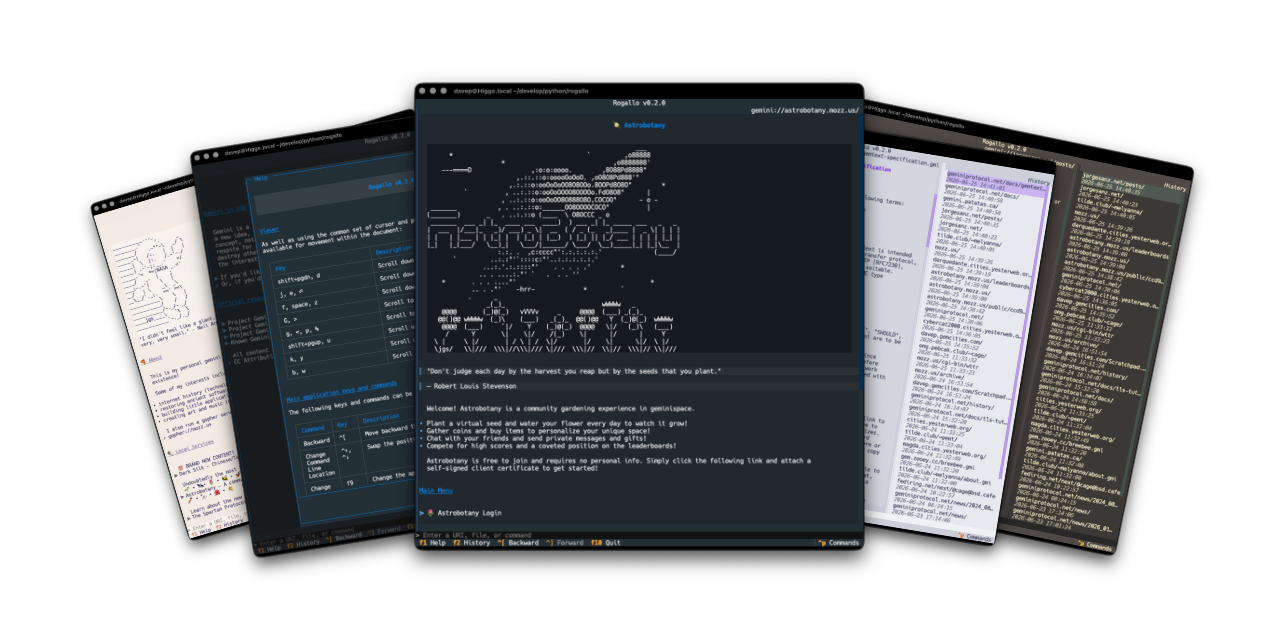
Rogallo is a terminal-based client for browsing Geminispace, Spartanspace, Gopherspace, and Fingerspace. Its key features include:
- Support for the
gemini,spartan,gopher, andfingerprotocols - Bookmarks management with search
- Location history tracking with search
- Backward and forward page navigation
- Copy-to-clipboard support for URIs or page content
- Configurable home page
- Full mouse navigation and interaction support
- Built-in source viewer
- Context-sensitive help screens
- Command palette for quick command discovery and execution
- Automatic handoff of unknown MIME types to the operating system
- Optional rendering (on by default) of ANSI escape sequences in pages
- Local Gemtext file viewing
- Built-in theme selection, plus support for user-supplied custom UI themes
- Persistent configuration across sessions
- Fully responsive layout that adjusts dynamically to terminal resizing
- Cross-platform support for macOS, GNU/Linux, Windows, and other operating systems running modern Python
Key features for Gemini protocol support include:
- User input handling (
1xresponses), including masked inputs for sensitive fields- Optional external text editor integration for composing inputs
- In-application generation of self-signed client certificates, with persistent per-capsule management
- Redirection handling (
3xresponses) - Flexible capsule certificate verification for both CA-signed and self-signed certificates
Installing
pipx
The application can be installed using pipx:
pipx install rogallo
uv
The application can be installed using uv:
uv tool install rogallo
If you don't have uv installed you can use uvx.sh to
perform the installation. For GNU/Linux or macOS or similar:
curl -LsSf uvx.sh/rogallo/install.sh | sh
or on Windows:
powershell -ExecutionPolicy ByPass -c "irm https://uvx.sh/rogallo/install.ps1 | iex"
Once installed run the rogallo command.
File locations
Rogallo stores files in an rogallo directory within both $XDG_DATA_HOME
and
$XDG_CONFIG_HOME.
If you wish to fully remove anything to do with Rogallo you will need to
remove those directories too.
Expanding for the common locations, the files normally created are:
~/.cache/rogallo/*-- The document cache.~/.config/rogallo/configuration.json-- The configuration file.~/.local/share/rogallo/*-- The locally-held data.
Getting help
If you need help, or have any ideas, please feel free to raise an issue or start a discussion.
TODO
See the TODO tag in issues to see what I'm planning.
1 maintainer

Download files
Download the file for your platform. If you're not sure which to choose, learn more about installing packages.
Source Distribution
Built Distribution
Filter files by name, interpreter, ABI, and platform.
If you're not sure about the file name format, learn more about wheel file names.
Copy a direct link to the current filters
File details
Details for the file rogallo-1.6.2.tar.gz.
File metadata
- Download URL: rogallo-1.6.2.tar.gz
- Upload date:
- Size: 51.0 kB
- Tags: Source
- Uploaded using Trusted Publishing? No
- Uploaded via: uv/0.12.2 {"installer":{"name":"uv","version":"0.12.2","subcommand":["publish"]},"python":null,"implementation":{"name":null,"version":null},"distro":{"name":"macOS","version":null,"id":null,"libc":null},"system":{"name":null,"release":null},"cpu":null,"openssl_version":null,"setuptools_version":null,"rustc_version":null,"ci":null}
File hashes
| Algorithm | Hash digest | |
|---|---|---|
| SHA256 |
e2aba34d7c9390fd018eec97738d775f4ec81f5328313672d2202e1718fb1031
|
|
| MD5 |
5488605bba572cd33be73a01587b133b
|
|
| BLAKE2b-256 |
873a3e1ebce7d4fee38e8bffb6fc26673caba5b4975f805379b76de9e5fe1bc9
|
File details
Details for the file rogallo-1.6.2-py3-none-any.whl.
File metadata
- Download URL: rogallo-1.6.2-py3-none-any.whl
- Upload date:
- Size: 79.4 kB
- Tags: Python 3
- Uploaded using Trusted Publishing? No
- Uploaded via: uv/0.12.2 {"installer":{"name":"uv","version":"0.12.2","subcommand":["publish"]},"python":null,"implementation":{"name":null,"version":null},"distro":{"name":"macOS","version":null,"id":null,"libc":null},"system":{"name":null,"release":null},"cpu":null,"openssl_version":null,"setuptools_version":null,"rustc_version":null,"ci":null}
File hashes
| Algorithm | Hash digest | |
|---|---|---|
| SHA256 |
1e52ead9d31501ae466a9c3ed21220ca78e6ba570915ca11daded093b9289611
|
|
| MD5 |
288e726e61ac71f21a16431adf5a79ed
|
|
| BLAKE2b-256 |
861aacea1e889ed9919eb9187f39000a0d98404d78c63dea71427d4a465365eb
|







