
ros-launch-analyzer
概要
ros-launch-analyzerは、ROSのlaunchファイルの依存関係を分析してグラフを生成するツールです。
ROS1がインストールされていない環境で使うことを想定したツールのため、ROSに依存せずに動かせます。
(そのためROSがインストールされている環境ならば簡単にパスが見つかるようなパッケージも、見つかりにくいことがあります)
機能
- launchファイル間の依存関係を解析
- ROSノードの依存関係を解析
- 依存関係をGraphvizを使ってグラフ化
- シンプルグラフと詳細グラフの生成
- ノード情報のCSV出力
インストール
pip install ros-launch-analyzer
実行方法
CLIとして
$ ros-launch-analyzer <launchファイルまたはディレクトリのパス> [--output <出力ファイル名>] [--ros-ws <ROSワークスペースのパス>]
解析対象の指定について:
-
ディレクトリを指定した場合: 指定されたディレクトリ以下の全ての
.launchおよび.launch.xmlファイルを再帰的に検索し、それらのファイル間の依存関係(<include>タグによる参照)を全て解析します。間接的な依存関係も含まれます。# 例: mycobot_gazebo パッケージの launch ディレクトリ全体を解析 $ ros-launch-analyzer catkin_ws/src/mycobot_ros/mycobot_gazebo/launch --ros-ws "$(pwd)/catkin_ws"
-
単一のlaunchファイルを指定した場合: 指定された launch ファイルと、そのファイルが 直接
<include>タグで参照している launch ファイルのみ を対象として解析し、グラフを生成します。指定ファイルから見て2階層目以降の間接的な依存関係はグラフに含まれません。これは、特定のファイル周辺の直接的な依存関係に絞って確認したい場合に便利です。# 例: demo.launch とそれが直接 include するファイルのみを解析 $ ros-launch-analyzer catkin_ws/src/mycobot_ros/mycobot_move_it_config/launch/demo.launch --ros-ws "$(pwd)/catkin_ws"
mycobot_rosのlaunchファイルを解析する例 (ディレクトリ指定)
$ cd /tmp
$ mkdir -p catkin_ws/src
$ git clone https://github.com/Tiryoh/mycobot_ros.git catkin_ws/src/mycobot_ros
$ ros-launch-analyzer catkin_ws/src/mycobot_ros/mycobot_gazebo/launch --ros-ws "$(pwd)/catkin_ws"
Pythonモジュールとして
from ros_launch_analyzer.analyzer import LaunchAnalyzer

# 解析器の初期化
analyzer = LaunchAnalyzer("/path/to/launch/dir", "/path/to/catkin_ws")

# launchファイルの解析
analyzer.parse_launch_file("/path/to/your.launch")

# グラフの生成
analyzer.create_graph("output_filename")
# または
analyzer.create_simple_graph("output_filename")  # シンプルグラフのみ
analyzer.create_full_graph("output_filename")    # 詳細グラフのみ
出力
以下のファイルを生成し出力します。
dotファイルはxdotやVSCodeの拡張機能(Graphviz Interactive Preview)などで表示できます。
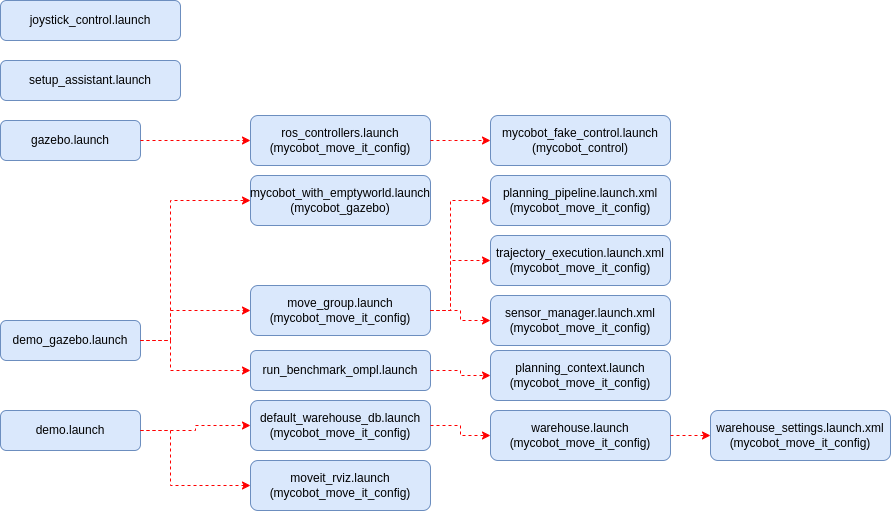
生成されたファイルはClaudeなどでdrawioのフォーマットに変換して使用すると便利です。
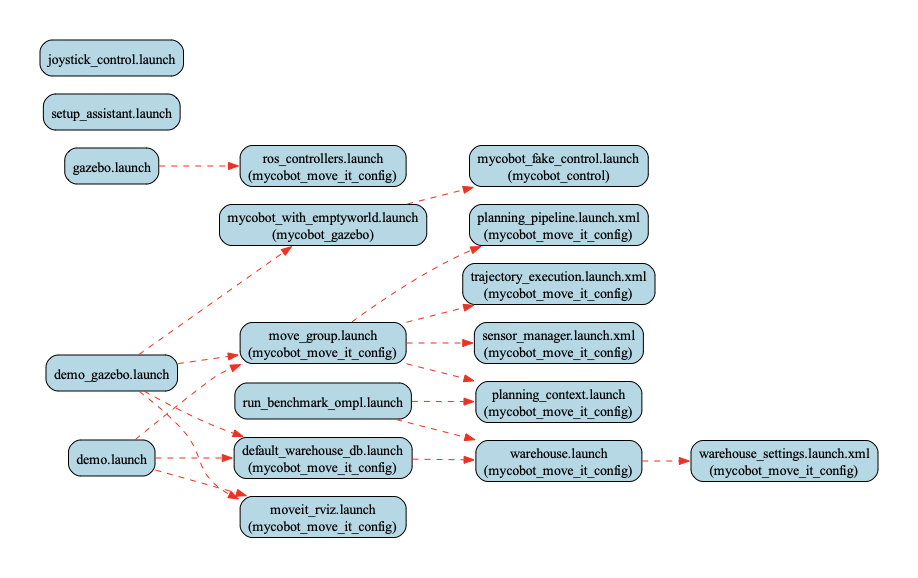
ros_nodes_graph_simple.dot- launchファイルの依存関係を表すGraphvizのdotファイル
ros_nodes_graph_simple.pdf- 上記のdotファイルをレンダリングしたPDF
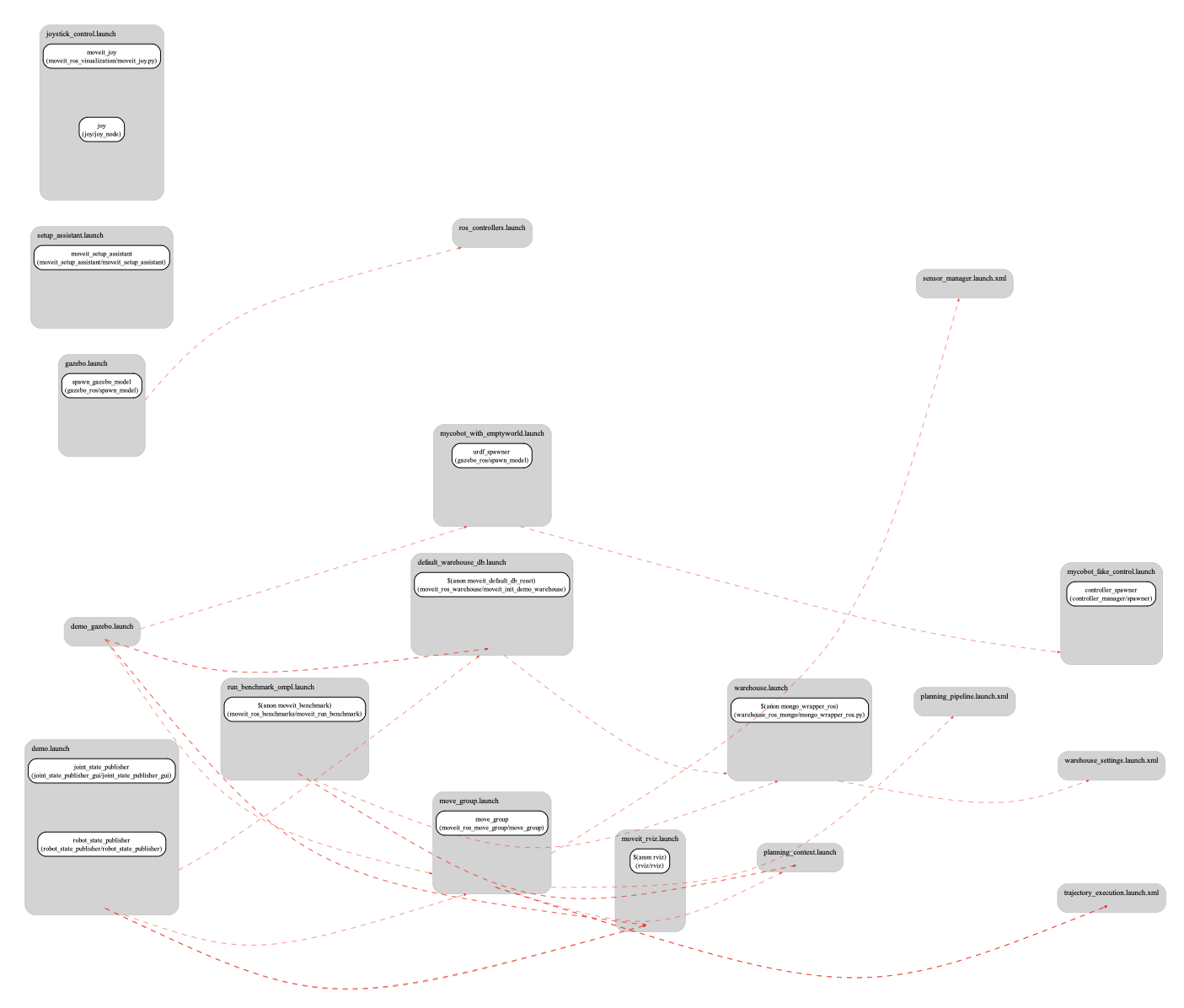
ros_nodes_graph.dot- launchファイル(ROSパッケージも含む)の依存関係を表すGraphvizのdotファイル
ros_nodes_graph.pdf- 上記のdotファイルをレンダリングしたPDF
ros_nodes_graph_nodes.csv- launchファイルのノード名とパッケージ名を出力したCSVファイル
mycobot_rosを解析した結果
simpleグラフ
fullグラフ
simpleグラフをdrawioのフォーマット(flow.drawio.txt)に変換したもの
必要条件
- Python 3.8以上
- Graphviz(システムにインストールされている必要があります)
ライセンス
本プロジェクトはMITライセンスのもとで公開されています。
1 maintainer

Metadata
1 maintainer
Release files for ros-launch-analyzer 0.1.1
For a detailed explanation of source distributions (sdists) and built distributions (wheels), please see the package formats documentation.
Source distribution (sdist)
| File | Size | Uploaded | Provenance | |
|---|---|---|---|---|
| ros_launch_analyzer-0.1.1.tar.gz | 12.4 kB | Without provenance | Details |
Built distribution (wheel)
| File | Interpreter | ABI | Platform | Reset |
|---|---|---|---|---|
| ros_launch_analyzer-0.1.1-py3-none-any.whl | Python 3 | none | any | Details |
Total release size: 25.4 kB
Release files / ros_launch_analyzer-0.1.1.tar.gz
| Download URL | ros_launch_analyzer-0.1.1.tar.gz |
|---|---|
| Size | 12.4 kB |
| Tags | Source |
|
SHA-256 checksum How to use checksums |
ad7efe3ba89db9525c6d45a88458f9c8924a7e1d799e88d7439d69fead15834a
|
|
BLAKE2b-256 checksum How to use checksums |
68250a207c7dd187995cdbf25e51989556af3d00470d920754a0f88505c8ca9d
|
| Upload date | |
|
Uploaded using Trusted Publishing? What is trusted publishing? |
No |
| Uploaded via |
twine/6.1.0 CPython/3.12.9
|
Release files / ros_launch_analyzer-0.1.1-py3-none-any.whl
| Download URL | ros_launch_analyzer-0.1.1-py3-none-any.whl |
|---|---|
| Size | 13.0 kB |
| Tags | Python 3 |
|
SHA-256 checksum How to use checksums |
76746c1d2a6686f1dbde20adbf6e7a546d2260e714245b5196cbde0962861c7f
|
|
BLAKE2b-256 checksum How to use checksums |
b706ee65239c18ae7abe60ec6bbc2a6c20e5588fad99d7601b7ac06424f67330
|
| Upload date | |
|
Uploaded using Trusted Publishing? What is trusted publishing? |
No |
| Uploaded via |
twine/6.1.0 CPython/3.12.9
|
Security for ros-launch-analyzer 0.1.1
Provenance
Provenance describes where a file came from. On PyPI, provenance is shared via attestations, which provide a verifiable record of the build or publishing details. View details, limitations and caveats.
No provenance found
None of the files in this release were uploaded with provenance metadata.
A note on package security
PyPI is a repository for distributing packages, not a service for auditing them. While third-party security researchers and our staff do their best to detect and remove malicious packages, PyPI cannot guarantee the quality, security or suitability of any given package.














