


Show live ROS 2 data in the Rerun viewer, as you would in rviz. All you write is a config file listing the topics you want to see: the bridge subscribes to them and sends each message to Rerun, drawing spatial data in its TF frame. The built-in modules need no code.
global_frame: map
modules:
  - name: camera
    module: image
    topic: /camera/image_raw
    entity_path: camera/image
  - name: scan
    module: laserscan
    topic: /scan
    entity_path: scan
ros-rerun-bridge --config my_robot.yaml
Or skip the config, and let the bridge find the topics it can show:
ros-rerun-bridge --auto --global-frame world # use the global frame you would set in rviz
Status: I created this repository mainly to get familiar with Rerun and to use it in my own ROS projects. It is under active development, so features, interfaces and behaviour may change. Tested with Rerun 0.40.0 and ROS 2 Jazzy and Lyrical.
Demos
Nav2: the Nav2 getting started demo with this config.

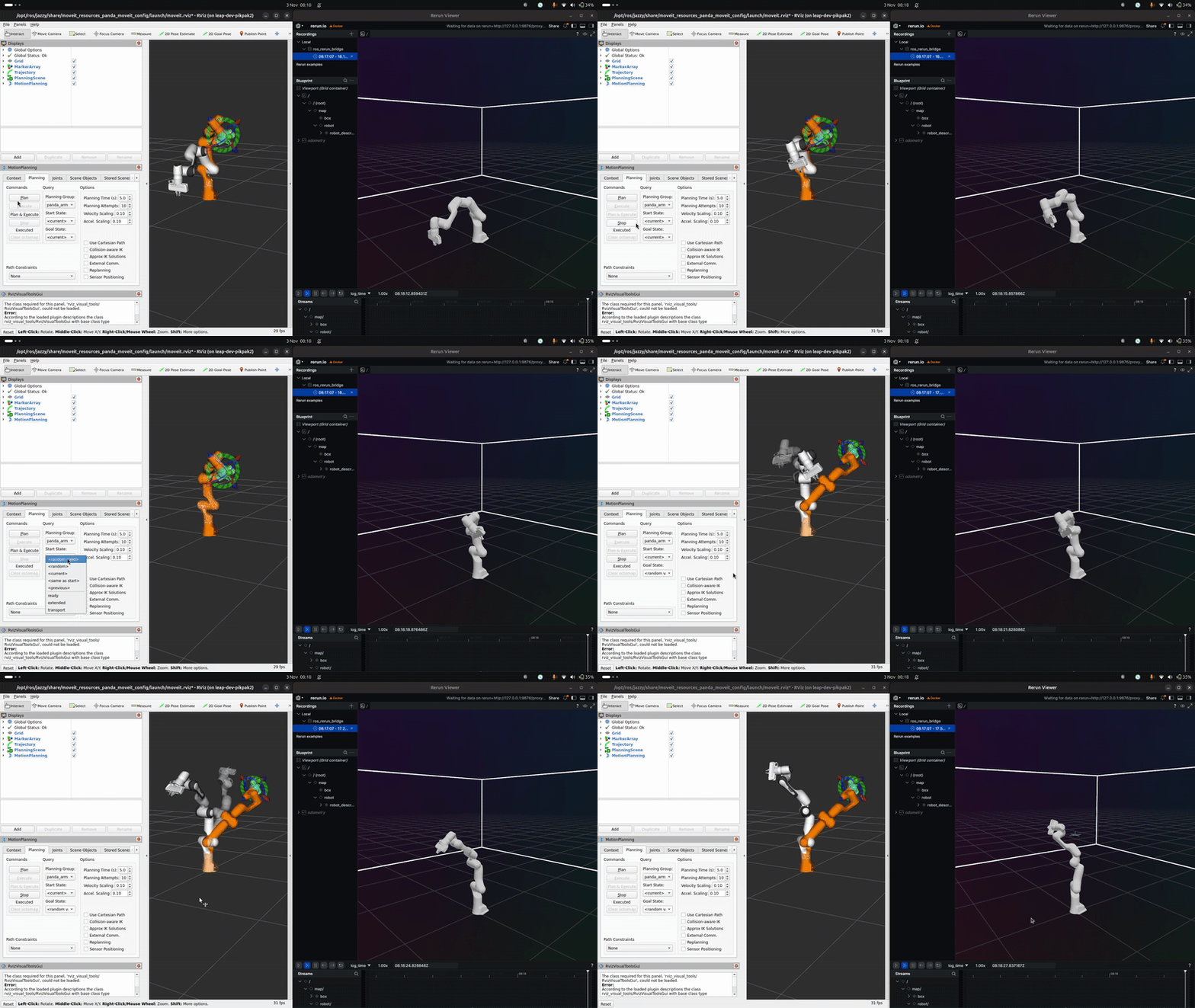
MoveIt: ros2 launch moveit_resources_panda_moveit_config demo.launch.py with this config.
Features
- Config, not code: one YAML file says which topics to show and how, and is checked when the bridge starts.
- TF and URDF aware: data is drawn in its TF frame. The robot model is loaded from its URDF and moves with TF or joint states.
- rviz's common displays: robot model, images, point clouds, laser scans, range sensors, markers, maps and costmaps, and more (see Modules).
- Remote viewing: any number of native or browser viewers can connect to a bridge running on a robot.
- Extensible: support a new message type with a small module class, in this package or in your own.
Quick start
You need ROS 2 (Jazzy or Lyrical), and uv or pipx. Install the bridge from PyPI in an environment of its own, which both create, as Rerun needs NumPy 2 and Jazzy ships NumPy 1:
uv tool install --python-preference only-system ros-rerun-bridge # or: pipx install ros-rerun-bridge
Do not pip install it into the system Python: on Jazzy, its NumPy 2 would break other ROS nodes.
You can start straight away, with no config. With your robot or simulator running, the bridge shows every topic it can draw, as it appears:
source /opt/ros/jazzy/setup.bash  # or lyrical
ros-rerun-bridge --auto --global-frame world  # use the global frame you would set in rviz
To choose what is shown, and how, list the topics in a config. To see one in action, try an example from a clone of this repo:
git clone https://github.com/justagist/ros_rerun_bridge.git && cd ros_rerun_bridge
source /opt/ros/jazzy/setup.bash  # or lyrical
ros-rerun-bridge --config examples/robot_arm/config.yaml
# In a second terminal, from the repo root with ROS sourced: publish a small arm's URDF and joint states
python3 examples/robot_arm/publisher.py
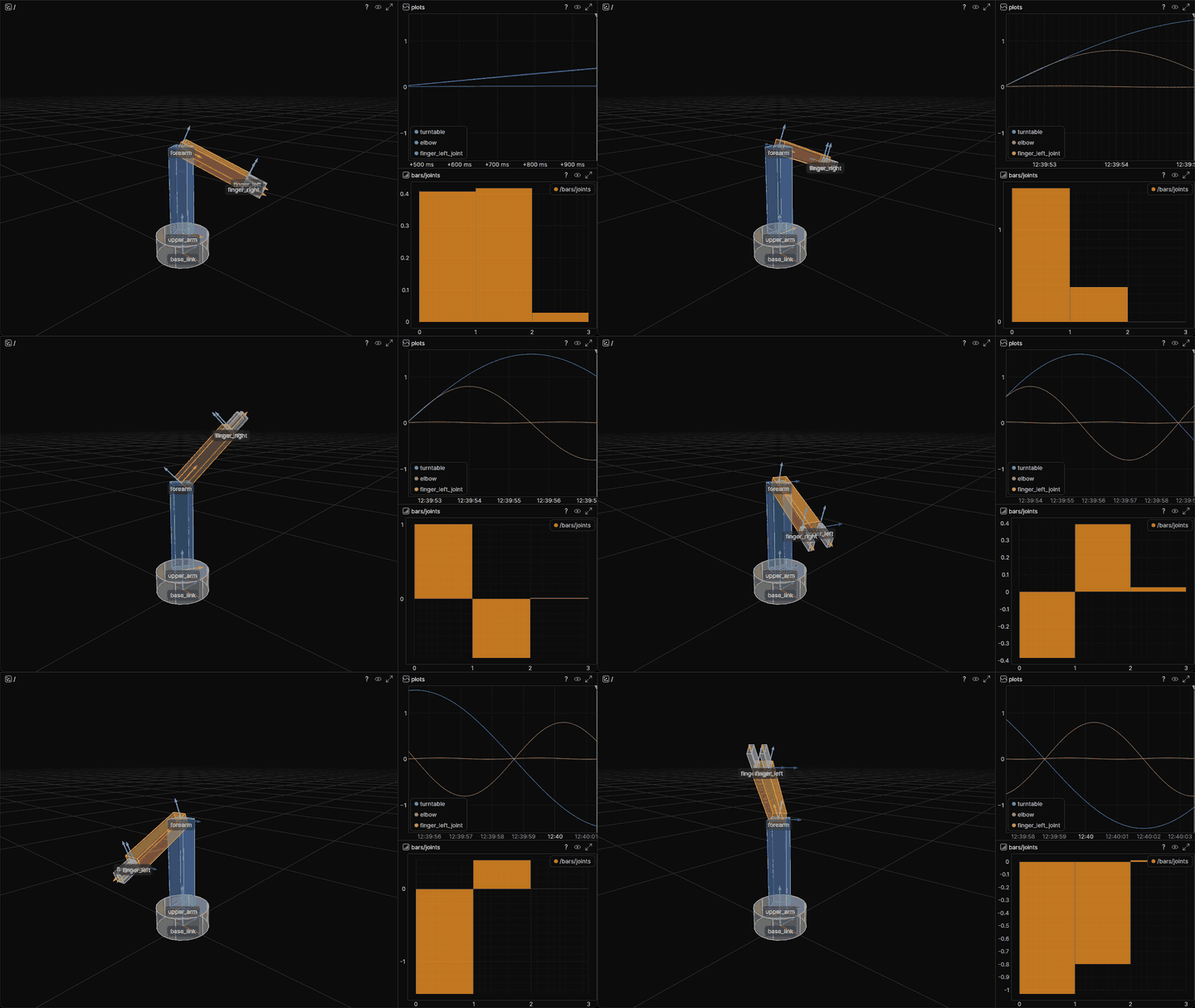
This opens the Rerun viewer, showing the arm moving and its joint positions plotted. The publisher only provides demo data: with a real robot, the bridge needs just a config listing its topics. examples has more, each runnable the same way.
See INSTALLATION.md for other ways to install, e.g. running from a clone without installing, and why the bridge needs its own environment.
Usage
ros-rerun-bridge --config <config.yaml> [options] [-- <ROS arguments>]
ros-rerun-bridge --auto [--config <config.yaml>] [options] [-- <ROS arguments>]
| Option | |
|---|---|
| (no option) | Open a Rerun viewer. |
--auto |
Also show the topics the config does not list, as they appear (automatic discovery). |
--global-frame <frame> |
The TF frame the 3D view is drawn in. Overrides the config's global_frame. |
--connect [--url <url>] |
Send to a Rerun viewer that is already running. |
--serve [--allow-origin <pattern>] |
Let viewers on other machines connect (REMOTE_VIEWING.md). |
--save <file.rrd> |
Record to a file, to open later with rerun <file.rrd>. |
--stdout |
Stream to standard output, to pipe into rerun -. |
--headless |
Run without a viewer. |
--version |
Print the version. |
Arguments after -- are passed to ROS, e.g. -- --ros-args -p use_sim_time:=true.
Recordings and bags
Recording, with --save, and opening recordings are Rerun's features: see Rerun's docs. To view a ROS bag as a live robot would be shown, play it into the bridge on the bag's clock:
ros-rerun-bridge --config <config.yaml> -- --ros-args -p use_sim_time:=true
ros2 bag play <bag> --clock
Rerun can also open an .mcap bag directly, without the bridge, converting common ROS 2 messages itself. The bridge covers more, such as markers, laser scans, the robot model and diagnostics, and keeps a config's layout.
Configuration
A config lists the topics to show. Each topic is handled by a module, which decides how it is drawn:
global_frame: map            # the TF frame the 3D view is rendered in
modules:
  - name: tf
    module: tf
    topic: /tf
    entity_path: tf
  - name: scan
    module: laserscan
    topic: /scan
    entity_path: scan
    qos: { reliability: best_effort }   # most sensor drivers publish best effort
    params:
      mode: points
CONFIGURATION.md describes every field, and covers frames, QoS and saving a viewer layout. The examples are a good starting point: each has a config, an optional viewer layout, and a publisher of demo data that only stands in for a real robot.
Modules
Built-in modules cover rviz's common displays: tf, robot_description, joint_states, image, compressed_image, depth_image, compressed_depth_image, camera_info, pointcloud2, laserscan, range, marker_array, pose, pose_array, wrench, occupancy_grid and particle_cloud. The scalars module plots numeric fields of any message as time series, bar_chart draws an array field as bars, and states shows a field as states over time. rosout shows ROS log entries, and diagnostics each component's diagnostic status over time. segmentation_image draws segmentation masks with their class names and colours, and detections_2d and detections_3d draw detection boxes labelled with their class, tracking id and score. See MODULES.md for what each shows and its parameters, and EXTENDING.md to add your own.
Known limitations
The bridge shows one robot, and some message types have no module yet. Automatic discovery infers what it can from topic names and types, so a few topics need configuring by hand. LIMITATIONS.md lists them, with what to do instead.
Development
source /opt/ros/jazzy/setup.bash  # or lyrical
uv run pytest            # tests (no running ROS nodes needed)
uv run ruff check        # lint
uv run ruff format       # format
Tests drive each module with real ROS messages and check what it logs to an in-memory Rerun recording. CI runs them in the ros:jazzy-ros-base and ros:lyrical-ros-base images.
License
1 maintainer

Metadata
1 maintainer
Release files for ros-rerun-bridge 0.18.0
For a detailed explanation of source distributions (sdists) and built distributions (wheels), please see the package formats documentation.
Source distribution (sdist)
| File | Size | Uploaded | Provenance | Actions |
|---|---|---|---|---|
| ros_rerun_bridge-0.18.0.tar.gz | 89.7 kB | With provenance | Details for ros_rerun_bridge-0.18.0.tar.gz |
Built distribution (wheel)
| File | Interpreter | ABI | Platform | Actions Reset |
|---|---|---|---|---|
| ros_rerun_bridge-0.18.0-py3-none-any.whl | Python 3 | none | any | Details for ros_rerun_bridge-0.18.0-py3-none-any.whl |
Total release size: 164.5 kB
Release files / ros_rerun_bridge-0.18.0.tar.gz
| Download URL | ros_rerun_bridge-0.18.0.tar.gz |
|---|---|
| Size | 89.7 kB |
| Tags | Source |
|
SHA-256 checksum How to use checksums |
55d2c97103cae5cfa2dabe393204599dfef73d25ad3975da4b454e894f3be4ff
|
|
BLAKE2b-256 checksum How to use checksums |
756f50c1bf315044a2dc280453f2f5d3088513e9f6adee11ee10b8c0dab35738
|
| Upload date | |
|
Uploaded using Trusted Publishing? What is trusted publishing? |
Yes |
| Uploaded via |
twine/7.0.0 CPython/3.13.16
|
Provenance
Provenance describes where a file came from. On PyPI, provenance is shared via attestations, which provide a verifiable record of the build or publishing details. View details, limitations and caveats.


PyPI Publish Attestation
PyPI verified that this artifact, at this checksum, originated from the publisher listed below.
Signed by GitHub Actions, verified by PyPI on Nov 5, 2026.
Transparency logRelease files / ros_rerun_bridge-0.18.0-py3-none-any.whl
| Download URL | ros_rerun_bridge-0.18.0-py3-none-any.whl |
|---|---|
| Size | 74.8 kB |
| Tags | Python 3 |
|
SHA-256 checksum How to use checksums |
bc84cb9643c2ce295ccb5558d6672410760d109516ae19a5277912340547f5dd
|
|
BLAKE2b-256 checksum How to use checksums |
f59e8d958333f3a41d583dadca609eeb11f7cbc9e70ec2e255fe1b9daad62513
|
| Upload date | |
|
Uploaded using Trusted Publishing? What is trusted publishing? |
Yes |
| Uploaded via |
twine/7.0.0 CPython/3.13.16
|
Provenance
Provenance describes where a file came from. On PyPI, provenance is shared via attestations, which provide a verifiable record of the build or publishing details. View details, limitations and caveats.
PyPI Publish Attestation
PyPI verified that this artifact, at this checksum, originated from the publisher listed below.
Signed by GitHub Actions, verified by PyPI on Nov 5, 2026.
Transparency logSecurity for ros-rerun-bridge 0.18.0
Provenance
Provenance describes where a file came from. On PyPI, provenance is shared via attestations, which provide a verifiable record of the build or publishing details. View details, limitations and caveats.
Full provenance
Both files in this release have been uploaded with provenance metadata.
Attestation for ros_rerun_bridge-0.18.0.tar.gz
PyPI Publish Attestation
PyPI verified that this artifact, at this checksum, originated from the publisher listed below.
Signed by GitHub Actions, verified by PyPI on Nov 5, 2026.
Transparency logA note on package security
PyPI is a repository for distributing packages, not a service for auditing them. While third-party security researchers and our staff do their best to detect and remove malicious packages, PyPI cannot guarantee the quality, security or suitability of any given package.
To learn more about protecting yourself from malicious actors, visit our package security documentation.














