
📘 rr2graph — Visualize Blood Pressure, Pulse, and Weight Data











rr2graph is a lightweight command-line tool for processing and visualizing blood pressure, pulse, and weight data stored in Excel files.
It generates monthly plots (box-swarm, scatter, histogram, violin) and exports them automatically as PNG, PDF, and SVG.
📤 Example Output
Example visualization using scatter and box-swarm plots:
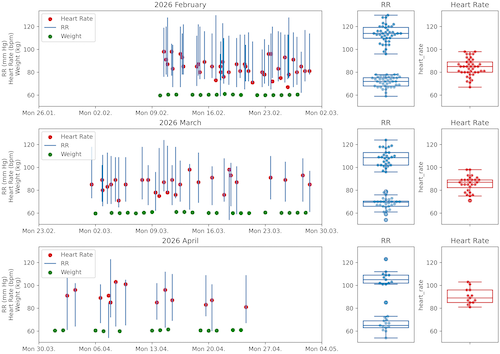
Format: A4 Landscape (11.69 × 8.27 inch)
The CLI prints all generated files:
Heart rows read: 81
Weight rows read: 49
→ Excel file: rr_data.xlsx
→ Months: 3
→ Output folder: plots/
Generating histogram plots…
Generated histogram plots stored at:
– plots/png/(2026-02__2026-04 3 months) per month data and histogram.png
– plots/pdf/(2026-02__2026-04 3 months) per month data and histogram.pdf
– plots/svg/(2026-02__2026-04 3 months) per month data and histogram.svg
…
🐳 Docker Quickstart (End User)
If you want to use rr2graph without installing Python locally, see the full guide here:
🐍 Python Quickstart (Virtual Environment, End User)
If you want to run rr2graph locally in an isolated Python environment, see the step-by-step guide here:
👉 Virtual Environment Quickstart
⚡ Python Quickstart with uv (End User)
If you prefer using the modern Python tool uv:
🚀 Installation
This project supports Pipenv-based installation.
-
Ensure you are in the project root
~/your/project/directory/
-
Install in editable mode using Pipenv
pipenv install -e .
This installs:
- the rr2graph package (editable mode)
- all dependencies defined in pyproject.toml
-
Optional: Development dependencies
pipenv install -r requirements_dev.txt
🧰 CLI Usage
After installation, the command rr2graph becomes available.
Show help:
rr2graph --help
usage: rr2graph [-h] [-e EXCEL] [-n NUM_OF_MONTHS] [-o OUTPUT] [-c CONFIG] [-v] [-g] [-i]

Reads Excel data and generates plots.

options:
  -h, --help            Show help and exit
  -e, --excel EXCEL     Path to Excel file (default: rr_data.xlsx)
  -n, --num_of_months NUM_OF_MONTHS
                        Number of months 1–6 (default: 3)
  -o, --output OUTPUT   Output folder for generated plots (default: plots/)
  -c, --config CONFIG   Optional YAML configuration file
  -v, --version         Show program version and exit
  -g, --generate-test-data
                        Generate test_rr_data.xlsx and exit
  -i, --info            Show system and configuration information
🧪 Generate Test Data
rr2graph -g
Creates:
test_rr_data.xlsx
with realistic blood pressure, pulse, and weight data.
ℹ️ System & Configuration Info
rr2graph --info
Example output:
rr2graph info
──────────────────────────────────────────────
Version:        1.1.0
Python:         3.11.15
Installed at:   /opt/homebrew/lib/python3.11/site-packages/rr2graph

Working dir:    /Users/your_user/rr2graph_test
System:         Darwin 25.3.0 (arm64)
Terminal:       utf-8

No config file found (config.yaml missing).
──────────────────────────────────────────────
Everything looks good ✓
📝 Configuration File (YAML)
Example config.yaml:
excel: "rr_data.xlsx"
num_of_months: 3
output: "plots/"
| Field | Description |
|---|---|
| excel | Path to the Excel file containing RR data |
| num_of_months | Number of months to analyze |
| output | Output directory for PNG/PDF/SVG plots |
Use it via:
rr2graph -c config.yaml
📊 Output Structure
Running:
rr2graph -c config.yaml
produces:
plots/
├── png/
├── pdf/
└── svg/
📁 Project Structure
/your/project/directory/
.
├── CHANGELOG.md
├── coverage.ini
├── Dockerfile
├── examples
│   └── example_box_swarm.png
├── LICENSE
├── Makefile
├── man
│   ├── install-man.sh
│   ├── rr2graph.1
│   └── uninstall-man.sh
├── MANIFEST.in
├── Pipfile
├── Pipfile.lock
├── plots
├── pyproject.toml
├── pytest.ini
├── README_DOCKER.md
├── README_UV.md
├── README_VENV.md
├── README.md
├── requirements_dev.txt
├── requirements.txt
├── rr2graph
│   ├── __init__.py
│   ├── cli.py
│   ├── helpers.py
│   ├── io.py
│   ├── layout.py
│   ├── monthly.py
│   ├── orchestrator.py
│   ├── plots
│   │   ├── __init__.py
│   │   ├── box_swarm.py
│   │   ├── hist.py
│   │   ├── scatter.py
│   │   └── violin.py
│   └── tools
│       ├── __init__.py
│       └── bump_version.py
└── tests
    ├── conftest.py
    ├── README.md
    ├── test_cli.py
    ├── test_helpers.py
    ├── test_io.py
    ├── test_layout.py
    ├── test_monthly.py
    ├── test_orchestrator.py
    ├── test_plots.py
    └── tools
        └── test_bump_version.py
🧪 Run Tests
pipenv run pytest
🛠 Troubleshooting
❌ UnicodeDecodeError in YAML
You likely passed an Excel file as --config.
Correct:
rr2graph -c config.yaml
Incorrect:
rr2graph -c test_rr_data.xlsx
❌ CLI command not found
Reinstall:
pipenv install -e .
👨💻 Developer Notes
Version bumping is handled via:
make version-patch
make version-minor
make version-major
TestPyPI upload:
make publish-test
Build artifacts:
make build
Manpage installation:
make install-man
make man
📄 License
MIT
1 maintainer

Metadata
1 maintainer
Release files for rr2graph 0.3.2
For a detailed explanation of source distributions (sdists) and built distributions (wheels), please see the package formats documentation.
Source distribution (sdist)
| File | Size | Uploaded | |
|---|---|---|---|
| rr2graph-0.3.2.tar.gz | 1.5 MB | Details |
Built distribution (wheel)
| File | Interpreter | ABI | Platform | Reset |
|---|---|---|---|---|
| rr2graph-0.3.2-py3-none-any.whl | Python 3 | none | any | Details |
Total release size: 1.6 MB
Release files / rr2graph-0.3.2.tar.gz
| Download URL | rr2graph-0.3.2.tar.gz |
|---|---|
| Size | 1.5 MB |
| Tags | Source |
|
SHA-256 checksum How to use checksums |
775bd7ca25da9828cfb39232f7c0e3e0bb2bdf7569fa9d24e8b1d60236dc0f3c
|
|
BLAKE2b-256 checksum How to use checksums |
6b22aa0f2f984904655a7d28d8c2b1e1cd73c3f4652a622b6c75e35e1fa99d0d
|
| Upload date | |
|
Uploaded using Trusted Publishing? What is trusted publishing? |
No |
| Uploaded via |
twine/6.2.0 CPython/3.12.3
|
Release files / rr2graph-0.3.2-py3-none-any.whl
| Download URL | rr2graph-0.3.2-py3-none-any.whl |
|---|---|
| Size | 25.8 kB |
| Tags | Python 3 |
|
SHA-256 checksum How to use checksums |
89f384aaa26e99107c064dc15c7e8c5a9920429b6534678e003e78e0462a5f72
|
|
BLAKE2b-256 checksum How to use checksums |
494186d70d5b08f2e198ccb9852f8360fbccaad960aebe8f0fe28b3b3cab1162
|
| Upload date | |
|
Uploaded using Trusted Publishing? What is trusted publishing? |
No |
| Uploaded via |
twine/6.2.0 CPython/3.12.3
|














