
RTLViz
Generate interactive block diagrams from Verilog source files.


Installation
Step 1: Install Package
pip install rtlviz
Step 2: Setup IDE
Spins up the MCP server config for all popular IDEs.
rtlviz setup
Step 3: Manual IDE Setup (if Step 2 fails)
If the automatic setup doesn't work, you can manually configure your IDE's MCP settings (e.g., claude_desktop_config.json).
Command: rtlviz-server works if installed in PATH. Otherwise use python -m rtlviz.
JSON Config:
{
  "mcpServers": {
    "rtlviz": {
      "command": "python",
      "args": ["-m", "rtlviz"]
    }
  }
}
Usage
AI Agent
After setup, ask your AI assistant (Role: Software Engineer):
"Use rtlviz MCP to generate a diagram for the Verilog files in
<path to code>"
The diagram will automatically open in your browser.
Recommended Models: For best results, use state-of-the-art reasoning models:
- Claude: Opus 4.5 , Sonnet 4.5
- Google: Gemini 3
- OpenAI: GPT-5.2
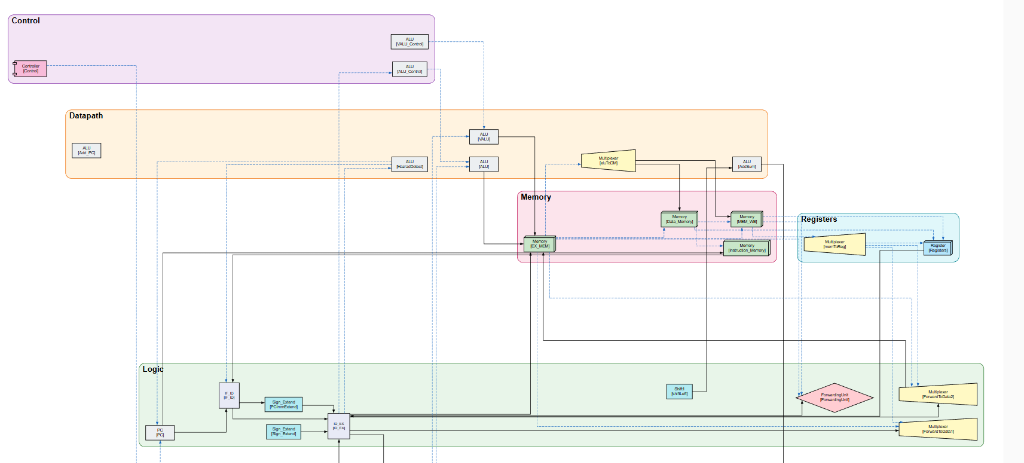
Example Output
Features
- Automatic Parsing - Extractions modules and connections from Verilog
- Pipeline Detection - Identifies CPU stages (IF, ID, EX, MEM, WB)
- Beautiful Diagrams - Orthogonal routing with semantic clustering
- Interactive - Pan, zoom, and export to SVG
- Auto-Open - Instantly opens generated diagrams in browser
Requirements
- Python 3.10+
- Internet connection (for Viz.js rendering)
Authors
- Naveen Venkat (naveenvenkat1711@gmail.com)
- Hari Ayyappane (hari.ayyaps@gamil.com)
License
MIT License
1 maintainer

Metadata
1 maintainer
Release files for rtlviz 0.9.0
For a detailed explanation of source distributions (sdists) and built distributions (wheels), please see the package formats documentation.
Source distribution (sdist)
| File | Size | Uploaded | |
|---|---|---|---|
| rtlviz-0.9.0.tar.gz | 9.9 kB | Details |
Built distribution (wheel)
| File | Interpreter | ABI | Platform | Reset |
|---|---|---|---|---|
| rtlviz-0.9.0-py3-none-any.whl | Python 3 | none | any | Details |
Total release size: 21.8 kB
Release files / rtlviz-0.9.0.tar.gz
| Download URL | rtlviz-0.9.0.tar.gz |
|---|---|
| Size | 9.9 kB |
| Tags | Source |
|
SHA-256 checksum How to use checksums |
7c873ed48f57ae0802340ebaa67994a83068be9e3cad89ce0014f73f20b1dcf7
|
|
BLAKE2b-256 checksum How to use checksums |
16291244a741a5701af24d15fedd6e367d397d6677813b46dd92e004c2d5615c
|
| Upload date | |
|
Uploaded using Trusted Publishing? What is trusted publishing? |
No |
| Uploaded via |
twine/6.2.0 CPython/3.12.8
|
Release files / rtlviz-0.9.0-py3-none-any.whl
| Download URL | rtlviz-0.9.0-py3-none-any.whl |
|---|---|
| Size | 11.9 kB |
| Tags | Python 3 |
|
SHA-256 checksum How to use checksums |
9bb14b59daaaa4f59711f764d5908c89e51c795f0919db3e096332398e1a6e02
|
|
BLAKE2b-256 checksum How to use checksums |
a65230dae6de51d64bee7409311ac38b270362004ba80f2b884b44857173f0a8
|
| Upload date | |
|
Uploaded using Trusted Publishing? What is trusted publishing? |
No |
| Uploaded via |
twine/6.2.0 CPython/3.12.8
|














