
RuleVis: Interactive Wazuh Rule Graph Explorer
RuleVis is a powerful analysis tool that transforms your Wazuh ruleset into a dynamic, interactive force-directed graph. It helps you visualize the complex relationships between rules, identify critical dependencies, discover structural issues, and analyze the distribution of your rule IDs.
This tool is designed for security engineers, SOC analysts, and Wazuh administrators who need to understand, maintain, and develop complex custom rulesets.

Features
- Interactive Graph Visualization: Renders your entire ruleset as a graph using D3.js and HTML Canvas for high performance.
- Dependency Analysis: Clearly shows parent-child relationships (
if_sid,if_group, etc.) with directed edges. - Node Expansion: Interactively expand nodes to reveal their parent or child dependencies on demand.
- Detailed Rule Information: Click on any rule to see its full description, groups, and a complete list of its parents and children.
- Condition Path Analysis: Open a large condition-analysis view for atomic or temporal rules, inspect direct parents, and expand each resolved root-to-rule path as a flattened table with condition provenance.
- Powerful Search: Instantly find and focus on any rule by its ID.
- Graph Statistics Panel: Get at-a-glance insights into your ruleset with statistics like:
- Top 5 rules with the most direct children (foundational rules).
- Top 5 rules with the highest impact (most total descendants).
- Top 5 rules with the most complex dependencies.
- A list of isolated rules.
- Cycles in the rules
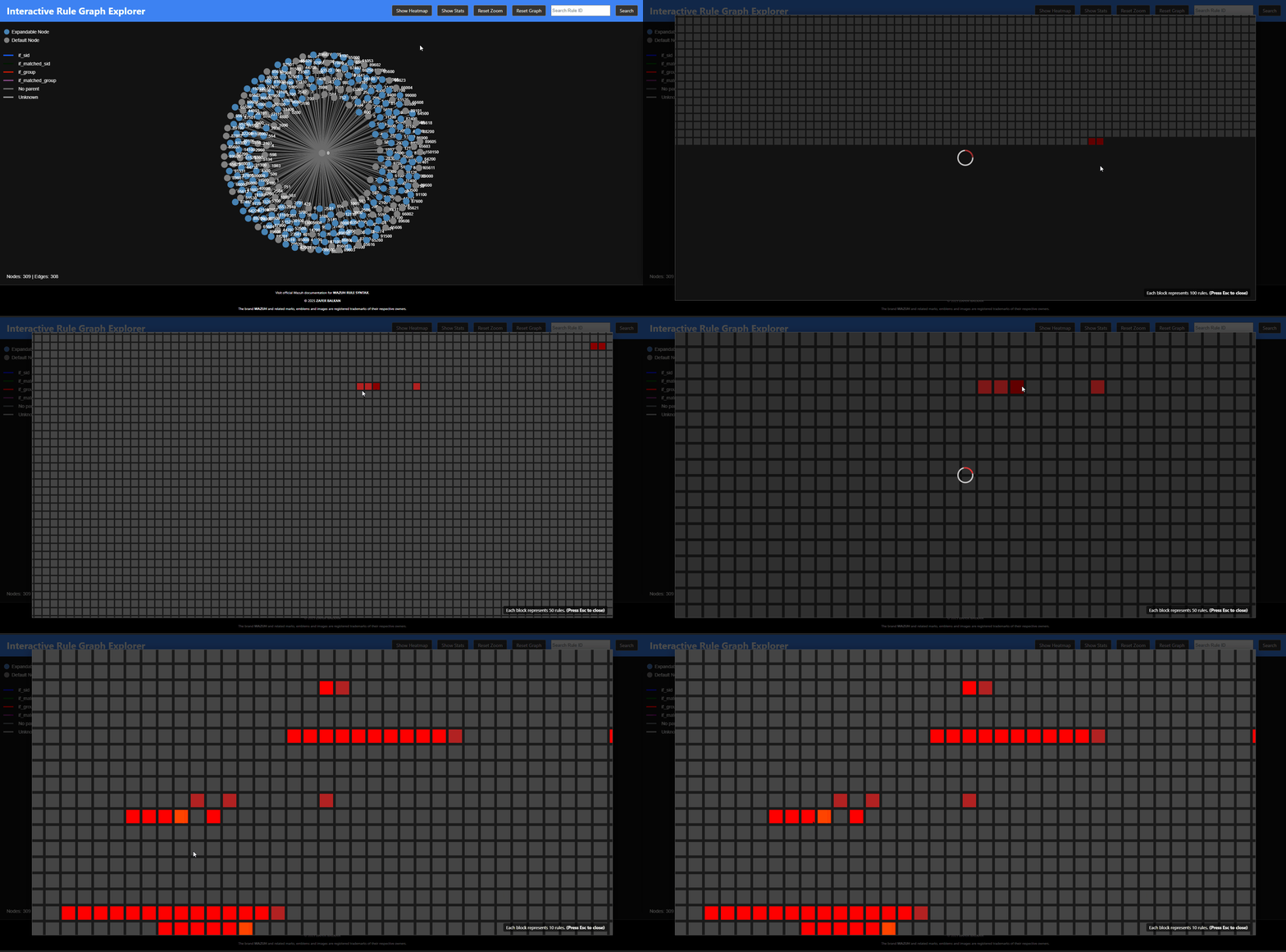
- Rule ID Heatmap: Visualize the entire rule ID space from 0 to 100,000+ to see which ID ranges are heavily used and which are available for custom rules.
- Keyboard Shortcuts: Pause the simulation (
Space), close panels (Esc), and more for an efficient workflow. - Focus: By default, when a node is highlighted, any node except for the selected node and its neighbords are dimmed. That allows better focus minimizing visual complexity.
The Problem It Solves
Wazuh's rule engine builds a complex, tree-like structure in memory. While powerful, this structure is invisible to the user. It can be difficult to:
- Understand the full impact of changing a single rule.
- Find redundant rules or overly complex dependency chains.
- Identify structural issues like circular dependencies, which can impact performance.
- Know which ID ranges are safe to use for new custom rules.
RuleVis makes these invisible structures visible, turning abstract XML files into a tangible, explorable map.
Installation
Using pipx (recommended)
pipx install rulevis
Using pip (for testing)
pip install rulevis
Using source
-
Clone the repository:
git clone https://github.com/zbalkan/rulevis.git
cd rulevis
-
Create and activate a Python virtual environment:
python -m venv .venv
source .venv/bin/activate
Or for Windows
python -m venv .venv
source .venv\Scripts\activate.ps1
-
Install dependencies:
pip install -r requirements.txt
Usage
The tool is run from the command line. You must provide the path to the directory (or directories) containing your Wazuh rule XML files.
rulevis --path /var/ossec/ruleset/rules,/var/ossec/etc/rules
Arguments:
--path, -p: (Required) A comma-separated list of paths to your Wazuh rule directories. This should include both the default rules and your custom rules.-h, --help: Show the help message.
Once executed, the script will:
- Parse all
.xmlfiles in the specified paths. - Build a graph model of the rule relationships.
- Pre-calculate statistics and heatmap data.
- Start a local web server.
- Automatically open the tool in your default web browser.
Key Features in Action
Graph Statistics
Quickly identify the most important and complex rules in your entire ruleset. Click on any rule in the list to instantly navigate to it in the main graph.

Rule ID Heatmap
Get a bird's-eye view of your rule ID landscape. Dark gray blocks are unused and available for your custom rules, while brighter red blocks indicate heavily populated ranges. This is invaluable for planning and organizing a large custom ruleset.
Condition Path Analysis
Analyze Conditions opens a large modal rather than extending the rule-details panel. The modal shows metadata for the selected rule (level, description, groups, MITRE ATT&CK IDs, and source file), lists its direct parent relationships, and resolves each graph path from the virtual root to the selected rule. Every path is collapsed by default and expands into a flattened condition table that keeps the originating rule for every condition. Relationship selectors such as if_sid, if_group, if_matched_sid, and if_matched_group are represented by the resolved path and are omitted from the flattened condition rows. Condition attributes are rendered inline with the condition name, leaving Origin | Condition | Value for atomic tables and Origin | Scope | Condition | Value for temporal tables.
For atomic rules, RuleVis follows atomic parent relationships and keeps alternative parent branches as separate paths rather than merging them into one condition set. When the same dynamic field is constrained repeatedly along a path, RuleVis performs a conservative simplification only when both expressions are exact anchored literal alternatives such as ^root$|^admin$. A broader earlier condition can be marked subsumed, a broader later condition redundant, and disjoint exact alternatives contradictory. Subsumed and redundant rows remain visible with strike-through so the derivation is still auditable. General regexes and negated fields are left unchanged rather than guessed. RuleVis intentionally does not model if_level relationships, so "resolved paths" means all paths represented by RuleVis, not every parent relationship supported by Wazuh.
For temporal rules, the same path view also follows historical if_matched_sid and if_matched_group relationships. Temporal tables add a Scope column:
historical_sourceidentifies predicates belonging to events whose earlier matches feed the temporal rule;current_eventidentifies predicates applied on the current-event side of the path;temporalidentifies correlation conditions on the selected temporal rule, such asfrequencyandtimeframe.
The clock shape is intentionally classified only by the presence of the frequency or timeframe rule attributes. Condition analysis is independent from that visual heuristic: temporal constructs such as if_matched_*, check_diff, or if_fts are still retained and analyzed even when they do not make the node a clock.
Technical Overview
The project is composed of four main Python modules and a JavaScript frontend:
generator.py: Parses Wazuh XML rule files and builds thenetworkx.MultiDiGraph, including rule metadata, relationship provenance, and extracted atomic/temporal conditions.conditions.py: Enumerates root-to-rule relationship paths and flattens the effective condition rows for atomic and temporal analysis.analyzer.py: Loads the graph and calculates structural statistics and rule-ID heatmap data.visualizer.py: Serves the Flask UI and APIs for graph navigation, condition analysis, statistics, and heatmap data.graph.js: Implements the D3 force simulation, Canvas graph rendering, side panels, heatmap interaction, and condition-analysis modal.
Experimental Source-Faithful Assessment
The experimental assessment pipeline is deliberately separate from the visualization graph and UI. It preserves Wazuh rule declarations in load order, reconstructs Wazuh 4.14.10 runtime rule occurrences, evaluates an explicitly supplied finite event domain with exact bitsets, classifies the resulting reachability/shadowing/drop behavior, and can serialize a stable JSON report.
The pipeline is:
Rule XML
  -> RuleCatalog
  -> EvaluationBuilder
  -> runtime occurrence DAG
  -> BitsetAssessor
  -> AssessmentClassifier
  -> AssessmentReport
  -> deterministic JSON
This is not yet a symbolic compiler for arbitrary Wazuh predicates, and it is not connected to the web UI. See Source-Faithful Assessment for the semantics, finding definitions, complexity model, benchmark command, and current limitations.
Here’s a ready-to-paste README subsection that explains rulevis logging clearly and professionally for your users. It assumes the per-user setup you’ve implemented.
Logging
rulevis automatically writes diagnostic and operational logs to a user-specific location. Logs are plain text encoded in UTF-8 and include timestamps, module names, and severity levels. The application creates its log directory if it does not exist.
| Platform | Log file location | Example path |
|---|---|---|
| Windows | %LocalAppData%\rulevis\Logs\rulevis.log |
C:\Users\<user>\AppData\Local\rulevis\Logs\rulevis.log |
| macOS | ~/Library/Logs/rulevis/rulevis.log |
/Users/<user>/Library/Logs/rulevis/rulevis.log |
| Linux / BSD | $XDG_STATE_HOME/rulevis/rulevis.log or fallback ~/.local/share/rulevis/logs/rulevis.log |
/home/<user>/.local/state/rulevis/rulevis.log |
rulevis follows the XDG Base Directory specification on Unix-like systems and Windows conventions under %LocalAppData%.
The log file records informational messages, warnings, and errors emitted during execution. You can safely delete it; a new one will be created automatically on the next run.
Notes
Wazuh documents <if_level> as a condition that can create a parent-child relationship. RuleVis deliberately does not model if_level. As a result, graph ancestry and resolved condition paths cover the relationship types represented by RuleVis (if_sid, if_group, if_matched_sid, and if_matched_group), not every relationship type supported by Wazuh.
The <if_fts> condition represents first-time-seen state rather than a parent-child graph relationship, so it is retained for condition analysis but does not create a graph edge.
1 maintainer

Metadata
1 maintainer
Release files for rulevis 1.1.0
For a detailed explanation of source distributions (sdists) and built distributions (wheels), please see the package formats documentation.
Source distribution (sdist)
| File | Size | Uploaded | |
|---|---|---|---|
| rulevis-1.1.0.tar.gz | 72.8 kB | Details |
Built distribution (wheel)
| File | Interpreter | ABI | Platform | Reset |
|---|---|---|---|---|
| rulevis-1.1.0-py3-none-any.whl | Python 3 | none | any | Details |
Total release size: 128.4 kB
Release files / rulevis-1.1.0.tar.gz
| Download URL | rulevis-1.1.0.tar.gz |
|---|---|
| Size | 72.8 kB |
| Tags | Source |
|
SHA-256 checksum How to use checksums |
ecb66fadb46e4ab6eb54bb9efa60e9c319d22fb3c566bb41a86e227d92d82893
|
|
BLAKE2b-256 checksum How to use checksums |
88dd5dd3107e6620403c71a189e80888d9e7f28a6e49b1fadb248cad220bccc0
|
| Upload date | |
|
Uploaded using Trusted Publishing? What is trusted publishing? |
Yes |
| Uploaded via |
twine/7.0.0 CPython/3.13.14
|
Provenance
Provenance describes where a file came from. On PyPI, provenance is shared via attestations, which provide a verifiable record of the build or publishing details. View details, limitations and caveats.


PyPI Publish Attestation
PyPI verified that this artifact, at this checksum, originated from the publisher listed below.
Signed by GitHub Actions, verified by PyPI on Oct 6, 2026.
Transparency logRelease files / rulevis-1.1.0-py3-none-any.whl
| Download URL | rulevis-1.1.0-py3-none-any.whl |
|---|---|
| Size | 55.5 kB |
| Tags | Python 3 |
|
SHA-256 checksum How to use checksums |
a27a07816d712380ddbfe40340718bce64fc56178c8825d1b746df8d9865386f
|
|
BLAKE2b-256 checksum How to use checksums |
b215a428b14b32d3b04d9b11d53b9a0e0164263b4ba6f46858742f01ed1caaaf
|
| Upload date | |
|
Uploaded using Trusted Publishing? What is trusted publishing? |
Yes |
| Uploaded via |
twine/7.0.0 CPython/3.13.14
|
Provenance
Provenance describes where a file came from. On PyPI, provenance is shared via attestations, which provide a verifiable record of the build or publishing details. View details, limitations and caveats.
PyPI Publish Attestation
PyPI verified that this artifact, at this checksum, originated from the publisher listed below.
Signed by GitHub Actions, verified by PyPI on Oct 6, 2026.
Transparency log













