
RUN-GIT
Git Operations Made Effortless — One command to add, commit, pull, and push with smart auto-messages.



Overview
RUN-GIT is a Python-powered CLI that simplifies Git workflows into single, intuitive commands. It handles the common add-commit-pull-push sequence automatically, generates meaningful commit messages, provides interactive branch management, and integrates with GitHub for repository creation.
Use case: Developers who run the same Git commands dozens of times daily and want a faster way to commit and push.
📦 Installation · 🚀 Quick Start · 📖 Commands · 🏗️ Architecture
Quick Push

One command does everything: run-git push
AI Assistant

Get AI-powered code reviews, PR descriptions, and commit messages directly from your terminal.
Features
| Feature | Description |
|---|---|
| One-Command Push | run-git push executes add → commit → pull → push automatically |
| Smart Commit Messages | Auto-generates Conventional Commits style messages based on staged changes |
| Interactive TUI | Full terminal menu for navigation without memorizing flags |
| GitHub Integration | Create public/private repositories directly from CLI |
| Branch Management | Create, switch, merge, and delete branches with simple commands |
| Commit Graph | Visualize commit history with ASCII graphs and file diffs |
| Secret File Guard | Warns before accidentally pushing sensitive files (.env, tokens) |
| Conflict Helper | Guided interactive merge conflict resolution |
| Rich Status View | Color-coded table-based status output |
| AI Assistant | Generate commit messages, code reviews, and PR descriptions with AI |
| Tag & Release | Create tags, push to remote, and publish GitHub releases with one click |
Installation
pip install run-git
Requires Python 3.8+. Works on macOS, Linux, and Windows.
First time: Set your GitHub token with
run-git initUpgrade:pip install --upgrade run-git
Quick Start
Push changes
run-git push                        # auto commit message + push
run-git push -m "feat: add login"  # custom commit message
Interactive menu
run-git # full TUI — no commands to memorize
Create GitHub repository
run-git new my-project                              # guided wizard
run-git new my-project --quick                      # defaults, no prompts
run-git new my-api -d "REST API" --public -g Python -l MIT  # full options
Tag & Release
# Create a tag
run-git tag v1.0.0

# Create tag with message
run-git tag v1.0.0 -m "First stable release"

# Create tag + push to remote
run-git tag v1.0.0 --push

# One-click: Create tag + push + GitHub release
run-git tag v1.0.0 -r

# Create release with AI-generated notes
run-git tag v1.0.0 -r --ai

# Create draft release
run-git tag v1.0.0 -r --draft

# Release from existing tag
run-git release v1.0.0
run-git release v1.0.0 -t "Version 1.0.0" -b "Bug fixes and improvements"
Command Reference
| Command | Description |
|---|---|
run-git |
Open the interactive TUI menu |
run-git push |
Add, commit, pull, and push in one step |
run-git push -m "<msg>" |
Push with custom commit message |
run-git new <name> |
Create a new GitHub repository |
run-git init |
Initialize a local or cloned repository |
run-git status |
Rich color-coded repository status |
run-git log |
Formatted commit history |
run-git graph |
Visual commit history (table view) |
run-git graph --graph |
ASCII graph with branch lines |
run-git branch |
List all branches |
run-git branch <name> |
Create a new branch |
run-git switch <name> |
Switch to a branch |
run-git merge <name> |
Merge a branch into current |
run-git pull |
Pull latest changes |
run-git sync |
Pull then push (keep in sync) |
run-git remote |
Show configured remotes |
run-git stash |
Stash uncommitted changes |
run-git undo |
Undo last commit (keeps changes staged) |
run-git config |
Manage configuration |
run-git tag <name> |
Create and push a tag |
run-git tag <name> -r |
Create tag + GitHub release |
run-git release <name> |
Create release from existing tag |
run-git --version |
Show installed version |
run-git --help |
Show help for any command |
Architecture
gitpush/
├── cli.py                 # Main CLI entry point (Click)
├── commands/              # Modular command handlers
│   ├── push.py           # Push command
│   ├── init.py           # Init command
│   ├── status.py         # Status & log commands
│   ├── branch.py         # Branch operations
│   ├── github.py         # GitHub integration
│   └── graph.py          # Commit graph visualization
├── core/                 # Business logic
│   ├── git_operations.py # Git operations
│   ├── commit_generator.py # Auto commit messages
│   └── conflict_resolver.py # Merge conflict handling
├── ui/                   # Terminal UI (Rich, questionary)
├── utils/                # Utilities (validators, formatters)
├── config/               # Configuration management
└── exceptions.py        # Custom exceptions
Design principles:
- Separation of concerns:
commands/(thin orchestration),core/(business logic),ui/(terminal rendering) - Testable: Core logic independent of CLI dependencies
- Extensible: New commands added as isolated modules
Auto Commit Messages
RUN-GIT analyzes staged changes and generates Conventional Commits style messages:
feat: add authentication module (3 files added)
fix: update user validation logic (2 files modified)
docs: update README (1 file modified)
refactor: remove deprecated helper functions (2 files deleted)
Comparison
| Raw Git | GitHub CLI (gh) |
RUN-GIT | |
|---|---|---|---|
| Push in one command | ❌ | ❌ | ✅ |
| Auto commit messages | ❌ | ❌ | ✅ |
| Interactive TUI | ❌ | Partial | ✅ |
| Create GitHub repos | ❌ | ✅ | ✅ |
| Secret file warnings | ❌ | ❌ | ✅ |
RUN-GIT is a speed layer on top of Git — not a replacement. Use it for daily work; reach for
gitorghwhen you need fine-grained control.
Contributing
Contributions, bug reports, and feature requests are welcome.
# Clone and setup
git clone https://github.com/himanshu231204/run-git.git
cd gitpush

# Install in development mode
pip install -e ".[test]"

# Run tests
pytest
License
Distributed under the MIT License. See LICENSE for details.
Author
Himanshu Kumar — @himanshu231204
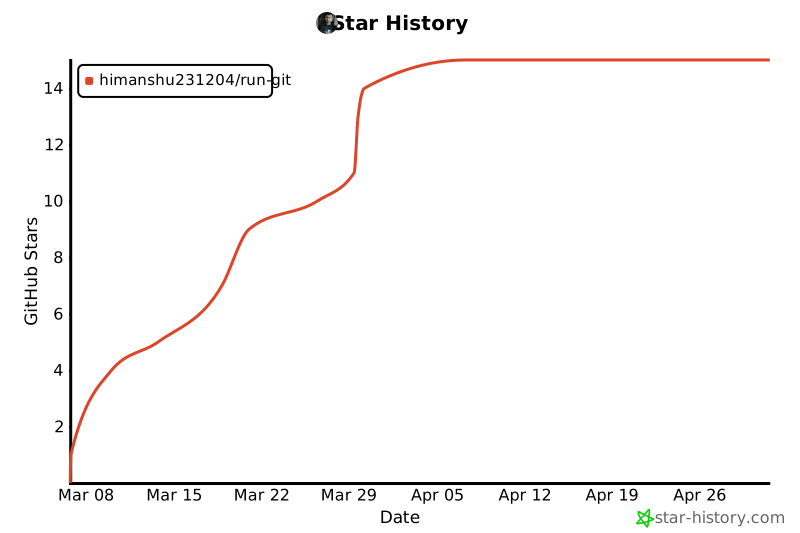
If RUN-GIT saves you time, please consider giving it a ⭐ — it helps others find the project!
1 maintainer

Metadata
1 maintainer
Release files for run-git 1.5.0
For a detailed explanation of source distributions (sdists) and built distributions (wheels), please see the package formats documentation.
Source distribution (sdist)
| File | Size | Uploaded | |
|---|---|---|---|
| run_git-1.5.0.tar.gz | 1.4 MB | Details |
Built distribution (wheel)
| File | Interpreter | ABI | Platform | Reset |
|---|---|---|---|---|
| run_git-1.5.0-py3-none-any.whl | Python 3 | none | any | Details |
Total release size: 1.5 MB
Release files / run_git-1.5.0.tar.gz
| Download URL | run_git-1.5.0.tar.gz |
|---|---|
| Size | 1.4 MB |
| Tags | Source |
|
SHA-256 checksum How to use checksums |
578a3f85b9cb0f51a0b9e797bf8474c05c6be93096924b6c698ed8fbad70520a
|
|
BLAKE2b-256 checksum How to use checksums |
ec42dd43924e7d6ee4cad7e05d53a2f5a49e5e9eab12fce132efcf93ee63e08f
|
| Upload date | |
|
Uploaded using Trusted Publishing? What is trusted publishing? |
No |
| Uploaded via |
twine/6.2.0 CPython/3.10.20
|
Release files / run_git-1.5.0-py3-none-any.whl
| Download URL | run_git-1.5.0-py3-none-any.whl |
|---|---|
| Size | 95.3 kB |
| Tags | Python 3 |
|
SHA-256 checksum How to use checksums |
cd10e9177937e08927beff4d52156305bfae2e36d43f132e80c6d3fa83b9817d
|
|
BLAKE2b-256 checksum How to use checksums |
ee2f325676acf1e62b6f0b3cffc2298ddeb31cc0426633edd732c69f5bb3f11f
|
| Upload date | |
|
Uploaded using Trusted Publishing? What is trusted publishing? |
No |
| Uploaded via |
twine/6.2.0 CPython/3.10.20
|














