








run-para
Parallel jobs manager CLI
- POSIX/Linux/MacOS/Windows compatible
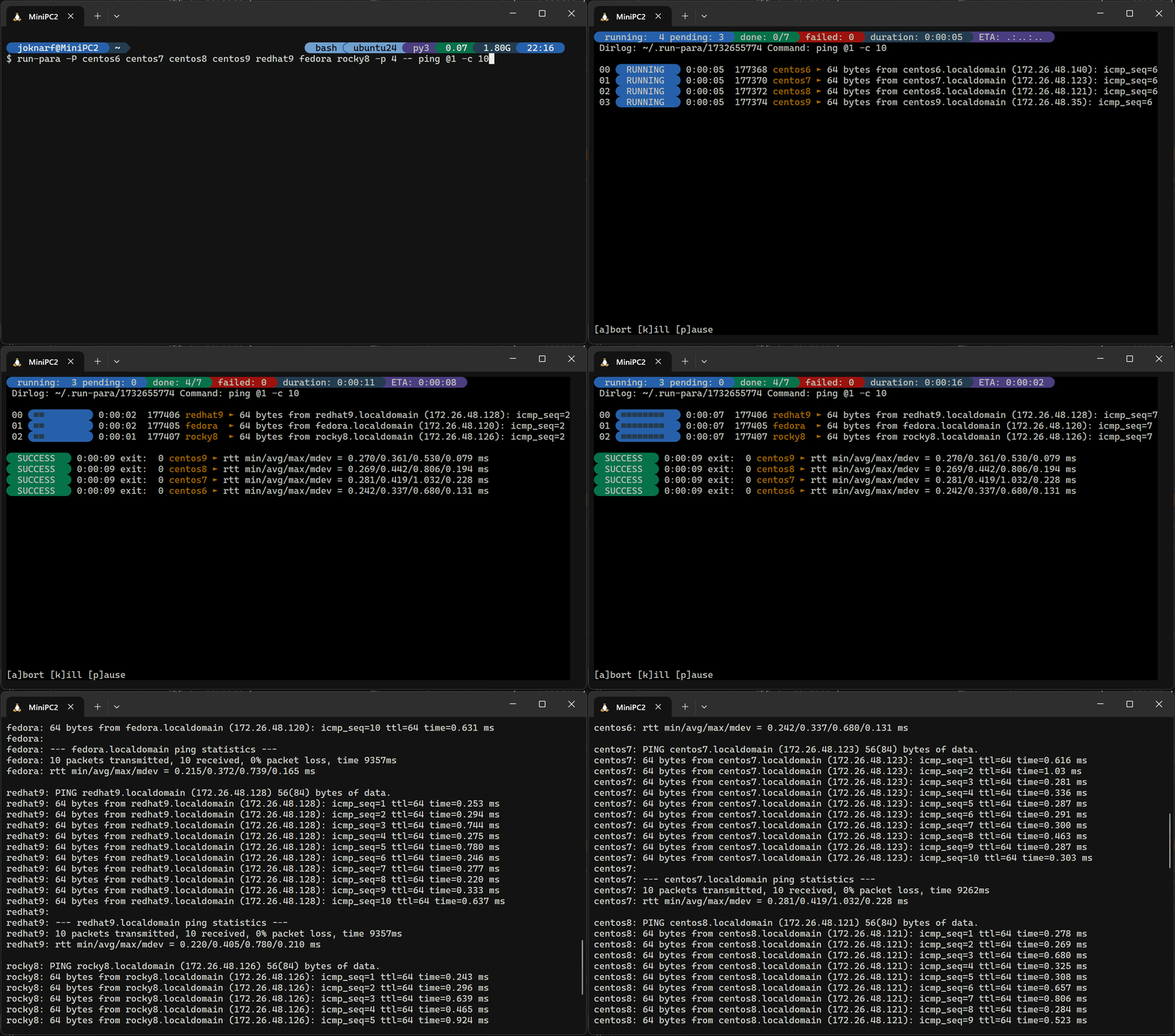
- Launch parallel command and maps list of params to command, with interactive display of the running commands outputs
- Keep all output in log files
- Interactive pause/resume/abort jobs, kill stuck command interactively.
Take a look at ssh-para if you need parallel ssh jobs to multiple servers
installation
pip install run-para
By default, run-para uses Nerd Fonts glyphs, modern terminals can now render the glyphs without installing specific font (the symbols can be overridden with SSHP_SYM_* environment variables, see below)
quick start
Run parallel commands:
$ run-para -P host1 host2 host3 -- ssh -n @1 "echo @1 is reachable"
TUI to consult last run logs
$ run-para -T
Review last runs results:
$ run-para -l
Review hosts statuses for last run:
$ run-para -L *.status
View failed hosts list:
$ run-para -L failed.status
Show output of command on all hosts:
$ run-para -L *.out
Show output of command for failed hosts:
$ run-para -L *.failed
Show output of command for host1:
$ run-para -L host1.out
params mapping to command
run-para will match parameters to the command according to @x mapping.
using -P options, can only pass 1 parameter to command
using -f paramsfile, can pass multiple parameters
example:
run-para -P param1 param2 -- echo @1
will launch:
echo param1
echo param2
run-para -f params.txt -- curl -OL "http://@1/download/@2"
params.txt:
server1 "the file1.zip"
server2 "the file2.zip"
will launch:
curl -OL "http://server1/download/the file1.zip"
curl -OL "http://server2/download/the file2.zip"
usage
run-para -h
usage: run-para [-h] [-V] [-j JOB] [-d DIRLOG] [-p PARALLEL] [-t TIMEOUT] [-v] [-D DELAY]
                [-f PARAMSFILE | -P PARAM [PARAM ...] | -l | -L LOGS [LOGS ...]]
                [command ...]

run-para v1.run-para.dev

positional arguments:
  command

options:
  -h, --help            show this help message and exit
  -V, --version         run-para version
  -j JOB, --job JOB     Job name added subdir to dirlog
  -d DIRLOG, --dirlog DIRLOG
                        directory for ouput log files (default: ~/.run-para)
  -m MAXWIDTH, --maxwidth MAXWIDTH
                        max width to use to display params
  -p PARALLEL, --parallel PARALLEL
                        parallelism (default 4)
  -t TIMEOUT, --timeout TIMEOUT
                        timeout of each job
  -v, --verbose         verbose display (param + line for last output)
  -n, --nopause         exit at end of run (no pause for keypress)
  -D DELAY, --delay DELAY
                        initial delay in seconds between ssh commands (default=0.3s)
  -f PARAMSFILE, --paramsfile PARAMSFILE
                        params list file
  -P PARAM [PARAM ...], --params PARAM [PARAM ...]
                        hosts list
  -C {bash,zsh,powershell}, --completion {bash,zsh,powershell}
                        autocompletion shell code to source
  -l, --list            list run-para results/log directories
  -L LOGS [LOGS ...], --logs LOGS [LOGS ...]
                        get latest/current run-para run logs
                        -L[<runid>/]*.out          : all hosts outputs
                        -L[<runid>/]<host>.out     : command output of host
                        -L[<runid>/]*.<status>     : command output of hosts <status>
                        -L[<runid>/]*.status       : hosts lists with status
                        -L[<runid>/]<status>.status: <status> hosts list
                        -L[<runid>/]params.list     : list of parms used to map command
                        default <runid> is latest run-para run (use -j <job> -d <dir> to access logs if used for run)
                        <status>: [success,failed,timeout,killed,aborted]
During run, use :
- k: to kill command held by a thread
- p: pause all remaining jobs to be scheduled
- r: resume scheduling of jobs
- a: abort all remaining jobs
- ctrl-c: stop all/exit
Environment variables:
- SSHP_SYM_BEG: Symbol character for begin decorative (default: "\ue0b4")
- SSHP_SYM_END: Symbol character for end decorative (default: "\ue0b6")
- SSHP_SYM_PROG: Symbol character for progress bar fill (default: "\u25a0")
- SSHP_SYM_RES: Symbol character before ssh output line (default: "\u25b6")
Activate autocompletion:
. <(run-para -C bash)run-para -C powershell | Out-String | Invoke-Expression
1 maintainer

Metadata
1 maintainer
Release files for run-para 1.2.21
For a detailed explanation of source distributions (sdists) and built distributions (wheels), please see the package formats documentation.
Source distribution (sdist)
| File | Size | Uploaded | |
|---|---|---|---|
| run_para-1.2.21.tar.gz | 35.8 kB | Details |
Built distribution (wheel)
| File | Interpreter | ABI | Platform | Reset |
|---|---|---|---|---|
| run_para-1.2.21-py3-none-any.whl | Python 3 | none | any | Details |
Total release size: 68.1 kB
Release files / run_para-1.2.21.tar.gz
| Download URL | run_para-1.2.21.tar.gz |
|---|---|
| Size | 35.8 kB |
| Tags | Source |
|
SHA-256 checksum How to use checksums |
586563544944fe65d2b78f5753e70cb58bddbdcadda9c81998e93e3fc2e5e8d1
|
|
BLAKE2b-256 checksum How to use checksums |
89e38dbace687946ac13f3e7c6fbcf530f219c539a30f4aa0a086680560843a3
|
| Upload date | |
|
Uploaded using Trusted Publishing? What is trusted publishing? |
No |
| Uploaded via |
twine/6.2.0 CPython/3.9.25
|
Release files / run_para-1.2.21-py3-none-any.whl
| Download URL | run_para-1.2.21-py3-none-any.whl |
|---|---|
| Size | 32.2 kB |
| Tags | Python 3 |
|
SHA-256 checksum How to use checksums |
4750429a7e415d3cec0e28f3ebc152a9e97aa60b504b5c02772edbd75459f68b
|
|
BLAKE2b-256 checksum How to use checksums |
34d73d38731fb61546acad72476756516181483cac93a69986c525596630ad18
|
| Upload date | |
|
Uploaded using Trusted Publishing? What is trusted publishing? |
No |
| Uploaded via |
twine/6.2.0 CPython/3.9.25
|














