
Interactive Parallel SSH jobs manager

Project description






run-para
Parallel jobs manager CLI
- POSIX/Linux/MacOS/Windows compatible
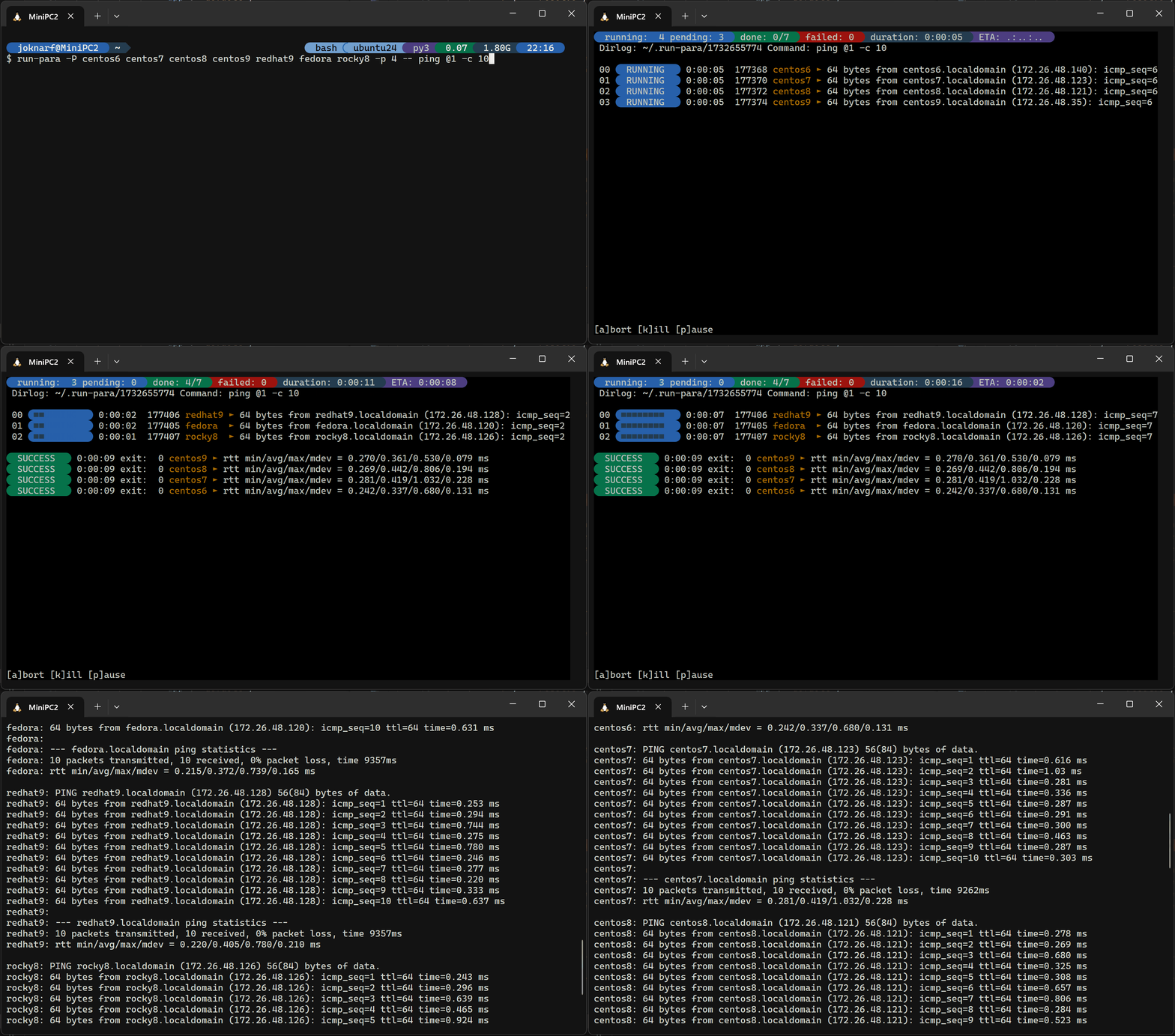
- Launch parallel command and maps list of params to command, with interactive display of the running commands outputs
- Keep all output in log files
- Interactive pause/resume/abort jobs, kill stuck command interactively.
Take a look at ssh-para if you need parallel ssh jobs to multiple servers
installation
pip install run-para
By default, run-para uses Nerd Fonts glyphs, modern terminals can now render the glyphs without installing specific font (the symbols can be overridden with SSHP_SYM_* environment variables, see below)
quick start
Run parallel commands:
$ run-para -P host1 host2 host3 -- ssh -n @1 "echo @1 is reachable"
TUI to consult last run logs
$ run-para -T
Review last runs results:
$ run-para -l
Review hosts statuses for last run:
$ run-para -L *.status
View failed hosts list:
$ run-para -L failed.status
Show output of command on all hosts:
$ run-para -L *.out
Show output of command for failed hosts:
$ run-para -L *.failed
Show output of command for host1:
$ run-para -L host1.out
params mapping to command
run-para will match parameters to the command according to @x mapping.
using -P options, can only pass 1 parameter to command
using -f paramsfile, can pass multiple parameters
example:
run-para -P param1 param2 -- echo @1
will launch:
echo param1
echo param2
run-para -f params.txt -- curl -OL "http://@1/download/@2"
params.txt:
server1 "the file1.zip"
server2 "the file2.zip"
will launch:
curl -OL "http://server1/download/the file1.zip"
curl -OL "http://server2/download/the file2.zip"
usage
run-para -h
usage: run-para [-h] [-V] [-j JOB] [-d DIRLOG] [-p PARALLEL] [-t TIMEOUT] [-v] [-D DELAY]
                [-f PARAMSFILE | -P PARAM [PARAM ...] | -l | -L LOGS [LOGS ...]]
                [command ...]

run-para v1.run-para.dev

positional arguments:
  command

options:
  -h, --help            show this help message and exit
  -V, --version         run-para version
  -j JOB, --job JOB     Job name added subdir to dirlog
  -d DIRLOG, --dirlog DIRLOG
                        directory for ouput log files (default: ~/.run-para)
  -m MAXWIDTH, --maxwidth MAXWIDTH
                        max width to use to display params
  -p PARALLEL, --parallel PARALLEL
                        parallelism (default 4)
  -t TIMEOUT, --timeout TIMEOUT
                        timeout of each job
  -v, --verbose         verbose display (param + line for last output)
  -n, --nopause         exit at end of run (no pause for keypress)
  -D DELAY, --delay DELAY
                        initial delay in seconds between ssh commands (default=0.3s)
  -f PARAMSFILE, --paramsfile PARAMSFILE
                        params list file
  -P PARAM [PARAM ...], --params PARAM [PARAM ...]
                        hosts list
  -C {bash,zsh,powershell}, --completion {bash,zsh,powershell}
                        autocompletion shell code to source
  -l, --list            list run-para results/log directories
  -L LOGS [LOGS ...], --logs LOGS [LOGS ...]
                        get latest/current run-para run logs
                        -L[<runid>/]*.out          : all hosts outputs
                        -L[<runid>/]<host>.out     : command output of host
                        -L[<runid>/]*.<status>     : command output of hosts <status>
                        -L[<runid>/]*.status       : hosts lists with status
                        -L[<runid>/]<status>.status: <status> hosts list
                        -L[<runid>/]params.list     : list of parms used to map command
                        default <runid> is latest run-para run (use -j <job> -d <dir> to access logs if used for run)
                        <status>: [success,failed,timeout,killed,aborted]
During run, use :
- k: to kill command held by a thread
- p: pause all remaining jobs to be scheduled
- r: resume scheduling of jobs
- a: abort all remaining jobs
- ctrl-c: stop all/exit
Environment variables:
- SSHP_SYM_BEG: Symbol character for begin decorative (default: "\ue0b4")
- SSHP_SYM_END: Symbol character for end decorative (default: "\ue0b6")
- SSHP_SYM_PROG: Symbol character for progress bar fill (default: "\u25a0")
- SSHP_SYM_RES: Symbol character before ssh output line (default: "\u25b6")
Activate autocompletion:
. <(run-para -C bash)run-para -C powershell | Out-String | Invoke-Expression
Release history Release notifications | RSS feed


Download files
Download the file for your platform. If you're not sure which to choose, learn more about installing packages.
Source Distribution
Built Distribution
Filter files by name, interpreter, ABI, and platform.
If you're not sure about the file name format, learn more about wheel file names.
Copy a direct link to the current filters
File details
Details for the file run_para-1.2.19.tar.gz.
File metadata
- Download URL: run_para-1.2.19.tar.gz
- Upload date:
- Size: 35.3 kB
- Tags: Source
- Uploaded using Trusted Publishing? No
- Uploaded via: twine/6.2.0 CPython/3.9.25
File hashes
| Algorithm | Hash digest | |
|---|---|---|
| SHA256 |
1d8cffdcd796fb87085ed2202c6327910be2e448db9c923bac48955e939622bd
|
|
| MD5 |
3bd0bbd13a01c9a1de31295f13bef9fb
|
|
| BLAKE2b-256 |
47272c0ce0108a2de6aa6159a0124ea620728d2866cdbda0763ae36de15b46df
|
File details
Details for the file run_para-1.2.19-py3-none-any.whl.
File metadata
- Download URL: run_para-1.2.19-py3-none-any.whl
- Upload date:
- Size: 32.3 kB
- Tags: Python 3
- Uploaded using Trusted Publishing? No
- Uploaded via: twine/6.2.0 CPython/3.9.25
File hashes
| Algorithm | Hash digest | |
|---|---|---|
| SHA256 |
183853685d07af93e45b526209843a246d1e0dd216968270f321070406026a72
|
|
| MD5 |
411fde467d96c3694bb2fc8078483cd6
|
|
| BLAKE2b-256 |
85708eb25e2111a3f62a6de3aa0a289cc296efff2c9f58664b9db7304d32dd10
|






