
runboard
Pre-registered machine-learning experiments, from the plan to the paper. Write your questions and hypotheses, lock the plan, run the experiments on your own GPU, Kaggle, a machine over SSH or a SLURM cluster, watch them live, and get every hypothesis decided with a bootstrap confidence interval, plus the tables, methods and deviations sections for the paper. One self-hosted dashboard for all your projects; everything stays in readable files in your repository.
New here? pip install runboard-ml numpy, then runboard demo: a five-minute pre-registered study on any CPU,
walked through in the tutorial.
Türkçe ·

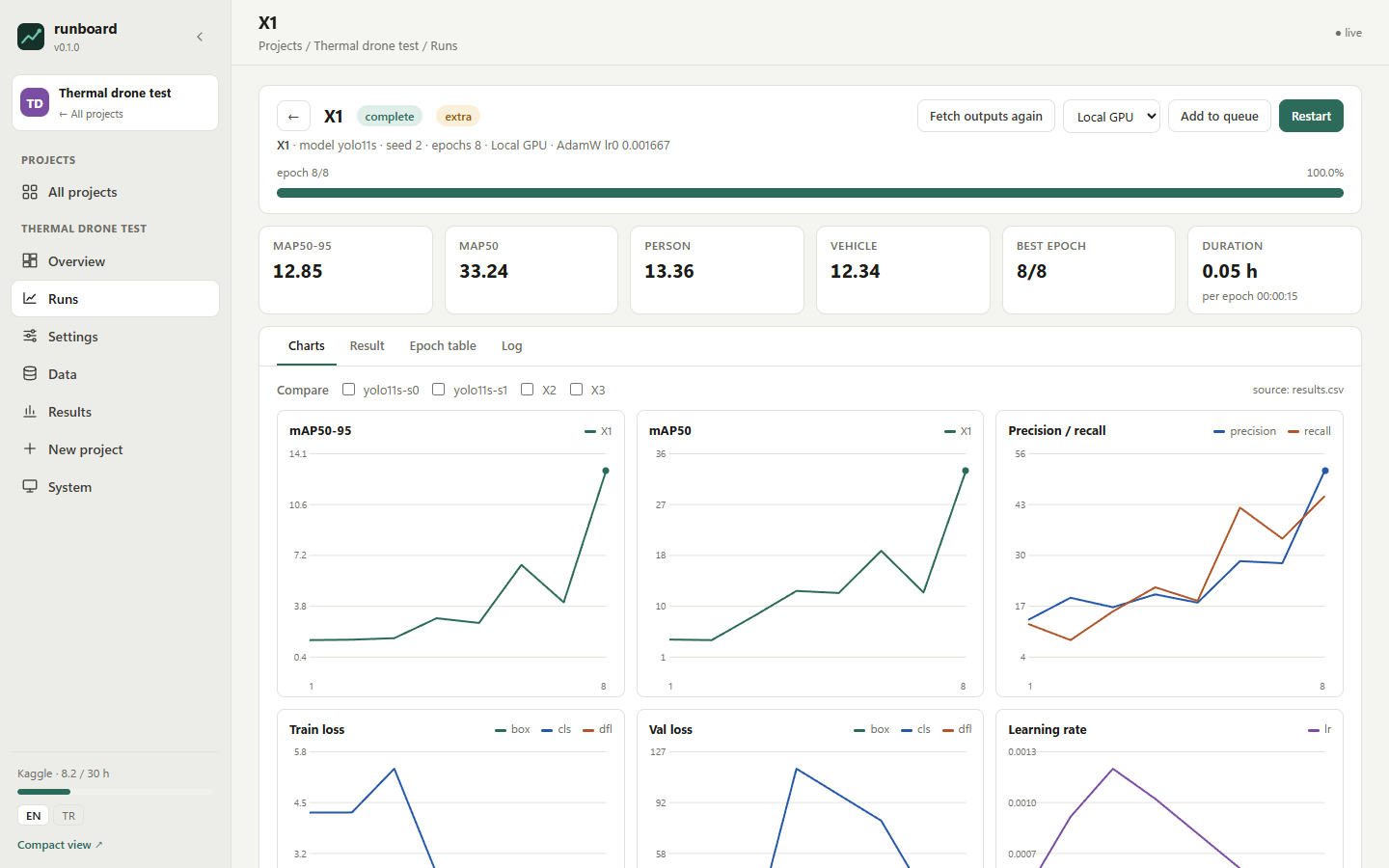
A run, live |
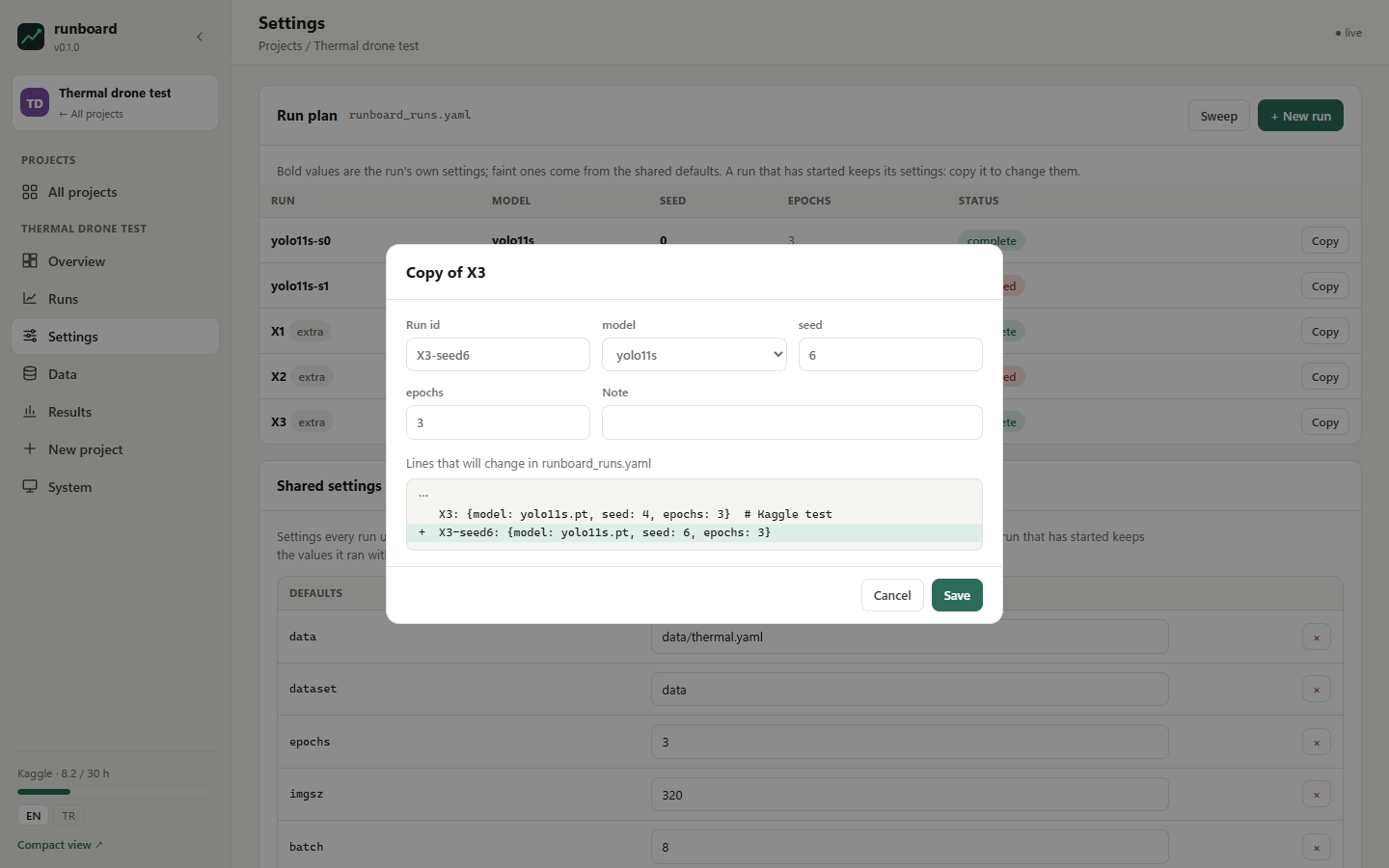
Editing the plan: a preview of the exact lines that change |
- Hypotheses a machine can check —
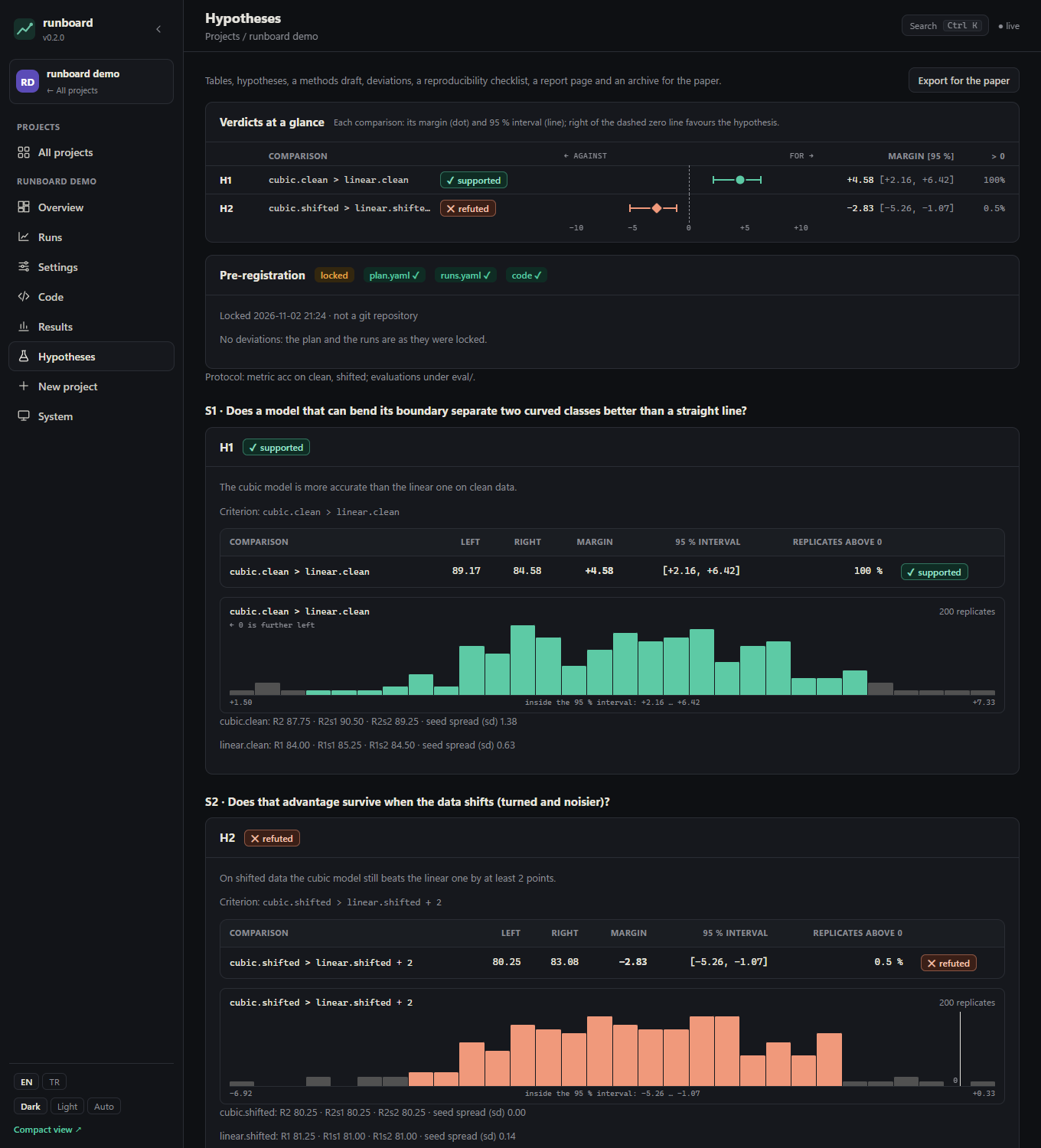
R7.aerial >= 0.9 * R5.aerial,collapse(R4, ground, aerial) > ..., seed groups,log_fit(...): each comparison is decided on paired bootstrap replicates as supported, refuted or indistinguishable, with its 95 % interval. - A lock that means something —
plan.lock.jsonrecords when, at which commit and the fingerprints of the plan, the runs and the scripts; every later change needs a reason and is listed as a deviation. A sealed test set is evaluated once per model, on the record. - Research wizard — questions, experiment designs (specialists, data-size curves, architectures, ablations, seeds), the evaluation protocol and hypotheses checked as you type become a ready project.
- Code templates — split, leakage check, conversion, data-size subsets, evaluation and speed scripts, written into your project as ordinary files that runboard never overwrites once you change them.
- Paper output — Markdown and LaTeX tables, the hypotheses, a methods draft, the deviations section, a reproducibility checklist, a registered-report page and an archive for Zenodo.
- Live runs anywhere — your GPU, Kaggle (private kernels, weekly quota, private datasets), a machine over SSH and a SLURM cluster (your own SSH keys; runboard never sees a password); logs, second-by-second progress, charts, a queue.
- Provenance — every run records the commit, uncommitted changes and the fingerprints of what it started from.
- Tablet view, a Code page, English and Türkçe.
Secrets never leave your machine: the Kaggle token stays in ~/.kaggle, paired devices and all state live in
~/.runboard, never inside a project repository.
Install
pip install runboard-ml            # or: pip install "runboard-ml[kaggle]" for Kaggle
runboard                           # http://localhost:8000 — this computer only, no password
The package is called runboard-ml on PyPI (runboard belongs to another project); the command and the Python module
are runboard. Do not install both in one environment: they would share the module name. Python 3.11 or newer.
Then, in the dashboard:
- System → Connections → Kaggle (only if you want cloud GPUs): the panel walks you through creating a token on
kaggle.com and pasting it once. It is saved to
~/.kaggle/access_tokenon this machine, tested, and never shown again. - New project: pick a folder and choose Pre-registered study (YOLO), YOLO training (no code) or My own training
script, then where to run (this computer, Kaggle, SSH, SLURM). runboard writes
runboard.yaml, the runs file and, for YOLO, the training and evaluation scripts into the folder; it never changes your own files.
A folder that already has a runboard.yaml can be added from the same wizard or with runboard add PATH.
Tablet access
By default runboard listens only on this computer (127.0.0.1) and asks for nothing. To follow runs from a tablet on
the same Wi-Fi, turn on System → Tablet access (the dashboard restarts on all network interfaces), press
Pair a device and scan the QR code with the tablet, or open the address shown and type the 6-digit code. The code
works once and for two minutes. Paired devices are listed there and can be removed at any time.
A paired device can follow, start and stop runs. Entering the Kaggle token, adding projects, changing code and the
project file, the folder browser and startup settings stay on this computer. Outside your home network, use a VPN such
as Tailscale and add its machine name to allowed_hosts in ~/.runboard/config.yaml. See
SECURITY.md.
A project by hand
The wizard covers the common cases. Under the hood a project is any folder with a runboard.yaml (and, for a
pre-registered study, a plan.yaml). runboard does not own your code or configs; the manifest just tells it where
things are:
version: 2
name: My detector
runs:
  file: configs/runs.yaml          # your runs, in your own format: a mapping of run id -> fields
  section: runs
  defaults: train
  name: "{id}-{model|stem}-s{seed}"
backends:
  local:  {command: '"{python}" train.py --run {id}', output_dir: runs/local}
  kaggle: {files: {train.py: train.py, runs.yaml: configs/runs.yaml}, command: "python train.py --run {id}"}
results:
  report: "{out}/summary.json"
  metrics: {primary: map50_95}
See the manifest reference for every option,
including plan.yaml, criteria, evaluation files, the lock and the backends, and
the design notes for how verdicts are
computed.
Reporting progress
Print one line per event from your training script, or use rb.py (stdlib only; runboard demo and the wizard put a
copy next to your scripts):
import rb
rb.ultralytics(model)            # Ultralytics: one line adds everything below
rb.start(epochs=100, batches=798)
rb.beat(epoch=3, batch=400, batches=798, its=4.9)
rb.epoch(3, epochs=100, secs=171, metrics={"map": 48.2}, best=48.2, eta=time.time() + 3600)
Each call prints @@rb {json}; your own log lines are untouched. Projects with existing plain-text logs can describe
them with regular expressions instead (progress.patterns).
Run it permanently
System → Start runboard when Windows starts (Windows), or a systemd/launchd service running runboard serve.
runboard serve also starts a small watchdog: if the dashboard stops answering for 20 s it is started again, and every
start, stop and unexpected error is written with its time to ~/.runboard/server.log. runboard stop stops both and
keeps them stopped until the next runboard serve (set watchdog: false in ~/.runboard/config.yaml to go without).
To reach it from outside your home network, put it behind a private network such as Tailscale rather than exposing the port.
Development
git clone https://github.com/alperentoker/runboard-ml
cd runboard-ml
pip install -e .[dev]
pytest
MIT licensed. Changes: CHANGELOG.md · plans: ROADMAP.md.
1 maintainer

Metadata
1 maintainer
Release files for runboard-ml 0.2.0
For a detailed explanation of source distributions (sdists) and built distributions (wheels), please see the package formats documentation.
Source distribution (sdist)
| File | Size | Uploaded | Provenance | Actions |
|---|---|---|---|---|
| runboard_ml-0.2.0.tar.gz | 242.9 kB | With provenance | Details for runboard_ml-0.2.0.tar.gz |
Built distribution (wheel)
| File | Interpreter | ABI | Platform | Actions Reset |
|---|---|---|---|---|
| runboard_ml-0.2.0-py3-none-any.whl | Python 3 | none | any | Details for runboard_ml-0.2.0-py3-none-any.whl |
Total release size: 471.1 kB
Release files / runboard_ml-0.2.0.tar.gz
| Download URL | runboard_ml-0.2.0.tar.gz |
|---|---|
| Size | 242.9 kB |
| Tags | Source |
|
SHA-256 checksum How to use checksums |
c8c1afbdcfebe46c8e812165208ff40973375cbebc1bb83b0797392cce9a2691
|
|
BLAKE2b-256 checksum How to use checksums |
9c76f5ab630258e0cb0465c5c7b6ed7bb9f752aefd7bc75d5c0dfa4c4608e6ee
|
| Upload date | |
|
Uploaded using Trusted Publishing? What is trusted publishing? |
Yes |
| Uploaded via |
twine/7.0.0 CPython/3.13.16
|
Provenance
Provenance describes where a file came from. On PyPI, provenance is shared via attestations, which provide a verifiable record of the build or publishing details. View details, limitations and caveats.


PyPI Publish Attestation
PyPI verified that this artifact, at this checksum, originated from the publisher listed below.
Signed by GitHub Actions, verified by PyPI on Nov 1, 2026.
Transparency logRelease files / runboard_ml-0.2.0-py3-none-any.whl
| Download URL | runboard_ml-0.2.0-py3-none-any.whl |
|---|---|
| Size | 228.2 kB |
| Tags | Python 3 |
|
SHA-256 checksum How to use checksums |
6e12daa81be20edd35773ec9322c1629ba7440a163da6b04901823880a903fdf
|
|
BLAKE2b-256 checksum How to use checksums |
0626fceab95f9f874ac7f087a618a88d0258d93beec6326beba56e1fbf400ee7
|
| Upload date | |
|
Uploaded using Trusted Publishing? What is trusted publishing? |
Yes |
| Uploaded via |
twine/7.0.0 CPython/3.13.16
|
Provenance
Provenance describes where a file came from. On PyPI, provenance is shared via attestations, which provide a verifiable record of the build or publishing details. View details, limitations and caveats.
PyPI Publish Attestation
PyPI verified that this artifact, at this checksum, originated from the publisher listed below.
Signed by GitHub Actions, verified by PyPI on Nov 1, 2026.
Transparency logSecurity for runboard-ml 0.2.0
Provenance
Provenance describes where a file came from. On PyPI, provenance is shared via attestations, which provide a verifiable record of the build or publishing details. View details, limitations and caveats.
Full provenance
All 2 files in this release have been uploaded with provenance metadata.
Attestation for runboard_ml-0.2.0.tar.gz
PyPI Publish Attestation
PyPI verified that this artifact, at this checksum, originated from the publisher listed below.
Signed by GitHub Actions, verified by PyPI on Nov 1, 2026.
Transparency logA note on package security
PyPI is a repository for distributing packages, not a service for auditing them. While third-party security researchers and our staff do their best to detect and remove malicious packages, PyPI cannot guarantee the quality, security or suitability of any given package.
To learn more about protecting yourself from malicious actors, visit our package security documentation.














