

S3 Log Extraction










Fast extraction of access summary data from S3 logs.
Originally developed for the DANDI Archive.
Read more about S3 logging on AWS.
⚠️ This package currently only supports processing of access data (GET-type requests); if you wish to use this package for other types of requests (PUT/DELETE/HEAD, etc.) please reach out by raising an issue. ⚠️
Installation
pip install s3-log-extraction
Note for Windows users: This package requires GAWK and is not natively supported on Windows. Windows users should use Windows Subsystem for Linux (WSL) to run this package.
Workflow
flowchart TD
    A[Configure cache<br/><br/>Initialize home and cache directories]
    B[Extract logs<br/><br/>Process raw S3 logs and store minimal extracted data]
    C[Update IP indexes<br/><br/>Generate anonymized indexes for each IP address]
    D[Update region codes<br/><br/>Map IPs to ISO 3166 region codes using the local GeoLite2 database]
    E[Update coordinates<br/><br/>Look up latitude/longitude for each region code in the bundled ISO 3166 tables]
    F[Generate summaries<br/><br/>Create per-dataset summaries for reporting]
    G[Generate totals<br/><br/>Aggregate statistics across datasets or archive]
    H[Share!<br/><br/>Post the summaries and totals in a public data repository]

    A --> B
    B --> C
    C --> D
    D --> E
    E --> F
    F --> G
    G --> H
Generic Usage
[Optional] Configure a non-default cache directory on a mounted disk that has sufficient space (the default is placed under ~/.cache). This will be the main location where extracted logs and other useful information will be stored.
s3logextraction config cache set <new cache directory>
To extract the logs:
s3logextraction extract <log directory>
To override the cache directory for a single extraction run (without changing global config):
s3logextraction extract <log directory> --cache <cache directory>
NOTE: If you feel like this command is taking a long time on your system, DO NOT interrupt it via ctrl+C or pkill. Instead, you can safely interrupt it by running:
s3logextraction stop
This will allow it to finish processing the current batch of logs and then exit gracefully.
After your logs are extracted, ensure the environment variables for the geolocation database are set:
- MAXMIND_ACCOUNT_ID and MAXMIND_LICENSE_KEY
- Credentials of a free MaxMind account, used to download the GeoLite2-City database.
- The database is downloaded into the cache directory on first use and refreshed automatically once it is more than a week old, so the credentials only need to be set on machines that generate the summaries.
export MAXMIND_ACCOUNT_ID="your_account_id_here"
export MAXMIND_LICENSE_KEY="your_license_key_here"
To generate top-level summaries and totals (that is, per dataset):
s3logextraction update summaries
s3logextraction update totals
Requesters are geolocated while the summaries are generated. Each IP address is checked against the published ranges of GitHub, AWS, GCP, and known VPN or datacenter providers, and labeled by that service if it falls in one; otherwise it is looked up in the local GeoLite2 database and labeled with its ISO 3166-1 alpha-3 country code and ISO 3166-2 subdivision code (e.g. "USA/CA" for California). Fetching the published ranges needs network access. No requester's location is written to disk; only the aggregated by_region.tsv summaries are.
To give every region of the published summaries a coordinate, for maps:
s3logextraction update ip coordinates
This step needs no credentials: each region code is looked up in ISO 3166 tables bundled with the package, whose coordinates come from the public-domain Natural Earth dataset. Cloud service regions such as AWS/us-east-1 are located with the GeoLite2 database.
To force a fresh download of the GeoLite2 database (this happens automatically when it is stale):
s3logextraction update ip database --force
This product includes GeoLite2 Data created by MaxMind, available from https://www.maxmind.com.
Finally, to generate archive-wide summaries and totals:
s3logextraction update summaries --mode archive
s3logextraction update totals --mode archive
Remote S3 Bucket Extraction
To extract logs from a remote S3 bucket, use the --mode remote flag. For large buckets, we strongly recommend
setting up AWS S3 Inventory and
downloading the inventory locally before running the extraction. Scanning the bucket directly via live network calls
(the default when no --inventory path is given) can be extremely slow for buckets with millions of objects.
Using S3 Inventory (recommended)
AWS S3 Inventory generates periodic snapshots of all objects in your bucket as gzip-compressed CSV files. Once
downloaded locally, the inventory lets s3logextraction enumerate all log files without making any live S3 listing
calls, providing a significant performance improvement over direct bucket scanning.
Expected inventory directory layout:
<inventory_directory>/
├── <timestamp>/               # e.g. 2026-05-03T01-00Z/
│   ├── manifest.json
│   └── manifest.checksum
├── data/
│   └── <uuid>.csv.gz          # gzip-compressed CSV inventory files
└── hive/
    └── dt=<YYYY-MM-DD-HH-MM>/ # e.g. dt=2026-05-03-01-00/
        └── symlink.txt        # references to data/*.csv.gz
Pass the path to the downloaded inventory directory via the --inventory option:
s3logextraction extract s3://my-logs-bucket --mode remote --inventory /path/to/inventory
To check how many log files are in the inventory and the total size:
s3logextraction stats --inventory /path/to/inventory
To report what percentage of log files have already been processed:
s3logextraction completion --inventory /path/to/inventory
Without an S3 Inventory (not recommended)
If you do not have an S3 Inventory available, do not use --mode remote without --inventory — the live bucket
scan will be extremely slow for large buckets. Instead, use s5cmd to manually
download the unprocessed log files to a local directory and then run the local extraction on those files:
s5cmd cp "s3://my-logs-bucket/*" /path/to/local/logs/
s3logextraction extract /path/to/local/logs/
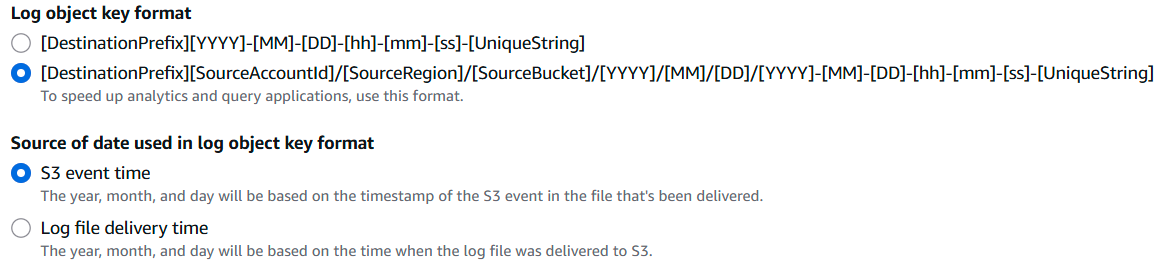
If you're new to using AWS S3 buckets and haven't yet enabled the logging this project utilizes, you can follow these simple instructions to get started.
- Log into your AWS console.
- Create a new PRIVATE S3 bucket - typically the name of the new bucket is the name of the one you wish to enable logging on with
-logsadded to the end. For example,dandiarchive-logs.- NEVER share this bucket publicly as it contains sensitive information.
- Navigate back to the S3 bucket you wish to enable logging on.
- Under the
Propertiestab, scroll down to the section calledServer access loggingand selectEdit. - Toggle the selection to
Enable, then specify the destination where logs will be stored as the new S3 bucket you created in step (2). - Recommended:
- Specify the
Log object key formatas the nested pattern shown below. - Ensure the
Source of date used in log object key formatis theS3 event time.
- Specify the
Developer Notes
Throughout the codebase, various processes are referred to in the following ways:
- parallelized: The process can be run in parallel across multiple workers, which increases throughput.
- interruptible: The process can be safely interrupted (
ctrl+Corpkill) with only a very low chance of causing corruption. For parallelized interruption you may have to eitherpkillthe main dispatch process or spamctrl+Cmultiple times. - updatable: The process can be resumed from the last checkpoint without losing any progress. It can also be run fresh at different times, such as on a CRON cycle, and it will only interact with unprocessed data.
Performance
By leveraging GAWK, this version of the S3 log handling is considerably more efficient than the previous attempts.
The previous attempt used a multistep process which took several days to run (even on multiple workers). It also required an additional ~200 GB cache to allow lazy updates of the per-object bins.
This version requires no intermediate cache, stores only the minimal amount of data to be shared, and takes less than a day to do a fresh run (and is also lazy regarding daily CRON updates).
Validation
In lieu of attempting fully validated parsing of each and every line from the log files (which is a hard, unsolved problem - see s3-log-parser), we instead validate the heuristics in a targeted manner through specific validation scripts.
These can also be used to verify the current state of the extraction process, such as warning about corrupt records or incomplete cache files.
Excluded IP regex configuration
The extraction heuristic pre-validator uses an excluded-IP regex. By default, no IPs are excluded.
Example custom regex:
export S3_LOG_EXTRACTION_EXCLUDED_IP_REGEX='^(192\.0\.2\.1|198\.51\.100\.2)$'
Submission of line decoding errors
Should you discover any lines in your S3 log files that cause failures in the codebase, please email them to the core maintainer (cody.c.baker.phd@gmail.com) before raising issues or submitting PRs contributing them as examples, to more easily correct any aspects that might require anonymization.
Download files
Download the file for your platform. If you're not sure which to choose, learn more about installing packages.
Source Distribution
Built Distribution
Filter files by name, interpreter, ABI, and platform.
If you're not sure about the file name format, learn more about wheel file names.
Copy a direct link to the current filters
File details
Details for the file s3_log_extraction-1.11.2.tar.gz.
File metadata
- Download URL: s3_log_extraction-1.11.2.tar.gz
- Upload date:
- Size: 164.9 kB
- Tags: Source
- Uploaded using Trusted Publishing? No
- Uploaded via:
twine/7.0.0 CPython/3.13.14
File hashes
| Algorithm | Hash digest | |
|---|---|---|
| SHA256 |
5e31a4dcef11990ca4a2aaeee21492785630827d39a56eb929f04df33ff880c8
|
|
| MD5 |
6a4e867cc9a3fa002154849deb67fa75
|
|
| BLAKE2b-256 |
41f18d52e95a557f93639c5c993014d37a60b4f98064ce2851db9ea4f456c7f0
|
File details
Details for the file s3_log_extraction-1.11.2-py3-none-any.whl.
File metadata
- Download URL: s3_log_extraction-1.11.2-py3-none-any.whl
- Upload date:
- Size: 133.8 kB
- Tags: Python 3
- Uploaded using Trusted Publishing? No
- Uploaded via:
twine/7.0.0 CPython/3.13.14
File hashes
| Algorithm | Hash digest | |
|---|---|---|
| SHA256 |
0c6d86f8543593571a9e14e841055778d675098b914917b00e9544d8f965e8ab
|
|
| MD5 |
bb537f699c24d35c2ca4dc8c063b5b2f
|
|
| BLAKE2b-256 |
7649d16a7350f48344e66f2b23628b7db0d40e8bd1f8abdd9ff87beb74cf60a8
|














