



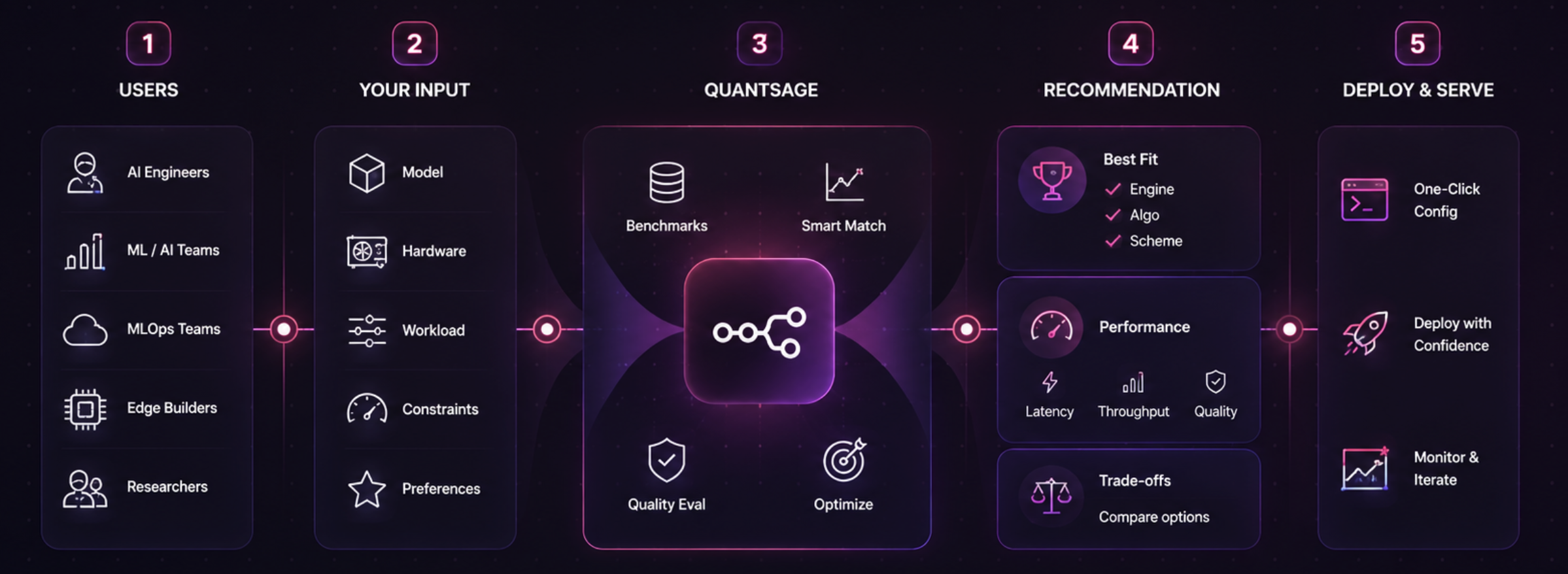
SageQuant is a data-driven CLI tool that helps you choose the optimal serving stack. Given your model size, target hardware, workload shape, and tail latency/quality budget, it recommends the best inference engine, quantization algorithm, and bit-width scheme.
It provides choices backed by real benchmark data, not guesswork.
Why SageQuant?
Choosing how to serve an LLM today is usually an ad-hoc decision: defaulting to vLLM, trying AWQ w4a16 because of a blog post, and hoping for the best.
SageQuant replaces this guesswork with a structured lookup across three distinct decisions:
- Inference Engine: vLLM vs. SGLang vs. TensorRT-LLM vs. MLX
- Quantization Algorithm: GPTQ vs. AWQ vs. FP8 vs. SmoothQuant vs. MLX native
- Bit-width Scheme: FP16 vs. 8-bit (W8A8) vs. 4-bit (W4A16)
Tradeoff Visualization
SageQuant maps tradeoffs across engines and algorithms for the same model and hardware:
| Engine | Quant Algo | Scheme | TTFT (p50 / p95) | Throughput | Quality vs. FP16 |
|---|---|---|---|---|---|
| vLLM | none | fp16 | 85 / 140ms | 45.0 tok/s | baseline |
| vLLM | GPTQ | w4a16 | 145 / 210ms | 38.2 tok/s | -1.1% (mmlu-5shot, n=200) |
| vLLM | AWQ | w4a16 | 140 / 205ms | 39.5 tok/s | -0.8% (mmlu-5shot, n=200) |
| SGLang | AWQ | w4a16 | 98 / 165ms | 52.0 tok/s | -1.4% (mmlu-5shot, n=200) |
Quick Start
1. Install
pip install -e .
# Advanced features (Streamlit dashboard & scikit-learn regression interpolation):
pip install -e ".[advanced]"
2. Get a Recommendation
Find the best stack based on your budget:
sage-quant recommend --model-size 7b --hardware a100-40gb --max-latency 200ms --min-quality 98
Recommended: SGLANG + AWQ (w4a16), prefix caching on
Workload: 128 in / 128 out tokens
Expected: 60ms TTFT (p50) · 105ms TTFT (p95) · 75.0 tok/s · -1.4% quality (mmlu-5shot, n=200)
Confidence: exact (3 matching benchmark runs)

Note (Engine): SGLang features RadixAttention and is highly efficient for high-cache-reuse workloads.
Note (Algo): AWQ generally preserves quality slightly better than GPTQ at 4-bit.
3. Generate Serving Config
Get a copy-pasteable server launch command:
sage-quant serve-config --model-size 7b --hardware a100-40gb --model meta-llama/Meta-Llama-3-8B-Instruct --prefer-engine sglang
4. Contribute Benchmarks
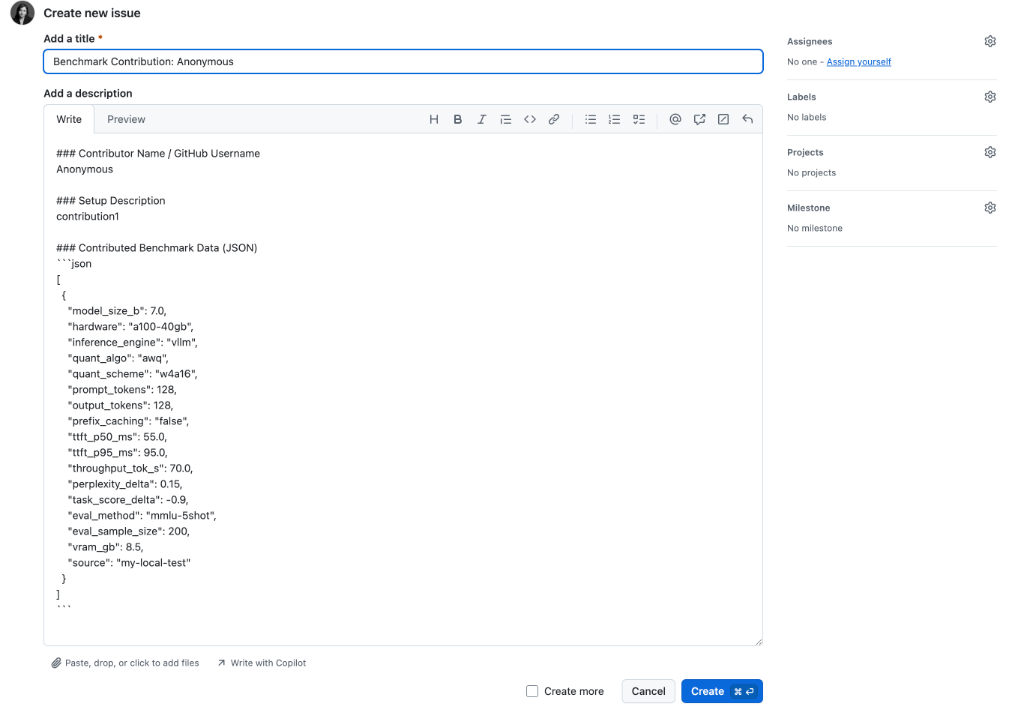
If you have run benchmarks locally, you can append your run log and share it with the community. You can refer to my_run.json for the expected input JSON format:
sage-quant contribute --run-log my_run.json
This command automatically validates your data, appends it locally, and generates a zero-friction, pre-filled link to open a GitHub Issue with your contribution:
Command Reference
sage-quant recommend
Find the optimal engine, algorithm, and scheme based on latency/quality constraints.
sage-quant recommend --model-size 7b --hardware a100-40gb --max-latency 200ms --min-quality 98 --prompt-tokens 128 --output-tokens 128
sage-quant serve-config
Generate runnable vLLM/SGLang/MLX launch configuration scripts or YAML files.
sage-quant serve-config --model-size 7b --hardware a100-40gb --model meta-llama/Meta-Llama-3-8B-Instruct
sage-quant list-hardware
List all unique hardware configurations in the dataset.
sage-quant list-hardware
sage-quant list-engines
List all unique inference engines in the dataset.
sage-quant list-engines
sage-quant list-quant-algos
List all unique quantization algorithms in the dataset.
sage-quant list-quant-algos
sage-quant contribute
Append custom benchmark runs to the local dataset and get zero-friction sharing instructions.
sage-quant contribute --run-log my_run.json
Documentation
For a comprehensive guide, detailed command usage, and real-world example scenarios, see the User Guide.
License
MIT
1 maintainer

Metadata
1 maintainer
Release files for sage-quant 0.2.3
For a detailed explanation of source distributions (sdists) and built distributions (wheels), please see the package formats documentation.
Source distribution (sdist)
| File | Size | Uploaded | |
|---|---|---|---|
| sage_quant-0.2.3.tar.gz | 18.6 kB | Details |
Built distribution (wheel)
| File | Interpreter | ABI | Platform | Reset |
|---|---|---|---|---|
| sage_quant-0.2.3-py3-none-any.whl | Python 3 | none | any | Details |
Total release size: 36.8 kB
Release files / sage_quant-0.2.3.tar.gz
| Download URL | sage_quant-0.2.3.tar.gz |
|---|---|
| Size | 18.6 kB |
| Tags | Source |
|
SHA-256 checksum How to use checksums |
f50aea8d8538b11ecde3aa4bb7d099f53f66252d260c0f60b968256dae95b5c8
|
|
BLAKE2b-256 checksum How to use checksums |
9806a9335cc9381ed2a661b99f2f7a358be35d09aa5c50194d826cdf880884e0
|
| Upload date | |
|
Uploaded using Trusted Publishing? What is trusted publishing? |
No |
| Uploaded via |
twine/6.2.0 CPython/3.12.6
|
Release files / sage_quant-0.2.3-py3-none-any.whl
| Download URL | sage_quant-0.2.3-py3-none-any.whl |
|---|---|
| Size | 18.2 kB |
| Tags | Python 3 |
|
SHA-256 checksum How to use checksums |
476e8bcd65b438deaa8e82b2ecd6bb2cdeb4c5c87e8b9278650ea7643d3de7a7
|
|
BLAKE2b-256 checksum How to use checksums |
781ec38bbdc05edeb668499c91dde5d69e87b25d7b101f892026de66b4777b3e
|
| Upload date | |
|
Uploaded using Trusted Publishing? What is trusted publishing? |
No |
| Uploaded via |
twine/6.2.0 CPython/3.12.6
|














