
SageQuant: Open-source inference tradeoff calculator and quantization advisor

Project description



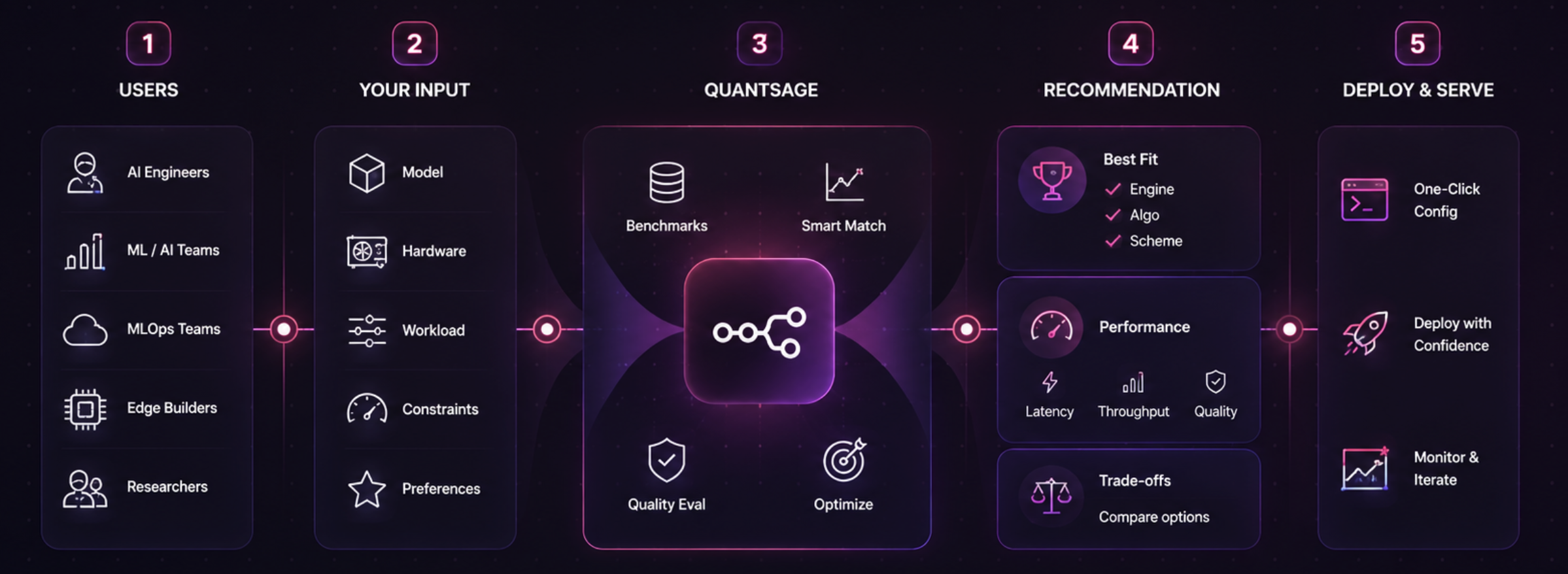
SageQuant is a data-driven CLI tool that helps you choose the optimal serving stack. Given your model size, target hardware, workload shape, and tail latency/quality budget, it recommends the best inference engine, quantization algorithm, and bit-width scheme.
It provides choices backed by real benchmark data, not guesswork.
Why SageQuant?
Choosing how to serve an LLM today is usually an ad-hoc decision: defaulting to vLLM, trying AWQ w4a16 because of a blog post, and hoping for the best.
SageQuant replaces this guesswork with a structured lookup across three distinct decisions:
- Inference Engine: vLLM vs. SGLang vs. TensorRT-LLM vs. MLX
- Quantization Algorithm: GPTQ vs. AWQ vs. FP8 vs. SmoothQuant vs. MLX native
- Bit-width Scheme: FP16 vs. 8-bit (W8A8) vs. 4-bit (W4A16)
Tradeoff Visualization
SageQuant maps tradeoffs across engines and algorithms for the same model and hardware:
| Engine | Quant Algo | Scheme | TTFT (p50 / p95) | Throughput | Quality vs. FP16 |
|---|---|---|---|---|---|
| vLLM | none | fp16 | 85 / 140ms | 45.0 tok/s | baseline |
| vLLM | GPTQ | w4a16 | 145 / 210ms | 38.2 tok/s | -1.1% (mmlu-5shot, n=200) |
| vLLM | AWQ | w4a16 | 140 / 205ms | 39.5 tok/s | -0.8% (mmlu-5shot, n=200) |
| SGLang | AWQ | w4a16 | 98 / 165ms | 52.0 tok/s | -1.4% (mmlu-5shot, n=200) |
Quick Start
1. Install
pip install -e .
# Advanced features (Streamlit dashboard & scikit-learn regression interpolation):
pip install -e ".[advanced]"
2. Get a Recommendation
Find the best stack based on your budget:
sage-quant recommend --model-size 7b --hardware a100-40gb --max-latency 200ms --min-quality 98
Recommended: SGLANG + AWQ (w4a16), prefix caching on
Workload: 128 in / 128 out tokens
Expected: 60ms TTFT (p50) · 105ms TTFT (p95) · 75.0 tok/s · -1.4% quality (mmlu-5shot, n=200)
Confidence: exact (3 matching benchmark runs)

Note (Engine): SGLang features RadixAttention and is highly efficient for high-cache-reuse workloads.
Note (Algo): AWQ generally preserves quality slightly better than GPTQ at 4-bit.
3. Generate Serving Config
Get a copy-pasteable server launch command:
sage-quant serve-config --model-size 7b --hardware a100-40gb --model meta-llama/Meta-Llama-3-8B-Instruct --prefer-engine sglang
4. Contribute Benchmarks
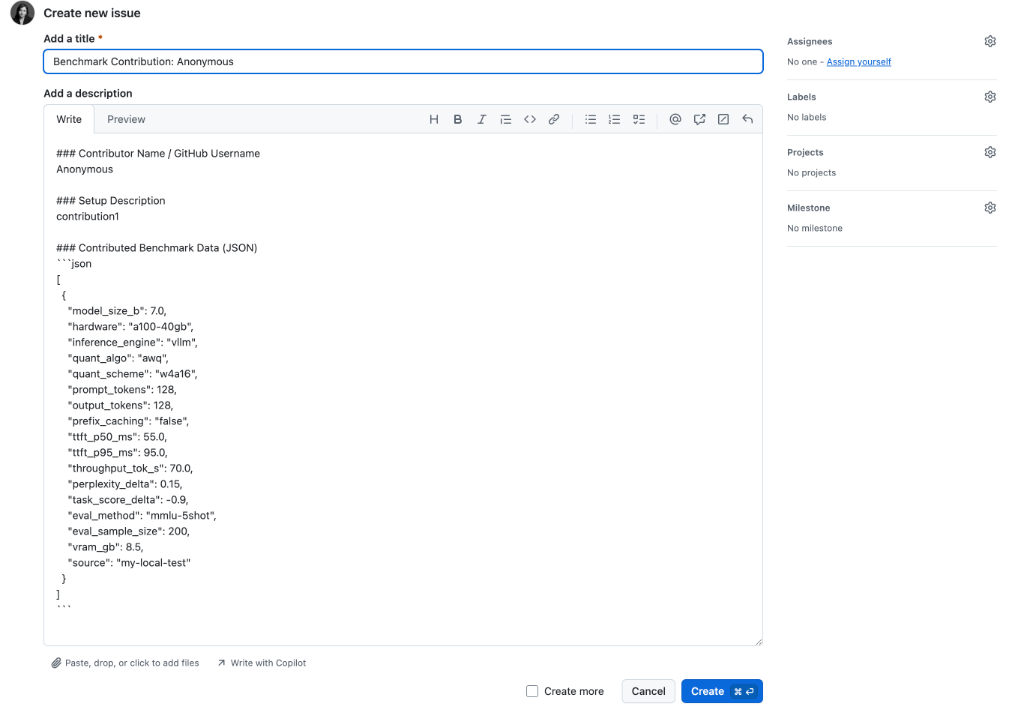
If you have run benchmarks locally, you can append your run log and share it with the community. You can refer to my_run.json for the expected input JSON format:
sage-quant contribute --run-log my_run.json
This command automatically validates your data, appends it locally, and generates a zero-friction, pre-filled link to open a GitHub Issue with your contribution:
Command Reference
sage-quant recommend
Find the optimal engine, algorithm, and scheme based on latency/quality constraints.
sage-quant recommend --model-size 7b --hardware a100-40gb --max-latency 200ms --min-quality 98 --prompt-tokens 128 --output-tokens 128
sage-quant serve-config
Generate runnable vLLM/SGLang/MLX launch configuration scripts or YAML files.
sage-quant serve-config --model-size 7b --hardware a100-40gb --model meta-llama/Meta-Llama-3-8B-Instruct
sage-quant list-hardware
List all unique hardware configurations in the dataset.
sage-quant list-hardware
sage-quant list-engines
List all unique inference engines in the dataset.
sage-quant list-engines
sage-quant list-quant-algos
List all unique quantization algorithms in the dataset.
sage-quant list-quant-algos
sage-quant contribute
Append custom benchmark runs to the local dataset and get zero-friction sharing instructions.
sage-quant contribute --run-log my_run.json
Documentation
For a comprehensive guide, detailed command usage, and real-world example scenarios, see the User Guide.
License
MIT


Download files
Download the file for your platform. If you're not sure which to choose, learn more about installing packages.
Source Distribution
Built Distribution
Filter files by name, interpreter, ABI, and platform.
If you're not sure about the file name format, learn more about wheel file names.
Copy a direct link to the current filters
File details
Details for the file sage_quant-0.2.3.tar.gz.
File metadata
- Download URL: sage_quant-0.2.3.tar.gz
- Upload date:
- Size: 18.6 kB
- Tags: Source
- Uploaded using Trusted Publishing? No
- Uploaded via: twine/6.2.0 CPython/3.12.6
File hashes
| Algorithm | Hash digest | |
|---|---|---|
| SHA256 |
f50aea8d8538b11ecde3aa4bb7d099f53f66252d260c0f60b968256dae95b5c8
|
|
| MD5 |
d8891cbea767ceabd5b9c0045edcf077
|
|
| BLAKE2b-256 |
9806a9335cc9381ed2a661b99f2f7a358be35d09aa5c50194d826cdf880884e0
|
File details
Details for the file sage_quant-0.2.3-py3-none-any.whl.
File metadata
- Download URL: sage_quant-0.2.3-py3-none-any.whl
- Upload date:
- Size: 18.2 kB
- Tags: Python 3
- Uploaded using Trusted Publishing? No
- Uploaded via: twine/6.2.0 CPython/3.12.6
File hashes
| Algorithm | Hash digest | |
|---|---|---|
| SHA256 |
476e8bcd65b438deaa8e82b2ecd6bb2cdeb4c5c87e8b9278650ea7643d3de7a7
|
|
| MD5 |
c43f78e1d52d0b5973099bec874efdc6
|
|
| BLAKE2b-256 |
781ec38bbdc05edeb668499c91dde5d69e87b25d7b101f892026de66b4777b3e
|






