
ViSAGE
An interactive 3D visualization package for SAGE26 semi-analytic galaxy formation outputs.
Renders dark matter haloes and SAGE galaxies together in a browser-based interactive viewer powered by PyVista and Trame.
Quick start
pip install sage-viewer
Explore Mode — view existing SAGE26 results by pointing at a .par file:
visage --par /path/to/SAGE26/input/millennium.par
Launch Mode — install, set up and run SAGE26, LightSAGE, SAGEswarm, DarkSAGE and DustySAGE. Run from your SAGE26 root (or the folder you want SAGE26 in) so ViSAGE finds your .par files and the tools automatically:
cd /path/to/SAGE26
visage
Open the printed URL in any browser. To launch on a remote cluster and view locally, use SSH port-forwarding:
# On the cluster
visage --par millennium.par --port 8080

# In a local terminal
ssh -L 8080:localhost:8080 user@cluster
# Then open http://localhost:8080 in your browser
Command-line options
--par FILE              Path to a SAGE .par file — omit (with --lightcone) to start in Launch Mode
--lightcone FILE        Path to a cli_lightcone HDF5 output file — opens the
                        full Explore UI on the lightcone instead of a SAGE box
--par-dir DIR           Directory to scan for additional .par files
                        (defaults to the parent of --par; used for the
                        multi-model dropdown)
--snap N                Initial snapshot number (default: last = z=0)
--port N                Trame server port (default: 8080)
--n-jobs N              Worker threads for parallel halo file reads
                        (default: the CPUs this process may use, minus one)
--cache-gb GB           Snapshot cache budget (default: half of RAM, or of
                        an HPC job's memory allocation; env VISAGE_CACHE_GB)
--gpu MODE              auto | high | low | system — which GPU renders
                        (default auto; env VISAGE_GPU). See below.
--perf                  Print frame timing (fps, render/encode ms, KB/frame)
                        every few seconds while the view moves
--max-halos N           Downsample ceiling per snapshot
--min-particles N       Resolved haloes have N particles (default 20): sets the mass cuts
--min-halo-mass MSUN    A fixed minimum halo mass instead
--min-stellar-mass MSUN A fixed minimum stellar mass instead
ViSAGE sizes itself to the machine. At startup it prints what it found,
for example System : Windows 11 (AMD64) · 16 CPUs (15 workers) · 31.8 GB RAM (cache 15.9 GB),
and, after the first frame, the GPU that is actually rendering. If OpenGL has
fallen back to the CPU (Remote Desktop, a VM, a missing driver), a warning
appears in the viewer. On a Windows laptop with both integrated and discrete
graphics, --gpu auto sets the Windows "High performance" graphics
preference for Python so the discrete GPU renders. high/low force the
choice, and system leaves the OS default alone.
Galaxies have no display cap — every galaxy above the mass floor loads, since all snapshots are preloaded up front.
Multi-model workflow
If your SAGE root looks like:
SAGE26/
├── input/
│   ├── millennium.par
│   ├── millennium_vanilla.par
│   └── microuchuu.par
└── output/
    ├── millennium/model_0.hdf5
    ├── millennium_vanilla/model_0.hdf5
    └── microuchuu/model_0.hdf5
then visage --par input/millennium.par discovers all three models automatically. Click the Launch menu (top-left) → Models section to switch, or click "+ overlay" next to a compatible model to render both at once.
Installation
PyPI (recommended)
pip install sage-viewer
Requires Python ≥ 3.11. After install, visage is available as a command. If your shell can't find it, add the user bin directory to your PATH:
# macOS (Python 3.12 user install)
export PATH="$HOME/Library/Python/3.12/bin:$PATH"
Movie recording in MOV format uses ffmpeg from your PATH. On Windows, a bundled copy is installed automatically.
Synthetic photometry (SED synthesis for lightcones) is an optional extra — it pulls in FSPS + astropy, which the base install omits:
pip install "sage-viewer[sed]"
FSPS also needs its stellar-population data on disk, pointed at by the SPS_HOME environment variable (see the python-fsps docs). Nothing else in ViSAGE depends on it.
From source
git clone https://github.com/MBradley1985/ViSAGE
cd ViSAGE
pip install .
Windows
py -m pip install sage-viewer
visage
The viewer (Explore, Lightcone, Story Mode, recording, the Console) runs
natively on Windows. The Launch Mode flows, SAGE26, SAGEswarm and
LightSAGE, build and run Unix C/C++ code, so on Windows ViSAGE runs
those tools inside WSL (Windows Subsystem for Linux) for you. Your
checkouts stay on your Windows drive (C:\Users\you\SAGE26 is
/mnt/c/Users/you/SAGE26 inside WSL), and the native viewer reads their
output directly. Set it up once:
- In an administrator PowerShell, run
wsl --install, then restart Windows. - Open the new Ubuntu app once and create a Linux user.
- Start
visage, open a flow, and click Install Linux build tools. This installs the compilers, HDF5, GSL, OpenMPI, Boost and Python inside WSL.
You can also run ViSAGE entirely inside WSL (pip install sage-viewer in
the Ubuntu terminal). It then behaves exactly as on Linux, and your Windows
browser opens http://localhost:8080 as usual.
HPC / supercomputer
A helper script is included for module-system clusters (Slurm, PBS, etc.):
# Load a Python module first (name varies by cluster)
module load python/3.12.0

# Create a venv and install ViSAGE in one step
./install_hpc.sh

# Optional: place the venv on scratch for faster I/O
./install_hpc.sh /scratch/$USER/visage-env
The install is editable (pip install -e .) so a git pull updates the code immediately with no reinstall. Load ffmpeg via your module system if you need MOV recording.
In every session:
source .venv/bin/activate
visage --par /path/to/millennium.par --port 8080
# SSH-tunnel the port to your local browser
Documentation
Full documentation at mbradley1985.github.io/ViSAGE.
Tabs at a glance
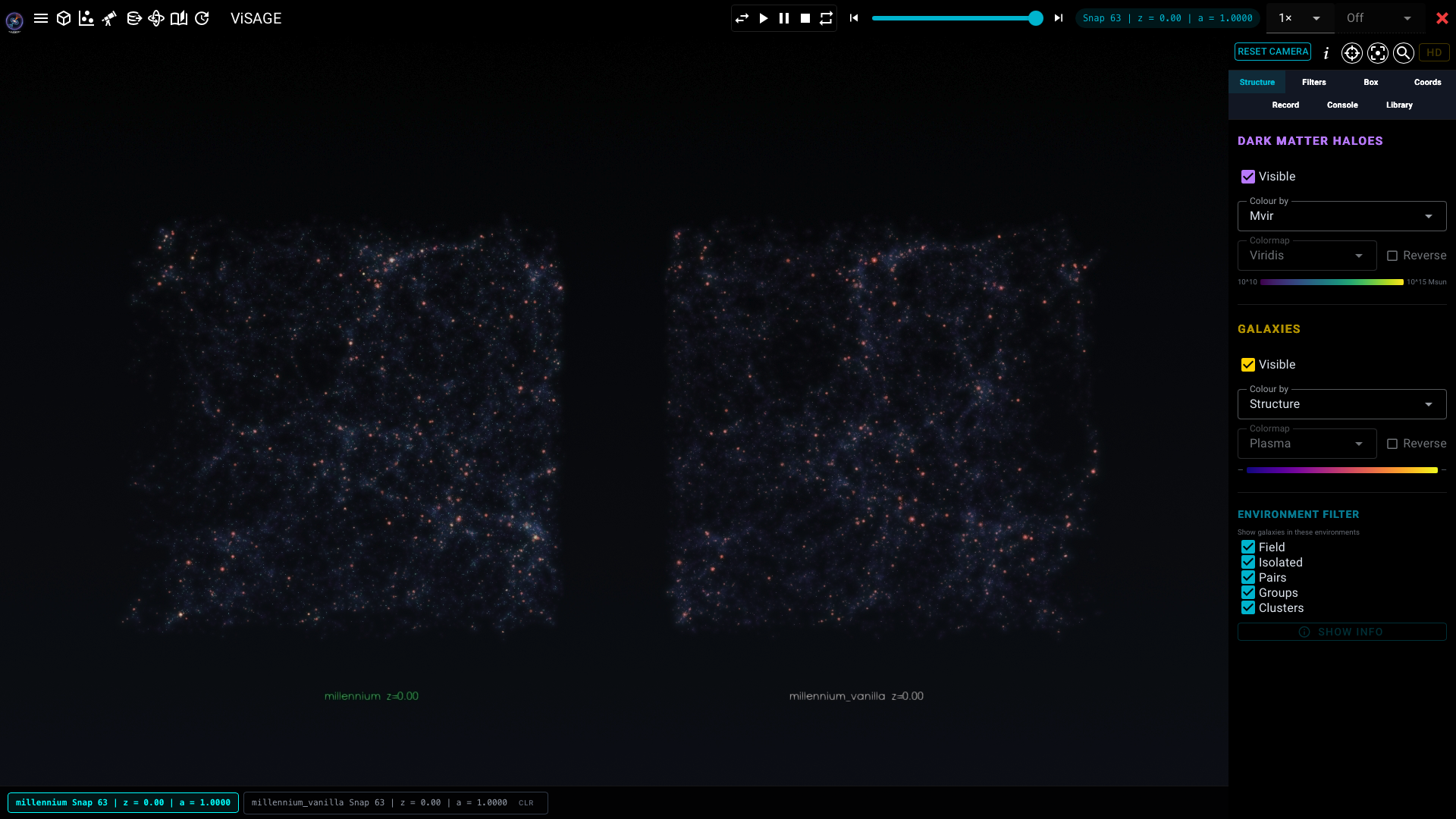
When multiple boxes are loaded a box strip appears at the bottom of the viewport. Click any box to make it active (green label). All tab controls then target that box.
| Tab | Purpose |
|---|---|
| Structure | Layer visibility, opacity, colour-by mode, colormap (with inline colorbar); environment filter, Show info (selection card) |
| Filters | A halo dial and a galaxy dial (pick the property, drag its limits; the ring shows where they sit), galaxy type; Find presets |
| Regions | Spheres, boxes, slices and selections, with live counts, drag handles and saved regions; the active region feeds Plotting and Export |
| Record | Screenshots (PNG/JPG/TIFF) and movie recording (GIF/MOV/PNG); overlays composite into captures |
| Console | Live xterm.js shell terminal (PTY-backed) + SAGE natural-language command mode. Multiple sessions, pop-out window |
| Library | Browse stored screenshots / movies; double-click a row to open as a movable, resizable floating card over the viewport (multiple items open simultaneously); per-row delete button removes the file from disk immediately |
| Plotting | SAGE26's diagnostic plots with observations, for the whole catalogue, a sphere, a box or a group, with the Filters and Environments applied. In a lightcone, Observed plots too. PNG, PDF, JPEG, SVG |
The Focus button (top of the right panel) is tab-aware: it focuses on the selection (galaxy, or halo and group), the coords point, or the box region.
Launch Mode
- Set up and run SAGE26, LightSAGE (lightcones), SAGEswarm (calibration), DarkSAGE and DustySAGE without leaving the viewer:
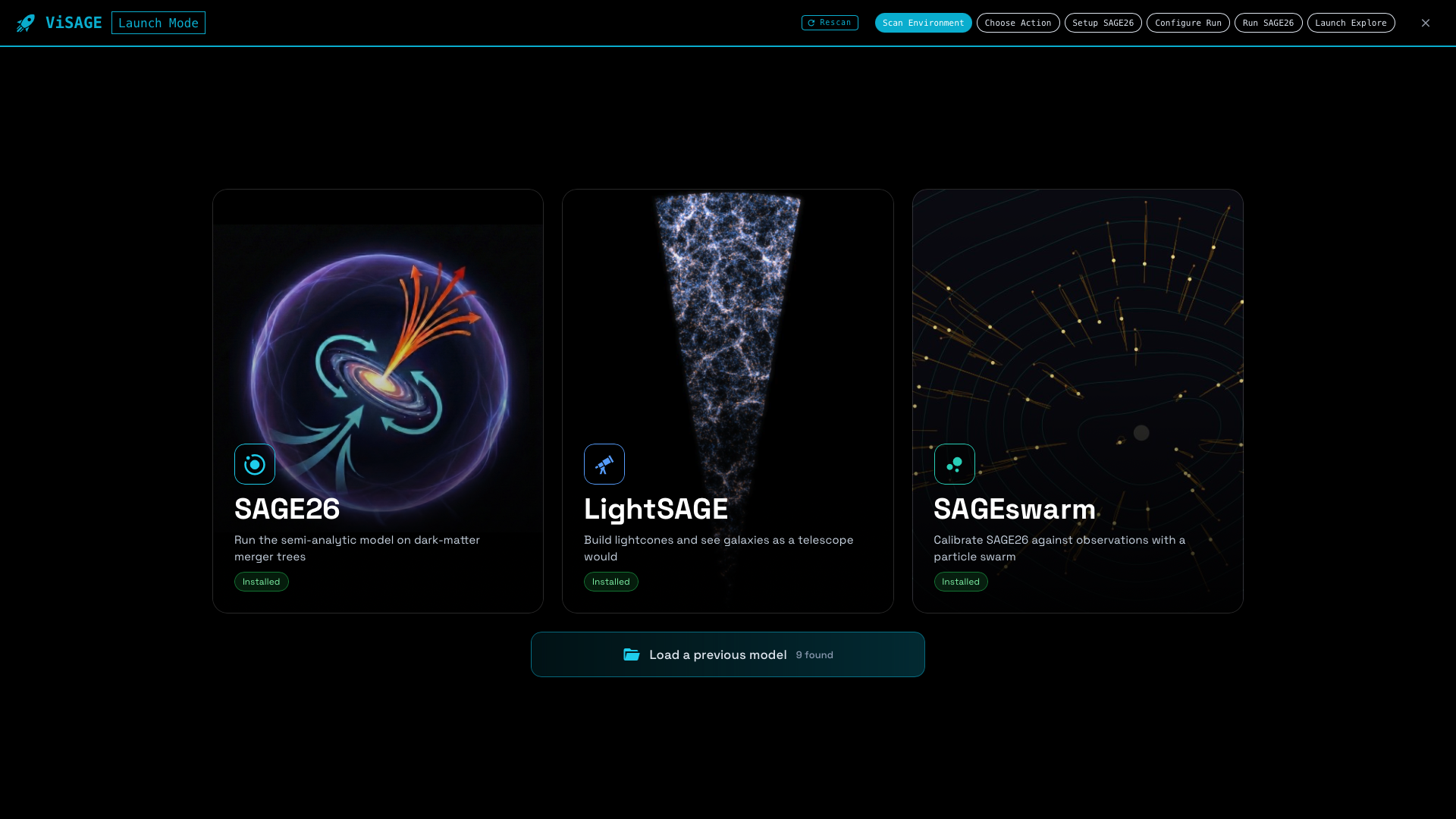
visagewith no--par/--lightcone, or the Launch Mode menu (SAGE-logo button, top-left of the toolbar), which opens SAGE26, LightSAGE or SAGEswarm directly, or the home page - Home: a picture card per tool, showing whether it's installed (DarkSAGE and DustySAGE share a split card), and Load a previous model, listing every model and lightcone found, on a field of twinkling stars
- Toolbar: the same look as Explore's: the steps as a stepper (clicking Scan Environment rescans for the tools) and an update button that installs a newer ViSAGE from PyPI
- Each tool's page: Run, Load existing, Install, Check for update (turns into Update when behind) and Clone / Re-clone. Install and Clone run on their button, showing the step and latest output, then the result:
- SAGE26: downloads the mini-Millennium trees on a first install, then
makeon every core (serial when there's no MPI compiler) - LightSAGE: CMake, Boost and HDF5 (Homebrew / apt in WSL), the photometry packages and FSPS stellar libraries, then only its
sage2kdtree/cli_lightconetools; SAGE itself is never rebuilt, since ViSAGE feeds it your SAGE26 output - SAGEswarm: its Python packages
- DarkSAGE, DustySAGE:
make; their code is never changed
- SAGE26: downloads the mini-Millennium trees on a first install, then
- Setting up a run: the key choices as big buttons (SAGE26: simulation, physics switches, and Run on 1 process or several under MPI; LightSAGE: source model, sky-and-depth presets, surveys, dust/IR/lines/disk-bulge; SAGEswarm: observations to match, search effort, free parameters), a Name that sets the run's output (with a warning when it would replace an existing model), and All settings: every value of the file in sections, with a search. The two always agree
- While it runs: the stages, a progress bar and numbers read from the tool's output (a growing tree branch for SAGE26; rounds and particle circles for SAGEswarm), and the tool's terminal beside what it's making: a SAGE26 box filling with galaxies, a lightcone filling outwards, or SAGEswarm's latest plots. Then Open in Explore / Open in Lightcone view
- DarkSAGE and DustySAGE: Run goes straight to the mini-Millennium trees and converts the binary output, and the run opens as any other model. They add H₂ fraction and dust-to-gas colouring, a Radial profile plot on DarkSAGE's selection card, and HD from DarkSAGE's real disc profiles and DustySAGE's real dust mass. They have no photometry, and LightSAGE refuses their output
- Opening any model or lightcone shows Opening … and reloads the page by itself when ViSAGE is ready
- Windows: the tools run inside WSL automatically, with a one-click Install Linux build tools — see Windows
- Screenshots, recordings, catalogue exports and lightcones save to
sage_outputs/in the directory you launched from; build and run scripts live in~/.visage/, never inside a tool's checkout
Features
Rendering
- World-space gaussian splat rendering of haloes and galaxies — splats scale with camera distance and stay physically meaningful at any zoom
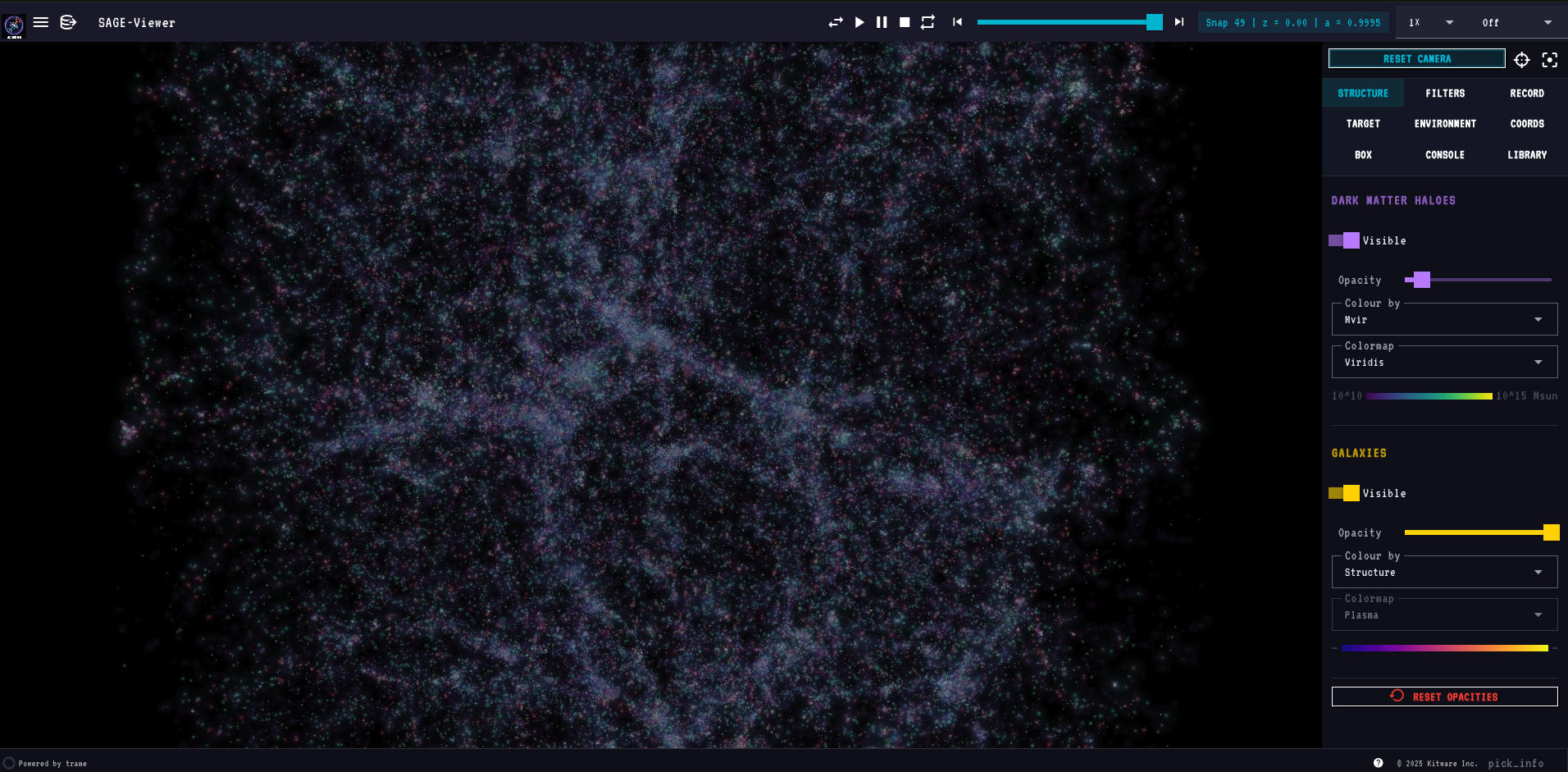
- Structure render mode: each galaxy drawn as a layered composition — cold-gas envelope (blue, sized by ColdGas) + outer envelope (green for CGM-regime sized by CGMgas, red for Hot-regime sized by HotGas)
- 27 selectable matplotlib colormaps, identical lists for halo and galaxy layers
- Live colormap, colour-by mode, opacity and visibility controls per layer
- Colour-by dropdowns are model-aware — only modes whose underlying field is present in the loaded model appear in the list; they update automatically on model switch
- Full still-quality rendering at all times — no resolution drop during camera drag or playback
Playback & camera
- Play / Pause / Stop / Reverse / Repeat transport at 0.1× – 5× speeds
- Continuous camera rotation (CW / CCW at 15° / 30° / 60° per second)
- Reset / Centre / Focus buttons
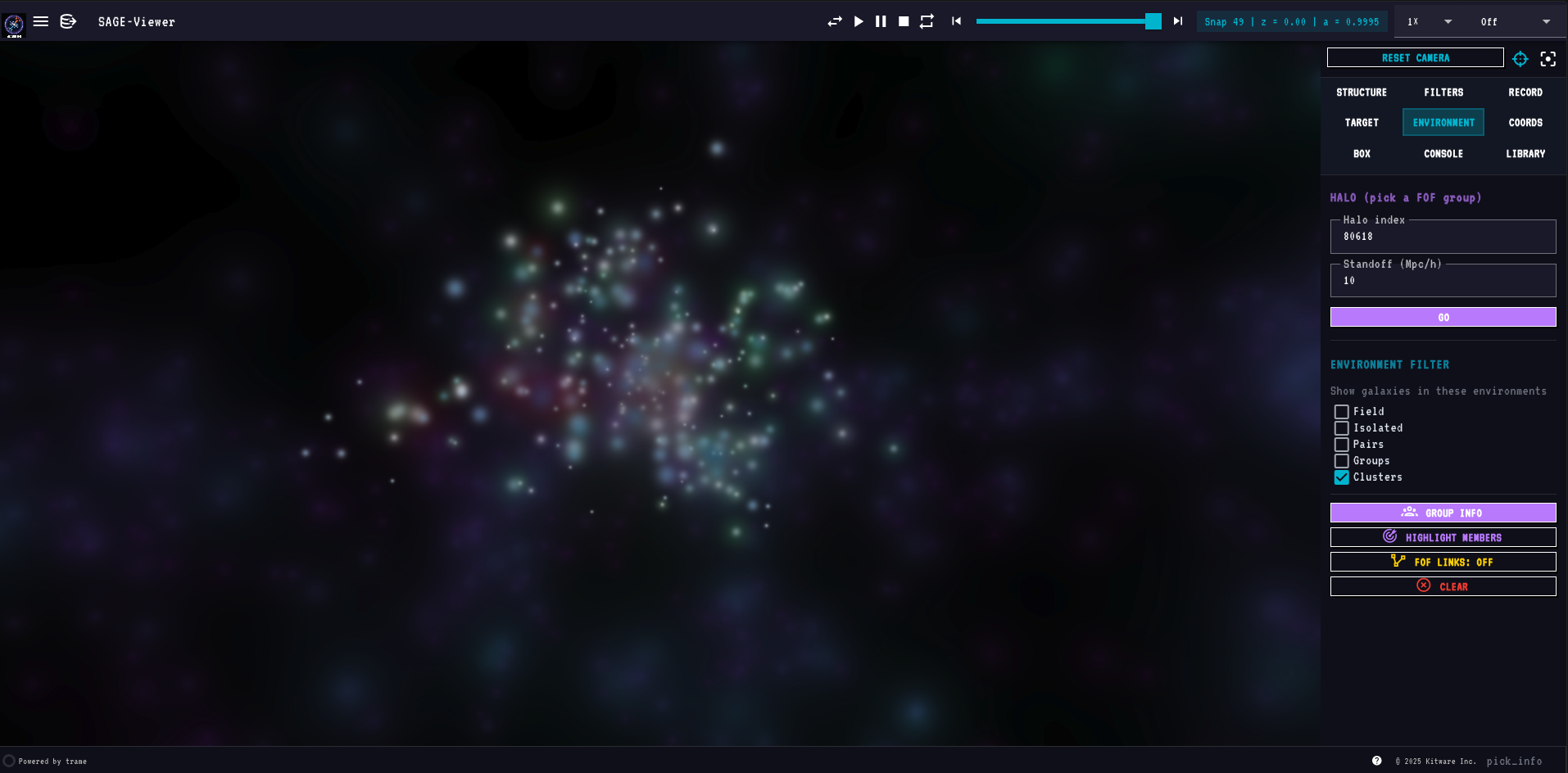
- Fly to halo, galaxy, coordinates, or sub-box (with focus mode that masks everything outside)
- Regions tab: Sphere, Box, Slice and Selection. Drag handles move a sphere or box, a slice can sweep through the volume, and a selection is drawn by lasso, rectangle or click; regions wrap around a periodic box and save with their model
- Switching models always lands at z=0 of the new model; slider and snap chip update immediately
- Camera bookmarks (save, restore, delete)
Selection & inspection
- Double-click a galaxy (any tab, and inside HD) to select it: a cyan ring on it and smaller rings on the rest of its FOF group (merged where they would pile up). The selection follows the galaxy through snapshots by its GalaxyIndex.
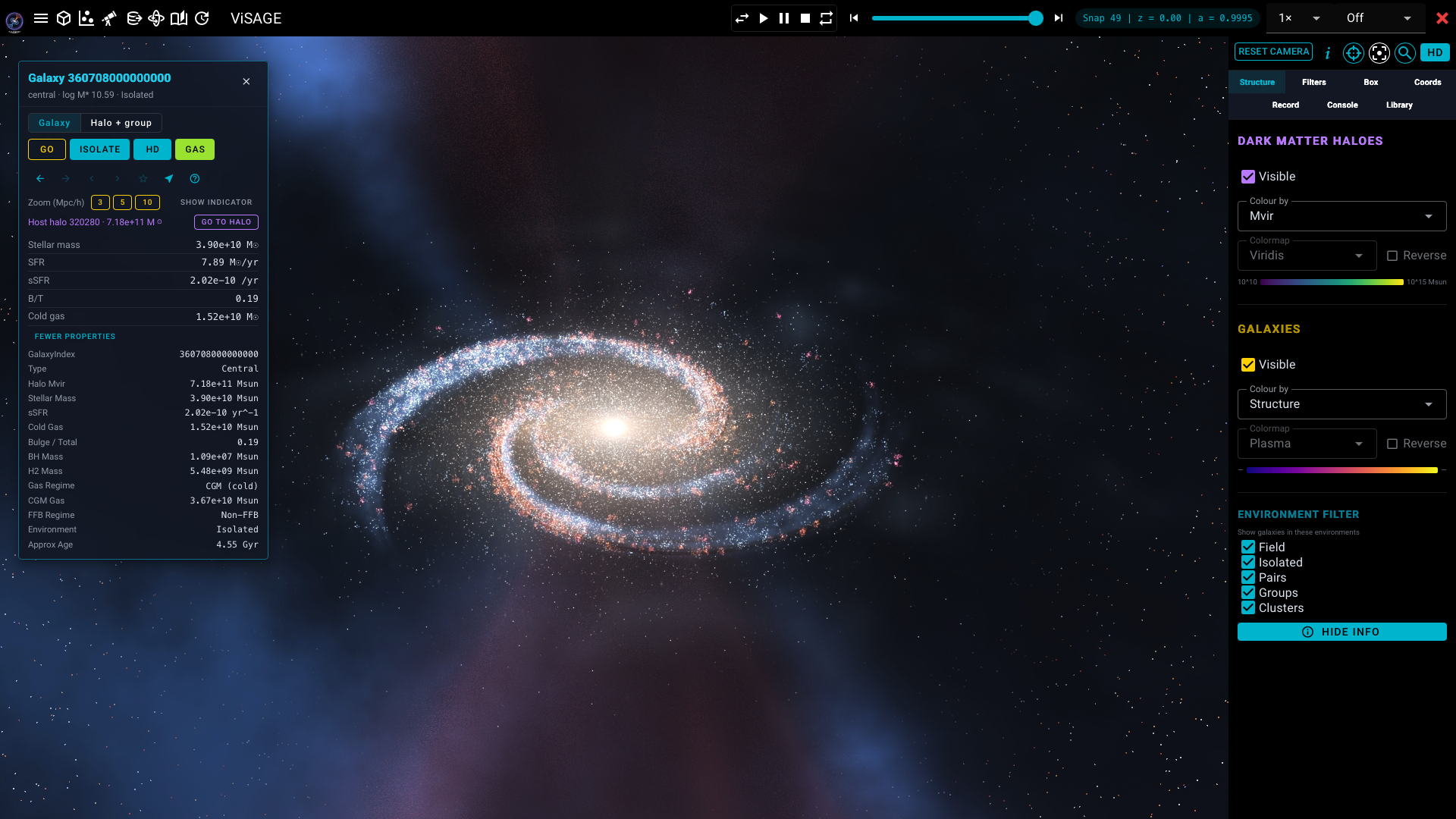
- Selection card (the i button beside Focus, or Show info in the Structure tab) — key properties and every field on demand, its host halo, the group's members (click to select), and Go / Isolate / HD / Gas. A Galaxy / Halo + group switch sets what Go and Isolate act on.
- Browsing — previous / next member, up to the central, hop to the nearest galaxy, back / forward history; on the card and on keys (
[]CNBShift+B) - Find (Filters tab) — presets such as most massive galaxies, richest clusters, Milky Way analogues, close pairs, mergers, starbursts, quenched centrals, radio-loud AGN, brightest quasars, gas-rich galaxies, ellipticals, intracluster light, galactic winds and hot atmospheres; only those the model can answer are offered. Click a result to select it and fly there
- Track (rail icon) — follow a galaxy or its whole halo through the snapshots, framed on it or the whole box, optionally isolated or showing only the galaxies that end up in it; play it, explore any snapshot, and save it as a movie
- HD mode — the selected galaxy, and its whole pair, group or cluster, as detailed 3D models built from SAGE properties (arms, bars, bulges, star clusters, HII regions, dust, merger debris, tidal features, ICL, optional halo gas and radio jets), ray-marched on the GPU. See the HD Mode guide. Needs a GPU.
- Enter to run in every input field — Console command, script path, screenshot/movie label all submit on Enter, equivalent to clicking the paired Go / Run / Take Screenshot button

Filtering
- Halo filters: Mvir (log10), Rvir (h⁻¹ Mpc), Vvir (km s⁻¹)
- Galaxy filters: stellar mass, sSFR, B/T, age, BH mass, ICS mass, type (centrals / satellites), FFB regime, CGM / Hot regime, environment class (Field / Isolated / Pairs / Groups / Clusters, via the Environment filter in the Structure tab)
- Filters are active-only — a slider sitting at its full-range endpoints has no effect; move it inward to filter. Every galaxy with detectable mass is visible at startup.
- Filters auto-disable when the loaded model doesn't contain the underlying field
- Reset Filters button restores defaults
- Playback respects all scene state — the pre-render frame cache is keyed on filter values, focus region, layer visibility/opacity/color-mode, and highlight indicator state; changing any of these and pressing Play again always produces fresh frames

Side-by-side multi-box comparison
- Load two or more SAGE models side-by-side in a single viewport with
+SBSin the Models section of the Launch menu - Each box is fully independent: its own snapshot, filters, colormaps, opacity, and visibility settings
- A box strip at the bottom of the viewport shows all loaded boxes; click any box label to make it active — the entire right panel (Structure, Filters, Regions, Console, …) then controls that box
- Active box label is green; idle boxes are white
- Play, step, and the snapshot slider advance only the active box's snapshot
- Rotation is disabled in multi-box mode (all boxes share one camera; independent rotation is not supported)
- Halo Mvir colour mode is always locked to Viridis; the colormap selector is greyed out when Mvir is selected
- CLR button in the box strip resets that box to its defaults without affecting others
Multi-model (overlays)
- Auto-scans
<sage_root>/output/for SAGE model subfolders - Switch the primary model from the Launch menu (any box size)
- Overlay a second compatible model on top (same box size + snap count)
- Loading spinner during model swaps; warning snackbar for incompatible overlays
Output
- Screenshots in PNG / JPG / TIFF
- Movie recording in GIF / MOV (H.264, via ffmpeg) / PNG sequence
- Configurable FPS (1 – 60) and resolution (Native / 2× / 4× supersampled)
- Optional user-typed label per capture; everything saves into
sage_outputs/session_<timestamp>/in your current working directory - Overlay compositing — Galaxy Info, Group Info, console pop-out, and open Library cards are all composited into screenshots and recordings exactly as they appear on screen
- Catalogue export (CSV, HDF5, FITS, TXT) for the current filter selection, target, or box region — or, in Lightcone Mode, the whole cone (including any synthetic-photometry columns) — saves to
sage_outputs/catalogues/
Story Mode
- Play JSON-defined stories — ordered scenes of captured viewer state (snapshot, camera, layers, filters, focus) with text/media overlays — as full presentations over the live 3D view
- Scenes carry titles, headings, body text, citations, LaTeX equations (vendored KaTeX, offline), images, videos, audio, and a clickable scene-menu grid
- Camera motions per scene: orbit, snapshot sweeps through cosmic time (with pre-rendering for instant playback), and fly-throughs with optional snapshot rewind to a target redshift
- Portable stories: symbolic snapshot references (
"first","last","40%","z=1.5") resolve against whatever model is loaded - Stories load from
sage_stories/in your launch directory; a bundled Presentation Template provides a full talk skeleton to copy and fill in — see the Story Mode guide
Plotting
- SAGE26's Local and History plots with observations, plus Observed plots for lightcones with photometry; works on SAGE26 models, lightcones, DarkSAGE and DustySAGE
- For the whole catalogue, a sphere, a box or a group, with the Filters and Environments applied
- Median and 1σ or each galaxy, colour by a property, log or linear axes, limits, dark background; saved to the Library as PNG, PDF, JPEG or SVG — see Plotting
HD Mode
- Using the galactic properties from the SAGE26 run, selecting this allows for a HD depiction of what the selected galaxies could/should/would appear.
- Within LightSAGE mode the galaxy is modified based on the photometry and dust properties calculated.
- On DarkSAGE runs the disc follows the model's radial profiles, and on DustySAGE runs the dust follows its dust mass.
- The more galaxies selected, the more CPU and GPU usage, be warned.
Lightcone Mode
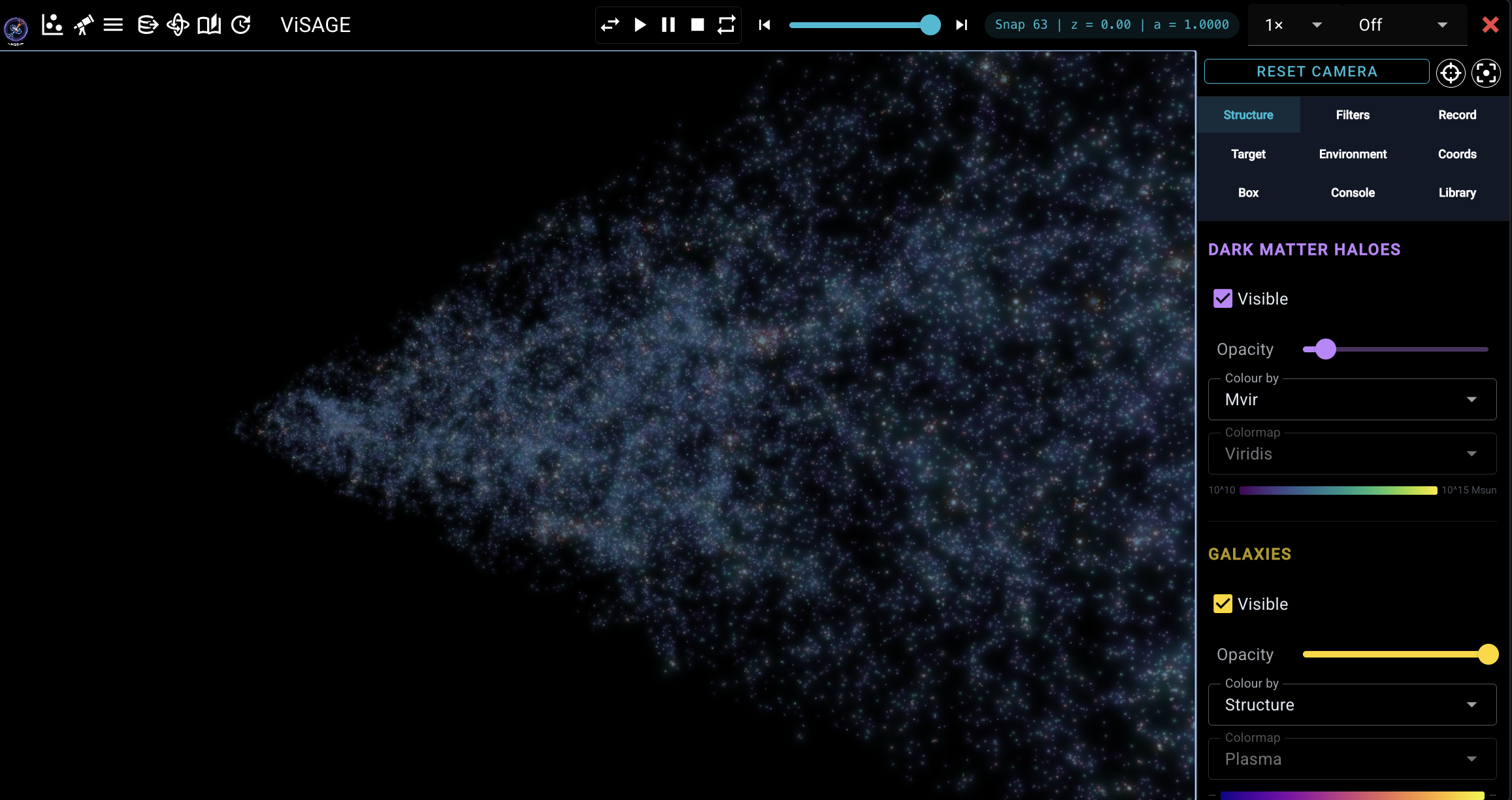
visage --lightcone FILEopens acli_lightconeHDF5 output in the exact same Explore UI as a SAGE box — same toolbar, navigation panel (every colour-by mode), info panel, and gaussian-splat rendering- Reads every SAGE field carried in the flat lightcone file into a full galaxy snapshot, plus host haloes built from the
Type == 0centrals - The snapshot slider becomes a redshift/time cut: it only spans the snapshots actually present in the cone, and moving it removes the near (lower-redshift) side of the cone, keeping the far side — the full cone shows at the slider's maximum
- Camera — reset frames the cone zoomed-in, horizontal and centred, end to end; the go-to-centre button stands you at the observer (coordinate origin) looking outward along the cone
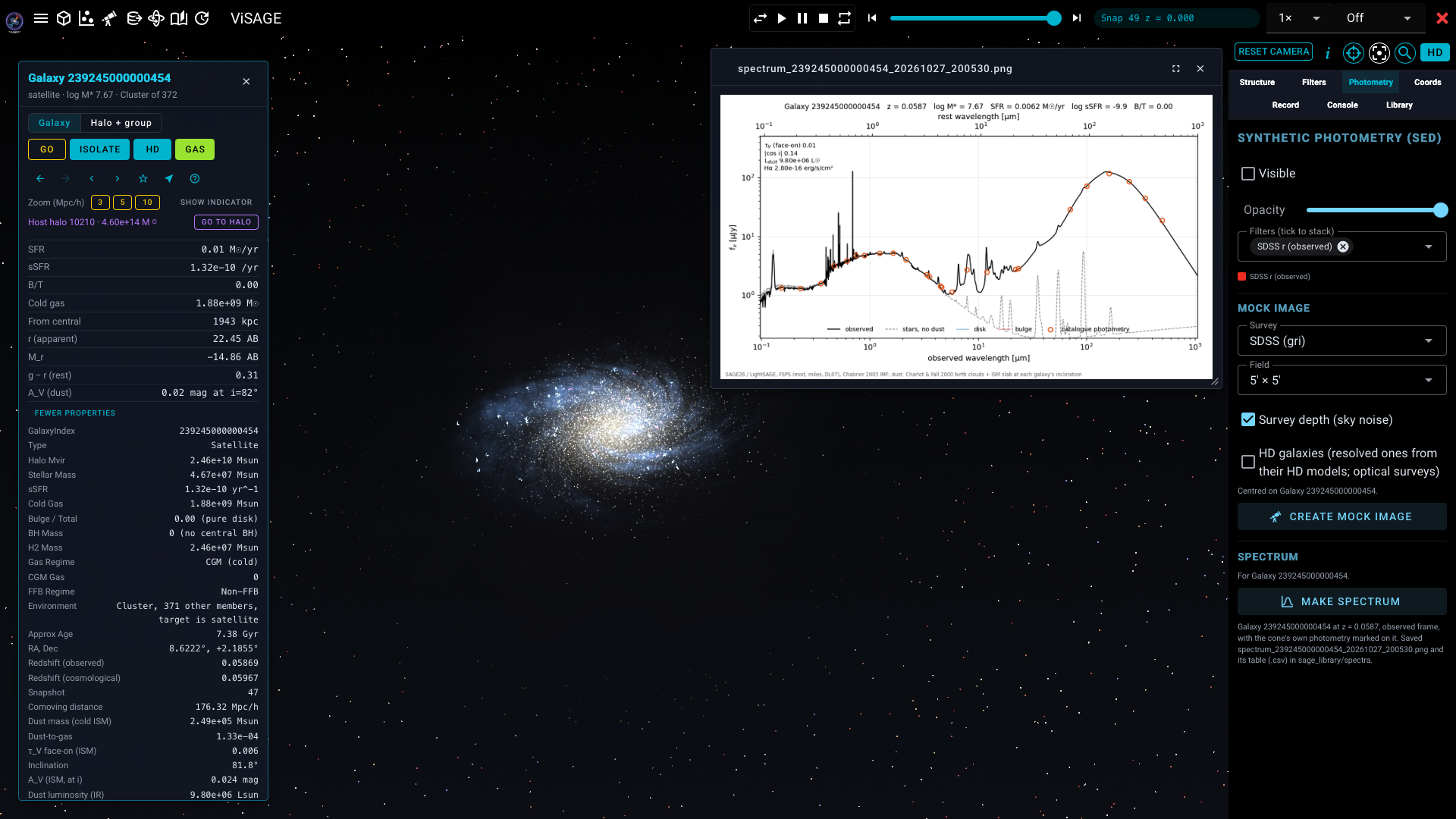
- Photometry tab — if the cone carries synthetic photometry, a separate, independent splat layer that builds a false-colour image from a stack of the ticked filters (named by survey, blue to red; each tinted its representative colour; mass-to-light stackable too). Own Visible/Opacity; show it with the galaxies on, off, or on its own
- Mock images — Create mock image, under Image in the Photometry tab, draws the sky around a galaxy as SDSS, DES, Pan-STARRS1, LSST, 2MASS, WISE, GALEX or JWST NIRCam would record it (each galaxy's disk and bulge at its size, inclination and colours; the survey's pixels, seeing and, optionally, its sky noise), saved as PNG and FITS (with WCS)
- Reach it from Launch Mode (Open in Lightcone view after a build, LightSAGE's Load existing, or Load a previous model), the Session Models list (see below), or directly via
--lightcone
Session models
- The Launch-Mode dropdown lists every box and lightcone opened so far this session under Session Models, with a box or telescope icon per kind and the active one marked
- Click any entry to jump straight back to it (a quick relaunch on the same port) — so loading a box after a lightcone (or vice versa) never loses track of what you had open
- Persisted in
~/.visage/session_models.jsonacross relaunches
Embedded console (Console tab)
- Terminal mode — a live xterm.js terminal backed by a real PTY (
$SHELL -lon macOS/Linux, PowerShell on Windows); full ANSI colour, cursor control, and interactive programs (vim,top,htop,less) all work - SAGE command mode — natural-language SAGE commands (
show only clusters,go to halo 42,snap 30,screenshot, …); switch via the SAGE Cmds button,terminalreturns to the shell - Multiple sessions with a
+button — each console has its own PTY process and command history - Pop-out floats a movable / resizable console card over the viewport so you can keep typing while watching the render
Self-contained metadata
- Cosmology (h, Ω_m, Ω_Λ), box size, and snapshot redshifts are read directly from
model_0.hdf5'sHeader/Simulation - The
.parfile is now only needed for tree-file paths
Supported simulations
| Simulation | Box size | Snapshots | Tree format |
|---|---|---|---|
| miniMillennium | 62.5 h⁻¹ Mpc | 64 | lhalo_binary |
| microUchuu | 96 h⁻¹ Mpc | 50 | lhalo_binary |
Both supported automatically — point at the .par file and ViSAGE figures out the rest from the HDF5.
Citation
If you use ViSAGE in published work, please cite it using CITATION.cff, and the models it runs:
-
SAGE26: Bradley M., Croton D. J., Mostoghiu Paun R. A., Dutta Chowdhury D., Willingham J. 2026, SAGE26 Paper I: Modelling the baryon cycle from cosmic dawn to the present day, arXiv:2610.09564
-
SAGE: Croton D. J. et al. 2016, ApJS 222, 22, doi:10.3847/0067-0049/222/2/22
-
DarkSAGE: Stevens A. R. H., Croton D. J., Mutch S. J. 2016, MNRAS 461, 859
-
DustySAGE: Triani D. P. et al. 2020, MNRAS 493, 2490
The Plotting tab's observations are from the following.
- Mass functions: Bell E. F. et al. 2003, ApJS 149, 289; Zwaan M. A. et al. 2005, MNRAS 359, L30; Obreschkow D., Rawlings S. 2009, ApJ 696, L129; Marchesini D. et al. 2009, ApJ 701, 1765; GAMA and Baldry et al. stellar mass functions by type and colour; TRINITY black hole mass functions, arXiv:2309.07210
- Scaling relations: Stark D. V., McGaugh S. S., Swaters R. A. 2009, AJ 138, 392; Tremonti C. A. et al. 2004, ApJ 613, 898; Curti M. et al. 2020, MNRAS 491, 944; Andrews B. H., Martini P. 2013, ApJ 765, 140; Kewley L. J., Ellison S. L. 2008, ApJ 681, 1183; Gallazzi A. et al. 2005, MNRAS 362, 41; Häring N., Rix H.-W. 2004, ApJ 604, L89; Scott N., Graham A. W., Schombert J. 2013, ApJ 768, 76
- Morphology and sizes: Moffett A. J. et al. 2016, MNRAS 462, 4336; Somerville R. S. et al. 2018, MNRAS 473, 2714
- Stellar mass density: Dickinson M. et al. 2003, ApJ 587, 25; Drory N. et al. 2005, ApJ 619, L131; Pérez-González P. G. et al. 2008, ApJ 675, 234; Glazebrook K. et al. 2004, Nature 430, 181; Fontana A. et al. 2006, A&A 459, 745; Rudnick G. et al. 2006, ApJ 650, 624; Elsner F., Feulner G., Hopp U. 2008, A&A 477, 503
- Observed: Driver S. P. et al. 2012, MNRAS 427, 3244 (luminosity functions); Driver S. P. et al. 2016, ApJ 827, 108 (number counts); Kauffmann G. et al. 2003, MNRAS 346, 1055; Kewley L. J. et al. 2001, ApJ 556, 121 (BPT)
LightSAGE's synthetic photometry, spectra and mock images build on the following. The full list is in Lightcone Photometry.
- Stellar populations (FSPS): Conroy C., Gunn J. E., White M. 2009, ApJ 699, 486; Conroy C., Gunn J. E. 2010, ApJ 712, 833
- Dust mass: Triani D. P. et al. 2020, MNRAS 493, 2490 (Dusty SAGE)
- Dust attenuation: Charlot S., Fall S. M. 2000, ApJ 539, 718; Trayford J. W. et al. 2020, MNRAS 491, 3937; Lagos C. d. P. et al. 2019, MNRAS 489, 4196 (Shark); Triani D. P. et al. 2023, MNRAS 519, 2500
- Dust emission: Draine B. T., Li A. 2007, ApJ 657, 810
- Emission lines: Gutkin J., Charlot S., Bruzual G. 2016, MNRAS 462, 1757; Feltre A., Charlot S., Gutkin J. 2016, MNRAS 456, 3354; Hirschmann M. et al. 2017, MNRAS 472, 2468
- AGN light curves: Hopkins P. F., Hernquist L. 2009, ApJ 698, 1550
- AGN continuum: Shen X. et al. 2020, MNRAS 495, 3252; Ueda Y. et al. 2014, ApJ 786, 104
- Intracluster stars: Montes M., Trujillo I. 2019, MNRAS 482, 2838; Alonso Asensio I. et al. 2020, MNRAS 494, 1859; Duffy A. R. et al. 2008, MNRAS 390, L64; Bartelmann M. 1996, A&A 313, 697
- Measured PSFs: the STDPSF library of J. Anderson, STScI (HST); Euclid Q1 MER PSF grids, IRSA; Perrin M. D. et al. 2014, Proc. SPIE 9143, 91433X (STPSF)
- Intergalactic absorption: Madau P. 1995, ApJ 441, 18
- Mock spectroscopy: Smee S. A. et al. 2013, AJ 146, 32; Balogh M. L. et al. 1999, ApJ 527, 54
- Group finding: Van Kempen W. et al. 2024, arXiv:2410.15548; Van Kempen W. et al. 2025, arXiv:2508.12556; Lambert T. S. et al. 2020, MNRAS 497, 2954; Huchra J. P., Geller M. J. 1982, ApJ 257, 423; Robotham A. S. G. et al. 2011, MNRAS 416, 2640; Beers T. C., Flynn K., Gebhardt K. 1990, AJ 100, 32; Blanton M. R. et al. 2003, ApJ 592, 819
- Survey catalogues: Strauss M. A. et al. 2002, AJ 124, 1810; Baldry I. K. et al. 2018, MNRAS 474, 3875
- Mock image display and PSF: Lupton R. et al. 2004, PASP 116, 133; Trujillo I. et al. 2001, MNRAS 328, 977
- Mock image noise: Nguyen H. T. et al. 2010, A&A 518, L5 (SPIRE confusion); Bagley M. B. et al. 2023, ApJL 946, L12 (CEERS depths); Abbott T. M. C. et al. 2018, ApJS 239, 18 (DES sky); Leinert C. et al. 1998, A&AS 127, 1 (zodiacal light)
- Mock image saturation: York D. G. et al. 2000, AJ 120, 1579; Drlica-Wagner A. et al. 2022, ApJS 261, 38; LSST Science Collaboration 2009, arXiv:0912.0201
- Mock image stars: Skrutskie M. F. et al. 2006, AJ 131, 1163 (2MASS); Almeida A. et al. 2023, ApJS 267, 44 (SDSS DR18); Jester S. et al. 2005, AJ 130, 873; Ballesteros F. J. 2012, EPL 97, 34008
License
MIT — see LICENSE.
1 maintainer

Metadata
1 maintainer
Release files for sage-viewer 2.23.0
For a detailed explanation of source distributions (sdists) and built distributions (wheels), please see the package formats documentation.
Source distribution (sdist)
| File | Size | Uploaded | Provenance | Actions |
|---|---|---|---|---|
| sage_viewer-2.23.0.tar.gz | 8.3 MB | With provenance | Details for sage_viewer-2.23.0.tar.gz |
Built distribution (wheel)
| File | Interpreter | ABI | Platform | Actions Reset |
|---|---|---|---|---|
| sage_viewer-2.23.0-py3-none-any.whl | Python 3 | none | any | Details for sage_viewer-2.23.0-py3-none-any.whl |
Total release size: 16.6 MB
Release files / sage_viewer-2.23.0.tar.gz
| Download URL | sage_viewer-2.23.0.tar.gz |
|---|---|
| Size | 8.3 MB |
| Tags | Source |
|
SHA-256 checksum How to use checksums |
ea01b93dfd3d89525a6c73e587d2f362e8c8aab4028797c8bf36445e91f08b95
|
|
BLAKE2b-256 checksum How to use checksums |
9a79790faf327797a548bbc0eaa2868d25284ef0b25237618a4db004de38d951
|
| Upload date | |
|
Uploaded using Trusted Publishing? What is trusted publishing? |
Yes |
| Uploaded via |
twine/7.0.0 CPython/3.13.16
|
Provenance
Provenance describes where a file came from. On PyPI, provenance is shared via attestations, which provide a verifiable record of the build or publishing details. View details, limitations and caveats.


PyPI Publish Attestation
PyPI verified that this artifact, at this checksum, originated from the publisher listed below.
Signed by GitHub Actions, verified by PyPI on Nov 18, 2026.
Transparency logRelease files / sage_viewer-2.23.0-py3-none-any.whl
| Download URL | sage_viewer-2.23.0-py3-none-any.whl |
|---|---|
| Size | 8.3 MB |
| Tags | Python 3 |
|
SHA-256 checksum How to use checksums |
eb8007da8961e27d1b135d505711ced1b76906a9bc86eab097bfbd893de29bb2
|
|
BLAKE2b-256 checksum How to use checksums |
79537d169971c88b08987e85c580ab2412facfa0241e874c9dc56de052bf7dab
|
| Upload date | |
|
Uploaded using Trusted Publishing? What is trusted publishing? |
Yes |
| Uploaded via |
twine/7.0.0 CPython/3.13.16
|
Provenance
Provenance describes where a file came from. On PyPI, provenance is shared via attestations, which provide a verifiable record of the build or publishing details. View details, limitations and caveats.
PyPI Publish Attestation
PyPI verified that this artifact, at this checksum, originated from the publisher listed below.
Signed by GitHub Actions, verified by PyPI on Nov 18, 2026.
Transparency logSecurity for sage-viewer 2.23.0
Provenance
Provenance describes where a file came from. On PyPI, provenance is shared via attestations, which provide a verifiable record of the build or publishing details. View details, limitations and caveats.
Full provenance
Both files in this release have been uploaded with provenance metadata.
Attestation for sage_viewer-2.23.0.tar.gz
PyPI Publish Attestation
PyPI verified that this artifact, at this checksum, originated from the publisher listed below.
Signed by GitHub Actions, verified by PyPI on Nov 18, 2026.
Transparency logA note on package security
PyPI is a repository for distributing packages, not a service for auditing them. While third-party security researchers and our staff do their best to detect and remove malicious packages, PyPI cannot guarantee the quality, security or suitability of any given package.
To learn more about protecting yourself from malicious actors, visit our package security documentation.














