
A collection of metrics for comparing saliency maps

Project description
Saliency Metrics




This module is a work in progress and is not yet complete.
This package is a modular package that implements various metrics for comparing saliency maps generated by explanation methods. To ensure fair comparisons, metrics should be computed on the same saliency map and corresponding ground truth map.
Saliency Metrics is a Python package that implements various metrics for comparing saliency maps generated by explanation methods. To ensure fair comparisons, metrics should be computed on the same saliency map and corresponding ground truth map. The package includes the following metrics:
- SSIM (Structural Similarity Index): A perceptual metric that quantifies the similarity between two images. It considers changes in structural information, luminance, and contrast.
- PSNR (Peak Signal-to-Noise Ratio): A metric that measures the ratio between the maximum possible power of a signal and the power of corrupting noise. It is often used to assess the quality of reconstructed images.
- EMD (Earth Mover's Distance): A metric that measures the distance between two probability distributions over a region D. It is often used in computer vision and image retrieval tasks.
tutorial.ipynb is an original way used to check and test the different metrics.
Installation
pip install saliencytools
Usage
from saliencytools import ssim, psnr, emd # and more

import numpy as np
import matplotlib.pyplot as plt


# create a random saliency map
saliency_map = np.random.rand(28*28).reshape(28, 28)- 0.5
# create a random ground truth map
ground_truth_map = np.random.rand(28*28).reshape(28, 28)- 0.5
# create a random binary mask

# use all the metrics to compare the saliency map with the ground truth map
for metric in [ssim, psnr, emd]:

    print(f"{metric.__name__}: {metric(saliency_map, ground_truth_map)}")
Validating the metrics
The tutorial.ipynb file is a Jupyter notebook that showcases the validation of the metrics. It includes examples of how to use the package, as well as visualizations of the results.
The notebook implements a KNN-like classification task using the MNIST dataset. It uses the saliencytools package to compute the distance between the test images and k prototypes of each class.
The k prototypes (k=5 in the notebook) are choosen random, and the distance is computed using all the metrics implemented in the package.
Some preprocessing is explored to check different ways to compute the distance.
C stands for Clipping the saliency maps in -1, 1.
N stands for Normalization of the saliency maps in 0, 1.
S stands for the application of the sobel filter to the saliency maps, so that the edges are more influencing.
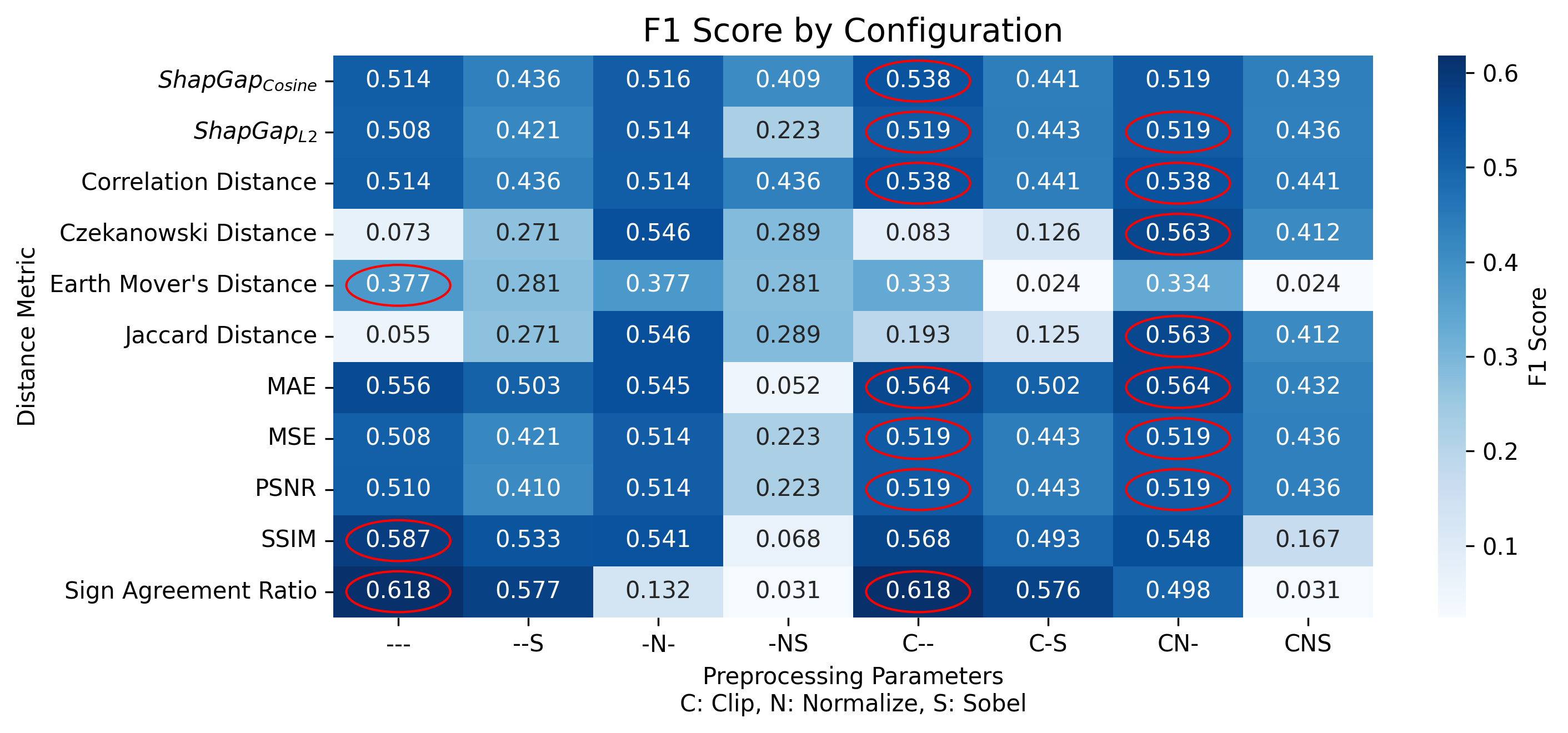
From the above images we can see that the F1 score changes depending on the metric used and the preprocessing applied. In this case the best metric is the Sign Agreement ratio (both without preprocessing and by clipping the saliency maps in -1, 1). The SSIM metric is the second best, without any preprocessing. For instance, the Jaccard metric is not good without preprocessing.
Metrics to add
from https://ar5iv.labs.arxiv.org/html/1604.03605
- [] Area under ROC Curve AUC
- [] Shuffled AUC sAUC
- [] Normalized Scanpath Saliency NSS
- [] Kullback-Leibler divergence KL [23, 49, 68, 88]
- [] Information Gain IG [45, 46]
Why Saliencytools?
This package is needed since other alternatives are not stable, not maintained or trustable. They are not specific for images, they don't exploit numpy or scipy, and they are not modular. The documentation of some is clear, yet the the examples are not complete.
Open Sources alternatives to this package are:
- distancia https://github.com/ym001/distancia
- images have to be converted to lists
- there are errors in the code
- there is no homogenization of the metrics
- documentation is nice (https://distancia.readthedocs.io/en/latest/)
- saliency-metrics https://github.com/sandylaker/saliency-metrics
- project abandoned (last commit 2022)
- documentaiton incomplete https://saliency-metrics.readthedocs.io/en/latest/index.html
Further reading
- Interpretable Machine Learning Book https://christophm.github.io/interpretable-ml-book/pixel-attribution.html


Download files
Download the file for your platform. If you're not sure which to choose, learn more about installing packages.
Source Distribution
Built Distribution
Filter files by name, interpreter, ABI, and platform.
If you're not sure about the file name format, learn more about wheel file names.
Copy a direct link to the current filters
File details
Details for the file saliencytools-0.34.tar.gz.
File metadata
- Download URL: saliencytools-0.34.tar.gz
- Upload date:
- Size: 9.3 kB
- Tags: Source
- Uploaded using Trusted Publishing? No
- Uploaded via: twine/6.1.0 CPython/3.10.12
File hashes
| Algorithm | Hash digest | |
|---|---|---|
| SHA256 |
f924112e9342b6332b16e9e10de23f2315383fb67eed148fc964df1893cf4e8b
|
|
| MD5 |
893e514ead9671c479cfe05a8b503e97
|
|
| BLAKE2b-256 |
19a58e58e7f72da1342d901b9b830e6762b53d8f087cb87e9dffbb08dbe20452
|
File details
Details for the file saliencytools-0.34-py3-none-any.whl.
File metadata
- Download URL: saliencytools-0.34-py3-none-any.whl
- Upload date:
- Size: 9.9 kB
- Tags: Python 3
- Uploaded using Trusted Publishing? No
- Uploaded via: twine/6.1.0 CPython/3.10.12
File hashes
| Algorithm | Hash digest | |
|---|---|---|
| SHA256 |
461301c57ac925ad311b623a8d254295f7e6446023075e092d739d4adc0f95a6
|
|
| MD5 |
b4fec21eb6a4dc7d8b74194961efa24f
|
|
| BLAKE2b-256 |
00c6946d9dd52614ca2f39f586356b89b1b5b272d006391d75c5dde42d4581f3
|






