
AWS Log Forwarder
AWS Log Forwarder consumes events from an AWS SQS queue, downloads the referenced log files from S3, and then forwards them to an HTTP endpoint, writes them to disk, or streams them to the console for quick inspection.
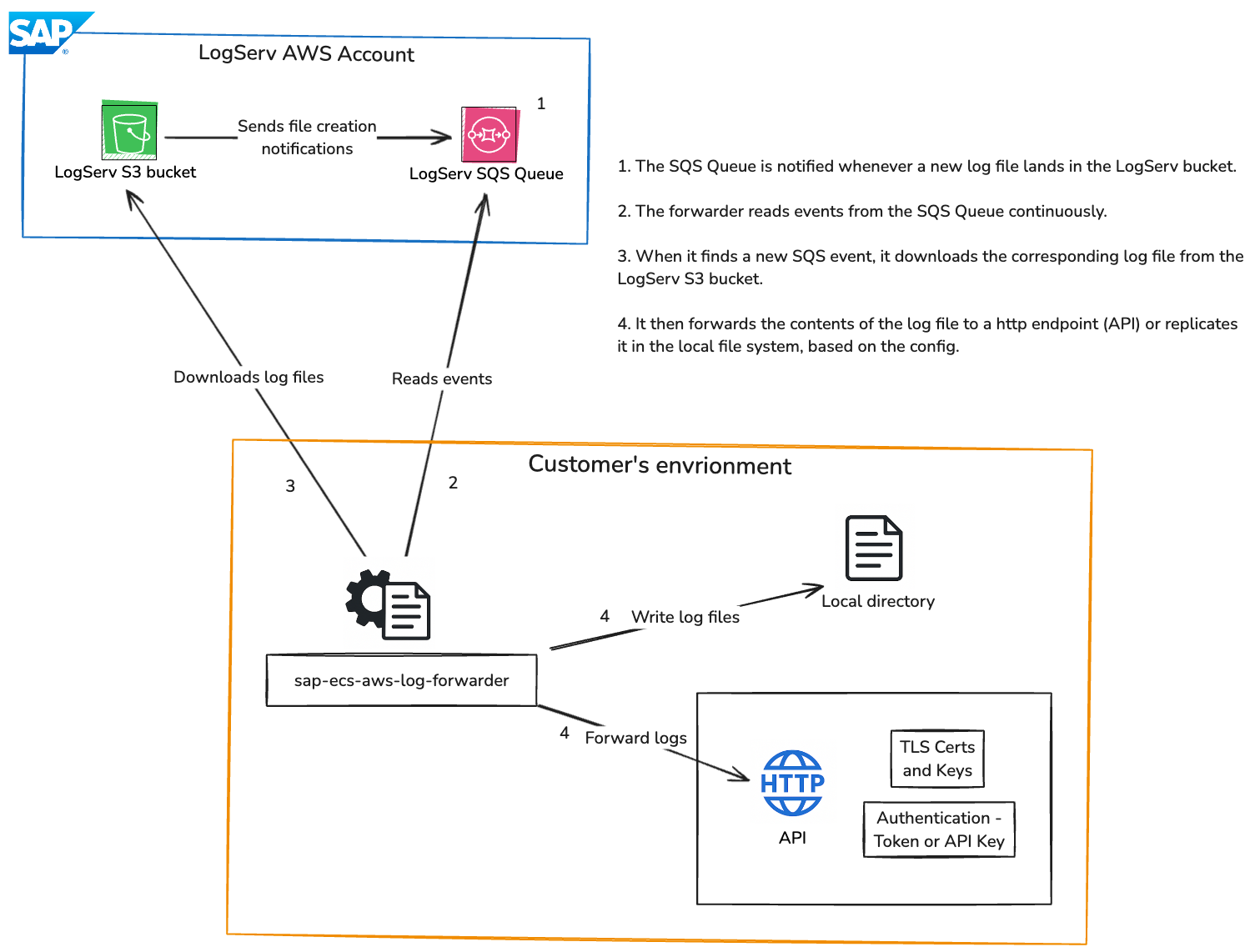
Features
- Monitors an AWS SQS queue for object creation events.
- Processes log files and forwards them to a configurable HTTP endpoint, writes them to local files, or streams them to the console for ad-hoc inspection.
- Supports both mutual TLS and standard HTTP connections.
- Offers flexible HTTP authentication via bearer tokens or API keys.
- Fully configurable through environment variables or a
.envfile in the working directory. - Provides an inactivity timeout to gracefully terminate when the queue is empty.
Prerequisites
- Python 3.10 or higher
- An AWS account with a configured S3 bucket and SQS queue.
- An IAM user with appropriate permissions to access the S3 bucket and SQS queue.
Installation
With direct internet access:
pip install sap-ecs-aws-log-forwarder

or

pip install sap-ecs-aws-log-forwarder==<version>
Without direct internet access:
- Download the wheel
On a machine with internet access, visit the PyPI files page forsap-ecs-aws-log-forwarderand download the.whlfile matching your Python version (e.g.,sap_ecs_aws_log_forwarder-1.0.7-py3-none-any.whl). - Transfer the file
Copy the downloaded wheel to the target (offline) machine using SCP, or another secure method. - Install from file
On the offline machine, run:pip install /path/to/sap_ecs_aws_log_forwarder-<version>-py3-none-any.whl
Configuration
Configure the forwarder by setting environment variables in your shell or in a .env file in the current working directory. The most common settings are listed below.
-
AWS_ACCESS_KEY_ID: Your AWS access key ID. (Required) -
AWS_SECRET_ACCESS_KEY: Your AWS secret access key. (Required) -
AWS_REGION: The AWS region where your Logserv resources are located. (Required) -
SQS_QUEUE_URL: The URL of the AWS SQS queue to consume events from. (Required) -
OUTPUT_METHOD: Method to forward logs (http,files, orconsole). (Required)http: Forward logs to an HTTP endpoint.files: Write logs to files in the specified output directory.console: Print each log line to stdout without forwarding or writing it elsewhere. All other informational/debug logging is suppressed in this mode.
-
TIMEOUT_DURATION: Time in seconds to wait for messages before exiting. (Optional) -
LOGSERV_LOG_INCLUDE_FILTERS: Comma-separated list of log type filters. Only messages whose subject paths contain at least one of these filters will be processed (e.g.,hana,hanaaudit,linux). (Optional) -
LOGSERV_LOG_EXCLUDE_FILTERS: Comma-separated list of log type exclude filters. Messages whose subject paths containing any of these filters will be skipped. (Optional) -
HTTP_ENDPOINT: HTTP endpoint to forward logs to. (Required ifOUTPUT_METHOD=http) -
TLS_CERT_PATH: Path to the TLS certificate for mutual TLS connections. (Optional) -
TLS_KEY_PATH: Path to the TLS key for mutual TLS connections. (Optional) -
AUTH_METHOD: Authentication method. (Required ifOUTPUT_METHOD=http)token: Use a bearer/OAuth token for authentication.api_key: Use an API key for authentication.
-
AUTH_TOKEN: Bearer/OAuth token for HTTP endpoint authentication. (Required ifAUTH_METHOD=token) -
API_KEY: API key for HTTP endpoint authentication. (Required ifAUTH_METHOD=api_key) -
OUTPUT_DIR: Output directory to write log files to. (Required ifOUTPUT_METHOD=files) -
COMPRESS_OUTPUT_FILE: Whether to gzip-compress output files. (Defaults totrue)true: Compress output files using gzip.false: Do not compress output files.
-
LOG_LEVEL: Log level for the forwarder application. (DEBUG,INFO,WARNING,ERROR,CRITICAL) (Defaults toINFO)
Example of setting environment variables in a shell:
export AWS_ACCESS_KEY_ID="your_access_key_id"
export AWS_SECRET_ACCESS_KEY="your_secret_access_key"
export AWS_REGION="your_region"
export SQS_QUEUE_URL="your_sqs_queue_url"
export TIMEOUT_DURATION=120  # Timeout after 120 seconds of inactivity. DO NOT set for indefinite runs.
export LOGSERV_LOG_INCLUDE_FILTERS="hana"
export LOGSERV_LOG_EXCLUDE_FILTERS="tmp"

# For HTTP output
export OUTPUT_METHOD="http"
export HTTP_ENDPOINT="https://your-http-endpoint.com"

export TLS_CERT_PATH="/path/to/your/tls_cert.pem"
export TLS_KEY_PATH="/path/to/your/tls_key.pem"

export AUTH_METHOD="token"
export AUTH_TOKEN="your_token"

export AUTH_METHOD="api_key"
export API_KEY="your_api_key"

# For file output
export OUTPUT_METHOD="files"
export OUTPUT_DIR="/path/to/your/output/directory/"
export COMPRESS_OUTPUT_FILE="true"

# For console output
export OUTPUT_METHOD="console"

# Log level
export LOG_LEVEL="DEBUG" # Options: DEBUG, INFO, WARNING, ERROR, CRITICAL. Default is INFO.
Example of setting environment variables in a local .env file:
AWS_ACCESS_KEY_ID="your_access_key_id"
AWS_SECRET_ACCESS_KEY="your_secret_access_key"
AWS_REGION="your_region"
SQS_QUEUE_URL="your_sqs_queue_url"
TIMEOUT_DURATION=120  # Timeout after 120 seconds of inactivity. DO NOT set for indefinite runs.
LOGSERV_LOG_INCLUDE_FILTERS="hana"
LOGSERV_LOG_EXCLUDE_FILTERS="tmp"

# For HTTP output
OUTPUT_METHOD="http"
HTTP_ENDPOINT="https://your-http-endpoint.com"

TLS_CERT_PATH="/path/to/your/tls_cert.pem"
TLS_KEY_PATH="/path/to/your/tls_key.pem"

AUTH_METHOD="token"
AUTH_TOKEN="your_token"

AUTH_METHOD="api_key"
API_KEY="your_api_key"

# For file output
OUTPUT_METHOD="files"
OUTPUT_DIR="/path/to/your/output/directory/"
COMPRESS_OUTPUT_FILE="true"

# For console output
OUTPUT_METHOD="console"

# Log level
LOG_LEVEL="DEBUG" # Options: DEBUG, INFO, WARNING, ERROR, CRITICAL. Default is INFO.
Usage
To run the AWS Log Forwarder, use the following command:
sap-ecs-aws-log-forwarder
This starts the process of consuming messages from the SQS queue, processing log files, and forwarding them according to the configured output mode. The program will exit if no messages are found within the specified timeout duration; otherwise it runs until you stop it.
Examples
Forwarding specific log types
To forward only specific log types, set LOGSERV_LOG_INCLUDE_FILTERS to a comma-separated list of filters.
For example, to forward HANA Audit logs, set the following environment variable:
In your shell:
export LOGSERV_LOG_INCLUDE_FILTERS="hanaaudit"
Or in your .env file:
LOGSERV_LOG_INCLUDE_FILTERS="hanaaudit"
Only files matching at least one of these filters will be processed and forwarded. If you want to forward all log types, simply omit the LOGSERV_LOG_INCLUDE_FILTERS variable or set it to an empty string. Please reach out to your SAP contact for the correct container structure or run the forwarder without the filter to see the available log types and their structure.
Excluding specific log types
To skip specific log types, set LOGSERV_LOG_EXCLUDE_FILTERS to a comma-separated list of filters.
In your shell:
export LOGSERV_LOG_EXCLUDE_FILTERS="tmp"
Or in your .env file:
LOGSERV_LOG_EXCLUDE_FILTERS="tmp"
Things to remember
- If
TIMEOUT_DURATIONis not set, the program will run indefinitely. - Your IAM user (whose access key and secret access key you're using) needs to have appropriate permissions to read files from the Logserv S3 bucket and messages from the Logserv SQS queue. This app will fail otherwise.
- Exclude filters are applied before include filters: any message matching an exclude filter will be skipped, even if it matches a include filter. In other words, if you set both
LOGSERV_LOG_INCLUDE_FILTERSandLOGSERV_LOG_EXCLUDE_FILTERS, the exclude filters will take precedence over the include filters
License
This application and its source code are licensed under the terms of the SAP Developer License Agreement. See the LICENSE file for more information.
Release Notes
1.0.3
- First proper release!
1.0.4
- METADATA updates.
1.0.5
- Updated README with diagrams and instructions on installing the package without access to the internet.
1.0.6
- Added a new configuration option (
LOG_LEVEL) to set the log level for the application. - Updated README with instructions on setting the log level.
1.0.7
- Added a new configuration option (
COMPRESS_OUTPUT_FILE) to enable or disable gzip compression for output files. - Added new configuration options (
LOGSERV_LOG_INCLUDE_FILTERSandLOGSERV_LOG_EXCLUDE_FILTERS) to specify positive and negative filters for events received from the SQS queue. - Added
OUTPUT_METHOD=consoleto stream log contents directly to stdout. - Updated README with instructions on setting the new configuration options.
1 maintainer

Metadata
1 maintainer
Release files for sap-ecs-aws-log-forwarder 1.0.8
For a detailed explanation of source distributions (sdists) and built distributions (wheels), please see the package formats documentation.
Built distribution (wheel)
| File | Interpreter | ABI | Platform | Reset |
|---|---|---|---|---|
| sap_ecs_aws_log_forwarder-1.0.8-py3-none-any.whl | Python 3 | none | any | Details |
Release files / sap_ecs_aws_log_forwarder-1.0.8-py3-none-any.whl
| Download URL | sap_ecs_aws_log_forwarder-1.0.8-py3-none-any.whl |
|---|---|
| Size | 16.9 kB |
| Tags | Python 3 |
|
SHA-256 checksum How to use checksums |
f0a891b009b1638fd79c544954ea164cfe2c6d109fd637de35a59469e82da1b3
|
|
BLAKE2b-256 checksum How to use checksums |
f3c1c9713132c88dbcf17379488d8b2641baea8b87401605db51b17ef5bf06f9
|
| Upload date | |
|
Uploaded using Trusted Publishing? What is trusted publishing? |
No |
| Uploaded via |
twine/6.2.0 CPython/3.12.1
|
Security for sap-ecs-aws-log-forwarder 1.0.8
Provenance
Provenance describes where a file came from. On PyPI, provenance is shared via attestations, which provide a verifiable record of the build or publishing details. View details, limitations and caveats.
No provenance found
None of the files in this release were uploaded with provenance metadata.
A note on package security
PyPI is a repository for distributing packages, not a service for auditing them. While third-party security researchers and our staff do their best to detect and remove malicious packages, PyPI cannot guarantee the quality, security or suitability of any given package.
To learn more about protecting yourself from malicious actors, visit our package security documentation.














