
A package to consume events from an AWS SQS queue, process log files, and forward them to a HTTP endpoint or file.

Project description
AWS Log Forwarder
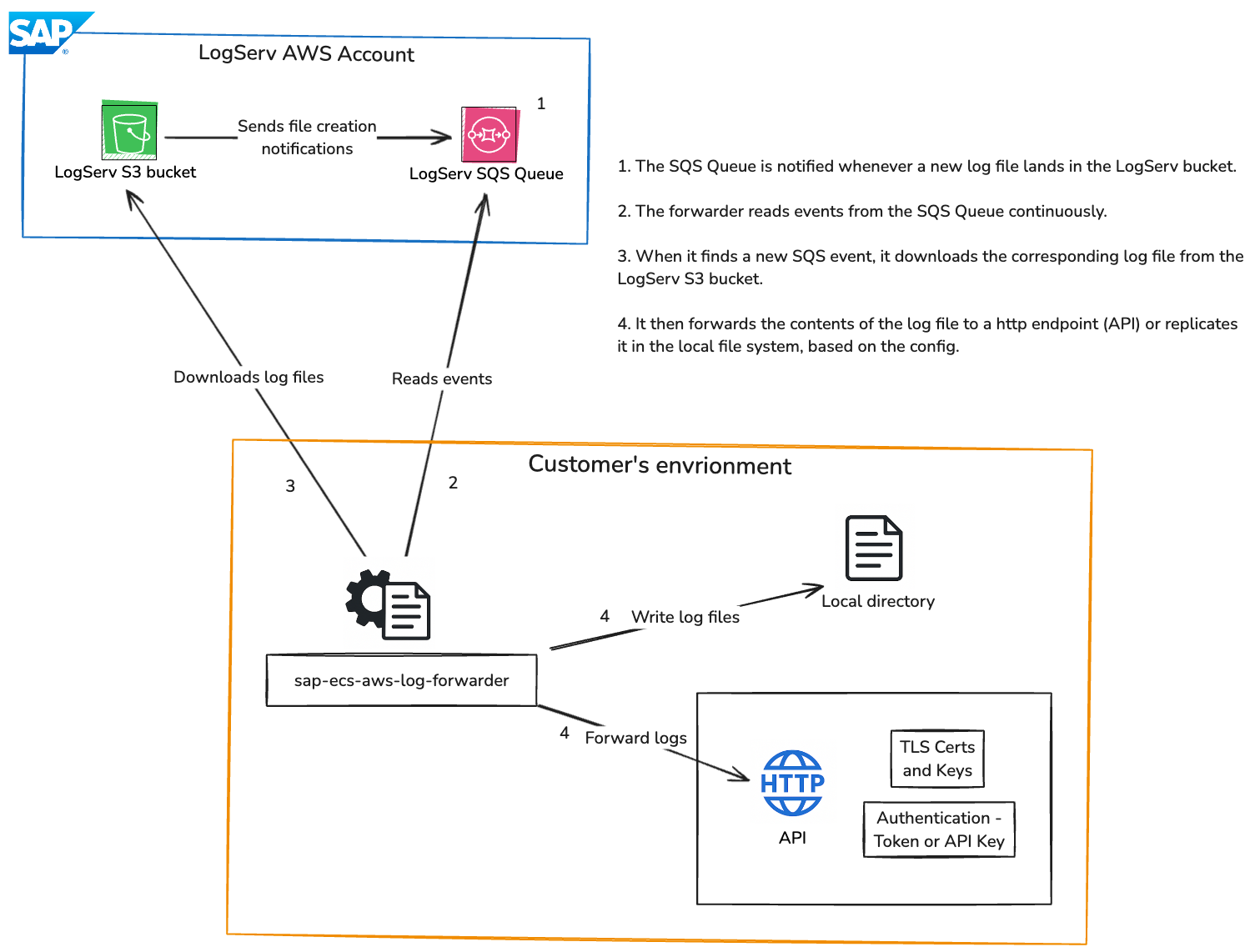
AWS Log Forwarder is a Python app that consumes events from an AWS SQS queue, processes log files stored in AWS S3, and forwards the logs either to an HTTP endpoint or writes them to files.
Features
- Consume object creation events from an AWS SQS queue.
- Download and decompress gzipped JSON log files from AWS S3.
- Forward logs to an HTTP endpoint or write them to files.
- Support for TLS protocol.
- Support for different HTTP authentication methods (Token, API Key).
- Configurable through environment variables.
- Configurable timeout to exit the program if no messages are found for a specified duration.
Prerequisites
- Python 3.8 or higher
- An AWS account with a configured S3 bucket and SQS queue.
- An IAM user with appropriate permissions to access the S3 bucket and SQS queue.
Installation
With direct internet access:
pip install sap-ecs-aws-log-forwarder
pip install sap-ecs-aws-log-forwarder==<version>
Without direct internet access:
- Navigate to the Download files section on pypi.org for sap-ecs-aws-log-forwarder and download the latest .whl (wheel) file. The file will typically have a name that includes details about compatibility (e.g., example_package-1.0-py3-none-any.whl).
- Upload the .whl file to the target machine that does not have direct internet access.
- Move to the directory where your .whl file is located or provide the full path when running the pip command.
Run the following command:
pip install /path/to/your_file.whl
Example:
pip install /User/Downloads/sap_ecs_aws_log_forwarder-1.0.4-py3-none-any.whl
Configuration
Set up the following environment variables to configure the AWS Log Forwarder. You can set these environment variables in your shell or in a .env file in your working directory.
AWS_ACCESS_KEY_ID: Your AWS access key ID.AWS_SECRET_ACCESS_KEY: Your AWS secret access key.AWS_REGION: The AWS region where your Logserv resources are located.SQS_QUEUE_URL: The URL of the AWS SQS queue to consume events from.TIMEOUT_DURATION: The time duration in seconds to wait for messages before exiting.OUTPUT_METHOD: The method to forward logs (httporfiles).HTTP_ENDPOINT: The HTTP endpoint to forward logs to (required ifOUTPUT_METHODishttp).TLS_CERT_PATH: Path to the TLS certificate for mutual TLS connections.TLS_KEY_PATH: Path to the TLS key for mutual TLS connections.AUTH_METHOD: Authentication method (token,api_key). Default istoken.- Auth Token: Set
AUTH_METHODtotokenand configureAUTH_TOKEN.AUTH_TOKEN: Bearer/OAuth token for HTTP endpoint authentication.
- API Key: Set
AUTH_METHODtoapi_keyand configureAPI_KEY.API_KEY: API key for HTTP endpoint API key authentication.
- Auth Token: Set
OUTPUT_DIR: The output directory to write log files to (required ifOUTPUT_METHODisfiles).LOG_LEVEL: The log level for the application (default isINFO). Options areDEBUG,INFO,WARNING,ERROR,CRITICAL.
Example of setting environment variables in a shell:
export AWS_ACCESS_KEY_ID="your_access_key_id"
export AWS_SECRET_ACCESS_KEY="your_secret_access_key"
export AWS_REGION="your_region"
export SQS_QUEUE_URL="your_sqs_queue_url"
export TIMEOUT_DURATION=120  # Timeout after 120 seconds of inactivity. DO NOT set for indefinite runs.

# For HTTP output
export OUTPUT_METHOD="http"
export HTTP_ENDPOINT="https://your-http-endpoint.com"

# TLS Configuration (Optional)
export TLS_CERT_PATH="/path/to/your/tls_cert.pem"
export TLS_KEY_PATH="/path/to/your/tls_key.pem"

# For Bearer/OAuth Token authentication
export AUTH_METHOD="token"
export AUTH_TOKEN="your_token"

# For API Key authentication
export AUTH_METHOD="api_key"
export API_KEY="your_api_key"

# For file output
export OUTPUT_METHOD="files"
export OUTPUT_DIR="/path/to/your/output/directory/"

# Log level
export LOG_LEVEL="DEBUG" # Options: DEBUG, INFO, WARNING, ERROR, CRITICAL. Default is INFO.
Example of setting environment variables in a .env file:
AWS_ACCESS_KEY_ID="your_access_key_id"
AWS_SECRET_ACCESS_KEY="your_secret_access_key"
AWS_REGION="your_region"
SQS_QUEUE_URL="your_sqs_queue_url"
TIMEOUT_DURATION=120  # Timeout after 120 seconds of inactivity. DO NOT set for indefinite runs.

# For HTTP output
OUTPUT_METHOD="http"
HTTP_ENDPOINT="https://your-http-endpoint.com"

# TLS Configuration (Optional)
TLS_CERT_PATH="/path/to/your/tls_cert.pem"
TLS_KEY_PATH="/path/to/your/tls_key.pem"

# For Bearer/OAuth Token authentication
AUTH_METHOD="token"
AUTH_TOKEN="your_token"

# For API Key authentication
AUTH_METHOD="api_key"
API_KEY="your_api_key"

# For file output
OUTPUT_METHOD="files"
OUTPUT_DIR="/path/to/your/output/directory/"

# Log level
LOG_LEVEL="DEBUG" # Options: DEBUG, INFO, WARNING, ERROR, CRITICAL. Default is INFO.
Usage
To run the AWS Log Forwarder, use the following command:
sap-ecs-aws-log-forwarder
This will start the process of consuming events from the SQS queue, downloading and processing log files, and forwarding them according to the specified method. The program will exit if no messages are found within the specified timeout duration. If no timeout duration is specified, the program will run indefinitely.
Things to remember
- If you do not set a TIMEOUT_DURATION, the program will run indefinitely.
- Your IAM user (whose access key and secret access key you're using) needs to have appropriate permissions to read files from the Logserv S3 bucket and messages from the Logserv SQS queue. This app will fail otherwise.
References
License
This application and its source code are licensed under the terms of the SAP Developer License Agreement. See the LICENSE file for more information.
Release Notes
1.0.3
- First proper release!
1.0.4
- METADATA updates.
1.0.5
- Updated README with diagrams and instructions on installing the package without access to the internet.
1.0.6
- Added a new configuration option (LOG_LEVEL) to set the log level for the application.
- Updated README with instructions on setting the log level.


Download files
Download the file for your platform. If you're not sure which to choose, learn more about installing packages.
Source Distributions
Built Distribution
Filter files by name, interpreter, ABI, and platform.
If you're not sure about the file name format, learn more about wheel file names.
Copy a direct link to the current filters
File details
Details for the file sap_ecs_aws_log_forwarder-1.0.6-py3-none-any.whl.
File metadata
- Download URL: sap_ecs_aws_log_forwarder-1.0.6-py3-none-any.whl
- Upload date:
- Size: 13.9 kB
- Tags: Python 3
- Uploaded using Trusted Publishing? No
- Uploaded via: twine/6.1.0 CPython/3.12.1
File hashes
| Algorithm | Hash digest | |
|---|---|---|
| SHA256 |
64a3f795c1242a81fa347ce1a55c697c67ca53ad30ed35dacee4a925ab41cfb6
|
|
| MD5 |
8fcadf7b79eec59bfdfb304bc78dbe45
|
|
| BLAKE2b-256 |
aa4a460f843fcfc0aa5a06ae9debe810944d6f3c0cd2f1a1514433929d81c5de
|






