
sase
One developer. A team of coding agents. Tracked, reviewable, repeatable work.







CI checks pull requests, Master Gate is the per-SHA master release gate, and Full CI runs the scheduled exhaustive lane.
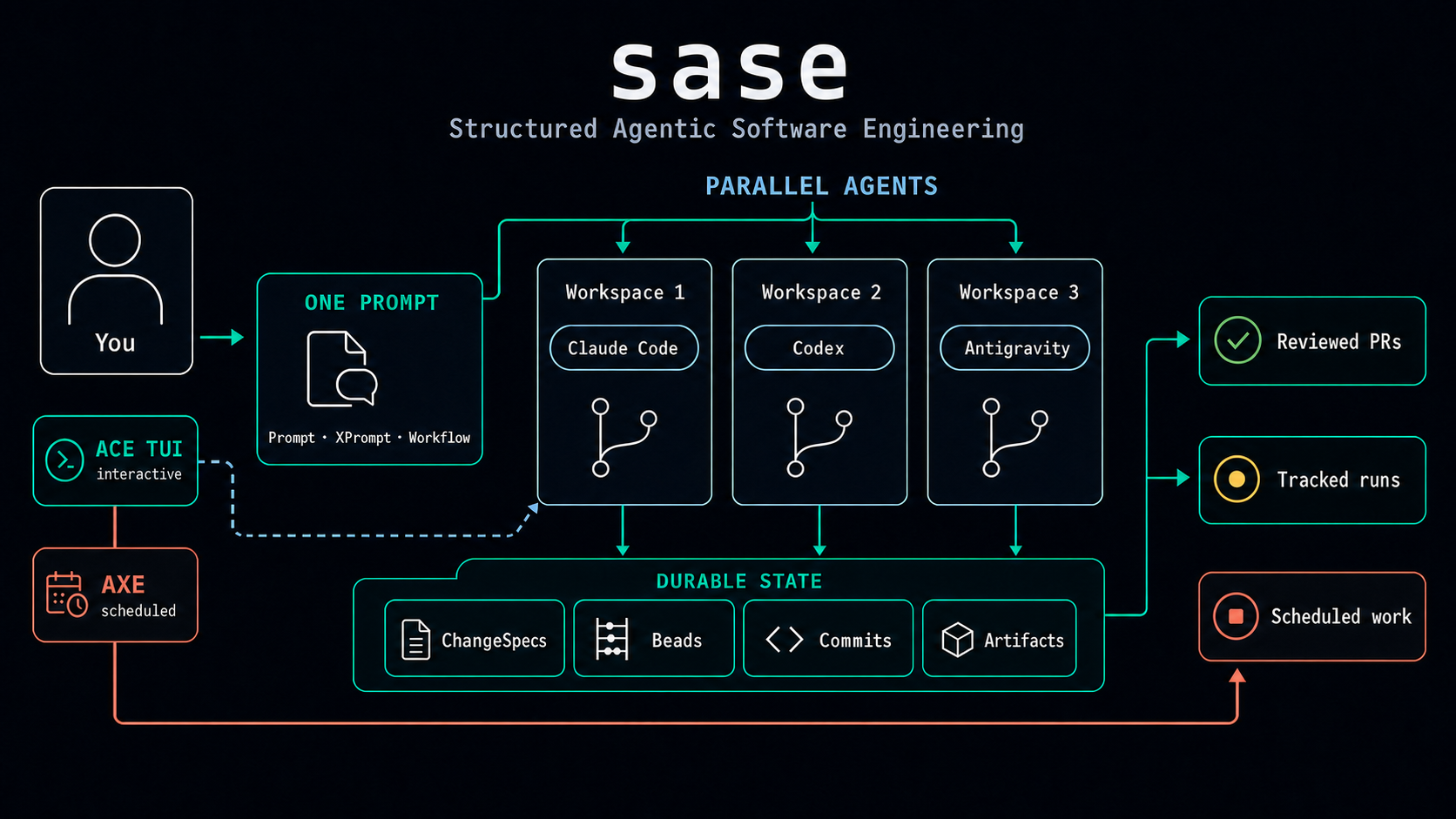
One prompt fans out to parallel agents in isolated workspaces; sase's TUI supervises, AXE schedules, durable state tracks Patches, beads, and artifacts, and reviewed PRs are the output.
sase (Structured Agentic Software Engineering, pronounced "sassy") turns Claude Code, Codex, Antigravity, Qwen Code, OpenCode, Meta's Muse Code, and xAI's Grok Build into a coordinated engineering team. One developer supervises parallel agents in isolated workspaces, with every run tracked, reviewable, and repeatable.
Status: sase is alpha software, and its interfaces and workflows are still evolving. It supports POSIX systems (Linux and macOS) only; Windows is not supported. sase assumes you have at least one supported agent CLI installed and authenticated for production work, and that you prefer opinionated git-based, workspace-per-agent workflows; if you want a standalone agent instead of a coordination layer, use those CLIs directly.
Why sase
- Launch, monitor, resume, and archive agent runs from one keyboard-driven TUI (sase's TUI).
- Run agents in parallel, each in an isolated numbered workspace clone.
- Keep prompts and multi-step workflows reusable (Macros) instead of trapped in shell history.
- Track every PR-sized unit of work with status, commits, comments, and review state (Patches).
- Keep person-owned outcomes and their status in durable Goals.
- Record project tool runs and ad-hoc commands, with their output and diagnostics, as ToolRuns.
- Schedule background and recurring agent work with the scheduler service proc.
sase does not replace coding agents; it makes agent-driven engineering dependable.
See it in action
One prompt, three live agents, three models. A single GitHub prompt fans out to Claude, Codex, and Antigravity, runs all three agents in isolated workspaces, and keeps kill controls close at hand.
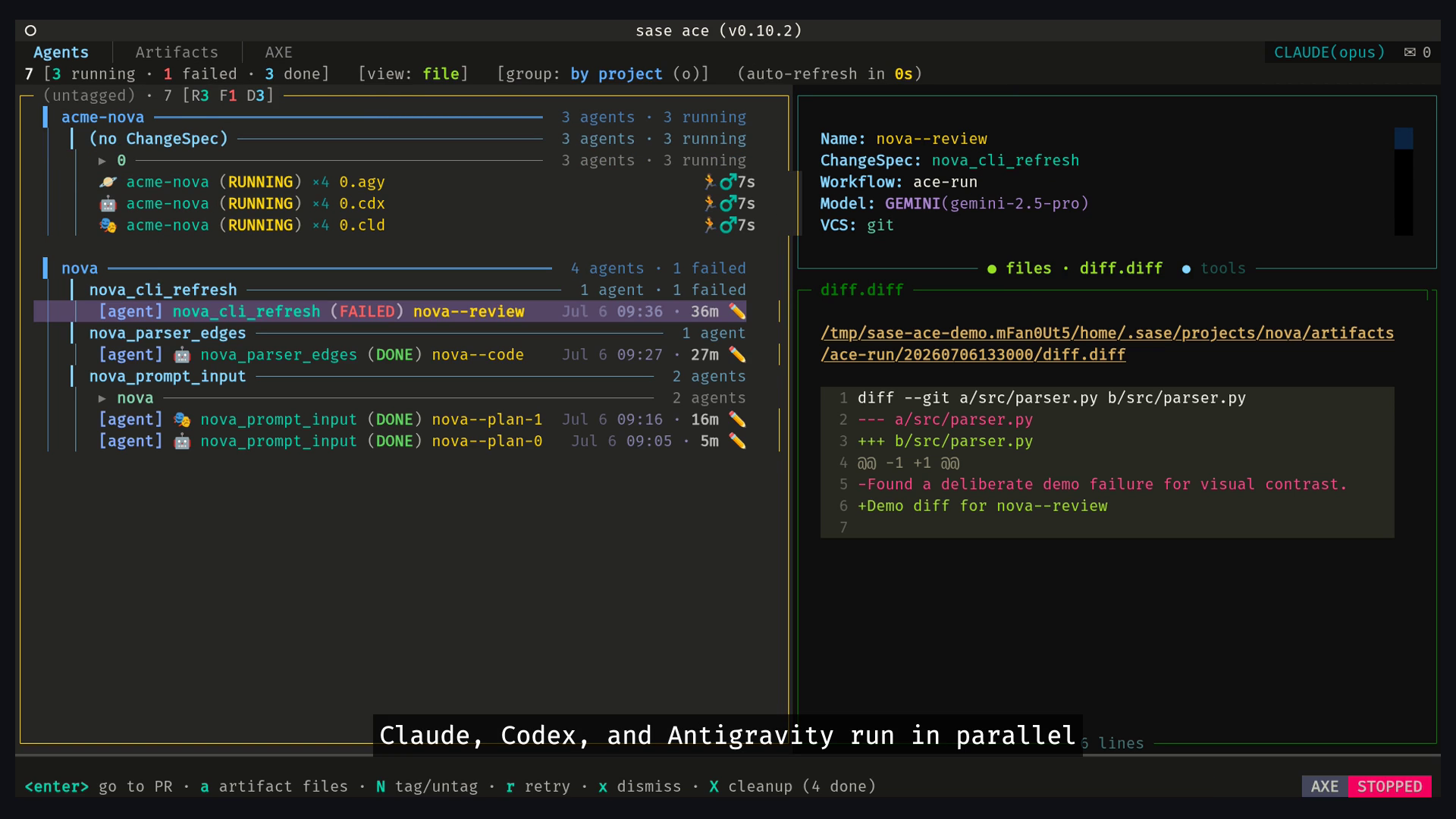
Supervise every run. The Agents tab shows live status, retry chains, per-agent diffs, chats, and artifact files from one control surface.
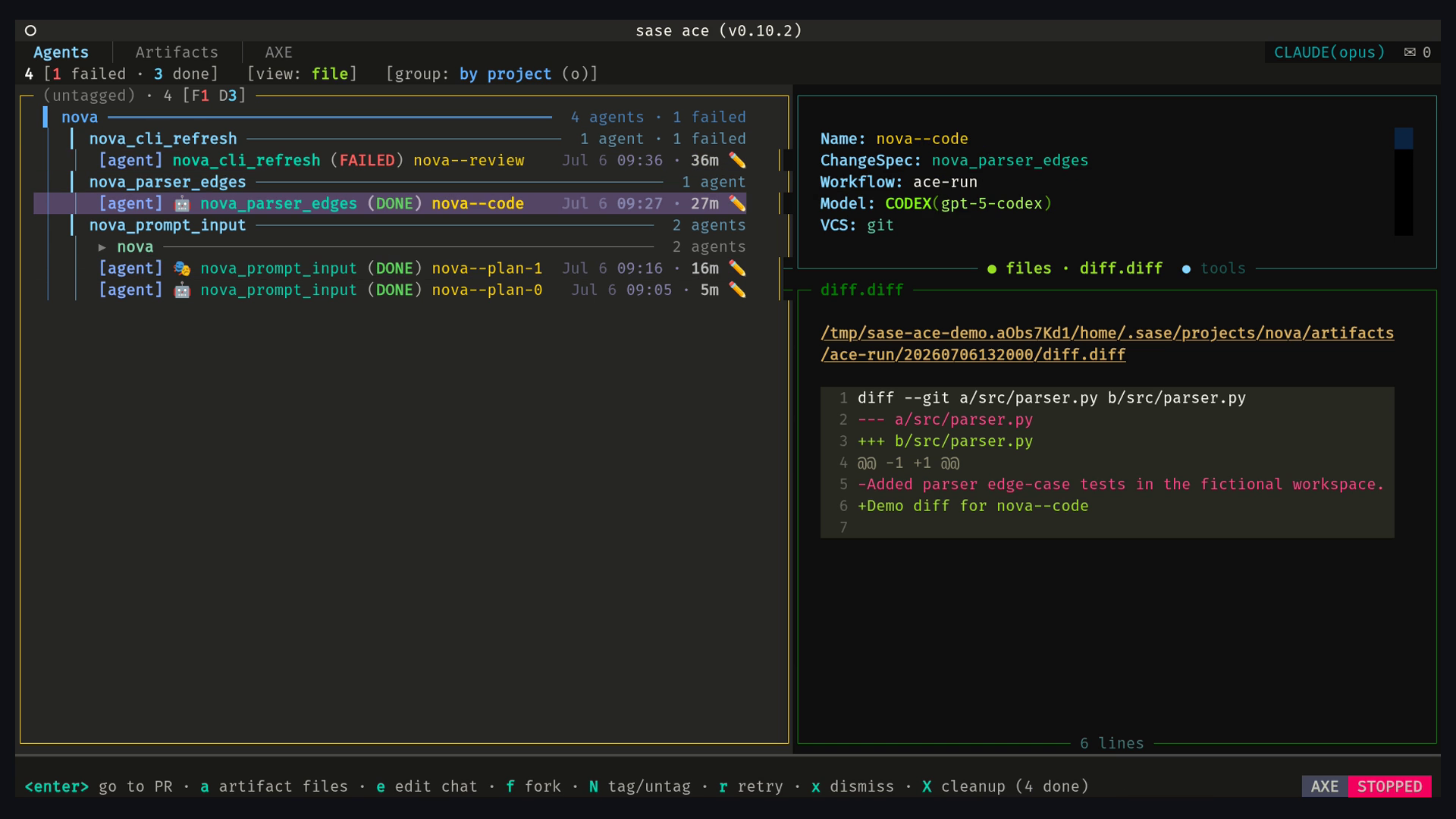
Select the still to watch the 29-second demo.
Land tracked changes. The Patches view follows the Patch lifecycle from WIP to Submitted, with grouping, search, stitches, and diffs.
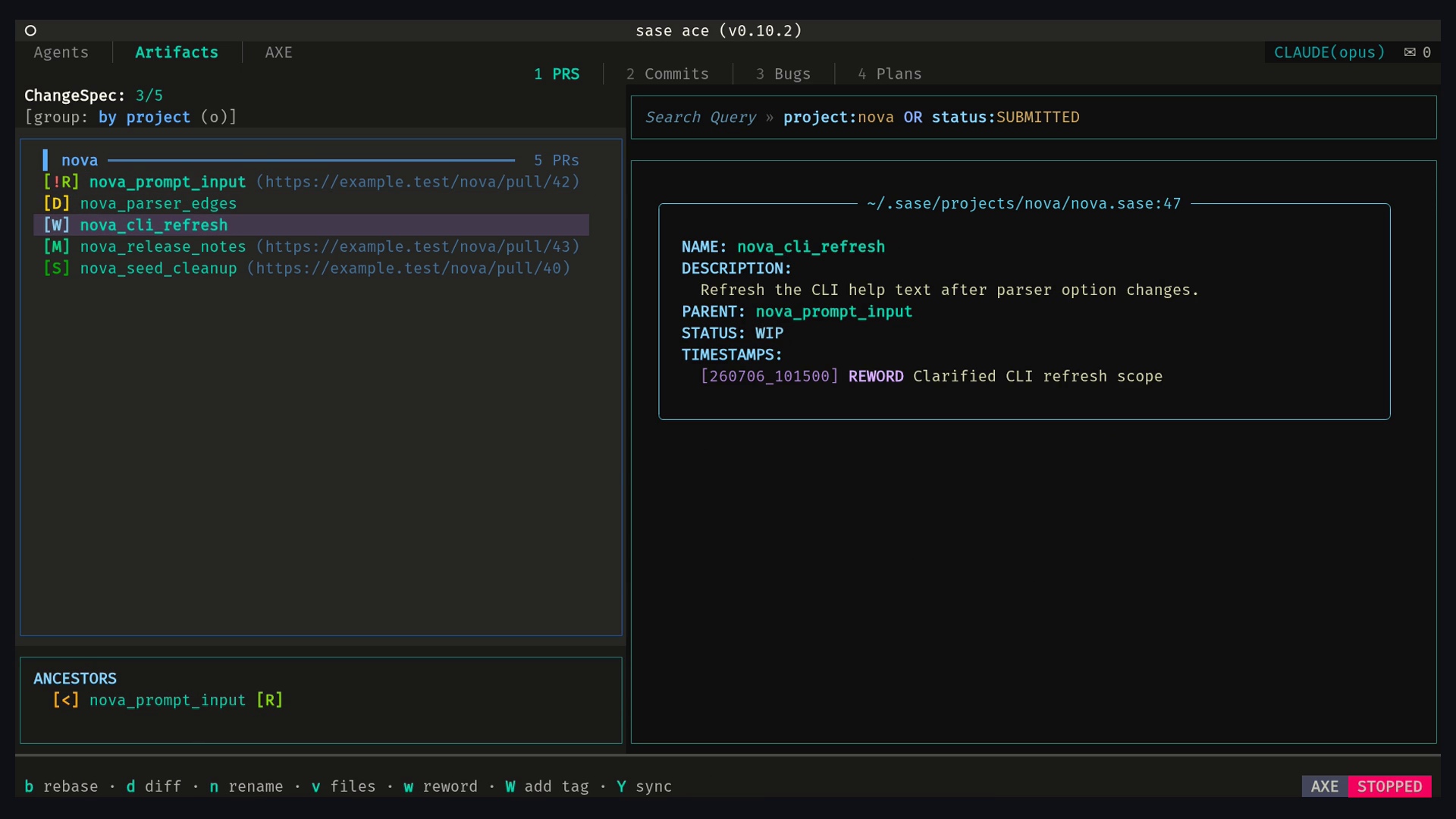
Select the still to watch the 26-second demo.
Quick start
Prerequisites: Linux or macOS (POSIX; Windows is not supported), Python 3.12+,
uv, git, a text editor ($EDITOR, falling back to
nvim then vim), and one authenticated agent CLI: Claude Code, Codex, Antigravity CLI
(agy), Qwen Code, OpenCode, Meta's Muse Code (muse), or xAI's Grok Build (grok).
SASE's default provider autodetection never selects Muse or Grok from PATH, because
those executable names are generic; select either explicitly with a provider/model
directive. Model-alias routing is a separate mechanism: whichever shipped size aliases
currently target Muse or Grok can select them (see the generated
shipped size-alias defaults).
The +home examples below run in SASE's built-in home sandbox, not in your current
directory.
uv tool install "sase>=0.18"                   # add a plugin too: uv tool install "sase>=0.18" --with sase-github
sase doctor                                               # check install, config, and provider authentication
sase completion install                                   # optional: <TAB> completion for zsh, bash, or fish
sase run "+home summarize what this repository does; do not change files" # auto-detected providers
# Or, for Muse Code:
sase run "%model:muse/muse-spark-1.3 +home summarize what this repository does; do not change files"
# Or, for Grok Build:
sase run "%model:grok/grok-4.7 +home summarize what this repository does; do not change files"
sase tui                                                  # open the interactive control surface
For a first run, use the auto-detected-provider command, or one of the explicit
Muse/Grok examples for deterministic provider selection. The +home
project tag targets
the built-in home project, which is bootstrapped automatically, so the first run needs
no project setup. It expands to the canonical #git:home workspace reference. After the
run completes, sase tui opens the TUI with the completed run visible on the Agents
tab.
If sase doctor reports a missing provider, install and authenticate it, then run the
check again; see
Choose providers and models. For full
installation details use INSTALL.md, or follow
Get started for the guided path.
Works with your agents
| Agent | Status |
|---|---|
| Claude Code | Supported |
Antigravity CLI (agy) |
Supported |
| Codex | Supported |
| Qwen Code | Supported |
| OpenCode | Supported |
| Muse Code | Supported |
| Grok Build | Supported |
Learn more
The complete documentation lives at sase.sh. New here? Start with Run your first agent (about 15 minutes), then pick the door that matches your goal:
- Learn — Get started — install SASE, run a first agent, and review a first change
- Do — Guides — goal-titled how-tos for setup, daily work, and fixing problems
- Understand — Concepts — how agents, work units, and landing fit together
- Look up — Reference — CLI, configuration, keymaps, and glossary
A few guides worth bookmarking:
-
Add an existing repository — work in a repository you already have
-
Choose providers and models — ready one provider and pick the model agents use
-
Diagnose problems with sase doctor — run the read-only checks first
-
Recover an interrupted agent — restart, resume, or revive a broken run
-
Blog — announcements and deep dives
-
The SASE Handbook (PDF) — the Guide-tier handbook and launch essay in one document
-
Support — report bugs and ask questions in GitHub Issues
Development
Development requires just. Start with
CONTRIBUTING.md, then see
Development for the full contributor guide.
git clone https://github.com/sase-org/sase
cd sase
just install-venv
sase core health
just install-venv sets up this checkout's .venv for tests and lint — it never
touches your global sase command. See
Your sase versus this checkout's .venv
before reaching for just install or just install-dev.
Run just check-full before submitting changes. That exhaustive local lane updates TUI
screenshot goldens; CI checks them with just fix-tui-screenshots --check. SASE agents
use just check unless explicitly instructed to run just check-full, and run either
through sase tool run (sase tool run check or sase tool run check-full); the raw
just recipes refuse to run in a SASE agent process.
Acknowledgements
sase builds on Boris Cherny's parallel-agents demonstration, Steve Yegge's beads, Agentic Software Engineering, and PDL. See the full acknowledgements.
License
sase is licensed under the MIT License. See LICENSE.
1 maintainer

Metadata
1 maintainer
Release files for sase 0.18.1
For a detailed explanation of source distributions (sdists) and built distributions (wheels), please see the package formats documentation.
Source distribution (sdist)
| File | Size | Uploaded | Provenance | Actions |
|---|---|---|---|---|
| sase-0.18.1.tar.gz | 18.5 MB | With provenance | Details for sase-0.18.1.tar.gz |
Built distribution (wheel)
| File | Interpreter | ABI | Platform | Actions Reset |
|---|---|---|---|---|
| sase-0.18.1-py3-none-any.whl | Python 3 | none | any | Details for sase-0.18.1-py3-none-any.whl |
Total release size: 40.5 MB
Release files / sase-0.18.1.tar.gz
| Download URL | sase-0.18.1.tar.gz |
|---|---|
| Size | 18.5 MB |
| Tags | Source |
|
SHA-256 checksum How to use checksums |
13ebd28e033dccf192b942d11ed48d040519c9c31033698582bdba759b89316f
|
|
BLAKE2b-256 checksum How to use checksums |
e0d98edd9267045f624693a07c80edaf463513414a22319e745638cadbaabbf2
|
| Upload date | |
|
Uploaded using Trusted Publishing? What is trusted publishing? |
Yes |
| Uploaded via |
twine/7.0.0 CPython/3.13.16
|
Provenance
Provenance describes where a file came from. On PyPI, provenance is shared via attestations, which provide a verifiable record of the build or publishing details. View details, limitations and caveats.


PyPI Publish Attestation
PyPI verified that this artifact, at this checksum, originated from the publisher listed below.
Signed by GitHub Actions, verified by PyPI on Oct 25, 2026.
Transparency logRelease files / sase-0.18.1-py3-none-any.whl
| Download URL | sase-0.18.1-py3-none-any.whl |
|---|---|
| Size | 22.0 MB |
| Tags | Python 3 |
|
SHA-256 checksum How to use checksums |
cdf700248b9d41e598f7952796dccd69961e04f37e0124d0fe32db32bc5910f5
|
|
BLAKE2b-256 checksum How to use checksums |
fbc3b3884ec9767989c17243694379120bedcafcc13c7e8cbd864b6bc4fe92f6
|
| Upload date | |
|
Uploaded using Trusted Publishing? What is trusted publishing? |
Yes |
| Uploaded via |
twine/7.0.0 CPython/3.13.16
|
Provenance
Provenance describes where a file came from. On PyPI, provenance is shared via attestations, which provide a verifiable record of the build or publishing details. View details, limitations and caveats.
PyPI Publish Attestation
PyPI verified that this artifact, at this checksum, originated from the publisher listed below.
Signed by GitHub Actions, verified by PyPI on Oct 25, 2026.
Transparency logSecurity for sase 0.18.1
Provenance
Provenance describes where a file came from. On PyPI, provenance is shared via attestations, which provide a verifiable record of the build or publishing details. View details, limitations and caveats.
Full provenance
Both files in this release have been uploaded with provenance metadata.
Attestation for sase-0.18.1.tar.gz
PyPI Publish Attestation
PyPI verified that this artifact, at this checksum, originated from the publisher listed below.
Signed by GitHub Actions, verified by PyPI on Oct 25, 2026.
Transparency logA note on package security
PyPI is a repository for distributing packages, not a service for auditing them. While third-party security researchers and our staff do their best to detect and remove malicious packages, PyPI cannot guarantee the quality, security or suitability of any given package.
To learn more about protecting yourself from malicious actors, visit our package security documentation.














