
sase
One developer. A team of coding agents. Tracked, reviewable, repeatable work.







CI checks pull requests, Master Gate is the per-SHA master release gate, and Full CI runs the scheduled exhaustive lane.
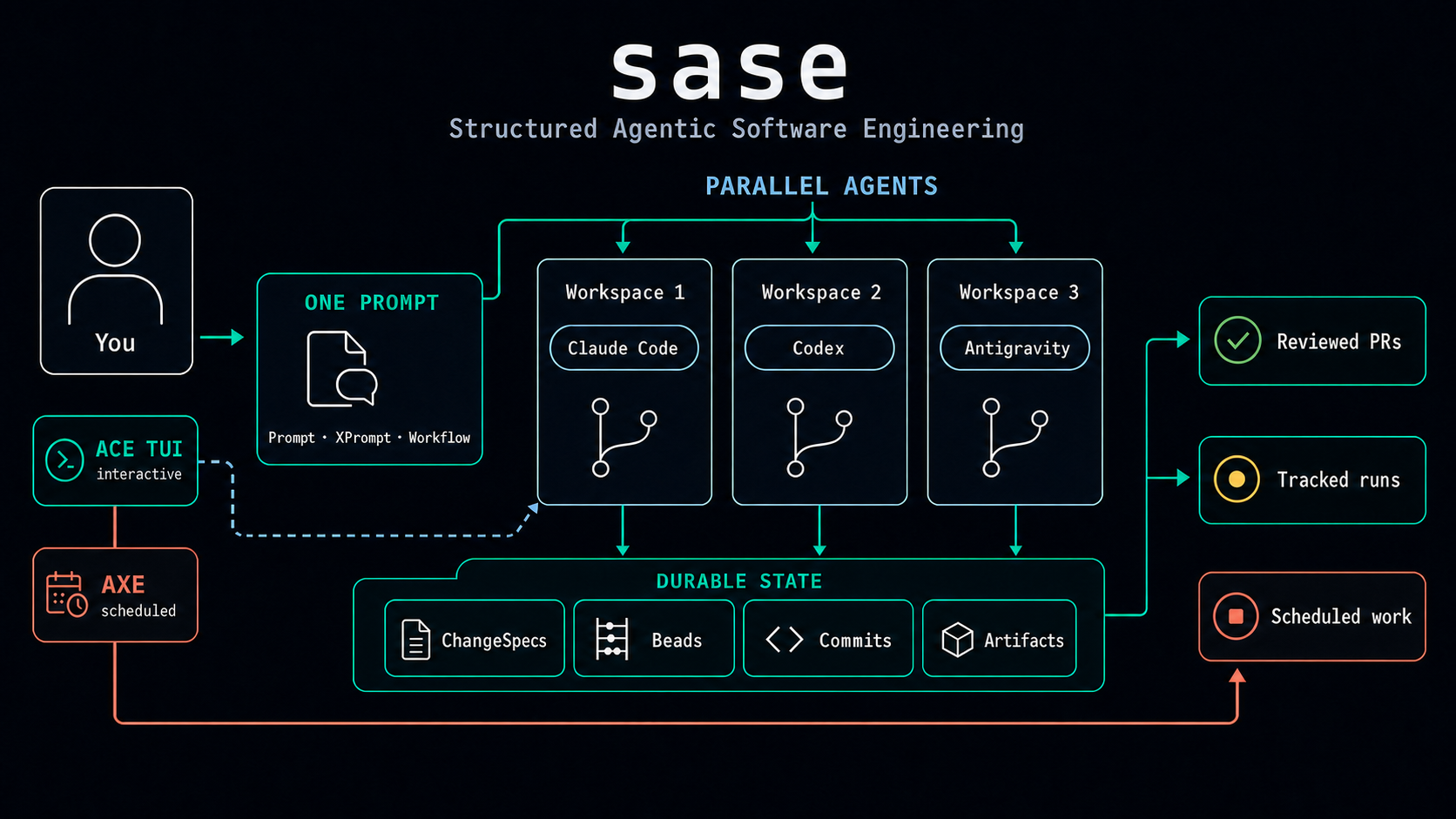
One prompt fans out to parallel agents in isolated workspaces; ACE supervises, AXE schedules, durable state tracks Patches, beads, and artifacts, and reviewed PRs are the output.
sase (Structured Agentic Software Engineering, pronounced "sassy") turns Claude Code, Codex, Antigravity, Qwen Code, OpenCode, Meta's Muse Code, and xAI's Grok Build into a coordinated engineering team. One developer supervises parallel agents in isolated workspaces, with every run tracked, reviewable, and repeatable.
Status: sase is alpha software, and its interfaces and workflows are still evolving. It supports POSIX systems (Linux and macOS) only; Windows is not supported. sase assumes you already use and pay for at least one agent CLI and prefer opinionated git-based, workspace-per-agent workflows; if you want a standalone agent instead of a coordination layer, use those CLIs directly.
Why sase
- Launch, monitor, resume, and archive agent runs from one keyboard-driven TUI (ACE).
- Run agents in parallel, each in an isolated numbered workspace clone.
- Keep prompts and multi-step workflows reusable (XPrompts) instead of trapped in shell history.
- Track every PR-sized unit of work with status, commits, comments, and review state (Patches).
- Schedule background and recurring agent work with the AXE daemon.
sase does not replace coding agents; it makes agent-driven engineering dependable.
See it in action
One prompt, three live agents, three models. A single GitHub prompt fans out to Claude, Codex, and Antigravity, runs all three agents in isolated workspaces, and keeps kill controls close at hand.
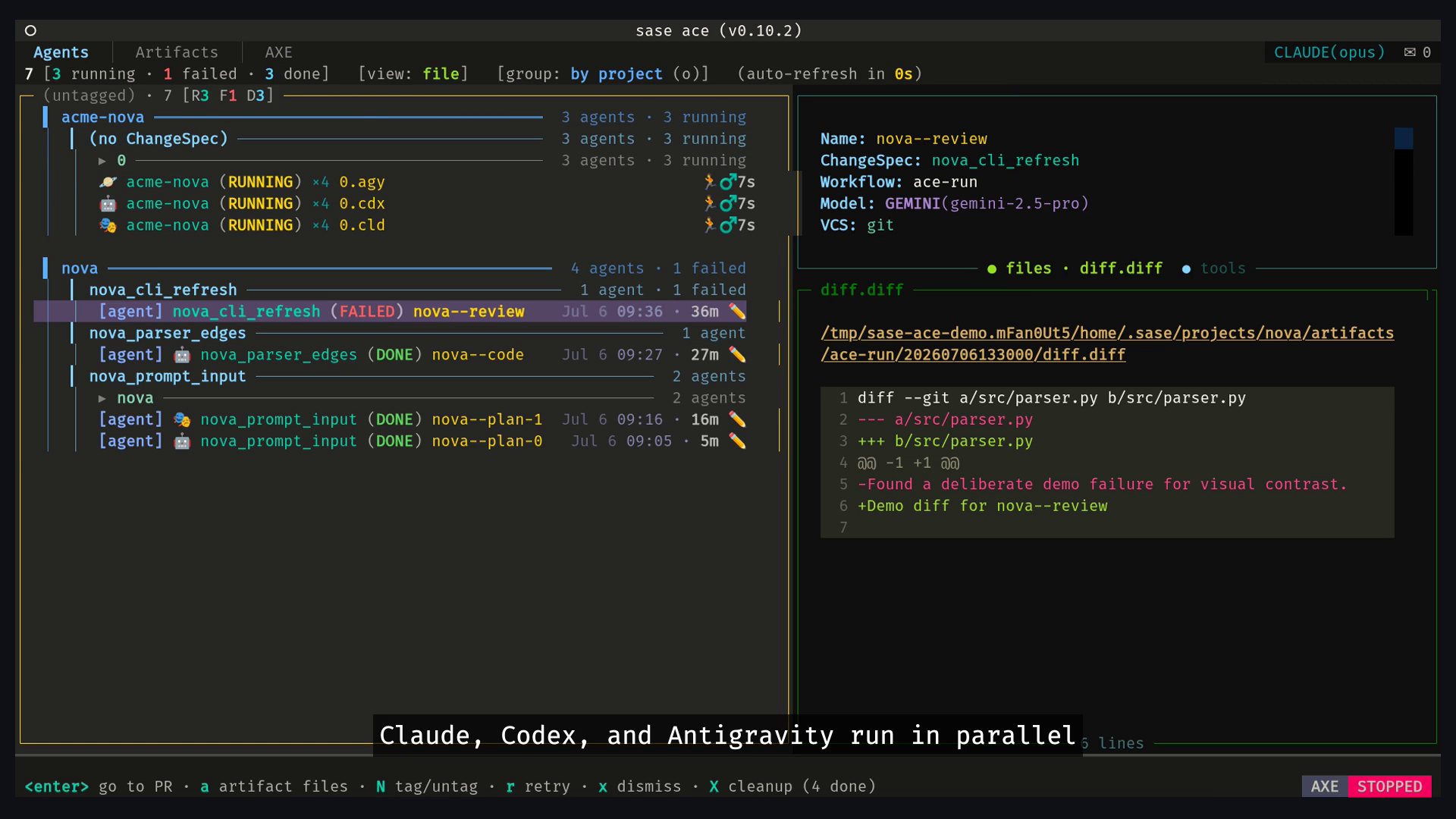
Supervise every run. The Agents tab shows live status, retry chains, per-agent diffs, chats, and artifact files from one control surface.
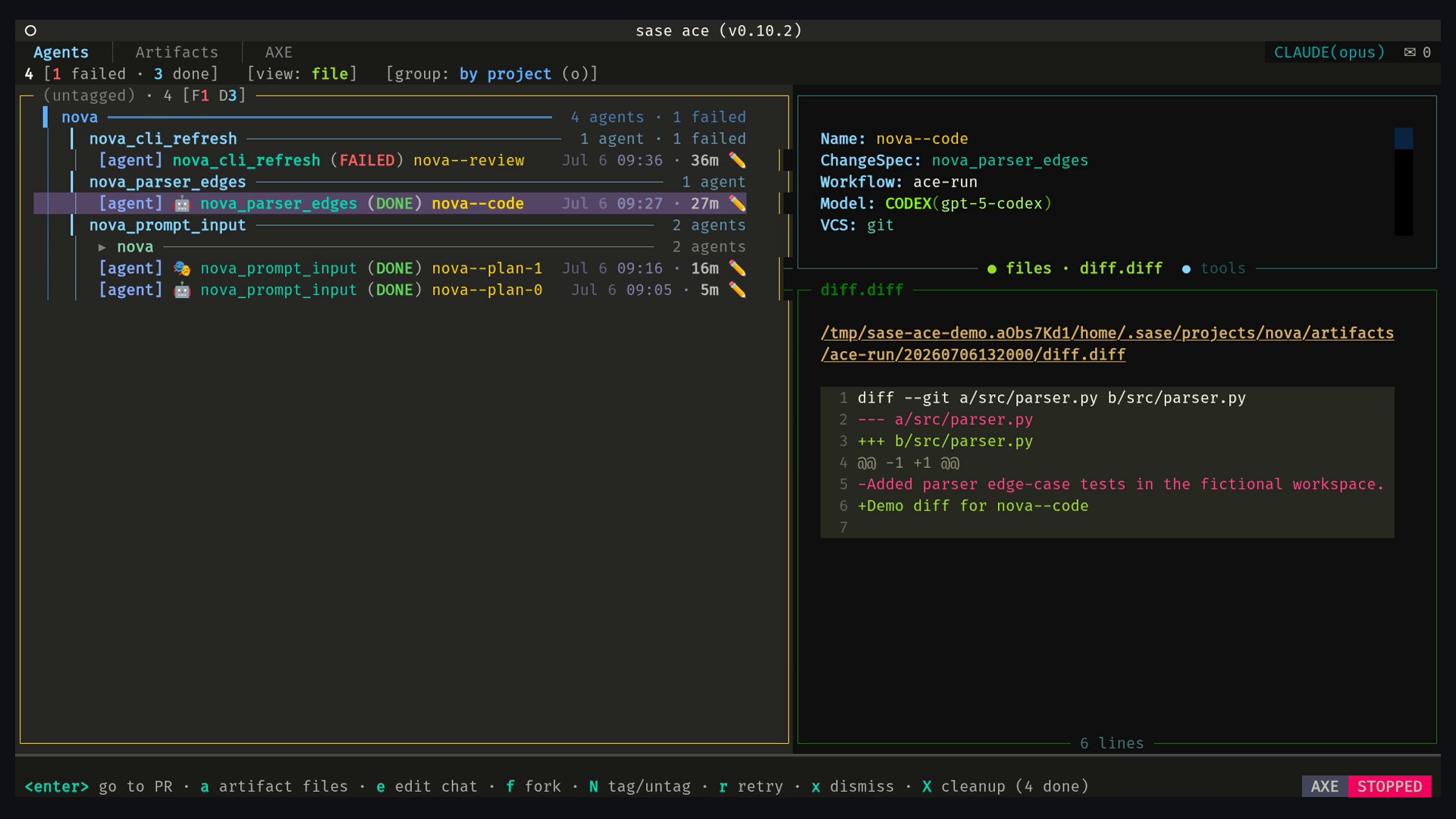
Select the still to watch the 29-second demo.
Land tracked changes. The Patches view follows the Patch lifecycle from WIP to Submitted, with grouping, search, stitches, and diffs.
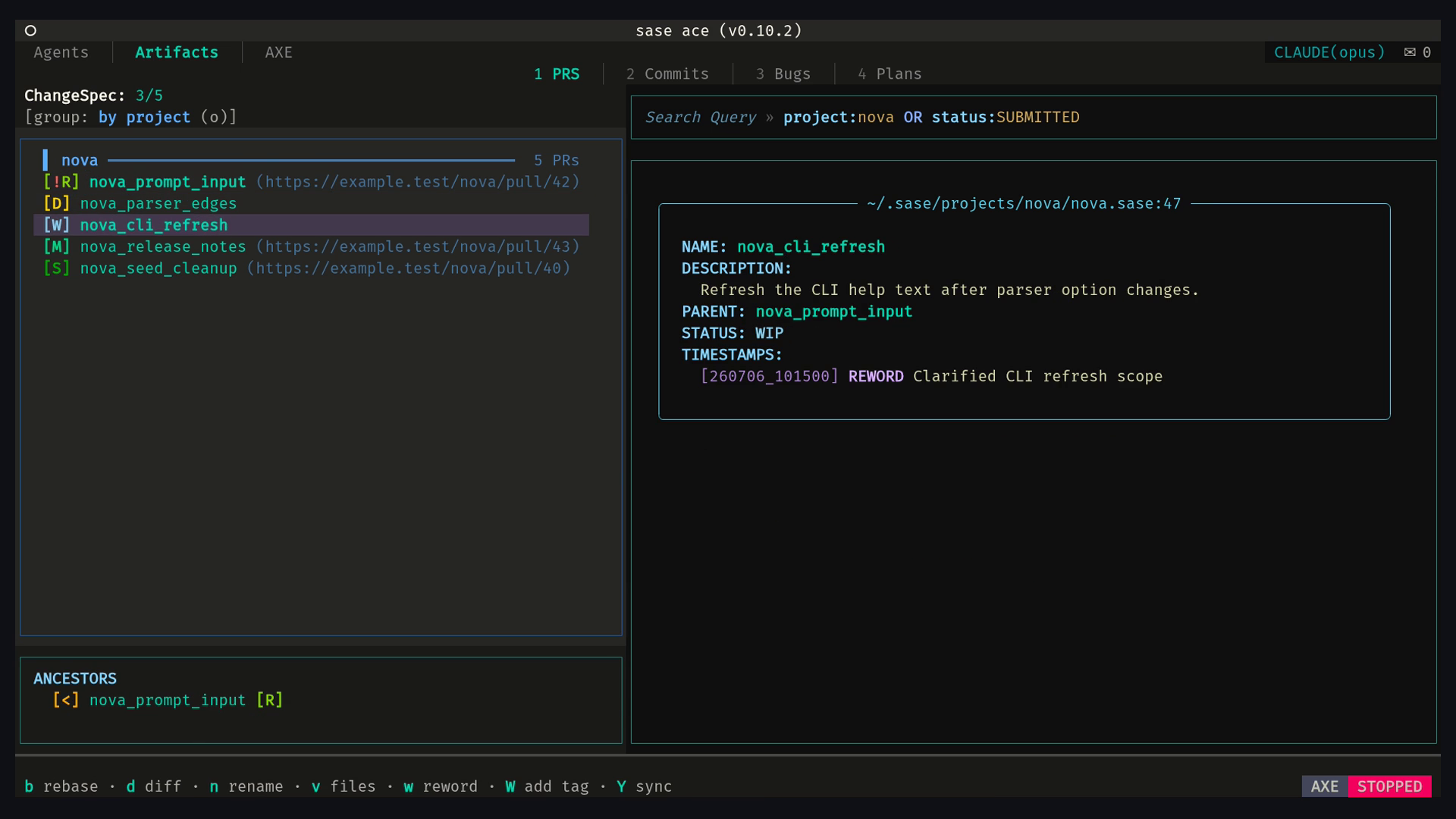
Select the still to watch the 26-second demo.
Quick start
Prerequisites: Linux or macOS (POSIX; Windows is not supported), Python 3.12+,
uv, git, a text editor ($EDITOR, falling back to
nvim then vim), and one authenticated agent CLI: Claude Code, Codex, Antigravity CLI
(agy), Qwen Code, OpenCode, Meta's Muse Code (muse), or xAI's Grok Build (grok).
SASE's default provider autodetection never selects Muse or Grok from PATH, because
those executable names are generic. Select Muse explicitly. Model-alias routing is a
separate mechanism: it can select Grok through the shipped @xsmall, @small, and
@medium pools, or as the last candidate in the @large and @xlarge fallbacks, when
Grok Build is installed.
uv tool install sase                                      # add a plugin too: uv tool install sase --with sase-github
sase doctor                                               # check install, config, and provider authentication
sase completion install                                   # optional: <TAB> completion for zsh, bash, or fish
sase run "#git:home summarize what this repository does; do not change files" # auto-detected providers
# Or, for Muse Code:
sase run "%model:muse/muse-spark-1.2 #git:home summarize what this repository does; do not change files"
# Or, for Grok Build:
sase run "%model:grok/grok-4.6 #git:home summarize what this repository does; do not change files"
sase ace                                                  # open the interactive control surface
For a first run, use the auto-detected-provider command, or one of the explicit
Muse/Grok examples for deterministic provider selection. The #git:home workspace
reference targets the built-in home project, which is bootstrapped automatically, so
the first run needs no project setup. After the run completes, sase ace opens the TUI
with the completed run visible on the Agents tab.
If sase doctor reports a missing provider, install and authenticate it, then run the
check again; see Agent Providers. For full
installation details use INSTALL.md, or follow
Getting Started for the guided path.
Works with your agents
| Agent | Status |
|---|---|
| Claude Code | Supported |
Antigravity CLI (agy) |
Supported |
| Codex | Supported |
| Qwen Code | Supported |
| OpenCode | Supported |
| Muse Code | Supported |
| Grok Build | Supported |
Learn more
The complete documentation lives at sase.sh.
- Getting Started — the guided beginner path
- ACE TUI — the interactive control surface
- XPrompts — reusable prompts and multi-step workflows
- Patches — tracked PR-sized units of work
- AXE Automation — scheduled and background agent work
- Spec-Driven Development — plans, epics, and beads
- Plugins — GitHub, Telegram, editor, and provider integrations
- CLI Reference — command index and links to detailed guides
- Shell Completion —
<TAB>completion for zsh, bash, and fish - Blog — announcements and deep dives
- The SASE Handbook (PDF) — the full documentation as a single document
- Support — report bugs and ask questions in GitHub Issues
Development
Development requires just. Start with
CONTRIBUTING.md, then see Development
for the full contributor guide.
git clone https://github.com/sase-org/sase
cd sase
uv venv .venv
source .venv/bin/activate
just install
sase core health
Run just check-full before submitting changes.
Acknowledgements
sase builds on Boris Cherny's parallel-agents demonstration, Steve Yegge's beads, Agentic Software Engineering, and PDL. See the full acknowledgements.
License
sase is licensed under the MIT License. See LICENSE.
1 maintainer

Metadata
1 maintainer
Release files for sase 0.17.0
For a detailed explanation of source distributions (sdists) and built distributions (wheels), please see the package formats documentation.
Source distribution (sdist)
| File | Size | Uploaded | |
|---|---|---|---|
| sase-0.17.0.tar.gz | 13.2 MB | Details |
Built distribution (wheel)
| File | Interpreter | ABI | Platform | Reset |
|---|---|---|---|---|
| sase-0.17.0-py3-none-any.whl | Python 3 | none | any | Details |
Total release size: 28.6 MB
Release files / sase-0.17.0.tar.gz
| Download URL | sase-0.17.0.tar.gz |
|---|---|
| Size | 13.2 MB |
| Tags | Source |
|
SHA-256 checksum How to use checksums |
9e6491a03135be7d9b66ead60aa8102854b69813a49e5232d6f1f18c9c25006d
|
|
BLAKE2b-256 checksum How to use checksums |
8ae0cef7f189b0067966a74982217c821d97cdf2eb403f393dc4172bf4186a07
|
| Upload date | |
|
Uploaded using Trusted Publishing? What is trusted publishing? |
Yes |
| Uploaded via |
twine/7.0.0 CPython/3.13.14
|
Provenance
Provenance describes where a file came from. On PyPI, provenance is shared via attestations, which provide a verifiable record of the build or publishing details. View details, limitations and caveats.


PyPI Publish Attestation
PyPI verified that this artifact, at this checksum, originated from the publisher listed below.
Signed by GitHub Actions, verified by PyPI on Aug 29, 2026.
Transparency logRelease files / sase-0.17.0-py3-none-any.whl
| Download URL | sase-0.17.0-py3-none-any.whl |
|---|---|
| Size | 15.5 MB |
| Tags | Python 3 |
|
SHA-256 checksum How to use checksums |
0331a3538078e4f40e23be914a6820720addc3d820499371eaafd248440bbc19
|
|
BLAKE2b-256 checksum How to use checksums |
b382ba6ef5dbb26aa5aa5c344908f2e85d5839b434a7392438d69bc166ac860d
|
| Upload date | |
|
Uploaded using Trusted Publishing? What is trusted publishing? |
Yes |
| Uploaded via |
twine/7.0.0 CPython/3.13.14
|
Provenance
Provenance describes where a file came from. On PyPI, provenance is shared via attestations, which provide a verifiable record of the build or publishing details. View details, limitations and caveats.
PyPI Publish Attestation
PyPI verified that this artifact, at this checksum, originated from the publisher listed below.
Signed by GitHub Actions, verified by PyPI on Aug 29, 2026.
Transparency log













