
Plain-text Python notebooks with checkpointing

Project description
Saturn
Features
-
Plain-text format. Notebooks are regular Python files. Different types of cells are comments with special formatting. Markdown rendering and syntax highlighting in the terminal thanks to rich.
-
Checkpoints. Special checkpoint cells allow to save the state of the session or individual variables.
-
Terminal graphics support. When using kitty terminal (or in principle anything that supports its graphics protocol) matplotlib figures are rendered inline in the terminal.
-
MPI awareness. When running under MPI, only rank 0 will write out the modified notebook. The REPL will take input on rank 0 and broadcast to other ranks. It's also possible to suppress output from all ranks other than 0.
-
Ability to convert from Jupyter to Saturn notebooks. This also allows to view Jupyter notebooks in the terminal.
Installation
pip install saturn-notebook
or add [viewer] extras for the --gui options below.
pip install saturn-notebook[viewer]
MPI support is optional and requires an MPI implementation with development
headers available before installing mpi4py.
pip install saturn-notebook[mpi]
Extras can be combined when needed.
pip install saturn-notebook[viewer,mpi]
Commands and options
-
saturn show notebook.pyDisplay the notebook in the terminal. No computation is performed. Optional
--html OUTPUT.htmlflag will produce HTML output. Use-k, --katexflag to embed KaTeX headers into non-standalone HTML. Use--standaloneto inline Saturn's CSS instead of linking CDN stylesheets; with--katex, standalone output embeds bundled KaTeX assets when markdown cells contain math delimiters.saturn show notebook.py --html notebook.html -kWhen installed with
[viewer]extras,-g, --guioption will display the notebook in a GUI (using pywebview).saturn show -g notebook.py -
saturn run [notebook.py [output.py]]Execute a Python notebook, either modifying it in place, or saving the result into a new notebook
output.py. If no inputnotebook.pyis provided, drop into REPL (-iis implied). When leaving, the REPL will ask whether to save the resulting notebook.-c, --clean: run from scratch, ignoring the checkpoints.-a, --auto-capture: automatically capture matplotlib figures, withoutshow().-i,--interactive: drop into REPL (using ptpython) after all the cells are processed; the results of the REPL interaction will be added to the notebook.--no-mpi: disable MPI awareness.-n, --dry-run: don't save the result.--only-root-output: under MPI, suppress output from all ranks other than 0.-e,--external notebook.zip: use external zip archivenotebook.zipto store binary content. If omitted, Saturn stores binary content next to the output notebook innotebook.zipby default.--force-external: replace an existing external archive even if it has no matching Saturn manifest.--inline: embed binary content directly in the notebook instead of using an external archive.
Any arguments passed after
--will be passed assys.argvto the notebook.saturn run notebook.py -- arguments --to notebook -
saturn clean notebook.py [output.py]Remove generated binary data, checkpoints, variable caches, and external archive metadata from the notebook. Use
--strip-outputto remove text output lines as well. -
saturn image notebook.py [i out.png]Save
i-th image fromnotebook.pyintoout.png. If the last two arguments are omitted, show all the images in the notebook together with their indices. -
saturn versionShow version of saturn and its dependencies.
-
saturn convert notebook.ipynb [notebook.py]Convert a Jupyter notebook into a Saturn notebook. If the output name
notebook.pyis missing, only show the Jupyter notebook. Optional--html OUTPUT.htmlflag will produce HTML output. Use--standaloneto inline Saturn's CSS instead of linking CDN stylesheets. With--katex, standalone output embeds bundled KaTeX assets when markdown cells contain math delimiters. When writing a Saturn notebook, binary content is stored in an external zip archive by default; use--inlineto embed it directly in the notebook. Use--force-externalto intentionally replace an existing archive without a matching Saturn manifest.When installed with
[viewer]extras,-g, --guioption will display the notebook in a GUI (using pywebview). -
saturn rehash notebook.py [output.py]Refresh checkpoint and variable-cache hashes without executing the notebook. This is useful after mechanical notebook text transformations when the cached payloads are still semantically valid. Binary content follows the same external archive behavior as
runandconvert; use--inlinefor a self-contained notebook or--force-externalto intentionally replace an existing archive without a matching Saturn manifest. -
saturn extract notebook.py notebook.zipExtract inline binary content into external archive.
-
saturn embed notebook.py notebook.zipEmbed binary content from external archive into the notebook.
Cell types
-
Markdown cells, prefix
#m>#m> # Sample notebook #m> #m> Description using markdown **formatting**. -
Output cells
#o>There is not usually a reason to modify these by hand, they are filled by Saturn with the output of code cells. If they contain PNG information, it's base64-encoded and wrapped in
{{{and}}}to allow automatic folding.#o> <matplotlib.image.AxesImage object at 0x114217550> #o> png{{{ #o> pngiVBORw0KGgoAAAANSUhEUgAAA8AAAAHgCAYAAABq5QSEAAAABHNCSVQICAgIfAhkiAAAAAlwSFlzAAAP ... #o> pngGAAAgBQEMAAAACkIYAAAAFL4v5JTyvRQ4v1eAAAAAElFTkSuQmCC #o> png}}}In Vim with
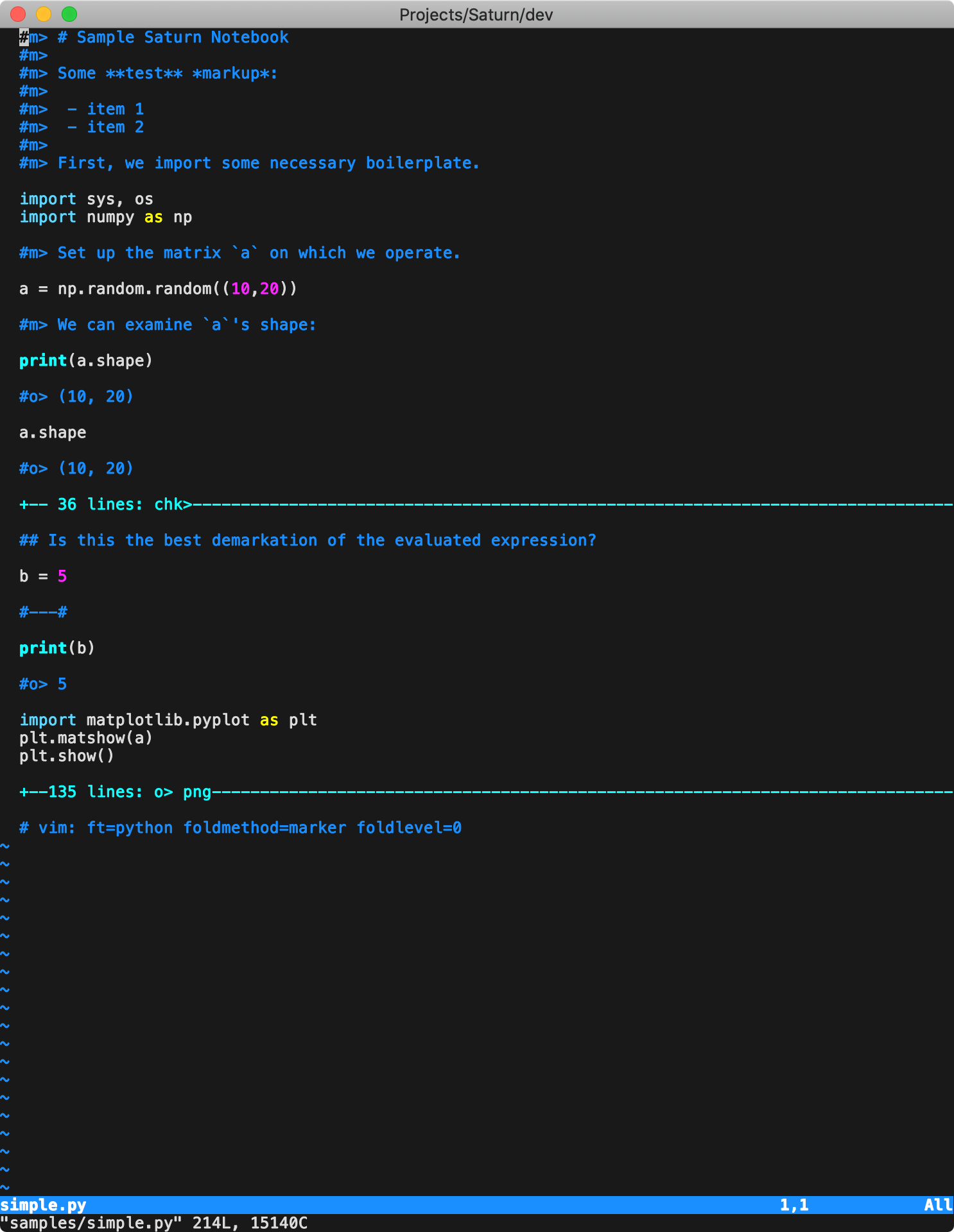
foldmethod=marker:#o> <matplotlib.image.AxesImage object at 0x114217550> +--135 lines: o> png-------------------------------------------------- -
Checkpoint cells
#chk>These indicate locations, where the code should checkpoint. Checkpointing serializes the session, which is stored base64-encoded in the same cell. The cell also stores the hash of the previous code blocks, and the checkpoint is valid if the prior code blocks haven't changed. By default saturn will resume from the last valid checkpoint. Same folding markers (
{{{and}}}) are used.#chk>{{{ #chk>gANDIJZCQePiVH9SX7wVtBfgrDpcgWu5HUFFiFEeyNF9sVjFcQB9cQEoWAwAAABfX2J1aWx0aW5zX19x ... #chk>wAyP55wdmz+qIkdBjBrYP3EjdHEkYnWGcSUu #chk>}}}In Vim with
foldmethod=marker:+-- 36 lines: chk>---------------------------------------------------- -
Variable cells
#var> x,y,zThese cells save only the value of the specified variables (which is useful if the full checkpoint is too big). If all the previous code cells haven't changed, the cell's saved content is loaded into the specified variables and the previous code cell is not evaluated.
-
Break cells
#---#These are used to break code cells that don't have any other type of a cell between them.
-
REPL cells
#-REPL-#These instruct Saturn to drop into an interactive REPL loop, just like the
-ioption. All the cells from the REPL will be inserted after this cell in the notebook. Afterwards, execution proceeds as normal. -
Code cells
All contiguous lines, not marked as one of the above, are grouped together into code cells.
-
Non-skippable code cells
#no-skip#Adding this line anywhere within the code cell will indicate that it shouldn't be skipped, even if we are restarting from a checkpoint. This is useful, for example, if a cell is modifying
sys.path, which won't be captured in a checkpoint. -
Non-hashable code cells
#no-hash#Adding this line anywhere within the code cell will indicate that it shouldn't be hashed, meaning that changing this cell (or removing it entirely) won't invalidate the checkpoints below. This should be used only with cells that don't change any variables, e.g., purely output or plotting cells.
-
Saturn cells
#saturn> external=out.zipThese provide metadata. For now, the only option is to provide the name of the external zip archive to store the binary content.
Vim support
All the binary (non-human-readable) cell content is wrapped in {{{, }}}
markers. Adding the following comment to the notebook, ensures that Vim starts
with all the binary content folded away.
# vim: foldmethod=marker foldlevel=0
It's also helpful to have Vim recognize the #m> prefix to correctly re-format
markdown cells with the gq command. This can be done, for example, by adding
the following to ~/.vim/after/ftplugin/python.vim:
setlocal comments=b:#,fb:-,b:#m>
REPL
REPL supports the following keyboard shortcuts:
Ctrl-d: exits the REPL.Ctrl-k: inserts a checkpoint cell. Equivalent to typing in#chk>manually.Ctrl-w: exits the REPL and doesn't drop into REPL, even if there are more REPL cells or-iis provided on the command line.Ctrl-q: exits the REPL and terminates execution of the entire notebook.F10: aborts execution of the entire notebook and doesn't save it out, even if we are not in--dry-runmode.
Documentation
- Saturn notebook format
- Execution error policy
- CLI reference
- External archive lifecycle
- Release validation
- Workflow examples
- Third-party notices
Development
Install development dependencies and run checks with uv:
uv sync --group dev
uv run pytest
uv run ruff check .
uv run pytest includes the legacy golden-file notebook regression coverage.
The legacy shell entry point delegates to the same pytest coverage:
./tests/run.sh
Screenshots
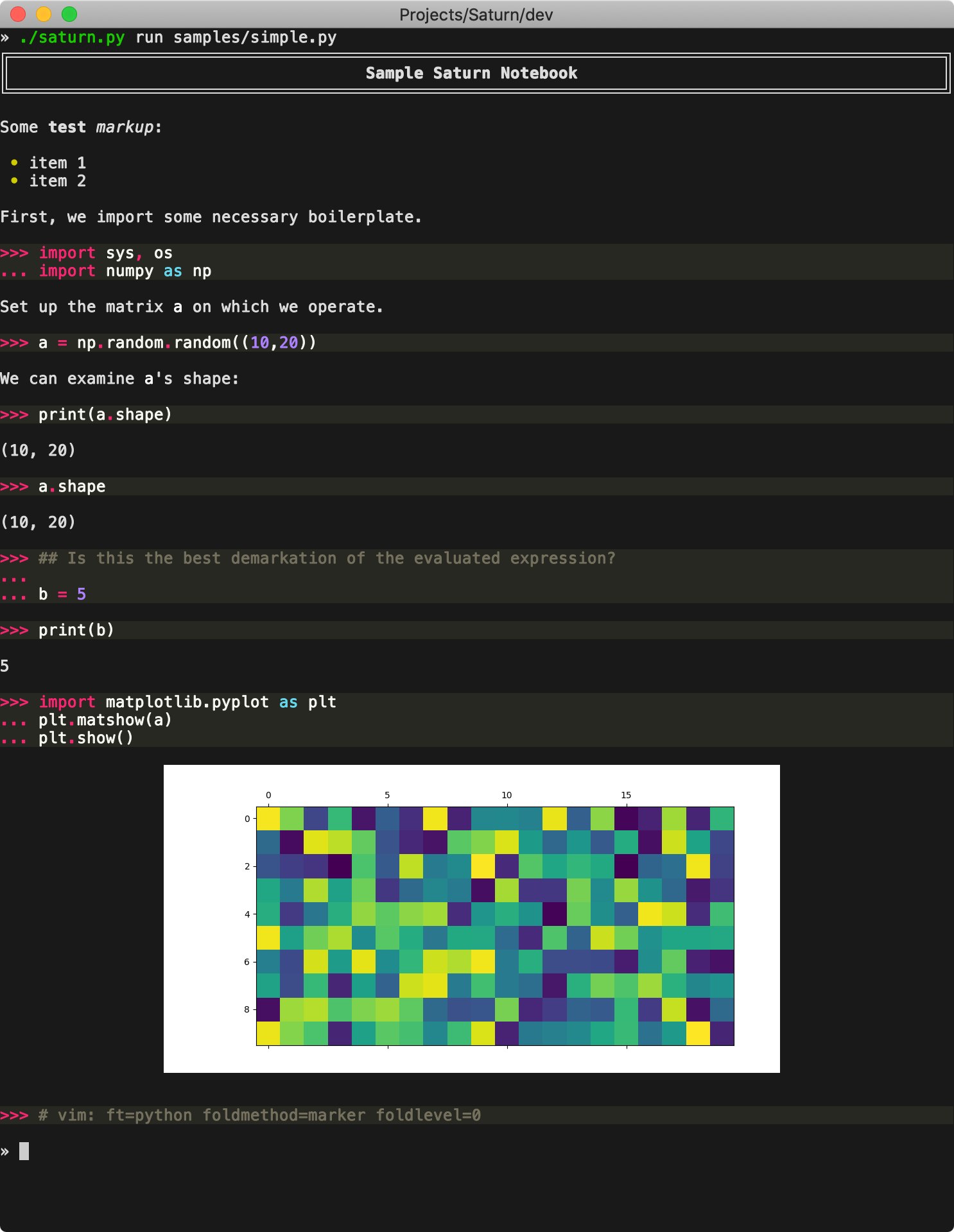
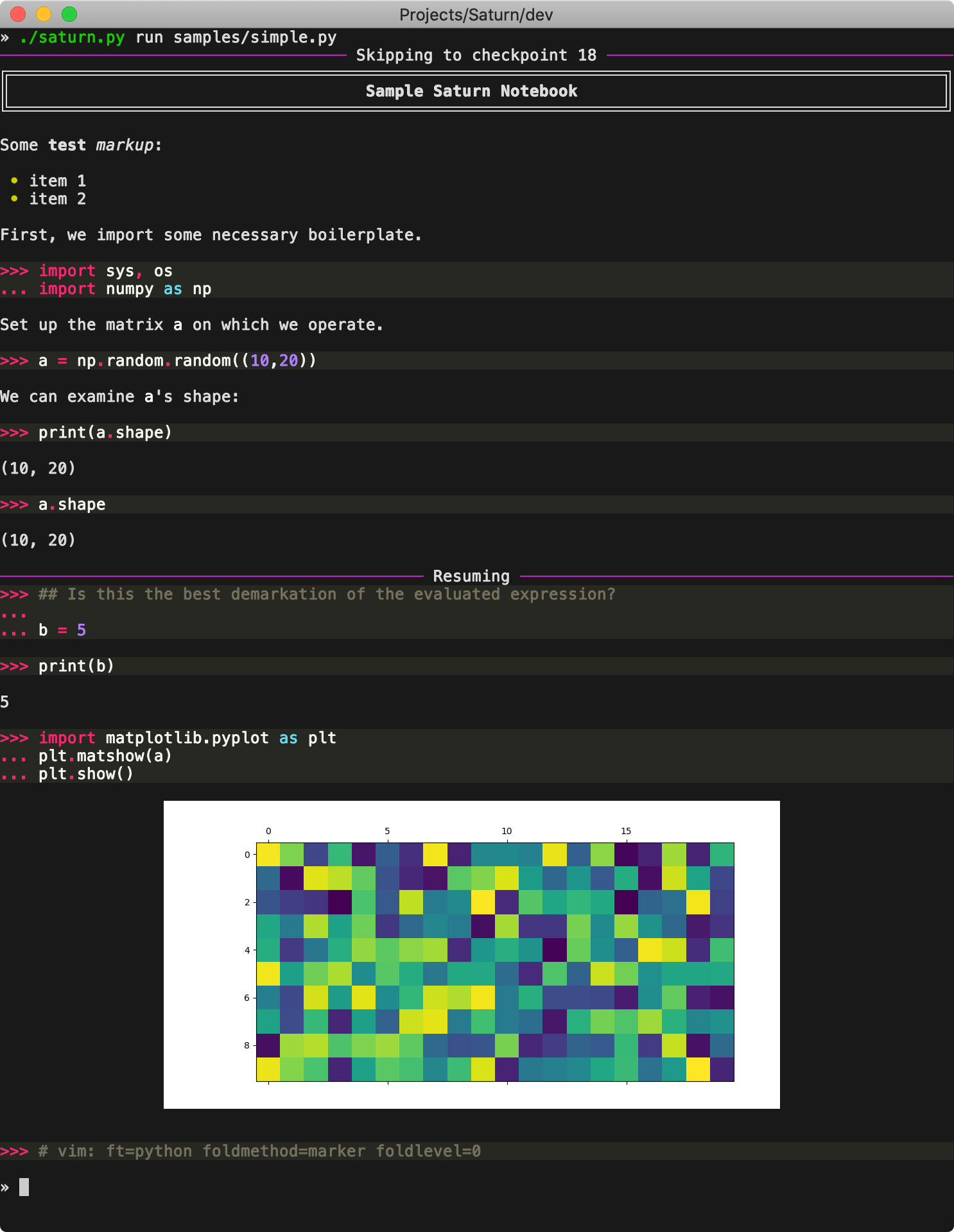
Running samples/simple.py:
- First run performs full computation and saves the checkpoint, as well as the figure output.
- Second run resumes from the checkpoint, since no code before it has changed.
- Vim folds the binary content.
Release history Release notifications | RSS feed


Download files
Download the file for your platform. If you're not sure which to choose, learn more about installing packages.
Source Distribution
Built Distribution
Filter files by name, interpreter, ABI, and platform.
If you're not sure about the file name format, learn more about wheel file names.
Copy a direct link to the current filters
File details
Details for the file saturn_notebook-1.4.0.tar.gz.
File metadata
- Download URL: saturn_notebook-1.4.0.tar.gz
- Upload date:
- Size: 1.2 MB
- Tags: Source
- Uploaded using Trusted Publishing? No
- Uploaded via: twine/6.2.0 CPython/3.14.6
File hashes
| Algorithm | Hash digest | |
|---|---|---|
| SHA256 |
a5344a9fc132e99264bcc3885002e4688a57c3b3c11dc24d1eb8327551ccfe9c
|
|
| MD5 |
4fbd9c185483628f18dc6511cb22551c
|
|
| BLAKE2b-256 |
8b378b553a8491d5aea195122ad08ddbdc22983c74a7d5f9ce4c78151a506fbe
|
File details
Details for the file saturn_notebook-1.4.0-py3-none-any.whl.
File metadata
- Download URL: saturn_notebook-1.4.0-py3-none-any.whl
- Upload date:
- Size: 383.3 kB
- Tags: Python 3
- Uploaded using Trusted Publishing? No
- Uploaded via: twine/6.2.0 CPython/3.14.6
File hashes
| Algorithm | Hash digest | |
|---|---|---|
| SHA256 |
cc5ea1d7e0d08579af2a99a21977fc5fb70b7d3e1241e7887579e094aa419263
|
|
| MD5 |
6c421d781687330f3567693b5906af4f
|
|
| BLAKE2b-256 |
253c0bb0d356715853c44c86badb80ae9faee68256d51870b1bd59308f14ae46
|






