
Surfactant SBOM Visualization

Project description
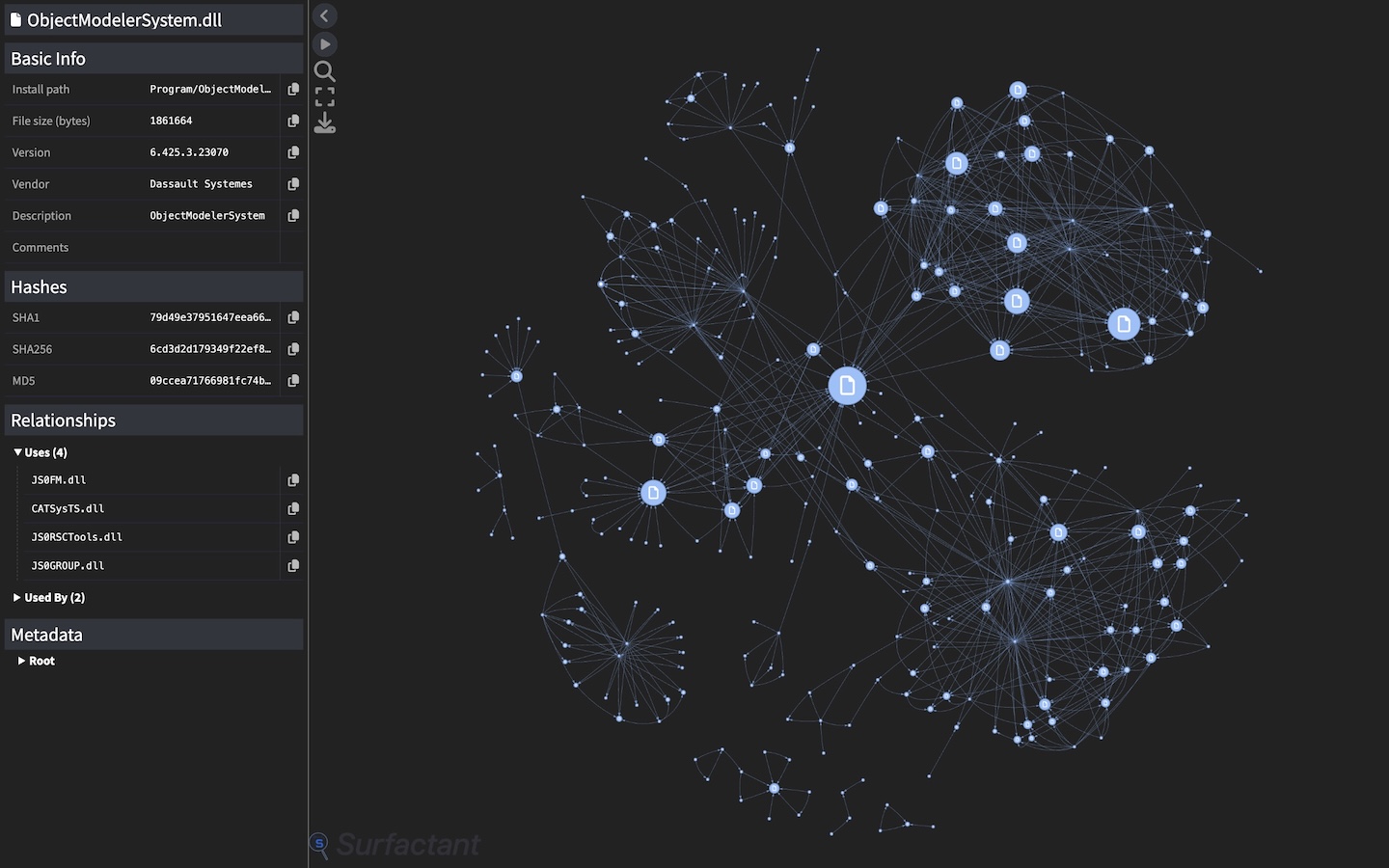
SBOM Visualization Plugin
A plugin for Surfactant that generates interactive visualizations of CyTRICS-formatted SBOMs
Installation
SBOMVis can be installed as a plugin for Surfactant or as a standalone executable with pip & pipx. Commands for installing with pipx (recommended) are shown below:
As a Surfactant plugin
$ pipx inject surfactant sbomvis
Standalone installation
$ pipx install sbomvis
Usage
The plugin can generate visualizations when running Surfactant's generate command or from an existing SBOM.
Generating visualizations during a Surfactant run
Passing in sbomvis as the output format will cause Surfactant to generate an HTML file with the same name as the SBOM containing the visualization. The original JSON SBOM will also be saved to the same directory.
$ surfactant generate --output_format=sbomvis SPECIMEN_CONFIG SBOM_OUTFILE
Generating visualizations from an existing SBOM
Visualizations can be created from an existing Surfactant SBOM by running sbomvis and passing in it's path with -p.
Surfactant SBOM Visualization
options: -h, --help show this help message and exit -p PATH [PATH ...], --path PATH [PATH ...] Path(s) to JSON SBOMs -c, --cull Enable culling of isolated nodes (may improve performance on large graphs at the cost of completeness) -pb, --use-progress-bar Display progress bar while waiting for large graphs to load instead of disabling physics
## Controls
Several controls are included:
* Clicking on a node will reveal a sidebar with more information about it
* Right clicking on a node will pin/unpin it in place
* Archives and containers can be expanded or collapsed by double clicking

Note: Physics is initially disabled for large graphs (~600+ nodes) to improve loading times. Once the graph is on screen it should be re-enabled via clicking the toggle in the upper left corner.
Release history Release notifications | RSS feed


Download files
Download the file for your platform. If you're not sure which to choose, learn more about installing packages.
Source Distribution
Built Distribution
Filter files by name, interpreter, ABI, and platform.
If you're not sure about the file name format, learn more about wheel file names.
Copy a direct link to the current filters
File details
Details for the file sbomvis-0.0.0rc16.tar.gz.
File metadata
- Download URL: sbomvis-0.0.0rc16.tar.gz
- Upload date:
- Size: 28.5 kB
- Tags: Source
- Uploaded using Trusted Publishing? Yes
- Uploaded via: twine/6.1.0 CPython/3.13.7
File hashes
| Algorithm | Hash digest | |
|---|---|---|
| SHA256 |
ee4cba2ed5d1338d304bd5293ac8dc5ef76b49df65b816d36de4b982b93db7a7
|
|
| MD5 |
ffb25a71e8c2b0414cb9de450c174e1c
|
|
| BLAKE2b-256 |
4ddb4e32541c4b1f3598f95015711a202d58e1a9d1db95a4757c563a34ebbd06
|
Provenance
The following attestation bundles were made for sbomvis-0.0.0rc16.tar.gz:
Publisher:
publish-plugin.yml on LLNL/Surfactant
-
Statement:
-
Statement type:
https://in-toto.io/Statement/v1 -
Predicate type:
https://docs.pypi.org/attestations/publish/v1 -
Subject name:
sbomvis-0.0.0rc16.tar.gz -
Subject digest:
ee4cba2ed5d1338d304bd5293ac8dc5ef76b49df65b816d36de4b982b93db7a7 - Sigstore transparency entry: 701600493
- Sigstore integration time:
-
Permalink:
LLNL/Surfactant@d238240d19145e82786a7ec336dc4836657ac067 -
Branch / Tag:
refs/heads/main - Owner: https://github.com/LLNL
-
Access:
public
-
Token Issuer:
https://token.actions.githubusercontent.com -
Runner Environment:
github-hosted -
Publication workflow:
publish-plugin.yml@d238240d19145e82786a7ec336dc4836657ac067 -
Trigger Event:
workflow_dispatch
-
Statement type:
File details
Details for the file sbomvis-0.0.0rc16-py3-none-any.whl.
File metadata
- Download URL: sbomvis-0.0.0rc16-py3-none-any.whl
- Upload date:
- Size: 30.6 kB
- Tags: Python 3
- Uploaded using Trusted Publishing? Yes
- Uploaded via: twine/6.1.0 CPython/3.13.7
File hashes
| Algorithm | Hash digest | |
|---|---|---|
| SHA256 |
9766508f43554062961b9caf3b07ea097ff81240b558b3e0a2f1af4b8d0caf11
|
|
| MD5 |
8a994954487770d358b0ef1ac4540929
|
|
| BLAKE2b-256 |
b2e31ab0f5f99d23c3037ac192b237e7b8d6a501fd9cd00fe3c8a6ada75e3141
|
Provenance
The following attestation bundles were made for sbomvis-0.0.0rc16-py3-none-any.whl:
Publisher:
publish-plugin.yml on LLNL/Surfactant
-
Statement:
-
Statement type:
https://in-toto.io/Statement/v1 -
Predicate type:
https://docs.pypi.org/attestations/publish/v1 -
Subject name:
sbomvis-0.0.0rc16-py3-none-any.whl -
Subject digest:
9766508f43554062961b9caf3b07ea097ff81240b558b3e0a2f1af4b8d0caf11 - Sigstore transparency entry: 701600494
- Sigstore integration time:
-
Permalink:
LLNL/Surfactant@d238240d19145e82786a7ec336dc4836657ac067 -
Branch / Tag:
refs/heads/main - Owner: https://github.com/LLNL
-
Access:
public
-
Token Issuer:
https://token.actions.githubusercontent.com -
Runner Environment:
github-hosted -
Publication workflow:
publish-plugin.yml@d238240d19145e82786a7ec336dc4836657ac067 -
Trigger Event:
workflow_dispatch
-
Statement type:






