

ScanSplitter


Automatically detect, split, and rotate multiple photos from scanned images.
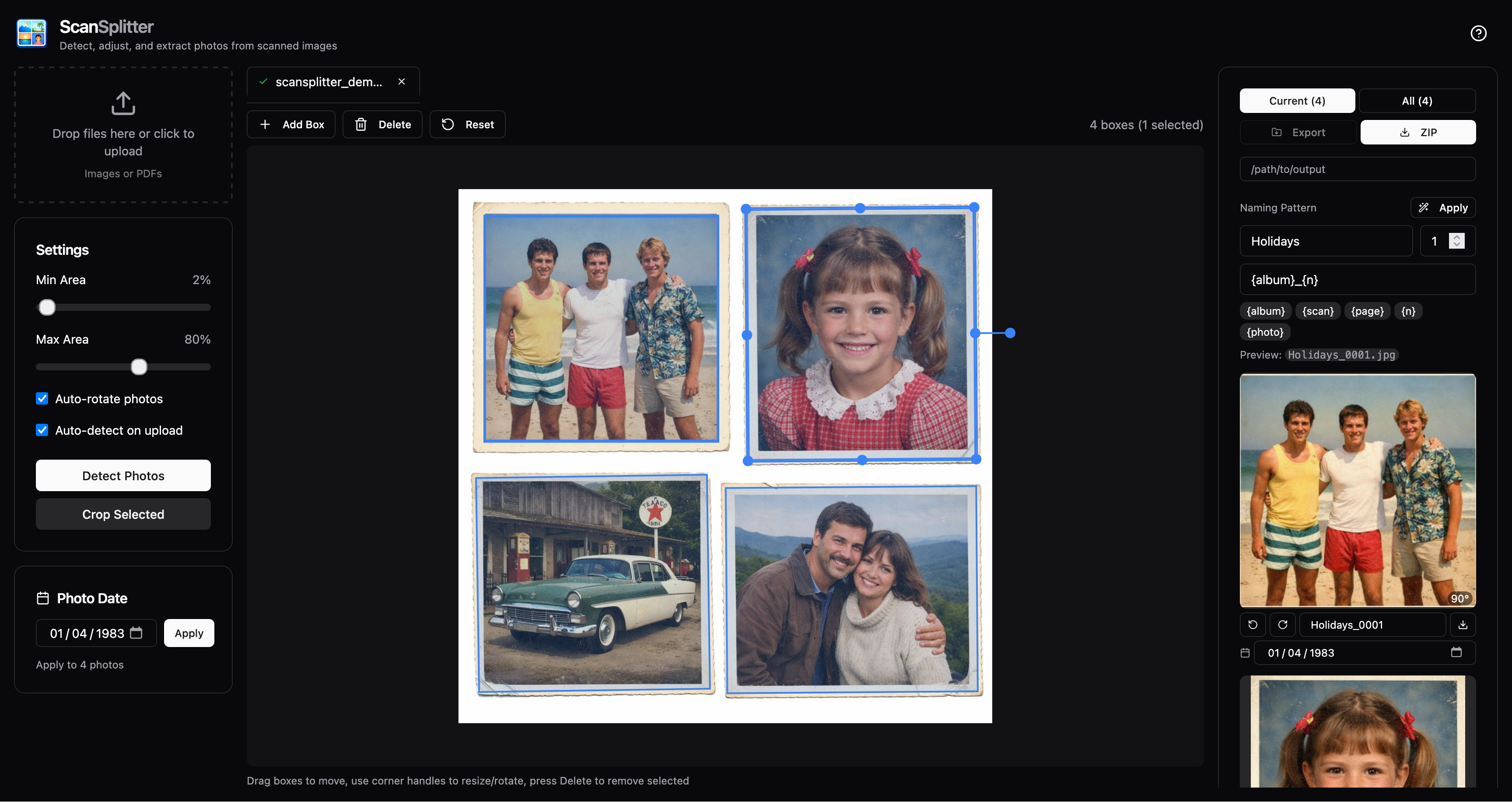
Drop a scan containing multiple photos and get individual, correctly-oriented images back.
Quick Start
One-time setup - Install uv:
curl -LsSf https://astral.sh/uv/install.sh | sh
Run ScanSplitter (no clone needed):
uvx scansplitter api
Opens at http://localhost:8000 - drag & drop your scans and export cropped photos. If port 8000 is already in use, pick another:
uvx scansplitter api --port 8001
Features
- Multiple detection modes - Split individual photos or preserve complete physical album pages with Album Splitter
- Interactive editing - Adjust, rotate, and resize bounding boxes before cropping
- Auto-rotation - Detects and corrects 90°/180°/270° rotations
- PDF support - Extract and process pages from PDF files
- Persistent projects - Import large collections, review only uncertain scans, and continue across restarts
- Archival workflow - Add dates, places, captions, people, restoration settings, lossless masters, and manifests
- Web UI - Modern React interface with Fabric.js canvas editor
- CLI - Batch process files from the command line
Detection Modes & Models
Photo detection (splitter)
- ScanSplitterv5 (default): Combines conservative v3/MobileSAM anchors with color-independent texture and frame passes. Agreeing texture rectangles tighten crops, multiple texture islands split merged page proposals, closed frames recover pale photographs, and tightly prompted segmentation verifies candidates near scan edges. Conflicting evidence falls back to the conservative anchor.
- ScanSplitterv4: The previous tightly prompted MobileSAM detector, retained for comparisons and existing saved projects.
- ScanSplitterv3: A model-free, background-aware OpenCV detector for album pages and low-contrast scans. It models paper/platen colors in Lab space, finds dense non-background regions, separates touching prints at narrow gutters, and snaps boxes to long physical edges.
- OpenRouter LLM (experimental): Sends a resized copy of the complete scan to a configurable OpenRouter vision model and asks for four corners around every inner photographic image. Select it in the Quick or Project detection menu. This mode is not local: the scan is uploaded to OpenRouter and the selected model provider.
To enable the experimental detector, copy the example environment file and add your key:
cp .env.example .env
# edit .env
./scripts/openrouter.py serve
OPENROUTER_MODEL is optional and defaults to google/gemini-3.7-flash.
The .env file is ignored by git, and the key is never sent to or stored by
the frontend. Successful responses are cached under
~/.scansplitter/llm-cache/ (or SCANSPLITTER_DATA_DIR) so re-detecting the
same scan with the same model does not incur another request. The cache stores
only model JSON coordinates, not scan images or API keys. Set
SCANSPLITTER_LLM_CACHE=0 to force fresh requests, or
SCANSPLITTER_LLM_CACHE_DIR to choose another cache directory. Run
./scripts/openrouter.py report to evaluate the OpenRouter model against all
ten ScanSplitter benchmark fixtures.
Whole album pages
- Album Splitter: Detects the physical page instead of its mounted photos, preserving handwriting, tape, patina, spacing, and page context while cropping away the surface around the album. It distinguishes the content-bearing leaf from a facing page or translucent interleaf. Choose Auto, One physical page, or Two-page spread / split in half. It runs locally without a model download and disables photo-oriented edge cleanup so page margins are not lost.
ScanSplitterv4/v5 use the MIT-licensed MobileSAM architecture and checksum-pinned ONNX exports from Acly/MobileSAM. The models total about 43MB, download on first use, and run locally with ONNX Runtime; images stay on the local machine.
Auto-rotation model
- Orientation model: An EfficientNetV2-based ONNX classifier that predicts the correct 0°/90°/180°/270° rotation for each cropped photo. ScanSplitter may fall back to classic heuristics if the model can’t be loaded.
Model downloads
Model-backed features download their weights on first use (MobileSAM totals about 43MB and the orientation model is about 80MB). The web UI shows download progress while this is happening.
Installation Options
Option 1: Run directly with uvx (recommended)
No installation needed - just run:
uvx scansplitter api
Option 2: Install with pipx
pipx install scansplitter
scansplitter api
Option 3: Install from source
git clone https://github.com/madnex/scansplitter
cd scansplitter
uv sync
uv run scansplitter api
Usage
Web Interface
scansplitter api
# or: uvx scansplitter api
Opens at http://localhost:8000 with:
- Drag & drop file upload (images and PDFs)
- Interactive bounding box editor (drag, resize, rotate)
- Multi-file support with tabs
- Current-scan or one-click all-scan cropping
- PDF page navigation
- JPEG or lossless PNG export
The web interface has two modes:
- Quick processes an ad-hoc set of scans and exports the current results.
- Projects keeps a named collection on disk, detects bulk uploads in the background, and tracks review, metadata, restoration, and delivery settings.
Projects workflow
Projects are intended for larger collections that may take more than one session to finish:
- Open Projects, create a named project, and add images or PDFs. PDF pages become individual scans. Detection starts in the background.
- ScanSplitter automatically approves clear detections and marks uncertain scans CHECK. Use Start review or open a scan from the grid.
- In review, adjust the photo boxes when necessary and choose Approve.
Press
Enterto approve and advance, or use the arrow keys to move through the queue. The sidebar shows each crop and lets you give it an individual filename or caption. Crop page immediately downloads only the current page's crops; Re-detect runs detection again for the current scan. - Add collection or per-scan metadata such as dates, places, captions, people, album/roll, and event. Front/back pairing links a photographed print's reverse side to its front; record any inscription manually in the caption.
- Optionally enable non-destructive deskew, color/fade correction, or 2× upscale. Select a crop and choose Compare to preview it without changing the stored scan; each photo can override the project defaults.
- Export approved photos as JPEG or lossless PNG. Projects can also create a PNG/TIFF master, organize files by metadata, include a JSON/CSV manifest, or deliver to a watched folder, Immich, or Nextcloud WebDAV.
Connect Immich
ScanSplitter only uploads approved JPEG or PNG access copies. It does not read,
modify, or delete assets already stored in Immich, so its API key needs only the
asset.upload permission:
- Sign in to Immich as the user who should own the uploaded photos.
- Open Account Settings → API Keys and create a key named, for example,
ScanSplitter. - Choose custom/scoped permissions and enable only
asset.upload. Do not grantall, asset deletion, or administrator permissions. - In ScanSplitter, open the project, choose Deliver → Immich, and enter:
- Immich server: the public base URL, such as
https://photos.example.com. A URL ending in/apialso works. - API key: the key created above.
- Immich server: the public base URL, such as
- To avoid entering the connection again, enable Remember this connection securely. The API key is stored in the operating system credential vault, never in the project or browser storage. If no supported vault is available, ScanSplitter keeps using one-time credential entry.
- Choose Deliver. Saved credentials can later be reused, updated, or forgotten from the Delivery dialog. Saved-secret features are available only while ScanSplitter runs in local mode.
The uploaded photos belong to the Immich user who created the API key. If
delivery returns 401 or 403, check that the key is valid and has
asset.upload. A reverse proxy must allow POST requests and the size of the
photos being uploaded to Immich's /api/assets endpoint.
Flags explain why a scan needs review. They can report that no photo was found, a box touches a scan edge, a box has an unusual aspect ratio or size, or boxes overlap. Each scan is evaluated independently, so pages may contain different numbers of photos. Review mode also shows every cropped photo on the page. Give an individual crop a filename or record a written note such as "Kirmes 1952"; blank filenames continue to use the automatic source-name and photo-index rule. Flags are warnings rather than hard errors: correct the boxes if needed, then approve the scan. Only approved and automatically approved scans are exported.
Projects persist under ~/.scansplitter/projects/. Set
SCANSPLITTER_DATA_DIR to use another data directory. Original project scans
remain untouched by metadata, restoration, and export operations. ScanSplitter
is designed as a local, single-user application and does not provide an
authentication layer for a publicly exposed server.
For implementation details, see the roadmap and the binding feature specifications.
Command Line
# Process a scanned image
uv run scansplitter process scan.jpg -o ./output/

# Process a PDF
uv run scansplitter process document.pdf -o ./output/

# Multiple files
uv run scansplitter process scan1.jpg scan2.png -o ./output/

# Options
uv run scansplitter process scan.jpg \
  --no-rotate \
  --min-area 5 \
  --max-area 70 \
  --detection-mode scansplitterv5 \
  --format jpg \
  -o ./output/
CLI Options:
| Option | Description |
|---|---|
-o, --output |
Output directory (default: ./output) |
--no-rotate |
Disable auto-rotation |
--min-area |
Minimum photo size as % of scan (default: 2) |
--max-area |
Maximum photo size as % of scan (default: 80) |
--detection-mode |
scansplitterv5 (default), scansplitterv4, album-splitter, or scansplitterv3 (Cloud AI is available in Quick, Projects, and the API, but not this batch command) |
--album-layout |
Album mode: auto (default), single, or spread |
--format |
Output format: png or jpg (default: png) |
How It Works
- Photo detection - Runs the selected local, album-page, or optional OpenRouter detector to produce rotatable bounding boxes.
- Interactive adjustment - You can refine boxes in the web UI before cropping.
- Cropping - Extracts rotated regions using the adjusted boxes.
- Auto-rotation (optional) - Uses the orientation model (with fallbacks) to fix 90°/180°/270° rotations.
Credits
ScanSplitter depends on excellent open models and upstream work:
- Orientation model (EfficientNetV2) is downloaded from Duarte Barbosa’s deep image orientation detection project (with a ScanSplitter backup mirror) — https://github.com/duartebarbosadev/deep-image-orientation-detection
Development
Frontend Development
# Start API server
uv run scansplitter api --reload

# In another terminal, start frontend dev server
cd frontend
npm install
npm run dev
Frontend runs on http://localhost:5173 with hot reload, proxying API requests to :8000.
Build Frontend
cd frontend
npm run build
Builds to src/scansplitter/static/, which FastAPI serves automatically.
1 maintainer

Metadata
1 maintainer
Release files for scansplitter 0.7.0
For a detailed explanation of source distributions (sdists) and built distributions (wheels), please see the package formats documentation.
Source distribution (sdist)
| File | Size | Uploaded | |
|---|---|---|---|
| scansplitter-0.7.0.tar.gz | 5.2 MB | Details |
Built distribution (wheel)
| File | Interpreter | ABI | Platform | Reset |
|---|---|---|---|---|
| scansplitter-0.7.0-py3-none-any.whl | Python 3 | none | any | Details |
Total release size: 10.3 MB
Release files / scansplitter-0.7.0.tar.gz
| Download URL | scansplitter-0.7.0.tar.gz |
|---|---|
| Size | 5.2 MB |
| Tags | Source |
|
SHA-256 checksum How to use checksums |
bf323f0485514f461d24a2c570ec8137fe5c823a288a25ad7a1dfa1f2bfcf0dc
|
|
BLAKE2b-256 checksum How to use checksums |
313fd72b568b4cfd303cb4d757545d983d1361f0bfd4bd9248acd6868be08352
|
| Upload date | |
|
Uploaded using Trusted Publishing? What is trusted publishing? |
No |
| Uploaded via |
uv/0.12.23 {"installer":{"name":"uv","version":"0.12.23","subcommand":["publish"]},"python":null,"implementation":{"name":null,"version":null},"distro":{"name":"Ubuntu","version":"24.04","id":"noble","libc":null},"system":{"name":null,"release":null},"cpu":null,"openssl_version":null,"setuptools_version":null,"rustc_version":null,"ci":true}
|
Release files / scansplitter-0.7.0-py3-none-any.whl
| Download URL | scansplitter-0.7.0-py3-none-any.whl |
|---|---|
| Size | 5.1 MB |
| Tags | Python 3 |
|
SHA-256 checksum How to use checksums |
2bdeea82728804c24f90ac46b09071178b0ccef7781bf45d212e4acaae0fa127
|
|
BLAKE2b-256 checksum How to use checksums |
efedad52cd12eb26a4d04aeebdb75a5de664f20dd261c4be7b1971b5057fb63c
|
| Upload date | |
|
Uploaded using Trusted Publishing? What is trusted publishing? |
No |
| Uploaded via |
uv/0.12.23 {"installer":{"name":"uv","version":"0.12.23","subcommand":["publish"]},"python":null,"implementation":{"name":null,"version":null},"distro":{"name":"Ubuntu","version":"24.04","id":"noble","libc":null},"system":{"name":null,"release":null},"cpu":null,"openssl_version":null,"setuptools_version":null,"rustc_version":null,"ci":true}
|














