
Automatically detect, split, and rotate multiple photos from scanned images

Project description

ScanSplitter


Automatically detect, split, and rotate multiple photos from scanned images.
Drop a scan containing multiple photos and get individual, correctly-oriented images back.
Quick Start
One-time setup - Install uv:
curl -LsSf https://astral.sh/uv/install.sh | sh
Run ScanSplitter (no clone needed):
uvx scansplitter api
Opens at http://localhost:8000 - drag & drop your scans and export cropped photos. If port 8000 is already in use, pick another:
uvx scansplitter api --port 8001
Features
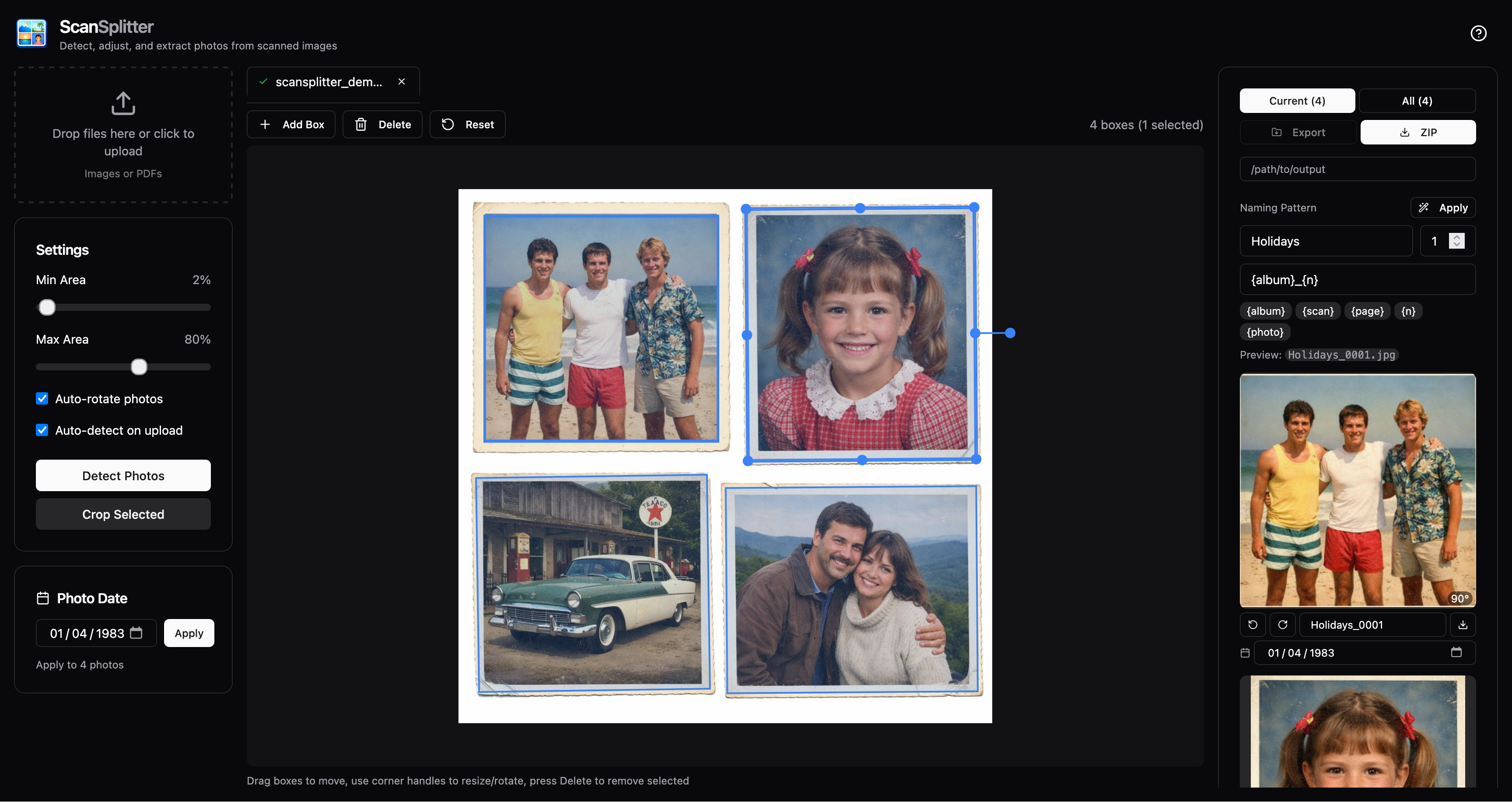
- Auto-detection - Finds multiple photos in a single scan using contour detection
- Interactive editing - Adjust, rotate, and resize bounding boxes before cropping
- Auto-rotation - Detects and corrects 90°/180°/270° rotations
- PDF support - Extract and process pages from PDF files
- Web UI - Modern React interface with Fabric.js canvas editor
- CLI - Batch process files from the command line
Installation Options
Option 1: Run directly with uvx (recommended)
No installation needed - just run:
uvx scansplitter api
Option 2: Install with pipx
pipx install scansplitter
scansplitter api
Option 3: Install from source
git clone https://github.com/janklan/scansplitter
cd scansplitter
uv sync
uv run scansplitter api
Usage
Web Interface
scansplitter api
# or: uvx scansplitter api
Opens at http://localhost:8000 with:
- Drag & drop file upload (images and PDFs)
- Interactive bounding box editor (drag, resize, rotate)
- Multi-file support with tabs
- PDF page navigation
- ZIP export
Command Line
# Process a scanned image
uv run scansplitter process scan.jpg -o ./output/

# Process a PDF
uv run scansplitter process document.pdf -o ./output/

# Multiple files
uv run scansplitter process scan1.jpg scan2.png -o ./output/

# Options
uv run scansplitter process scan.jpg \
  --no-rotate \
  --min-area 5 \
  --max-area 70 \
  --format jpg \
  -o ./output/
CLI Options:
| Option | Description |
|---|---|
-o, --output |
Output directory (default: ./output) |
--no-rotate |
Disable auto-rotation |
--min-area |
Minimum photo size as % of scan (default: 2) |
--max-area |
Maximum photo size as % of scan (default: 80) |
--format |
Output format: png or jpg (default: png) |
How It Works
- Preprocessing - Convert to grayscale, apply Gaussian blur
- Thresholding - Adaptive binary threshold to separate photos from background
- Contour Detection - Find distinct regions using OpenCV
- Filtering - Keep regions between min/max area thresholds
- Interactive Adjustment - User can modify detected boxes in the web UI
- Rotation Detection - Score each 90° rotation using Hough line detection
- Cropping - Extract photos using adjusted bounding boxes
Development
Frontend Development
# Start API server
uv run scansplitter api --reload

# In another terminal, start frontend dev server
cd frontend
npm install
npm run dev
Frontend runs on http://localhost:5173 with hot reload, proxying API requests to :8000.
Build Frontend
cd frontend
npm run build
Builds to src/scansplitter/static/, which FastAPI serves automatically.


Download files
Download the file for your platform. If you're not sure which to choose, learn more about installing packages.
Source Distribution
Built Distribution
Filter files by name, interpreter, ABI, and platform.
If you're not sure about the file name format, learn more about wheel file names.
Copy a direct link to the current filters
File details
Details for the file scansplitter-0.2.1.tar.gz.
File metadata
- Download URL: scansplitter-0.2.1.tar.gz
- Upload date:
- Size: 4.8 MB
- Tags: Source
- Uploaded using Trusted Publishing? No
- Uploaded via: uv/0.9.21 {"installer":{"name":"uv","version":"0.9.21","subcommand":["publish"]},"python":null,"implementation":{"name":null,"version":null},"distro":{"name":"Ubuntu","version":"24.04","id":"noble","libc":null},"system":{"name":null,"release":null},"cpu":null,"openssl_version":null,"setuptools_version":null,"rustc_version":null,"ci":true}
File hashes
| Algorithm | Hash digest | |
|---|---|---|
| SHA256 |
c83b444a75d3eb40c8ff1b945e03adc3b5ab3e5e42546c80e3dd0881f234ee13
|
|
| MD5 |
6169fbd5d5d198459cfc6616bd85d1da
|
|
| BLAKE2b-256 |
4b41002edf60e1c8990632676ec42b89860f437000e34f4f43153c12f0c58237
|
File details
Details for the file scansplitter-0.2.1-py3-none-any.whl.
File metadata
- Download URL: scansplitter-0.2.1-py3-none-any.whl
- Upload date:
- Size: 4.8 MB
- Tags: Python 3
- Uploaded using Trusted Publishing? No
- Uploaded via: uv/0.9.21 {"installer":{"name":"uv","version":"0.9.21","subcommand":["publish"]},"python":null,"implementation":{"name":null,"version":null},"distro":{"name":"Ubuntu","version":"24.04","id":"noble","libc":null},"system":{"name":null,"release":null},"cpu":null,"openssl_version":null,"setuptools_version":null,"rustc_version":null,"ci":true}
File hashes
| Algorithm | Hash digest | |
|---|---|---|
| SHA256 |
d76523457b74ce0c6d493c08f054cfdeb6887d3873f2f30722e4a0a9220b9344
|
|
| MD5 |
5c9dd9cdb03e25f36a0dbdbbd600a034
|
|
| BLAKE2b-256 |
c473c13a1516bdfca3415b210a57e0f6b8f4f48fb60d2c1d17b09bca014294e3
|






