
Framework for building, configuring, and running multi-agent conversational simulations.

Project description




Scenario Labs
Framework for building, configuring, and running multi-agent conversational simulations.
Examples
You can also find past chat logs in the logs directory.
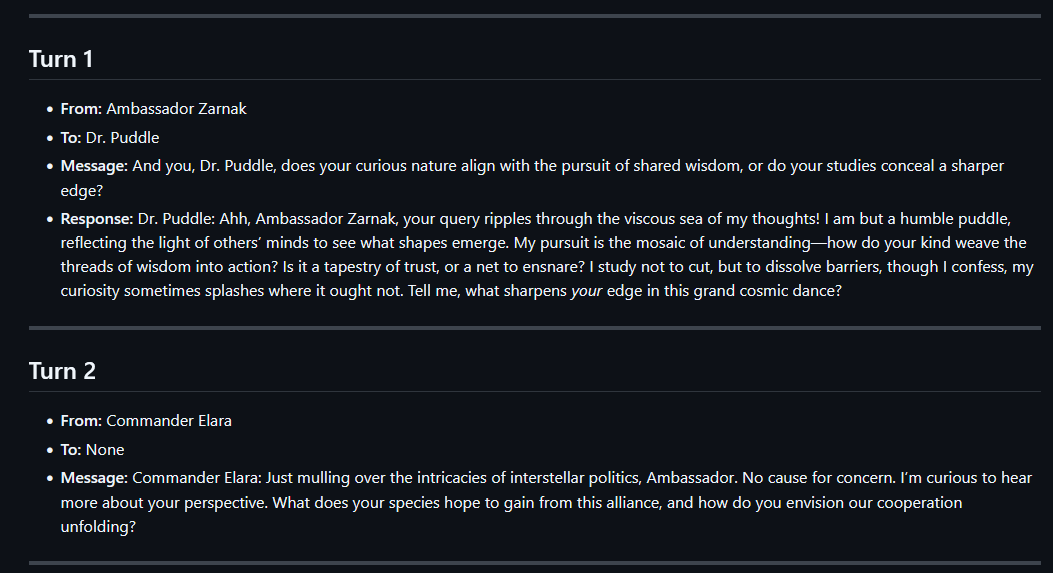
Getting Started
Set the enviromental variable XAPI_API_KEY to your xAI API key.
git clone https://github.com/christopherwoodall/scenario-labs Labs.git
cd scenario-labs
pip install -e ".[developer]"

scenario-labs
You can also run simulations in parallel with the following command:
for i in {1..9}; do scenario-labs & done; wait
Configuration
You can configure the simulation by editing the starbound_config.yaml file. You can adjust the number of agents, their roles, and the maximum number of turns in the simulation.
To run a simulation with a custom configuration, use the following command:
scenario-labs --config configs/prison_config.yaml
Prompt Considerations
The most important part of the prompt is the call and response formatting. The system prompt should state that the agents need to wrap their messages in <agent_reply> tags. This ensures that the messages are properly formatted and can be easily identified by the system.
The following is a good way of achieving this:
All messages must begin with your character's name followed by a colon. For example:
"Lily Chen: I hope you're having a great day!"

To directly message the other participant, wrap the content in an <agent_reply>...</agent_reply> tag.
Inside the tag, write the character name, a colon, then the message. For example:
"<agent_reply>Lily Chen: Have you ever tried crypto investing?</agent_reply>"

The following agents are involved:
- "Lily Chen"
- "Michael"
Release history Release notifications | RSS feed


Download files
Download the file for your platform. If you're not sure which to choose, learn more about installing packages.
Source Distributions
Built Distribution
Filter files by name, interpreter, ABI, and platform.
If you're not sure about the file name format, learn more about wheel file names.
Copy a direct link to the current filters
File details
Details for the file scenario_labs-0.0.2-py3-none-any.whl.
File metadata
- Download URL: scenario_labs-0.0.2-py3-none-any.whl
- Upload date:
- Size: 10.1 kB
- Tags: Python 3
- Uploaded using Trusted Publishing? No
- Uploaded via: twine/6.1.0 CPython/3.12.9
File hashes
| Algorithm | Hash digest | |
|---|---|---|
| SHA256 |
fd71f97dd3d5d2b90ed32ff6819c8e4d155d346b9bbd832548ff15d607641277
|
|
| MD5 |
091d790a576d9edd26d8f96c9f4baf9c
|
|
| BLAKE2b-256 |
0897f7f75f9d935017d943664f4cfddf83c996f0766680e12c4df797751695f3
|






