
This release is a pre-release and may not be stable for production use.

scientific-spinbox
ScientificSpinbox is a Qt Widget based on QDoubleSpinBox that enables users to insert and manipulate physical quantities naturally.




Getting started
This widget makes it easier for people from STEM (Science, Technology, Engineering, and Mathematics) fields to interact with numeric inputs in a natural way with units and converstion between them, also allowing the usage of scientific notation and adding resources that highly improve the user experience.
The backend that deals with units and their conversion can be set up/integrated separately, but it is currently making use of the package Pint.
This package also makes use of QtPy, an abstraction layer for PyQt/PySide, making it simple to interchange between those bindings and their versions.
Its main application is to be integrated with the PyMR framework to provide a better user interface when setting physical values for Magnetic Resonance experiments, where it is necessary to use, for example, frequency, degrees, voltage, and current.
Despite the specific use, we provided this package as an independent one so more people can benefit from it. The final intention is to integrate this special QSpinBox into the Qt/PySide/PyQt package, if they have interest in the future.
Examples
Below is an example of a ScientificSpinBox widget used to insert values with units of time. The allowed units are s, ms and us and the base unit is ms. The widget enables the user to use scientific notation, edit the values using step up/step down and insert any desired number of decimal places.
Altough the user can play around with the units, the baseValue will always be the input converted to the base unit.
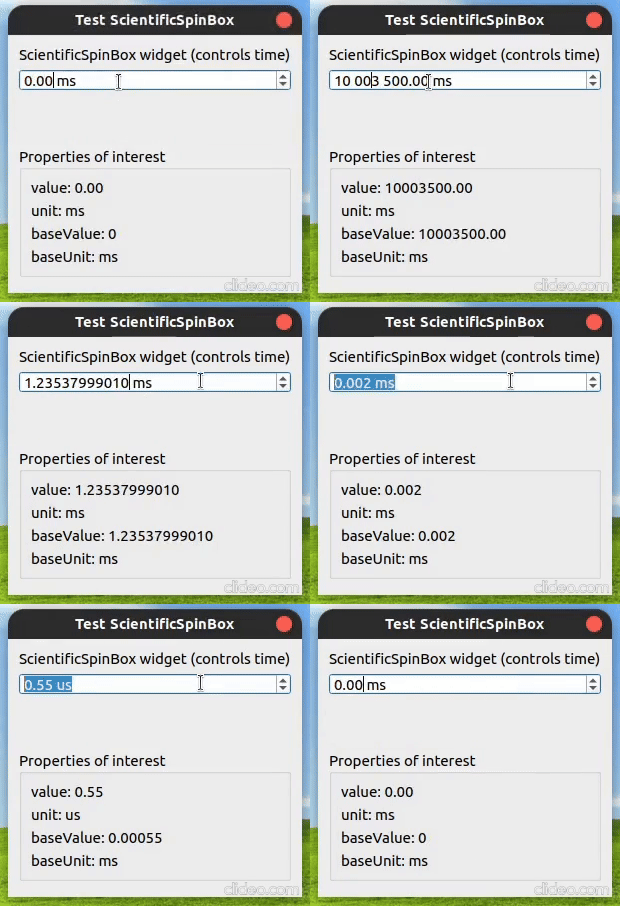
Example of a ScientificSpinBox with base_unit='ms' and allowed_units=['s','ms','us'].
Installing, updating and uninstalling
To install or update, do:
pip install -U scientific-spinboxTo remove, do:
pip uninstall scientific-spinboxTo install it in development mode, from a local clone, do:
git clone https://gitlab.com/dpizetta/pqwidget.git scientific-spinbox
cd scientific-spinbox && git checkout develop-v1.x
pip install -e .
Testing
To run automated tests for scientific-spinbox, you can use the test environment on tox:
tox -e testThe test environment runs with PyQt5 by default.
There are environments for testing the widget with PyQt5, PyQt6 and PySide6, as well as Python 3.10 and Python 3.11.
tox -e py310-test-pyside6
tox -e py310-test-pyqt5
tox -e py310-test-pyqt6
tox -e py311-test-pyside6
tox -e py311-test-pyqt5
tox -e py311-test-pyqt6Usage
This widget is intended to be used within your own Qt application. Please read the documentation to see examples of usage and details on how to use it and extend its functionalities.
Compatibility
Currently works with PyQt5, PyQt6 and PySide6. There’s no plans of implementing a compatibility layer with PySide2 for now.
Support
There is no warranty or support at all. Use it at your own risk. If you find an issue, please report it and the maintainers will try or help to fix.
Contributing
Any contribution is welcome and appreciated. Before contributing, please read the “Contributing” section of the documentation.
License
This project is licensed under GNU Lesser General Public License (LGPLv3).
Project status
This project is still on Beta. It is being actively developed and should reach its first stable release soon.
2 maintainers


Metadata
2 maintainers
Release files for scientific-spinbox 1.0.1b1
For a detailed explanation of source distributions (sdists) and built distributions (wheels), please see the package formats documentation.
Source distribution (sdist)
| File | Size | Uploaded | |
|---|---|---|---|
| scientific_spinbox-1.0.1b1.tar.gz | 40.5 kB | Details |
Built distribution (wheel)
| File | Interpreter | ABI | Platform | Reset |
|---|---|---|---|---|
| scientific_spinbox-1.0.1b1-py3-none-any.whl | Python 3 | none | any | Details |
Total release size: 87.4 kB
Release files / scientific_spinbox-1.0.1b1.tar.gz
| Download URL | scientific_spinbox-1.0.1b1.tar.gz |
|---|---|
| Size | 40.5 kB |
| Tags | Source |
|
SHA-256 checksum How to use checksums |
376172d76f3077d1e79d5b456a345d580feb8563a7ba22922d1b93e0e8558e1d
|
|
BLAKE2b-256 checksum How to use checksums |
a1a44863457d90d8d5dda8d5a5a37e811632ff004f7a69be0903e2da3e4d98ea
|
| Upload date | |
|
Uploaded using Trusted Publishing? What is trusted publishing? |
No |
| Uploaded via |
twine/6.1.0 CPython/3.10.12
|
Release files / scientific_spinbox-1.0.1b1-py3-none-any.whl
| Download URL | scientific_spinbox-1.0.1b1-py3-none-any.whl |
|---|---|
| Size | 46.9 kB |
| Tags | Python 3 |
|
SHA-256 checksum How to use checksums |
52dd2064e4d110674d74ec5164eebe6439f4978fb311f24e0bda56a9a58056e6
|
|
BLAKE2b-256 checksum How to use checksums |
ae45d95fc4728d8ddb848b21e334ffb5010832aee1037b2a049f6f9370ce51c6
|
| Upload date | |
|
Uploaded using Trusted Publishing? What is trusted publishing? |
No |
| Uploaded via |
twine/6.1.0 CPython/3.10.12
|














