
Intel(R) Extension for Scikit-learn*



Extension for Scikit-learn is a free software AI accelerator designed to deliver over 10-100X acceleration to your existing scikit-learn code. The software acceleration is achieved with vector instructions, AI hardware-specific memory optimizations, threading, and optimizations.
With Extension for Scikit-learn, you can:
- Speed up training and inference by up to 100x with equivalent mathematical accuracy
- Benefit from performance improvements across different hardware configurations, including GPUs and multi-GPU configurations
- Integrate the extension into your existing Scikit-learn applications without code modifications
- Continue to use the open-source scikit-learn API
- Enable and disable the extension with a couple of lines of code or at the command line
🛠 Installation
Intel(R) Extension for Scikit-learn is available at the Python Package Index, in Conda-Forge and in Intel's conda channel.
To install through pip:
pip install scikit-learn-intelex
See the documentation for more details about supported platforms and other ways of installing it.
You can build the package from sources as well.
⚡️ Get Started
Easiest way to benefit from accelerations from the extension is by patching scikit-learn with it:
- Enable CPU optimizations
import numpy as np
from sklearnex import patch_sklearn
patch_sklearn()

from sklearn.cluster import DBSCAN

X = np.array([[1., 2.], [2., 2.], [2., 3.],
              [8., 7.], [8., 8.], [25., 80.]], dtype=np.float32)
clustering = DBSCAN(eps=3, min_samples=2).fit(X)
-
Enable GPU optimizations
Note: executing on GPU has additional system software requirements - see details.
import numpy as np
from sklearnex import patch_sklearn, config_context
patch_sklearn()

from sklearn.cluster import DBSCAN

X = np.array([[1., 2.], [2., 2.], [2., 3.],
              [8., 7.], [8., 8.], [25., 80.]], dtype=np.float32)
with config_context(target_offload="gpu:0"):
    clustering = DBSCAN(eps=3, min_samples=2).fit(X)
Usage without patching
Alternatively, all functionalities are also available under a separate module which can be imported directly, without involving any patching.
-
To run on CPU:
import numpy as np
from sklearnex.cluster import DBSCAN

X = np.array([[1., 2.], [2., 2.], [2., 3.],
              [8., 7.], [8., 8.], [25., 80.]], dtype=np.float32)
clustering = DBSCAN(eps=3, min_samples=2).fit(X)
-
To run on GPU:
import numpy as np
from sklearnex import config_context
from sklearnex.cluster import DBSCAN

X = np.array([[1., 2.], [2., 2.], [2., 3.],
              [8., 7.], [8., 8.], [25., 80.]], dtype=np.float32)
with config_context(target_offload="gpu:0"):
    clustering = DBSCAN(eps=3, min_samples=2).fit(X)
🚀 Scikit-learn patching
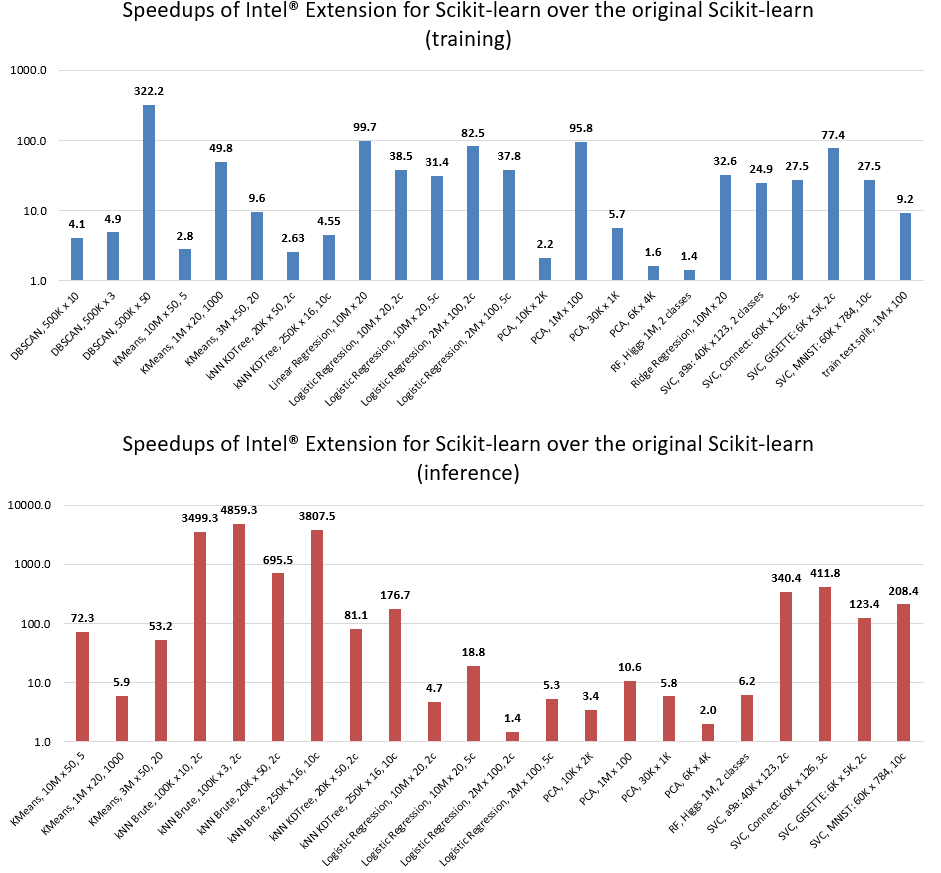
- HW: c5.24xlarge AWS EC2 Instance using an Intel Xeon Platinum 8275CL with 2 sockets and 24 cores per socket
- SW: scikit-learn version 0.24.2, scikit-learn-intelex version 2021.2.3, Python 3.8
Intel(R) Extension for Scikit-learn patching affects performance of specific Scikit-learn functionality. Refer to the list of supported algorithms and parameters for details. In cases when unsupported parameters are used, the package fallbacks into original Scikit-learn. If the patching does not cover your scenarios, submit an issue on GitHub.
Read more about it in the documentation for scikit-learn patching.
👀 Follow us on Medium
We publish blogs on Medium, so follow us to learn tips and tricks for more efficient data analysis with the help of Intel(R) Extension for Scikit-learn. Here are our latest blogs:
- Save Time and Money with Intel Extension for Scikit-learn
- Superior Machine Learning Performance on the Latest Intel Xeon Scalable Processors
- Leverage Intel Optimizations in Scikit-Learn
- Intel Gives Scikit-Learn the Performance Boost Data Scientists Need
- From Hours to Minutes: 600x Faster SVM
- Improve the Performance of XGBoost and LightGBM Inference
- Accelerate Kaggle Challenges Using Intel AI Analytics Toolkit
- Accelerate Your scikit-learn Applications
- Accelerate Linear Models for Machine Learning
- Accelerate K-Means Clustering
🔗 Important links
- Notebook examples
- Documentation
- scikit-learn API and patching
- Benchmark code
- Building from Sources
- About Intel(R) oneAPI Data Analytics Library
💬 Support
Report issues, ask questions, and provide suggestions using:
You may reach out to project maintainers privately at onedal.maintainers@intel.com
1 maintainer

Metadata
1 maintainer
Release files for scikit-learn-intelex-gpu 2026.2.0
For a detailed explanation of source distributions (sdists) and built distributions (wheels), please see the package formats documentation.
Built distributions (wheels)
Total release size: 10.3 MB
Release files / scikit_learn_intelex_gpu-2026.2.0-py314-none-win_amd64.whl
| Download URL | scikit_learn_intelex_gpu-2026.2.0-py314-none-win_amd64.whl |
|---|---|
| Size | 918.5 kB |
| Tags | Python 3.14 Windows x86-64 |
|
SHA-256 checksum How to use checksums |
0e5a1d32b9a2fefbbf4d3f6cfacc6336241d2721c44ae71e9ceec0af68ff9881
|
|
BLAKE2b-256 checksum How to use checksums |
90b547a3b4ac114de8699f554cbecb24d4e3e1270edc832873c56102538da972
|
| Upload date | |
|
Uploaded using Trusted Publishing? What is trusted publishing? |
No |
| Uploaded via |
twine/3.8.0 colorama/0.4.4 importlib-metadata/4.6.4 keyring/23.5.0 pkginfo/1.8.2 readme-renderer/34.0 requests-toolbelt/0.9.1 requests/2.34.2 rfc3986/1.5.0 tqdm/4.57.0 urllib3/1.26.5 CPython/3.10.6
|
Release files / scikit_learn_intelex_gpu-2026.2.0-py314-none-manylinux_2_28_x86_64.whl
| Download URL | scikit_learn_intelex_gpu-2026.2.0-py314-none-manylinux_2_28_x86_64.whl |
|---|---|
| Size | 1.2 MB |
| Tags | Linux glibc 2.28+ x86-64 Python 3.14 |
|
SHA-256 checksum How to use checksums |
6f51f362948cc65767d8baeb4b8b9207f1e2703d1774abf14108e1fb1b667729
|
|
BLAKE2b-256 checksum How to use checksums |
4c40991898f18bef0c2064279641e3337f021cea63df6bd216c73dc2b775583a
|
| Upload date | |
|
Uploaded using Trusted Publishing? What is trusted publishing? |
No |
| Uploaded via |
twine/3.8.0 colorama/0.4.4 importlib-metadata/4.6.4 keyring/23.5.0 pkginfo/1.8.2 readme-renderer/34.0 requests-toolbelt/0.9.1 requests/2.34.2 rfc3986/1.5.0 tqdm/4.57.0 urllib3/1.26.5 CPython/3.10.6
|
Release files / scikit_learn_intelex_gpu-2026.2.0-py313-none-win_amd64.whl
| Download URL | scikit_learn_intelex_gpu-2026.2.0-py313-none-win_amd64.whl |
|---|---|
| Size | 917.3 kB |
| Tags | Python 3.13 Windows x86-64 |
|
SHA-256 checksum How to use checksums |
386f391f323c16b96d73ea58d52b2fe146c319d1b82f3992132c9c68e2846aae
|
|
BLAKE2b-256 checksum How to use checksums |
48e1c6dec23e721c1b4da69cedc521fd31a793dfb405053120cafbaaf332d9d9
|
| Upload date | |
|
Uploaded using Trusted Publishing? What is trusted publishing? |
No |
| Uploaded via |
twine/3.8.0 colorama/0.4.4 importlib-metadata/4.6.4 keyring/23.5.0 pkginfo/1.8.2 readme-renderer/34.0 requests-toolbelt/0.9.1 requests/2.34.2 rfc3986/1.5.0 tqdm/4.57.0 urllib3/1.26.5 CPython/3.10.6
|
Release files / scikit_learn_intelex_gpu-2026.2.0-py313-none-manylinux_2_28_x86_64.whl
| Download URL | scikit_learn_intelex_gpu-2026.2.0-py313-none-manylinux_2_28_x86_64.whl |
|---|---|
| Size | 1.2 MB |
| Tags | Linux glibc 2.28+ x86-64 Python 3.13 |
|
SHA-256 checksum How to use checksums |
cb3e2981db407e5b4bcb6e36a6905fc47271ba9d56699a93f9fd377b89fea52a
|
|
BLAKE2b-256 checksum How to use checksums |
22ad2dee3b12d9218d2e2945545b23ef263b885471925ad2e13b3cad15f662b2
|
| Upload date | |
|
Uploaded using Trusted Publishing? What is trusted publishing? |
No |
| Uploaded via |
twine/3.8.0 colorama/0.4.4 importlib-metadata/4.6.4 keyring/23.5.0 pkginfo/1.8.2 readme-renderer/34.0 requests-toolbelt/0.9.1 requests/2.34.2 rfc3986/1.5.0 tqdm/4.57.0 urllib3/1.26.5 CPython/3.10.6
|
Release files / scikit_learn_intelex_gpu-2026.2.0-py312-none-win_amd64.whl
| Download URL | scikit_learn_intelex_gpu-2026.2.0-py312-none-win_amd64.whl |
|---|---|
| Size | 917.0 kB |
| Tags | Python 3.12 Windows x86-64 |
|
SHA-256 checksum How to use checksums |
da49f7fc05520a2437d2e11511255736666cced1c7ad636064eb7254ff72d07d
|
|
BLAKE2b-256 checksum How to use checksums |
ef69639e1114781cc749858abe1bc7f4ad38a1996f876d4dcd48695555d5ed72
|
| Upload date | |
|
Uploaded using Trusted Publishing? What is trusted publishing? |
No |
| Uploaded via |
twine/3.8.0 colorama/0.4.4 importlib-metadata/4.6.4 keyring/23.5.0 pkginfo/1.8.2 readme-renderer/34.0 requests-toolbelt/0.9.1 requests/2.34.2 rfc3986/1.5.0 tqdm/4.57.0 urllib3/1.26.5 CPython/3.10.6
|
Release files / scikit_learn_intelex_gpu-2026.2.0-py312-none-manylinux_2_28_x86_64.whl
| Download URL | scikit_learn_intelex_gpu-2026.2.0-py312-none-manylinux_2_28_x86_64.whl |
|---|---|
| Size | 1.2 MB |
| Tags | Linux glibc 2.28+ x86-64 Python 3.12 |
|
SHA-256 checksum How to use checksums |
9f98b9e8df533dee8750ad3d74f1bf8e73d26966bcd55ee2598cc18c1ebb6e2c
|
|
BLAKE2b-256 checksum How to use checksums |
e87e6ca9d170378ebac69c742d5b98bf1b2bf7ad6f756aa22e36e20a73547bd7
|
| Upload date | |
|
Uploaded using Trusted Publishing? What is trusted publishing? |
No |
| Uploaded via |
twine/3.8.0 colorama/0.4.4 importlib-metadata/4.6.4 keyring/23.5.0 pkginfo/1.8.2 readme-renderer/34.0 requests-toolbelt/0.9.1 requests/2.34.2 rfc3986/1.5.0 tqdm/4.57.0 urllib3/1.26.5 CPython/3.10.6
|
Release files / scikit_learn_intelex_gpu-2026.2.0-py311-none-win_amd64.whl
| Download URL | scikit_learn_intelex_gpu-2026.2.0-py311-none-win_amd64.whl |
|---|---|
| Size | 834.6 kB |
| Tags | Python 3.11 Windows x86-64 |
|
SHA-256 checksum How to use checksums |
81d878c1abb888c9dc3814219002de7622b13acea67a2d4072bc96fc1dd3fac7
|
|
BLAKE2b-256 checksum How to use checksums |
4968d86b57f0c0219a43f95c4e1fea76c4ae77e18f14394627b95b461ec8d72d
|
| Upload date | |
|
Uploaded using Trusted Publishing? What is trusted publishing? |
No |
| Uploaded via |
twine/3.8.0 colorama/0.4.4 importlib-metadata/4.6.4 keyring/23.5.0 pkginfo/1.8.2 readme-renderer/34.0 requests-toolbelt/0.9.1 requests/2.34.2 rfc3986/1.5.0 tqdm/4.57.0 urllib3/1.26.5 CPython/3.10.6
|
Release files / scikit_learn_intelex_gpu-2026.2.0-py311-none-manylinux_2_28_x86_64.whl
| Download URL | scikit_learn_intelex_gpu-2026.2.0-py311-none-manylinux_2_28_x86_64.whl |
|---|---|
| Size | 1.2 MB |
| Tags | Linux glibc 2.28+ x86-64 Python 3.11 |
|
SHA-256 checksum How to use checksums |
f24f05c142a4746e8f560feca37d7567b0579be1936912101c08a5124129b540
|
|
BLAKE2b-256 checksum How to use checksums |
b7d4a700091d1742512663c64ac10ec021c6b515b536aee13d2470b9d26eb5b5
|
| Upload date | |
|
Uploaded using Trusted Publishing? What is trusted publishing? |
No |
| Uploaded via |
twine/3.8.0 colorama/0.4.4 importlib-metadata/4.6.4 keyring/23.5.0 pkginfo/1.8.2 readme-renderer/34.0 requests-toolbelt/0.9.1 requests/2.34.2 rfc3986/1.5.0 tqdm/4.57.0 urllib3/1.26.5 CPython/3.10.6
|
Release files / scikit_learn_intelex_gpu-2026.2.0-py310-none-win_amd64.whl
| Download URL | scikit_learn_intelex_gpu-2026.2.0-py310-none-win_amd64.whl |
|---|---|
| Size | 837.7 kB |
| Tags | Python 3.10 Windows x86-64 |
|
SHA-256 checksum How to use checksums |
5d33a52e42546df798ac286de82190cc29f873b000d8233f2a5694b62226e0cc
|
|
BLAKE2b-256 checksum How to use checksums |
8de77e7f1134e376e897f6d56b146e5b1e90c7966a9bdba1b08c408cb7298cc9
|
| Upload date | |
|
Uploaded using Trusted Publishing? What is trusted publishing? |
No |
| Uploaded via |
twine/3.8.0 colorama/0.4.4 importlib-metadata/4.6.4 keyring/23.5.0 pkginfo/1.8.2 readme-renderer/34.0 requests-toolbelt/0.9.1 requests/2.34.2 rfc3986/1.5.0 tqdm/4.57.0 urllib3/1.26.5 CPython/3.10.6
|
Release files / scikit_learn_intelex_gpu-2026.2.0-py310-none-manylinux_2_28_x86_64.whl
| Download URL | scikit_learn_intelex_gpu-2026.2.0-py310-none-manylinux_2_28_x86_64.whl |
|---|---|
| Size | 1.2 MB |
| Tags | Linux glibc 2.28+ x86-64 Python 3.10 |
|
SHA-256 checksum How to use checksums |
1d9cba11e029255b05c27ea0a6d80fd3e1bfe82ff742e73785b50864d5f78e8b
|
|
BLAKE2b-256 checksum How to use checksums |
a5f019428a962d386f262478a03db991ff2c7ae7250662e9da036b1d1c5896ae
|
| Upload date | |
|
Uploaded using Trusted Publishing? What is trusted publishing? |
No |
| Uploaded via |
twine/3.8.0 colorama/0.4.4 importlib-metadata/4.6.4 keyring/23.5.0 pkginfo/1.8.2 readme-renderer/34.0 requests-toolbelt/0.9.1 requests/2.34.2 rfc3986/1.5.0 tqdm/4.57.0 urllib3/1.26.5 CPython/3.10.6
|
Security for scikit-learn-intelex-gpu 2026.2.0
Provenance
Provenance describes where a file came from. On PyPI, provenance is shared via attestations, which provide a verifiable record of the build or publishing details. View details, limitations and caveats.
No provenance found
None of the files in this release were uploaded with provenance metadata.
A note on package security
PyPI is a repository for distributing packages, not a service for auditing them. While third-party security researchers and our staff do their best to detect and remove malicious packages, PyPI cannot guarantee the quality, security or suitability of any given package.














