
scmap
Assign RGB colors to 3D orientations (points on a sphere).
scmap maps each 3D direction vector to an RGB color. This is useful for
visualizing orientation fields, directional measurements, or vector data in 3D.
Installation
Install from PyPI:
pip install scmap
Quick Start
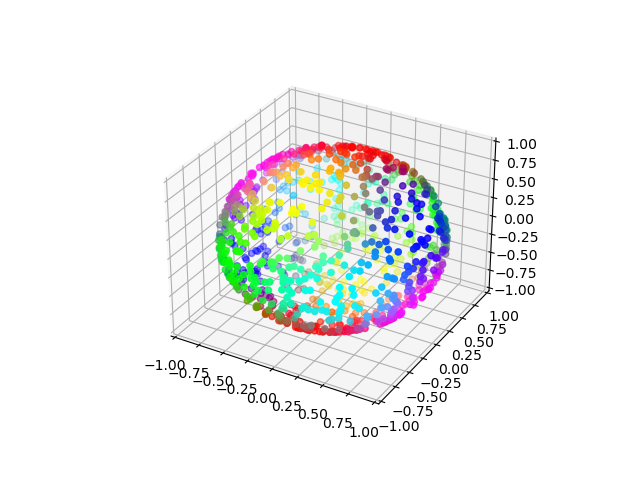
Generate random unit vectors and color them with the default all-purpose map
Ico:
import numpy as np
import scmap

# 1000 random 3D vectors
vectors = np.random.standard_normal((1000, 3))
vectors /= np.linalg.norm(vectors, axis=1, keepdims=True)

coloring = scmap.Ico()
colors = coloring(vectors)  # shape: (1000, 3), RGB values in [0, 1]
Plot the result with Matplotlib:
import matplotlib.pyplot as plt

fig = plt.figure()
ax = fig.add_subplot(projection="3d")
ax.scatter(vectors[:, 0], vectors[:, 1], vectors[:, 2], c=colors)
ax.set_xlim(-1, 1)
ax.set_ylim(-1, 1)
ax.set_zlim(-1, 1)
plt.show()
Orienting the Colormap
All colormap classes support these orientation options:
z_direction: define which direction should be treated as the colormap z-axis.rotation: pass a custom 3x3 rotation matrix.ordering: permute input axes, for example[2, 0, 1].
Example using z_direction:
coloring = scmap.Duo(z_direction=[0.3, 0.4, 0.5])
colors = coloring(vectors)
Example using ordering:
coloring = scmap.Uno(ordering=[2, 0, 1])
colors = coloring(vectors)
Example using an explicit rotation matrix:
R = scmap.get_rotation([0.0, 1.0, 0.0])
coloring = scmap.Ico(rotation=R)
colors = coloring(vectors)
Available Colormaps
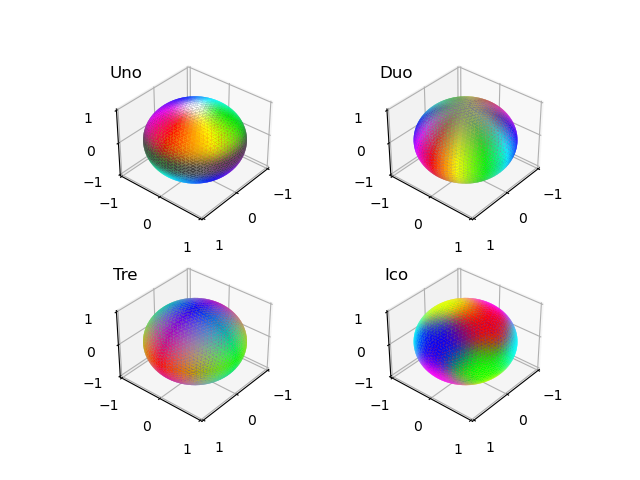
The package includes six colormaps:
Uno: best when vectors are mostly aligned with one dominant direction.Duo: best when vectors are mostly distributed in a plane.Tre: emphasizes alignment with x/y/z axes.Ico: balanced, general-purpose spherical colormap.Inc: colors by inclination.Azy: colors by azimuth.
Notes
- Input vectors should be provided as an array with shape
(..., 3), where the last dimension is always 3 (x, y, z). Works with any number of leading dimensions, e.g.,(n, 3),(h, w, 3),(d, h, w, 3), etc. - Vectors are normalized internally before color mapping and must be non-zero.
- Output colors are RGB arrays with shape
(..., 3), matching the input shape.
1 maintainer

Metadata
1 maintainer
Release files for scmap 0.1.1
For a detailed explanation of source distributions (sdists) and built distributions (wheels), please see the package formats documentation.
Source distribution (sdist)
| File | Size | Uploaded | Provenance | Actions |
|---|---|---|---|---|
| scmap-0.1.1.tar.gz | 13.4 kB | Without provenance | Details for scmap-0.1.1.tar.gz |
Built distribution (wheel)
| File | Interpreter | ABI | Platform | Actions Reset |
|---|---|---|---|---|
| scmap-0.1.1-py3-none-any.whl | Python 3 | none | any | Details for scmap-0.1.1-py3-none-any.whl |
Total release size: 27.1 kB
Release files / scmap-0.1.1.tar.gz
| Download URL | scmap-0.1.1.tar.gz |
|---|---|
| Size | 13.4 kB |
| Tags | Source |
|
SHA-256 checksum How to use checksums |
0690b6706ad7e1f56220164e18f123a4b131b05d6289af3aa148fee5dcf1eb50
|
|
BLAKE2b-256 checksum How to use checksums |
614f121702ab703c538f76d4667bcd48affbae68cf04f6d0968105158d84c2e2
|
| Upload date | |
|
Uploaded using Trusted Publishing? What is trusted publishing? |
No |
| Uploaded via |
twine/6.2.0 CPython/3.9.12
|
Release files / scmap-0.1.1-py3-none-any.whl
| Download URL | scmap-0.1.1-py3-none-any.whl |
|---|---|
| Size | 13.7 kB |
| Tags | Python 3 |
|
SHA-256 checksum How to use checksums |
dad1dad1124cc28c5aa5ec6054a5675e8a3323a388465f8f4de1e4acfb2354c7
|
|
BLAKE2b-256 checksum How to use checksums |
be4605946bb661d9d10145a66705aac7371503ad3e305d5a4ba3b7b35336bb47
|
| Upload date | |
|
Uploaded using Trusted Publishing? What is trusted publishing? |
No |
| Uploaded via |
twine/6.2.0 CPython/3.9.12
|
Security for scmap 0.1.1
Provenance
Provenance describes where a file came from. On PyPI, provenance is shared via attestations, which provide a verifiable record of the build or publishing details. View details, limitations and caveats.
No provenance found
None of the files in this release were uploaded with provenance metadata.
A note on package security
PyPI is a repository for distributing packages, not a service for auditing them. While third-party security researchers and our staff do their best to detect and remove malicious packages, PyPI cannot guarantee the quality, security or suitability of any given package.
To learn more about protecting yourself from malicious actors, visit our package security documentation.














