
scraperecon
Run this before you write a scraper. It tells you what bot protection a site has, whether plain HTTP or TLS impersonation is enough to get through, and how aggressively it rate limits — before you've written a single line of scraper code.
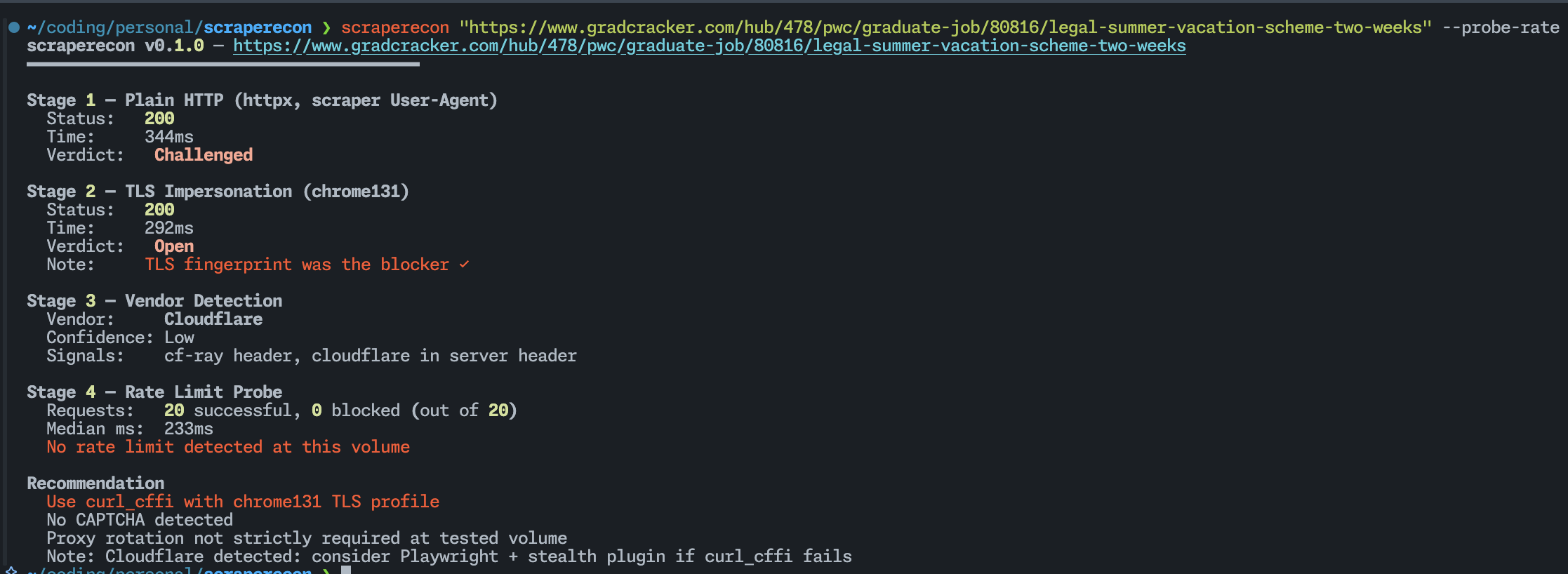
Usage
scraperecon https://target.com
scraperecon — https://target.com
━━━━━━━━━━━━━━━━━━━━━━━━━━━━━━━━━━━━━━━━

Scrape Report
  robots.txt: https://target.com/robots.txt
  robots.txt blocks scraping, proceed at own caution
  Sitemap:    12,843 URLs across 4 sitemap file(s)

Stage 1 — Plain HTTP (httpx, scraper User-Agent)
  Status:   403 Forbidden
  Time:     212ms
  Verdict:  Blocked

Stage 2 — TLS Impersonation (chrome131)
  Status:   200 OK
  Time:     389ms
  Verdict:  Open
  Note:     TLS fingerprint was the blocker ✓

Stage 3 — Vendor Detection
  Vendor:     Cloudflare
  Confidence: High
  Signals:    cf-ray header, __cf_bm cookie, challenges.cloudflare.com in body

Stage 4 — Rate Limit Probe
  Skipped (pass --probe-rate to enable)

Embedded Data Patterns (2/5 detected in Stage 2 (chrome131))
Pattern                 Detected  Signal                              Why It Matters
JSON-LD                 Yes       script[type="application/ld+json"]  Parse schema payloads for product,
                                                                      article, job, or org fields.
Next.js hydration       Yes       script#__NEXT_DATA__                Read props/pageProps from the
                                                                      Next.js bootstrap JSON.
Nuxt payload            No        window.__NUXT__ or data-nuxt-data   Inspect the Nuxt payload for
                                                                      server-rendered entities and route data.
Apollo/Relay cache      No        window.__APOLLO_STATE__ or          Extract normalized GraphQL entities
                                  __RELAY_PAYLOADS__                  from the hydrated client cache.
Bootstrapped app state  No        window.__INITIAL_STATE__ or         Mine the initial Redux-style store
                                  __PRELOADED_STATE__                 for records already sent to the client.

Recommendation
  Use curl_cffi with chrome131 TLS profile
  No CAPTCHA detected at probe volume
  Proxy rotation not required at low request rates
What it does
scraperecon starts with a scrape report, then runs four stages against a URL in order, stopping early where it can.
Scrape Report
Fetches robots.txt before the network challenge stages. If the target path is disallowed for generic crawlers, scraperecon prints:
robots.txt blocks scraping, proceed at own caution
It also discovers sitemap URLs from robots.txt, falls back to /sitemap.xml when needed, follows sitemap indexes recursively, and counts the number of page URLs found. This is useful for sizing a site before you write a scraper.
Stage 1 — Plain HTTP
A basic GET with no tricks. If this comes back clean, you don't need anything else — plain httpx or requests will work fine and you can stop here.
It also checks whether a 200 response is actually real content or a JS challenge page. Cloudflare in particular loves returning 200 with a challenge rather than a 403. scraperecon catches that and marks it Challenged instead of lying to you with a green Open.
Stage 2 — TLS Impersonation
If Stage 1 was blocked or challenged, it retries using curl_cffi impersonating Chrome's TLS fingerprint. A lot of bot detection happens at the TLS handshake level — Python's requests library has a completely different fingerprint from a real browser, and that alone is enough to get you blocked on many sites before the server has even looked at your headers. If Stage 2 passes where Stage 1 didn't, you know exactly what the fix is.
Stage 3 — Vendor Detection
Inspects headers, cookies, and the response body for known signatures and tells you which bot protection vendor is running. This matters because Cloudflare, DataDome, Akamai, and PerimeterX all require different bypass strategies. Knowing which one you're dealing with upfront saves you from trying things that were never going to work.
Stage 4 — Rate Limit Probe (opt-in)
Fires N requests with configurable concurrency and watches what happens — hard 429s, silent response time degradation, mid-session redirects. Off by default because blasting a site without thinking about it is bad practice. Pass --probe-rate when you actually need the data.
Embedded Data Patterns
Checks the best HTML body it retrieved and reports five common client-visible data formats that are often directly scrapable without browser automation:
- JSON-LD
- Next.js
__NEXT_DATA__ - Nuxt
__NUXT__payloads - Apollo/Relay hydrated GraphQL caches
- Redux-style bootstrapped app state
If any of these are present, the terminal table tells you what was found and what kind of extraction path is likely to work.
When a payload is valid JSON, it also shows up to 7 top-level keys with a + n more suffix when the object is larger.
Install
pipx install scraperecon
Usage
scraperecon https://target.com
scraperecon https://target.com --probe-rate
scraperecon https://target.com --probe-rate --concurrency 10 --requests 50
scraperecon https://target.com --impersonate safari170
scraperecon https://target.com --show-sitemap-preview
scraperecon https://target.com --show-embedded-keys
scraperecon https://target.com --save
scraperecon https://target.com --json | jq .recommendation
| Flag | Default | Description |
|---|---|---|
--probe-rate |
off | Run Stage 4 rate limit probe |
--concurrency |
5 | Workers for rate probe |
--requests |
20 | Total requests for rate probe |
--impersonate |
chrome131 | TLS profile for Stage 2. Options: chrome131, chrome120, safari170 |
--timeout |
10 | Per-request timeout in seconds |
--json |
off | Machine-readable JSON output |
--show-sitemap-preview |
off | Show up to 3 sample URLs for each detected sitemap in the human-readable report |
--show-embedded-keys |
off | Show parsed top-level keys for embedded data patterns in the human-readable report |
--save |
off | Save the full HTML responses to local files (<domain>_stage1.html, etc.) |
--skip-tls |
off | Skip Stage 2 |
--skip-vendor |
off | Skip Stage 3 |
Reading the recommendation
At the end of every run you get a plain-English recommendation based on what was found.
- Plain HTTP should be sufficient —
httpxorrequestswill work. No special setup needed. - Use curl_cffi with
<profile>— TLS fingerprinting is blocking you. Switch tocurl_cffiwith the listed profile. - May need browser automation — both plain and TLS requests were blocked. You're likely looking at a full JS challenge (Turnstile, hCaptcha). Playwright with a stealth plugin is probably your next move.
- Proxy rotation recommended — the rate probe hit throttling. At any real request volume you'll need rotating proxies.
- CAPTCHA detected — the response body contained CAPTCHA indicators. Automated solving or a managed scraping service required.
JSON output
Pass --json to get machine-readable output. Robots and sitemap data live under scrape_report, before the stage results.
{
  "target": "https://target.com",
  "scrape_report": {
    "blocked": true,
    "robots_url": "https://target.com/robots.txt",
    "sitemap_url_count": 12843,
    "sitemaps_checked": 4,
    "sitemap_sources": [
      "https://target.com/sitemap.xml",
      "https://target.com/sitemap_0.xml"
    ]
  },
  "stages": {
    "plain": {},
    "tls": {},
    "vendor": {},
    "rate_limit": null
  },
  "scrapable_patterns": [
    {
      "name": "JSON-LD",
      "detected": true,
      "signal": "script[type=\"application/ld+json\"]",
      "extraction_hint": "Parse schema payloads for product, article, job, or org fields."
    }
  ]
}
Adding vendor signatures
Signatures live in scraperecon/data/signatures.json. It's a flat JSON file — no code required. If you know a signal that's missing, open a PR.
{
  "name": "YourVendor",
  "signals": [
    { "type": "header_present", "key": "x-your-vendor", "weight": 0.8 },
    { "type": "cookie_name", "value": "your_cookie", "weight": 0.6 }
  ]
}
Signal types: header_present, header_value, cookie_name, body_contains, status_code.
What it won't do
scraperecon is a recon tool, not a scraping library. It tells you what you need — it doesn't do it for you. No CAPTCHA solving, no Playwright integration, no proxy support, no persistent history, and no crawling page URLs from sitemap results.
Every scraper project starts with the same 20 minutes of manual work: try curl, get blocked, try curl_cffi, check the headers, fire some requests and see what happens. This automates that.
1 maintainer

Metadata
1 maintainer
Release files for scraperecon 0.1.3
For a detailed explanation of source distributions (sdists) and built distributions (wheels), please see the package formats documentation.
Source distribution (sdist)
| File | Size | Uploaded | Provenance | |
|---|---|---|---|---|
| scraperecon-0.1.3.tar.gz | 31.2 kB | With provenance | Details |
Built distribution (wheel)
| File | Interpreter | ABI | Platform | Reset |
|---|---|---|---|---|
| scraperecon-0.1.3-py3-none-any.whl | Python 3 | none | any | Details |
Total release size: 53.4 kB
Release files / scraperecon-0.1.3.tar.gz
| Download URL | scraperecon-0.1.3.tar.gz |
|---|---|
| Size | 31.2 kB |
| Tags | Source |
|
SHA-256 checksum How to use checksums |
f68841bd61d0a41b4a120e7a01db9cc0a32eb73afb4fd053d5a8688b206c0c46
|
|
BLAKE2b-256 checksum How to use checksums |
c0fc323967b96b3b42f98c85c5e0f432dd8ca616bddafedaad920b23a07b9113
|
| Upload date | |
|
Uploaded using Trusted Publishing? What is trusted publishing? |
Yes |
| Uploaded via |
twine/6.1.0 CPython/3.13.12
|
Provenance
Provenance describes where a file came from. On PyPI, provenance is shared via attestations, which provide a verifiable record of the build or publishing details. View details, limitations and caveats.


PyPI Publish Attestation
PyPI verified that this artifact, at this checksum, originated from the publisher listed below.
Signed by GitHub Actions, verified by PyPI on May 23, 2026.
Transparency logRelease files / scraperecon-0.1.3-py3-none-any.whl
| Download URL | scraperecon-0.1.3-py3-none-any.whl |
|---|---|
| Size | 22.2 kB |
| Tags | Python 3 |
|
SHA-256 checksum How to use checksums |
83d7215a16902dc5418ffde01e8c95b6440ccfa194e7eb8b3990350f95ec6750
|
|
BLAKE2b-256 checksum How to use checksums |
c52e907cdbbe6d679b627851044f4b803ae28d74cd45271fd044e8547910837f
|
| Upload date | |
|
Uploaded using Trusted Publishing? What is trusted publishing? |
Yes |
| Uploaded via |
twine/6.1.0 CPython/3.13.12
|
Provenance
Provenance describes where a file came from. On PyPI, provenance is shared via attestations, which provide a verifiable record of the build or publishing details. View details, limitations and caveats.
PyPI Publish Attestation
PyPI verified that this artifact, at this checksum, originated from the publisher listed below.
Signed by GitHub Actions, verified by PyPI on May 23, 2026.
Transparency logSecurity for scraperecon 0.1.3
Provenance
Provenance describes where a file came from. On PyPI, provenance is shared via attestations, which provide a verifiable record of the build or publishing details. View details, limitations and caveats.
Full provenance
All 2 files in this release have been uploaded with provenance metadata.
Attestation for scraperecon-0.1.3.tar.gz
PyPI Publish Attestation
PyPI verified that this artifact, at this checksum, originated from the publisher listed below.
Signed by GitHub Actions, verified by PyPI on May 23, 2026.
Transparency logA note on package security
PyPI is a repository for distributing packages, not a service for auditing them. While third-party security researchers and our staff do their best to detect and remove malicious packages, PyPI cannot guarantee the quality, security or suitability of any given package.














