
A CLI tool that runs a sequential reconnaissance pipeline against a target URL before a developer writes a scraper.

Project description
scraperecon
Run this before you write a scraper. It tells you what bot protection a site has, whether plain HTTP or TLS impersonation is enough to get through, and how aggressively it rate limits — before you've written a single line of scraper code.
Usage
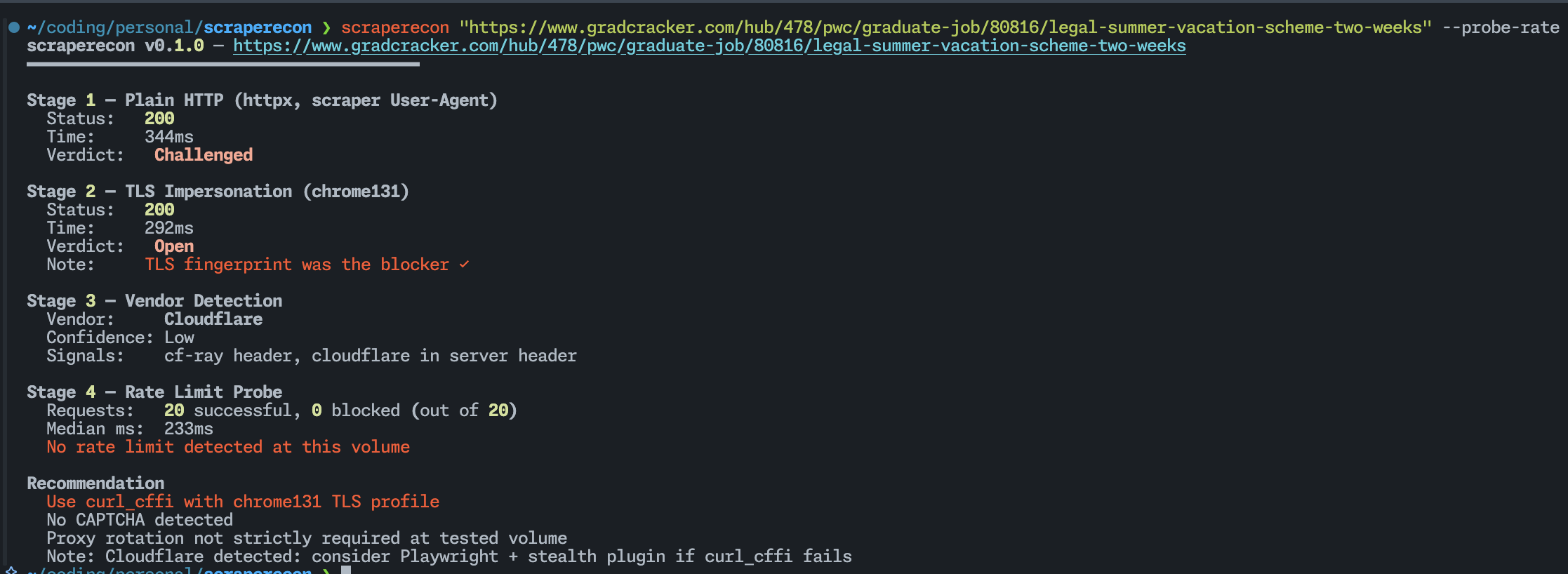
scraperecon https://target.com
scraperecon — https://target.com
━━━━━━━━━━━━━━━━━━━━━━━━━━━━━━━━━━━━━━━━

Stage 1 — Plain HTTP (httpx, scraper User-Agent)
  Status:   403 Forbidden
  Time:     212ms
  Verdict:  Blocked

Stage 2 — TLS Impersonation (chrome131)
  Status:   200 OK
  Time:     389ms
  Verdict:  Open
  Note:     TLS fingerprint was the blocker ✓

Stage 3 — Vendor Detection
  Vendor:     Cloudflare
  Confidence: High
  Signals:    cf-ray header, __cf_bm cookie, challenges.cloudflare.com in body

Stage 4 — Rate Limit Probe
  Skipped (pass --probe-rate to enable)

Recommendation
  Use curl_cffi with chrome131 TLS profile
  No CAPTCHA detected at probe volume
  Proxy rotation not required at low request rates
What it does
scraperecon runs four stages against a URL in order, stopping early where it can.
Stage 1 — Plain HTTP
A basic GET with no tricks. If this comes back clean, you don't need anything else — plain httpx or requests will work fine and you can stop here.
It also checks whether a 200 response is actually real content or a JS challenge page. Cloudflare in particular loves returning 200 with a challenge rather than a 403. scraperecon catches that and marks it Challenged instead of lying to you with a green Open.
Stage 2 — TLS Impersonation
If Stage 1 was blocked or challenged, it retries using curl_cffi impersonating Chrome's TLS fingerprint. A lot of bot detection happens at the TLS handshake level — Python's requests library has a completely different fingerprint from a real browser, and that alone is enough to get you blocked on many sites before the server has even looked at your headers. If Stage 2 passes where Stage 1 didn't, you know exactly what the fix is.
Stage 3 — Vendor Detection
Inspects headers, cookies, and the response body for known signatures and tells you which bot protection vendor is running. This matters because Cloudflare, DataDome, Akamai, and PerimeterX all require different bypass strategies. Knowing which one you're dealing with upfront saves you from trying things that were never going to work.
Stage 4 — Rate Limit Probe (opt-in)
Fires N requests with configurable concurrency and watches what happens — hard 429s, silent response time degradation, mid-session redirects. Off by default because blasting a site without thinking about it is bad practice. Pass --probe-rate when you actually need the data.
Install
pipx install scraperecon
Usage
scraperecon https://target.com
scraperecon https://target.com --probe-rate
scraperecon https://target.com --probe-rate --concurrency 10 --requests 50
scraperecon https://target.com --impersonate firefox120
scraperecon https://target.com --save
scraperecon https://target.com --json | jq .recommendation

| Flag            | Default   | Description                                                                          |
| --------------- | --------- | ------------------------------------------------------------------------------------ |
| `--probe-rate`  | off       | Run Stage 4 rate limit probe                                                         |
| `--concurrency` | 5         | Workers for rate probe                                                               |
| `--requests`    | 20        | Total requests for rate probe                                                        |
| `--impersonate` | chrome131 | TLS profile for Stage 2. Options: `chrome131`, `chrome120`, `firefox120`, `safari17` |
| `--timeout`     | 10        | Per-request timeout in seconds                                                       |
| `--json`        | off       | Machine-readable JSON output                                                         |
| `--save`        | off       | Save the full HTML responses to local files (`<domain>_stage1.html`, etc.)           |
| `--skip-tls`    | off       | Skip Stage 2                                                                         |
| `--skip-vendor` | off       | Skip Stage 3                                                                         |

---

## Reading the recommendation

At the end of every run you get a plain-English recommendation based on what was found.

- **Plain HTTP should be sufficient** — `httpx` or `requests` will work. No special setup needed.
- **Use curl_cffi with `<profile>`** — TLS fingerprinting is blocking you. Switch to `curl_cffi` with the listed profile.
- **May need browser automation** — both plain and TLS requests were blocked. You're likely looking at a full JS challenge (Turnstile, hCaptcha). Playwright with a stealth plugin is probably your next move.
- **Proxy rotation recommended** — the rate probe hit throttling. At any real request volume you'll need rotating proxies.
- **CAPTCHA detected** — the response body contained CAPTCHA indicators. Automated solving or a managed scraping service required.

---

## Adding vendor signatures

Signatures live in `scraperecon/data/signatures.json`. It's a flat JSON file — no code required. If you know a signal that's missing, open a PR.

```json
{
  "name": "YourVendor",
  "signals": [
    { "type": "header_present", "key": "x-your-vendor", "weight": 0.8 },
    { "type": "cookie_name", "value": "your_cookie", "weight": 0.6 }
  ]
}
Signal types: header_present, header_value, cookie_name, body_contains, status_code.
What it won't do
scraperecon is a recon tool, not a scraping library. It tells you what you need — it doesn't do it for you. No CAPTCHA solving, no Playwright integration, no proxy support, no persistent history.
Every scraper project starts with the same 20 minutes of manual work: try curl, get blocked, try curl_cffi, check the headers, fire some requests and see what happens. This automates that.
Release history Release notifications | RSS feed

Download files
Download the file for your platform. If you're not sure which to choose, learn more about installing packages.
Source Distribution
Built Distribution
Filter files by name, interpreter, ABI, and platform.
If you're not sure about the file name format, learn more about wheel file names.
Copy a direct link to the current filters
File details
Details for the file scraperecon-0.1.0.tar.gz.
File metadata
- Download URL: scraperecon-0.1.0.tar.gz
- Upload date:
- Size: 12.1 kB
- Tags: Source
- Uploaded using Trusted Publishing? Yes
- Uploaded via: twine/6.1.0 CPython/3.13.12
File hashes
| Algorithm | Hash digest | |
|---|---|---|
| SHA256 |
ddae7a9b956201cd2a7dcd3df1a7e423234543c569f40cd19906503fc6876576
|
|
| MD5 |
29c8673e25d900d7e0aed04655884db9
|
|
| BLAKE2b-256 |
044ce1be6da8fc2dbfd64228c7f04ba9e19337541fc0222d787d5242862e5989
|
Provenance
The following attestation bundles were made for scraperecon-0.1.0.tar.gz:
Publisher:
publish.yml on DaKheera47/scraperecon
-
Statement:
-
Statement type:
https://in-toto.io/Statement/v1 -
Predicate type:
https://docs.pypi.org/attestations/publish/v1 -
Subject name:
scraperecon-0.1.0.tar.gz -
Subject digest:
ddae7a9b956201cd2a7dcd3df1a7e423234543c569f40cd19906503fc6876576 - Sigstore transparency entry: 1434170706
- Sigstore integration time:
-
Permalink:
DaKheera47/scraperecon@e8283d7156458ee602c05f9385785bd423698583 -
Branch / Tag:
refs/tags/v0.1.0 - Owner: https://github.com/DaKheera47
-
Access:
public
-
Token Issuer:
https://token.actions.githubusercontent.com -
Runner Environment:
github-hosted -
Publication workflow:
publish.yml@e8283d7156458ee602c05f9385785bd423698583 -
Trigger Event:
release
-
Statement type:
File details
Details for the file scraperecon-0.1.0-py3-none-any.whl.
File metadata
- Download URL: scraperecon-0.1.0-py3-none-any.whl
- Upload date:
- Size: 16.0 kB
- Tags: Python 3
- Uploaded using Trusted Publishing? Yes
- Uploaded via: twine/6.1.0 CPython/3.13.12
File hashes
| Algorithm | Hash digest | |
|---|---|---|
| SHA256 |
c24484829b59f6f4e4748b3817e50c1c98be7f02c4a2ecb1f22e2858ffd8718b
|
|
| MD5 |
a6c050517b20baf4ed576b30ae006803
|
|
| BLAKE2b-256 |
23413f59ef0789b322cbf569fcab06552036ca909656eaa0f5e9c9e4e6300635
|
Provenance
The following attestation bundles were made for scraperecon-0.1.0-py3-none-any.whl:
Publisher:
publish.yml on DaKheera47/scraperecon
-
Statement:
-
Statement type:
https://in-toto.io/Statement/v1 -
Predicate type:
https://docs.pypi.org/attestations/publish/v1 -
Subject name:
scraperecon-0.1.0-py3-none-any.whl -
Subject digest:
c24484829b59f6f4e4748b3817e50c1c98be7f02c4a2ecb1f22e2858ffd8718b - Sigstore transparency entry: 1434170768
- Sigstore integration time:
-
Permalink:
DaKheera47/scraperecon@e8283d7156458ee602c05f9385785bd423698583 -
Branch / Tag:
refs/tags/v0.1.0 - Owner: https://github.com/DaKheera47
-
Access:
public
-
Token Issuer:
https://token.actions.githubusercontent.com -
Runner Environment:
github-hosted -
Publication workflow:
publish.yml@e8283d7156458ee602c05f9385785bd423698583 -
Trigger Event:
release
-
Statement type:






