
SCuM Programmer
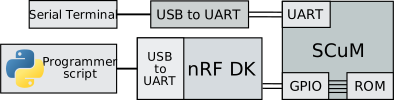
Use an nRF52840-DK and a Python script to program SCuM!
Prerequisites
Setup the nRF52840-DK
- Download scum-programmer.hex
- Plug in your nRF52840-DK into your computer, drive "JLINK" appears
- Drag-and-drop
scum-programmer.hexonto this drive
Interact with SCuM's serial port
- Connect SCuM's UART to an USB-to-UART converter
- Open the serial port corresponding to your USB-to-UART converter using a
serial terminal, using 19200 baud.
For example using Socat on Linux:
socat - open:/dev/ttyUSB0,b19200,echo=0,raw,cs8,parenb=0,cstopb=0
Python script installation
The scum-programmer command line tool is published on PyPI:
pip install scum-programmer
Usage
Load code onto SCuM
The scum-programmer command requires a firmware input file in .bin format.
Use it as following:
scum-programmer path/to/scum-firmware.bin
On Windows, the nRF J-Link TTY port cannot be detected automatically and needs
to be set manually using the --port option. For example:
scum-programmer --port COM42 path/to/scum-firmware.bin
Calibrate SCuM
If the application requires calibration, use the --calibrate option to trigger
the calibration after booting SCuM:
scum-programmer --calibrate path/to/scum-firmware.bin
Build the nRF firmware
- Install SEGGER Embedded Studio for ARM
- Open
scum_programmer/scum-programmer.emProject - Select the
scum-programmerproject and build it (F7) - Download it on the nRF using the
Target > Download scum-programmermenu
1 maintainer

Metadata
1 maintainer
Release files for scum-programmer 0.2.2
For a detailed explanation of source distributions (sdists) and built distributions (wheels), please see the package formats documentation.
Source distribution (sdist)
| File | Size | Uploaded | Provenance | |
|---|---|---|---|---|
| scum_programmer-0.2.2.tar.gz | 7.1 kB | Without provenance | Details |
Built distribution (wheel)
| File | Interpreter | ABI | Platform | Reset |
|---|---|---|---|---|
| scum_programmer-0.2.2-py3-none-any.whl | Python 3 | none | any | Details |
Total release size: 15.9 kB
Release files / scum_programmer-0.2.2.tar.gz
| Download URL | scum_programmer-0.2.2.tar.gz |
|---|---|
| Size | 7.1 kB |
| Tags | Source |
|
SHA-256 checksum How to use checksums |
c11b6df23db1b93a856332b259a13ecbaa730a34bf6efd5550461f3b490ad56d
|
|
BLAKE2b-256 checksum How to use checksums |
5a400e1b544623d55c81a9a4a547d3f111caa524f7e323e60db75e6cd993ab7a
|
| Upload date | |
|
Uploaded using Trusted Publishing? What is trusted publishing? |
No |
| Uploaded via |
twine/6.1.0 CPython/3.12.9
|
Release files / scum_programmer-0.2.2-py3-none-any.whl
| Download URL | scum_programmer-0.2.2-py3-none-any.whl |
|---|---|
| Size | 8.8 kB |
| Tags | Python 3 |
|
SHA-256 checksum How to use checksums |
9d8d004a061f6a5a09dcf7124acd8e51e34b29afdba01d2e33d7cd0697cddab4
|
|
BLAKE2b-256 checksum How to use checksums |
e74b1960f221b416fcdc120d0725a56cea9d6d842d4f476b49b9bca726b40851
|
| Upload date | |
|
Uploaded using Trusted Publishing? What is trusted publishing? |
No |
| Uploaded via |
twine/6.1.0 CPython/3.12.9
|
Security for scum-programmer 0.2.2
Provenance
Provenance describes where a file came from. On PyPI, provenance is shared via attestations, which provide a verifiable record of the build or publishing details. View details, limitations and caveats.
No provenance found
None of the files in this release were uploaded with provenance metadata.
A note on package security
PyPI is a repository for distributing packages, not a service for auditing them. While third-party security researchers and our staff do their best to detect and remove malicious packages, PyPI cannot guarantee the quality, security or suitability of any given package.














