
SCuM programmer script.

Project description
SCuM Programmer
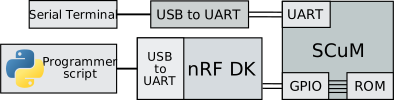
Use an nRF52840-DK and a Python script to program SCuM!
Prerequisites
Setup the nRF52840-DK
- Download
scum-programmer.hexfrom the https://github.com/pisterlab/scum-sdk/releases/latest/ - Plug in your nRF52840-DK into your computer, drive "JLINK" appears
- Drag-and-drop
scum-programmer.hexonto this drive
Interact with SCuM's serial port
- Connect SCuM's UART to an USB-to-UART converter
- Open the serial port corresponding to your USB-to-UART converter using a
serial terminal, using 19200 baud.
For example using Socat on Linux:
socat - open:/dev/ttyUSB0,b19200,echo=0,raw,cs8,parenb=0,cstopb=0
Python script installation
The scum-programmer command line tool is published on PyPI:
pip install scum-programmer
Usage
Load code onto SCuM
The scum-programmer command requires a firmware input file in .bin format.
Use it as following:
scum-programmer path/to/scum-firmware.bin
On Windows, the nRF J-Link TTY port cannot be detected automatically and needs
to be set manually using the --port option. For example:
scum-programmer --port COM42 path/to/scum-firmware.bin
Calibrate SCuM
If the application requires calibration, use the --calibrate option to trigger
the calibration after booting SCuM:
scum-programmer --calibrate path/to/scum-firmware.bin
Build the nRF firmware
- Install SEGGER Embedded Studio for ARM
- Open
scum_programmer/scum-programmer.emProject - Select the
scum-programmerproject and build it (F7) - Download it on the nRF using the
Target > Download scum-programmermenu


Download files
Download the file for your platform. If you're not sure which to choose, learn more about installing packages.
Source Distribution
Built Distribution
Filter files by name, interpreter, ABI, and platform.
If you're not sure about the file name format, learn more about wheel file names.
Copy a direct link to the current filters
File details
Details for the file scum_programmer-0.1.2.tar.gz.
File metadata
- Download URL: scum_programmer-0.1.2.tar.gz
- Upload date:
- Size: 7.1 kB
- Tags: Source
- Uploaded using Trusted Publishing? No
- Uploaded via: python-httpx/0.27.2
File hashes
| Algorithm | Hash digest | |
|---|---|---|
| SHA256 |
c419f0392ae8a680061ce3252875cd96ca8acdba94b463e51594b1e377482023
|
|
| MD5 |
4d912666909a347c77742b3fd7c9bef8
|
|
| BLAKE2b-256 |
f9aa7a0c202f37a56a5e50906d8ef1a6ae481b0b313db310c4bafd172c16da23
|
File details
Details for the file scum_programmer-0.1.2-py3-none-any.whl.
File metadata
- Download URL: scum_programmer-0.1.2-py3-none-any.whl
- Upload date:
- Size: 8.8 kB
- Tags: Python 3
- Uploaded using Trusted Publishing? No
- Uploaded via: python-httpx/0.27.2
File hashes
| Algorithm | Hash digest | |
|---|---|---|
| SHA256 |
90da5f84ff610d8318c90e404e7d092243ffdd9e271bd70b7d9729433ef4e6f8
|
|
| MD5 |
f72678c5dbfb157e9e9ded61db808aeb
|
|
| BLAKE2b-256 |
be9d255cd1b060ede754d6aa08146cb418c8bdb6426cb2eae7755f9fdf97c132
|






