
SDCI - Sistema de Deploy Continuo Integrado - Integrated Continuous Deployment System - Sidecar Micro CD

Project description
🚀 SDCI - Sistema de Deploy Continuo Integrado
SDCI (Sistema de Deploy Continuo Integrado - Integrated Continuous Deployment System) is a lightweight continuous deployment system consisting of a server and client tool. It allows you to run predefined tasks remotely through a simple command-line interface.
⚠️ NOTE: This project is currently in ALPHA. A better documentation will be provided soon.
✨ Features
- Server component built with FastAPI
- Command-line client tool for easy task execution
- Token-based authentication
- Real-time task output streaming
- Task status monitoring
- Authenticated single-file upload with progress bar
- CLI interface to manage tasks
🔩 Architecture Diagram
The ideal way to work with this tool is using the following structure:
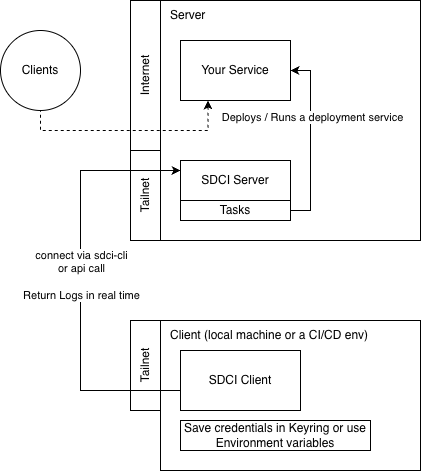
For safety purposes, the ideal way to handle such workflow is to protect SDCI connection under a Tailscale or any other VPN connection; Also you can add sdci on the internet, but a reverse proxy is strongly recommended (e.g. Traefik or Nginx)
📥 Installation
Requirements
- Python 3.13 or higher
Installing the client
The recommended approach is by using pipx;
pipx install sdci
📖 Usage
Starting the server
Run the server component:
sdci-server serve --host 0.0.0.0 --server-token YOUR_TOKEN --tasks-dir ./tasks
By default, the server runs on 0.0.0.0:8842.
Installing as a systemd service (Linux only)
sdci-server setup installs and starts SDCI as a persistent systemd service.
sdci-server setup --ip 0.0.0.0 --token YOUR_TOKEN
The command requires Linux with systemd and will prompt for sudo when writing privileged files.
| Flag | Required | Default | Description |
|---|---|---|---|
--ip |
yes | — | Host/IP the server binds to |
--token |
yes | — | Server token (stored in /etc/sdci/sdci.env) |
--port |
no | 8842 |
Port to listen on |
--tasks-dir |
no | ~/.sdci/tasks |
Directory containing task scripts |
--user |
no | invoking user | OS user the service runs as |
--service-name |
no | sdci |
systemd unit name |
--force |
no | false | Overwrite existing unit without prompting |
The token is written to /etc/sdci/sdci.env with mode 0600 (root-readable only) and is never embedded in the unit file itself.
Creating tasks
The server will look up for tasks in the tasks/ directory where you ran this server. It will look for shell scripts on this folder. The job name is the script name without the .sh extension.
Using the client
The client tool can be used to trigger tasks on the server:
sdci-cli run --token YOUR_TOKEN SERVER_URL TASK_NAME [PARAMETERS...]
Example:
sdci-cli run --token HAPPY123 http://localhost:8842 job_1 param1 param2 param3
Parameters
--token: Authentication token (required)SERVER_URL: URL of the SDCI server (required)TASK_NAME: Name of the task to run (required)PARAMETERS: Optional parameters to pass to the task
Uploading an asset
You can upload a single file (e.g. a build artifact or archive) to the server. The
file is stored under the server's upload directory, inside the relative REMOTE_PATH
directory (created recursively), keeping its original filename:
sdci-cli upload-asset --token YOUR_TOKEN SERVER_URL LOCAL_FILE REMOTE_PATH
Example (lands at <upload-dir>/releases/v1/app.zip on the server):
sdci-cli upload-asset --token HAPPY123 http://localhost:8842 ./app.zip releases/v1
Upload notes:
- The server runs either one task OR one upload at a time (shared global lock);
it returns
429while busy. - Path traversal is rejected (
400) and an existing destination file is never overwritten (409). - A progress bar is shown during upload.
The server's upload directory is configured with the --upload-dir flag (or the
UPLOAD_DIR env var, default ./uploads):
sdci-server --upload-dir ./uploads --server-token YOUR_TOKEN --tasks-dir ./tasks
👤 Author
- Jonhnatha Trigueiro joepreludian@gmail.com
Release history Release notifications | RSS feed


Download files
Download the file for your platform. If you're not sure which to choose, learn more about installing packages.
Source Distribution
Built Distribution
Filter files by name, interpreter, ABI, and platform.
If you're not sure about the file name format, learn more about wheel file names.
Copy a direct link to the current filters
File details
Details for the file sdci-1.0.0.tar.gz.
File metadata
- Download URL: sdci-1.0.0.tar.gz
- Upload date:
- Size: 10.7 kB
- Tags: Source
- Uploaded using Trusted Publishing? No
- Uploaded via: uv/0.11.21 {"installer":{"name":"uv","version":"0.11.21","subcommand":["publish"]},"python":null,"implementation":{"name":null,"version":null},"distro":{"name":"Ubuntu","version":"24.04","id":"noble","libc":null},"system":{"name":null,"release":null},"cpu":null,"openssl_version":null,"setuptools_version":null,"rustc_version":null,"ci":true}
File hashes
| Algorithm | Hash digest | |
|---|---|---|
| SHA256 |
16acb0fc000c760c23a8eb1f752cf534d5ed955eb1182892f911bd46241d963c
|
|
| MD5 |
b32c557a84e96097111bf7f0e9903312
|
|
| BLAKE2b-256 |
8db67cec5dbde3e12d70ef083391635d857a1c91060c4e16ff41f0894edb64b4
|
File details
Details for the file sdci-1.0.0-py3-none-any.whl.
File metadata
- Download URL: sdci-1.0.0-py3-none-any.whl
- Upload date:
- Size: 14.2 kB
- Tags: Python 3
- Uploaded using Trusted Publishing? No
- Uploaded via: uv/0.11.21 {"installer":{"name":"uv","version":"0.11.21","subcommand":["publish"]},"python":null,"implementation":{"name":null,"version":null},"distro":{"name":"Ubuntu","version":"24.04","id":"noble","libc":null},"system":{"name":null,"release":null},"cpu":null,"openssl_version":null,"setuptools_version":null,"rustc_version":null,"ci":true}
File hashes
| Algorithm | Hash digest | |
|---|---|---|
| SHA256 |
1e3531a9afc8ed580e41c524b09291233c5545a818b5ce22ea84afaa4156c867
|
|
| MD5 |
cb9cef398787bf53cb399ee633dc8d2a
|
|
| BLAKE2b-256 |
b35f10d4e164cf98b4c975c60f78e05c651ff9ff493b9353dda0c98eafda9954
|






