
sdgp - Stable Diffusion Get Prompt

Project description
[Installation(Recommended)] | | [sd-get-prompt (Native C Version)]
SDGP (Stable-Diffusion-Get-Prompt)
Easy display for Stable Diffusion tEXt(Meitu iTXt) Exif data. Anyone can copy and paste from GTK+ dialog.
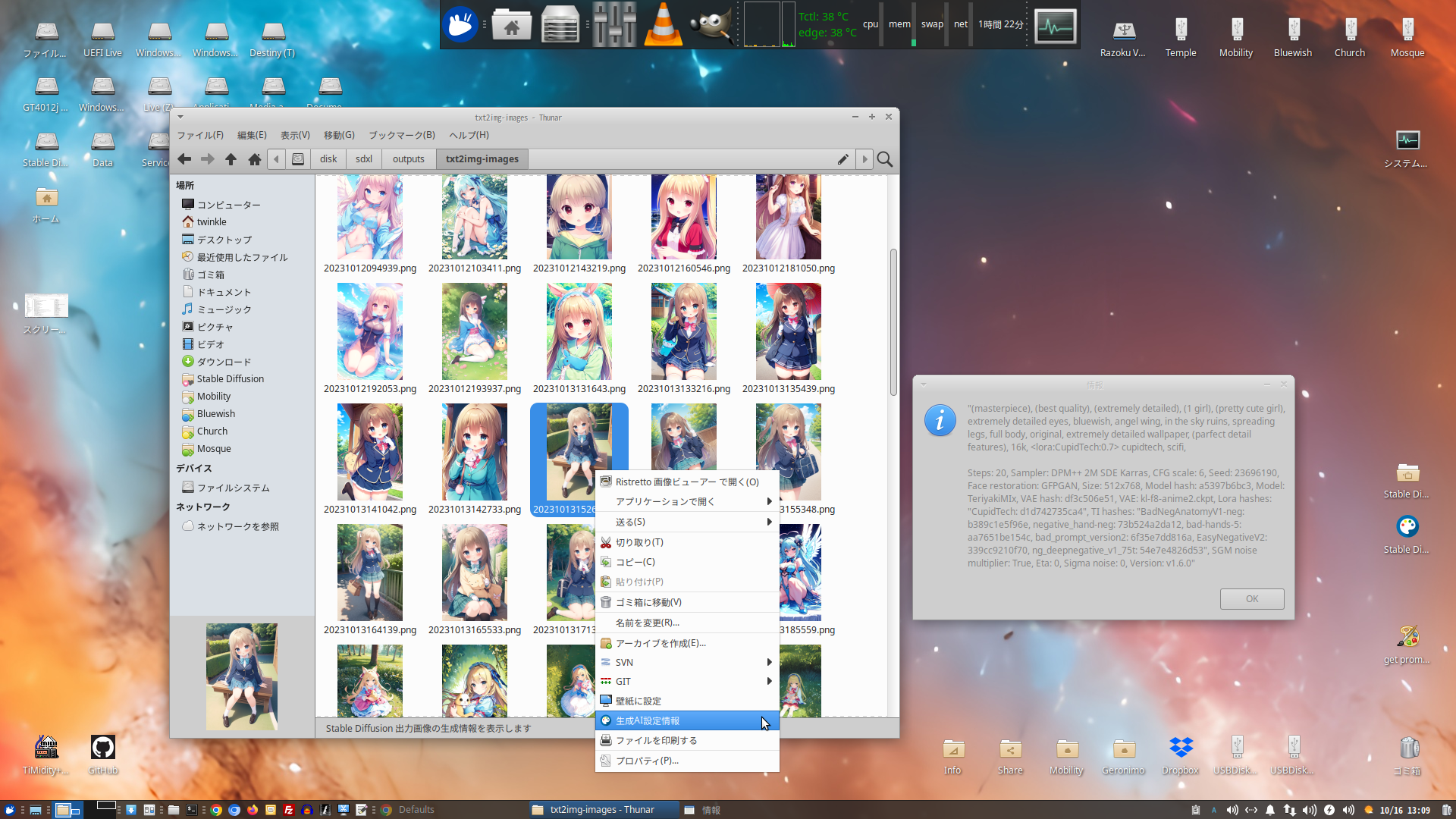
Sample picture is Japanese language but everybodは can understanding through SD(Stable Diffusion) icon picture on right click menu.
Showing Creation AI Configuration Info.
Usage (Python Module)
- Use as Library
from sdgp import sdgp

# return dict of iTXt contents
dict = sdgp(path)
- commandline
python -m sdgp -i PATH

or use TextView

python -m sdgp -i PATH --textview
Usage (Right Clickable)
How to use?
- Run to python -m sdgp -i PATH
KDE
- create .desktop file.
- place to .kde/share/kde4/services/ServiceMenus/
[Desktop Entry]
Version=1.0
Type=Application
Name=sd-get-prompt
Comment=Get tEXt parametor
Exec=python -m sdgp -i %f
ServiceTypes=KonqPopupMenu/Plugin
MimeType=image/png
Icon=applications-graphics
Path=
Terminal=false
StartupNotify=true
& Apply to KDE Dolphin service dir and good changes.
XFce
- Add right-click action for thunar(python -m sdgp -i %f)
Others
for Other wm(window Manager) and file manager.
- Should be reading your file manager manpages. May be could under run Linux Mint and other Cinnamon distribution and Gnome Nautilus, measure file manager too.
Microsoft Windows
GLib and GTK+ needed(MingW, CYgwin, Others).
Installation
This is a desktop application built with Python using the GTK3 toolkit. It leverages PyGObject (the Python bindings for GTK and other GNOME libraries) to create a native user interface.
Features
- Modern GTK3 Interface: Utilizes the latest GTK3 features for a contemporary look and feel.
- Pythonic Development: Written entirely in Python, making it easy to read, understand, and extend.
- Pango Text Rendering: Supports rich text formatting using Pango attributes for enhanced text presentation (e.g., bold, italics, colors, varying font sizes).
- (Add more specific features of your application here, e.g., "File management," "Data visualization," etc.)
Requirements
Before running the application, ensure you have the necessary dependencies installed.
- Python 3.x
- GTK3 Development Files
- PyGObject
Installation on Linux (Debian/Ubuntu)
- Update your package list:
sudo apt update
- Install Python 3, GTK3 development files, and PyGObject:
sudo apt install python3 python3-venv gir1.2-gtk-3.0 python3-gi
gir1.2-gtk-3.0provides the necessary GObject Introspection data for GTK3, andpython3-giis the Python binding itself.
Installation on Windows (using MSYS2)
For Windows, using MSYS2 is the recommended way to get a working GTK3 development environment.
- Download and install MSYS2 from the official website.
- Open an MSYS2 UCRT64 (or MINGW64) terminal.
- Update the package database:
pacman -Syu(You might need to run this multiple times and restart the terminal.) - Install Python, pip, GTK3, and PyGObject:
pacman -S python3 python3-pip mingw-w64-ucrt-x86_64-gtk3 mingw-w64-ucrt-x86_64-python-gobject
(Adjustucrttomingwif you are using the MINGW64 terminal.)
Installation on macOS (using Homebrew)
- Install Homebrew if you haven't already:
/bin/bash -c "$(curl -fsSL [https://raw.githubusercontent.com/Homebrew/install/HEAD/install.sh](https://raw.githubusercontent.com/Homebrew/install/HEAD/install.sh))"
- Install GTK3:
brew install gtk+3
- Install PyGObject via pip:
pip3 install PyGObject
Setup and Running
It's highly recommended to use a Python virtual environment for dependency management.
-
Create a virtual environment: When working with GTK and PyGObject, it's crucial to create the virtual environment with access to system site-packages so it can find the installed GTK libraries.
python3 -m venv venv --system-site-packages
(You can replace
venvwith your preferred virtual environment name.) -
Activate the virtual environment:
source venv/bin/activate
On Windows (MSYS2):
source venv/bin/activate
(Or
.\venv\Scripts\activatein Command Prompt/PowerShell if not using MSYS2.) -
Install project dependencies: Once the virtual environment is active, install any specific Python dependencies listed in
requirements.txt.pip install -r requirements.txt
(Ensure
requirements.txtis in your project's root directory.) -
Run the application:
python your_main_script.py(Replace
your_main_script.pywith the actual name of your application's main Python file.)
Contribution (Optional)
If you'd like to contribute to this project, please feel free to fork the repository, make your changes, and submit a pull request.
License (Optional)
This project is licensed under the [Resist-Psychiatry Declaration License & GNU GPL VERSION 3] - see the LICENSE.RPTv1 and LICENSE.GPLv3 file for details.


Download files
Download the file for your platform. If you're not sure which to choose, learn more about installing packages.
Source Distribution
Built Distribution
Filter files by name, interpreter, ABI, and platform.
If you're not sure about the file name format, learn more about wheel file names.
Copy a direct link to the current filters
File details
Details for the file sdgp-0.96.1.tar.gz.
File metadata
- Download URL: sdgp-0.96.1.tar.gz
- Upload date:
- Size: 26.0 kB
- Tags: Source
- Uploaded using Trusted Publishing? No
- Uploaded via: twine/6.1.0 CPython/3.11.2
File hashes
| Algorithm | Hash digest | |
|---|---|---|
| SHA256 |
46732877465c4f80d523fd17ef78552de622f17b1e6732c6ad3c4108a5f28c3b
|
|
| MD5 |
b0c8a8b4e998feab1d39b9c8a8f53edf
|
|
| BLAKE2b-256 |
2f86b6230452becfe02f26d093ae37dbc306be86c650ab064915500e61bfb6d1
|
File details
Details for the file sdgp-0.96.1-py3-none-any.whl.
File metadata
- Download URL: sdgp-0.96.1-py3-none-any.whl
- Upload date:
- Size: 24.3 kB
- Tags: Python 3
- Uploaded using Trusted Publishing? No
- Uploaded via: twine/6.1.0 CPython/3.11.2
File hashes
| Algorithm | Hash digest | |
|---|---|---|
| SHA256 |
41f61a46b1545a9d3e4aed2af26823f8e9908fae27144f61a333584a23e9268b
|
|
| MD5 |
ddb2214ea299cef81b44aef4ee00b2ab
|
|
| BLAKE2b-256 |
e4b055a2cd382c016a41dfb7144d0dd984decc09a43fa9752be2fe0f09bc1bd4
|






