
sdgp - Stable Diffusion Get Prompt

Project description
[Installation()] [sd-get-prompt (Native C Version)]
SDGP(Stable-Diffusion-Get-Prompt)
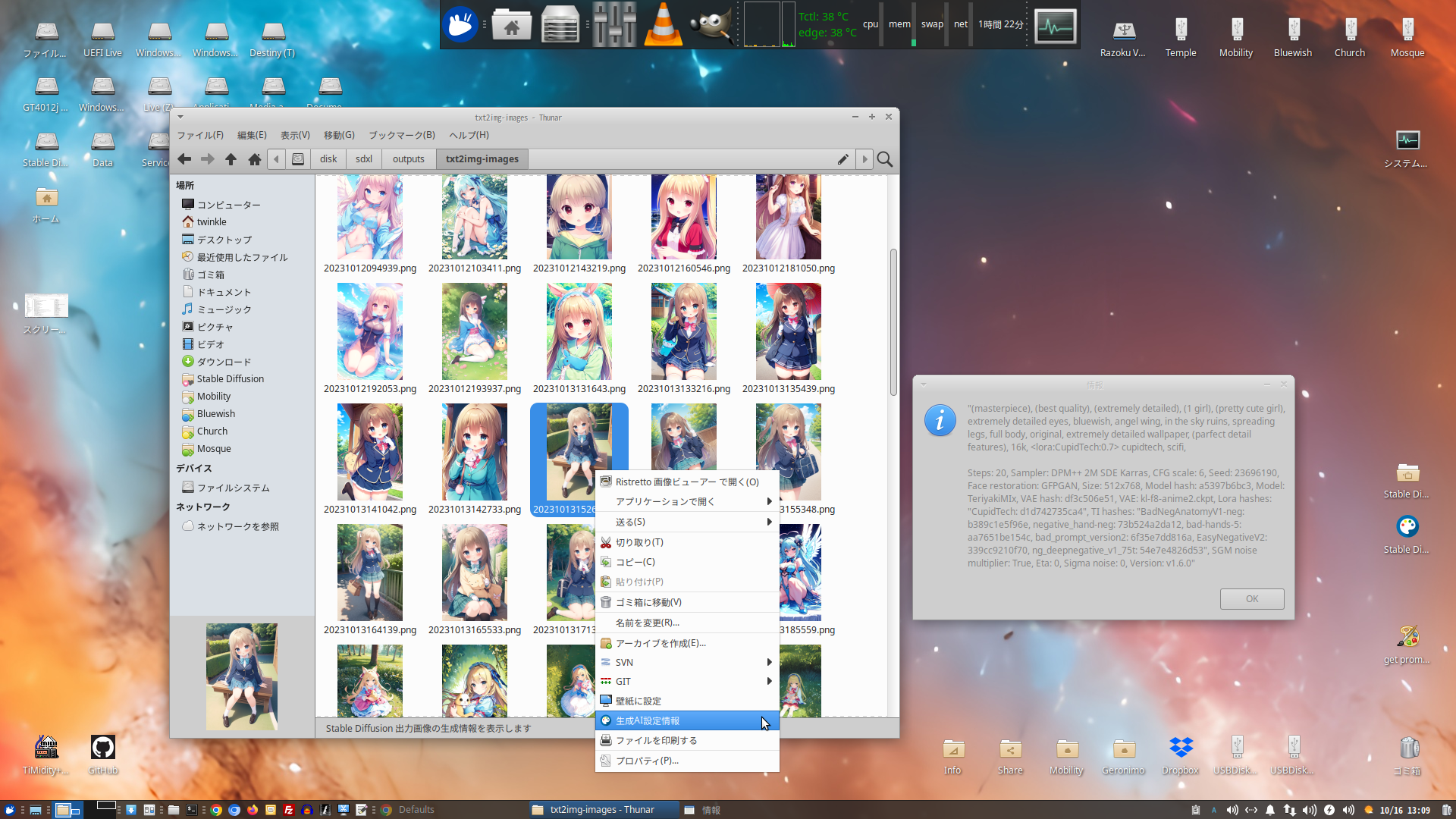
Easy display for Stable Diffusion tEXt(Meitu iTXt) Exif data. Anyone can copy and paste from GTK+ dialog.
Sample picture is Japanese language but everybodは can understanding through SD(Stable Diffusion) icon picture on right click menu.
Showing Creation AI Configuration Info.
Usage (Python Module)
- Use as Library
from sdgp import sdgp

# return dict of iTXt contents
dict = sdgp(path)
- commandline
python -m sdgp -i PATH
Usage (Right Clickable)
How to use?
- Run to python -m sdgp -i PATH
KDE
- create .desktop file.
- place to .kde/share/kde4/services/ServiceMenus/
[Desktop Entry]
Version=1.0
Type=Application
Name=sd-get-prompt
Comment=Get tEXt parametor
Exec=python -m sdgp -i %f
ServiceTypes=KonqPopupMenu/Plugin
MimeType=image/png
Icon=applications-graphics
Path=
Terminal=false
StartupNotify=true
& Apply to KDE Dolphin service dir and good changes.
XFce
- Add right-click action for thunar(python -m sdgp -i %f)
Others
for Other wm(window Manager) and file manager.
- Should be reading your file manager manpages. May be could under run Linux Mint and other Cinnamon distribution and Gnome Nautilus, measure file manager too.
Microsoft Windows
GLib and GTK+ needed(MingW, CYgwin, Others).
Installation
This package includes C extensions that require compilation during installation. Therefore, your system needs to have the necessary development environment set up.
Prerequisites for Compilation
Before installing the package, ensure the following development tools and libraries are installed on your system:
- C/C++ Compiler: Such as GCC on Linux, Clang on macOS, or MinGW-w64 on Windows.
- pkg-config: A utility used to find compiler and linker flags for installed libraries.
- GTK 3 Development Files: The development headers and libraries for GTK 3.
- libpng Development Files: The development headers and libraries for libpng.
Installation Steps
Once the prerequisites are met, you can install the package using pip: pip install your_package_name
(Replace your_package_name with the actual name of your package on PyPI.) Detailed Setup Instructions by OS
Linux (Debian/Ubuntu-based)
sudo apt update
sudo apt install build-essential pkg-config libgtk-2-dev
Linux (Fedora/RHEL-based)
sudo dnf install @development-tools pkg-config gtk2-devel
macOS
You can install the prerequisites using Homebrew:
brew install pkg-config gtk+2
Windows
On Windows, we recommend using the MSYS2 environment with the MinGW-w64 toolchain.
- Download and install MSYS2 from the official MSYS2 website.
- Open the "MSYS2 MinGW 64-bit" terminal (from your Start Menu).
- Inside the MSYS2 terminal, update the package lists and install the necessary development packages: pacman -Syu
pacman -S mingw-w64-x86_64-gcc mingw-w64-x86_64-pkg-config mingw-w64-x86_64-gtk2
- After installing the prerequisites, you can then run the pip install command from the same MSYS2 MinGW 64-bit terminal. This README.md content should clearly guide users through the installation process for your package.


Download files
Download the file for your platform. If you're not sure which to choose, learn more about installing packages.
Source Distribution
File details
Details for the file sdgp-0.91.0.tar.gz.
File metadata
- Download URL: sdgp-0.91.0.tar.gz
- Upload date:
- Size: 23.8 kB
- Tags: Source
- Uploaded using Trusted Publishing? No
- Uploaded via: twine/6.1.0 CPython/3.11.2
File hashes
| Algorithm | Hash digest | |
|---|---|---|
| SHA256 |
d7ec26d1077496f7660af299f9c0c6f94a07355be5d5c560ee451c2b1f757e5c
|
|
| MD5 |
6c6461846f2687936654f913366ffe70
|
|
| BLAKE2b-256 |
57e65f2dcfb3cc9d412ff73535a56a1d8bb01811c2c216b08abdd37a013e6104
|






