
sdr-grader







A deterministic, rule-based linter for Adobe Customer Journey Analytics
(CJA) and Adobe Analytics (AA) implementations. It consumes JSON snapshots
from cja_auto_sdr and
aa_auto_sdr, evaluates them
against a versioned YAML rubric, and produces a self-contained HTML report
card plus machine-readable JSON.
File and directory grading make no network requests or Adobe API calls: the
same input and rubric always produce the same grade. The convenience modes
--dataview and --rsid are different: they launch a child generator, and
that child calls Adobe APIs before the local grader runs.
Public preview scope
This project is in public preview. Its grades are review aids, not certification: the bundled thresholds and severities reflect maintainer judgment, with no implementations currently admitted to grading calibration. Review every finding against the source implementation before changing production configuration.
Default rubric packs 3.0 include 27 applicable checks for AA and 27 for CJA
from a shared catalog of 31. AA now includes eVar allocation/expiration,
success-event type, serialization configuration, and merchandising settings
against declared expectations. Supply their API fields and supplementary event
configuration with --extra-input aa_admin=aa-admin.json; no separate pack is
required. Missing evidence is reported as not assessed and excluded from scoring,
so 27 available checks does not mean 27 were assessed on every snapshot.
Configuration checks do not verify runtime event-ID delivery or product binding.
See the AA administration input guide.
The catalog includes four CJA-only and four AA-only rules; these counts do not
claim a complete audit of either platform. See the
platform coverage and evidence boundary.
The verified preview matrix is Ubuntu with Python 3.11 and 3.12. macOS with Python 3.12 has historical local exercise only. Windows and later Python versions are unverified; their examples are retained as guidance. The package installation constraint remains Python 3.11 or newer and is broader than the verified matrix.
See what the rubric marks healthy. Review what to fix.
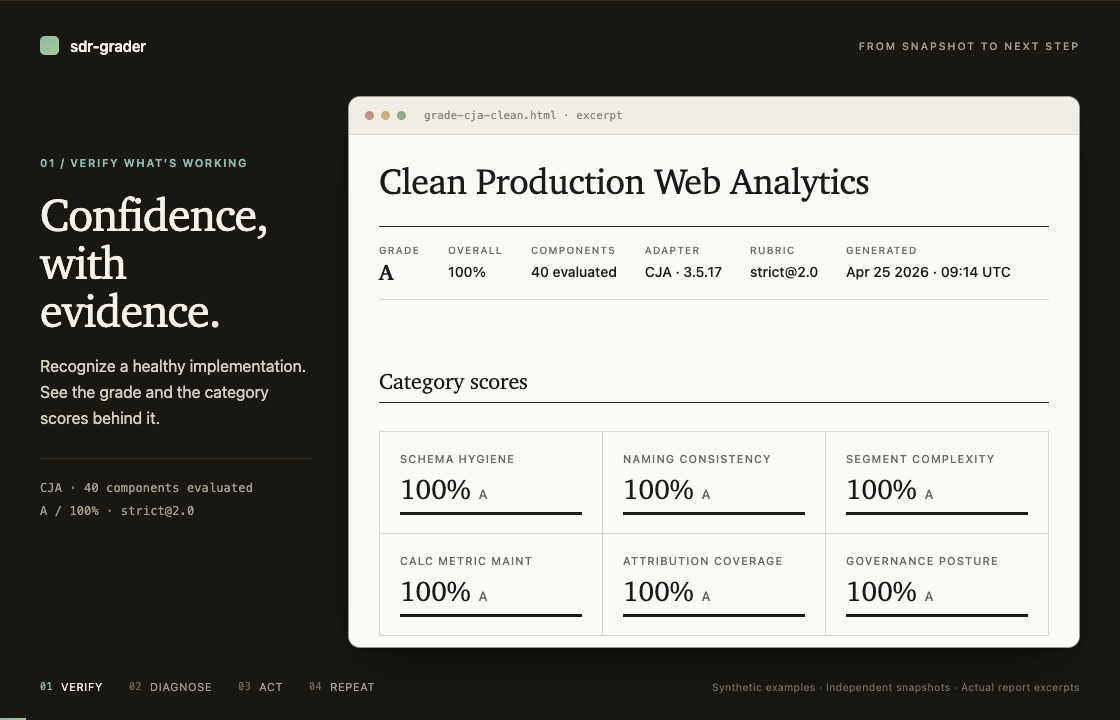
21-second loop · Actual report excerpts from independent synthetic snapshots. Click the animation for a still image. Explore the complete synthetic CJA report with no findings, diagnostic CJA report, or synthetic AA report with no findings.
What it grades
sdr-grader checks schema hygiene, naming consistency, segment complexity,
calculated metric maintainability, attribution coverage, and governance posture.
Choose strict for tighter thresholds or pragmatic for the same checks with
more forgiving thresholds and severities.
Rules assess the data in your snapshot. Unresolved references remain visible, but explicitly typed calculated-metric-to-segment references are unscored: snapshot absence cannot establish whether a segment is available or valid. This also leaves genuinely invalid references in that category unscored; other reference penalties still apply. See the reference grading policy for eligibility and diagnostic details.
Optional checks can use operator-supplied JSON alongside the snapshot; see Supplementary inputs.
How it grades
- Adapt the platform snapshot into a normalized implementation.
- Run rules from the selected rubric pack.
- Score each weighted category from fired and available severity.
- Assign a letter using the pack's descending grade-scale bands.
Penalties apply per failed rule, so removing some entries from a mixed finding may leave its score unchanged. For consistent trends and comparisons, regrade historical snapshots with the same package and rubric, and review CI thresholds when upgrading. See the scoring implementation for details.
First local grade
This auth-free quickstart grades a tagged synthetic fixture, so you can confirm the installation before using production data or configuring Adobe credentials. It requires Python 3.11 or newer. The commands are verified on Ubuntu with Python 3.11 and 3.12; the macOS path has historical local exercise on Python 3.12, and the Windows commands are unverified guidance.
Install the released grader with uv (or use pipx or another isolated Python
tool installer):
uv tool install sdr-grader
sdr-grader --version
Download the v1.5.0 synthetic CJA snapshot.
macOS and Linux:
curl -fL -o cja_snapshot_clean.json https://raw.githubusercontent.com/brian-a-au/sdr-grader/v1.5.0/tests/fixtures/cja_snapshot_clean.json
Windows PowerShell (unverified guidance):
Invoke-WebRequest -Uri "https://raw.githubusercontent.com/brian-a-au/sdr-grader/v1.5.0/tests/fixtures/cja_snapshot_clean.json" -OutFile "cja_snapshot_clean.json"
Grade it with the installed command (Windows use is unverified):
sdr-grader cja_snapshot_clean.json --output grade.html --json grade.json --quiet
Open the local HTML report:
open grade.html                 # macOS
xdg-open grade.html             # Linux
Start-Process .\grade.html # Windows PowerShell
Live snapshots have two separate optional prerequisites:
- CJA: install
cja_auto_sdrusing its Installation instructions, then configure its Adobe credentials. Generate with--include-all-inventory; without the complete CJA inventory, calculated-metric and segment inputs are empty and those rules stay silent. - AA: install
aa_auto_sdrusing its Installation instructions, then configure its Adobe credentials. AA includes both inventories by default.
The upstream CJA
Component Inventory Overview
documents the complete set of --include-* switches.
Using sdr-grader
The following are installed-user workflows. Generate live snapshots only after installing and authenticating the appropriate prerequisite above:
# CJA: include the complete component inventory.
cja_auto_sdr dv_prod_web --include-all-inventory --format json --output snapshot.json

# AA: inventory is included by default.
aa_auto_sdr prod_us --format json --output snapshot.json

# Either platform is auto-detected from the resulting JSON.
sdr-grader snapshot.json --output grade.html --json grade.json
For an installed streaming workflow on shells with pipe support (Windows is unverified guidance):
cja_auto_sdr dv_prod_web --include-all-inventory --format json --output - | sdr-grader - --output grade.html
aa_auto_sdr prod_us --format json --output - | sdr-grader - --output grade.html
Input modes
| Mode | Invocation | Network behavior |
|---|---|---|
| File | sdr-grader path/to/snapshot.json |
Local only. |
| Directory | sdr-grader path/to/snapshots/ |
Local only; selects the newest snapshot. |
| Historical | sdr-grader path/to/snapshots/ --at 2026-04-01 |
Local only; selects the closest snapshot not after the date. |
| Trend | sdr-grader path/to/snapshots/ --trend |
Local only; grades dated snapshots chronologically. |
| CJA child generator | sdr-grader --dataview dv_prod_web |
cja_auto_sdr calls Adobe APIs; complete inventory is requested automatically. |
| AA child generator | sdr-grader --rsid prod_us |
aa_auto_sdr calls Adobe APIs. |
| Stdin | … | sdr-grader - |
The grader is local; the producer determines whether the pipeline uses a network. |
One run grades one platform. Keep CJA and AA snapshots in separate directories. Directory history uses only same-platform, same-instance siblings; trend mode rejects mixed-platform or mixed-instance input rather than combining it.
Supplementary inputs
Forked rubrics can read optional JSON from Implementation.supplementary_data.
Attach it with repeatable --extra-input KEY=PATH flags; a rule whose key is
absent stays silent. The tagged
supplementary-input contract
defines keys, paths, and failure behavior.
Output
- HTML report card at
--output PATH(defaultgrade-{report-id}.html) is a single self-contained file with no external CSS or JavaScript. - JSON output at
--json PATHuses schema1and contains stable instance, adapter, rubric, and grader identity plus the complete report model. See the tagged JSON output contract.
HTML color packs
Generated HTML supports exactly four built-in color packs, in this public
order: default, ADBE, OMTR, BLUE. Select one for a normal report or a
trend report with the case-sensitive --color-pack option:
sdr-grader snapshot.json --color-pack ADBE --output grade.html
sdr-grader snapshots/ --trend --color-pack BLUE --output trend.html
The same choice is available to renderer API callers:
from sdr_grader.render import render
from sdr_grader.trend import render_trend

grade_html = render(report, color_pack="OMTR")
trend_html = render_trend(trend, color_pack="BLUE")
--pack and --color-pack are independent. --pack selects the scoring
rubric (strict or pragmatic); --color-pack selects only the presentation
palette for generated HTML. It does not enter the report model or separately
written JSON, and does not change findings, scoring, grades, or exit codes.
The named palettes use source swatches as design inspiration only. They are not official brand assets, contain no logos, and do not imply affiliation, sponsorship, endorsement, or approval by any company. Reviewed text and essential-graphic color pairs are tested at WCAG contrast thresholds, but color is not the only severity cue: reports retain severity text and bordered structure. Print-specific foreground, background, and border roles are also tested. Every palette remains embedded in the same self-contained HTML, so reports continue to work offline without external CSS or JavaScript.
Rendered examples for this release:
| Clean (A) | Messy (F) | |
|---|---|---|
| CJA | CJA clean | CJA messy |
| AA | AA clean | AA messy |
Troubleshooting
Missing generators, Adobe authentication, incomplete inventories, platform detection, directory mixing, compatibility warnings, output paths, and privacy are covered in the tagged troubleshooting guide.
Before sharing an HTML or JSON report, follow the current report-sharing privacy matrix.
Integrating sdr-grader
- CI integration — use
--fail-belowsafely in automation. - Trend reports — filename conventions and flag interactions.
- Internal leaderboards — build a distribution reference from collected JSON outputs.
- Supplementary inputs — attach repeatable
--extra-input KEY=PATHdata. - Claude Code skill — query a grade without rerunning the grader.
Extending sdr-grader
Start with the tagged customization guide, then choose the narrowest extension surface:
- Project configuration — suppressions in
.sdr-grader.yaml. - Rubric format — fork or create a YAML pack.
- Check-function guide — add rule logic.
- Adapter guide — add a platform in a source checkout.
Maintaining sdr-grader
These are source-checkout workflows. Run them from the repository root after cloning the v1.5.0 source tree:
uv sync
uv run pytest
uv run ruff check
uv run python scripts/build_cja_fixtures.py
uv run python scripts/generate_examples.py
uv run python scripts/generate_grade_examples.py
uv run python scripts/generate_trend_example.py
Maintainer references:
- Platform coverage — CJA/AA compatibility evidence and known gaps.
- Calibration corpus — private compatibility and calibration admission.
- Threshold calibration — admitted-cohort status.
- Rubric audit — rule premises against Adobe documentation.
- Release checklist — publication, recovery, and announcement gates.
Community
1 maintainer

Metadata
1 maintainer
Release files for sdr-grader 1.5.0
For a detailed explanation of source distributions (sdists) and built distributions (wheels), please see the package formats documentation.
Source distribution (sdist)
| File | Size | Uploaded | |
|---|---|---|---|
| sdr_grader-1.5.0.tar.gz | 339.6 kB | Details |
Built distribution (wheel)
| File | Interpreter | ABI | Platform | Reset |
|---|---|---|---|---|
| sdr_grader-1.5.0-py3-none-any.whl | Python 3 | none | any | Details |
Total release size: 492.3 kB
Release files / sdr_grader-1.5.0.tar.gz
| Download URL | sdr_grader-1.5.0.tar.gz |
|---|---|
| Size | 339.6 kB |
| Tags | Source |
|
SHA-256 checksum How to use checksums |
4573da81a93aee9dd6ea978a2bc45a493ebe3218f80943ad44df379de9f7115c
|
|
BLAKE2b-256 checksum How to use checksums |
8832ed77f1f46b3c734a519b7c272ff266dc68948d6b7b783a70b7b2f2734691
|
| Upload date | |
|
Uploaded using Trusted Publishing? What is trusted publishing? |
Yes |
| Uploaded via |
twine/7.0.0 CPython/3.13.14
|
Provenance
Provenance describes where a file came from. On PyPI, provenance is shared via attestations, which provide a verifiable record of the build or publishing details. View details, limitations and caveats.


PyPI Publish Attestation
PyPI verified that this artifact, at this checksum, originated from the publisher listed below.
Signed by GitHub Actions, verified by PyPI on Sep 21, 2026.
Transparency logRelease files / sdr_grader-1.5.0-py3-none-any.whl
| Download URL | sdr_grader-1.5.0-py3-none-any.whl |
|---|---|
| Size | 152.7 kB |
| Tags | Python 3 |
|
SHA-256 checksum How to use checksums |
fb725b8f3a3deeb28b733b5ef0c53e6605ca42e6a59bfa74d4cd3f15fcb55748
|
|
BLAKE2b-256 checksum How to use checksums |
0648bbbf61a00efb28fc1715ee78fed46e05baf7f07a5a2b0d4f910a0eb1b45c
|
| Upload date | |
|
Uploaded using Trusted Publishing? What is trusted publishing? |
Yes |
| Uploaded via |
twine/7.0.0 CPython/3.13.14
|
Provenance
Provenance describes where a file came from. On PyPI, provenance is shared via attestations, which provide a verifiable record of the build or publishing details. View details, limitations and caveats.
PyPI Publish Attestation
PyPI verified that this artifact, at this checksum, originated from the publisher listed below.
Signed by GitHub Actions, verified by PyPI on Sep 21, 2026.
Transparency log













