
sdr-visualizer





Static-output visual catalog generator for Adobe Customer Journey Analytics (CJA) and Adobe Analytics (AA) implementations. Consumes JSON snapshots from cja_auto_sdr and aa_auto_sdr and produces a single self-contained HTML file with:
- A searchable, filterable component catalog (the primary view)
- An interactive force-directed reference graph
- Per-segment anatomy diagrams that make deeply-nested segments legible
- Per-calculated-metric formula trees with click-through to referenced metrics
- Snapshot-to-snapshot Changes and multi-snapshot Trend views
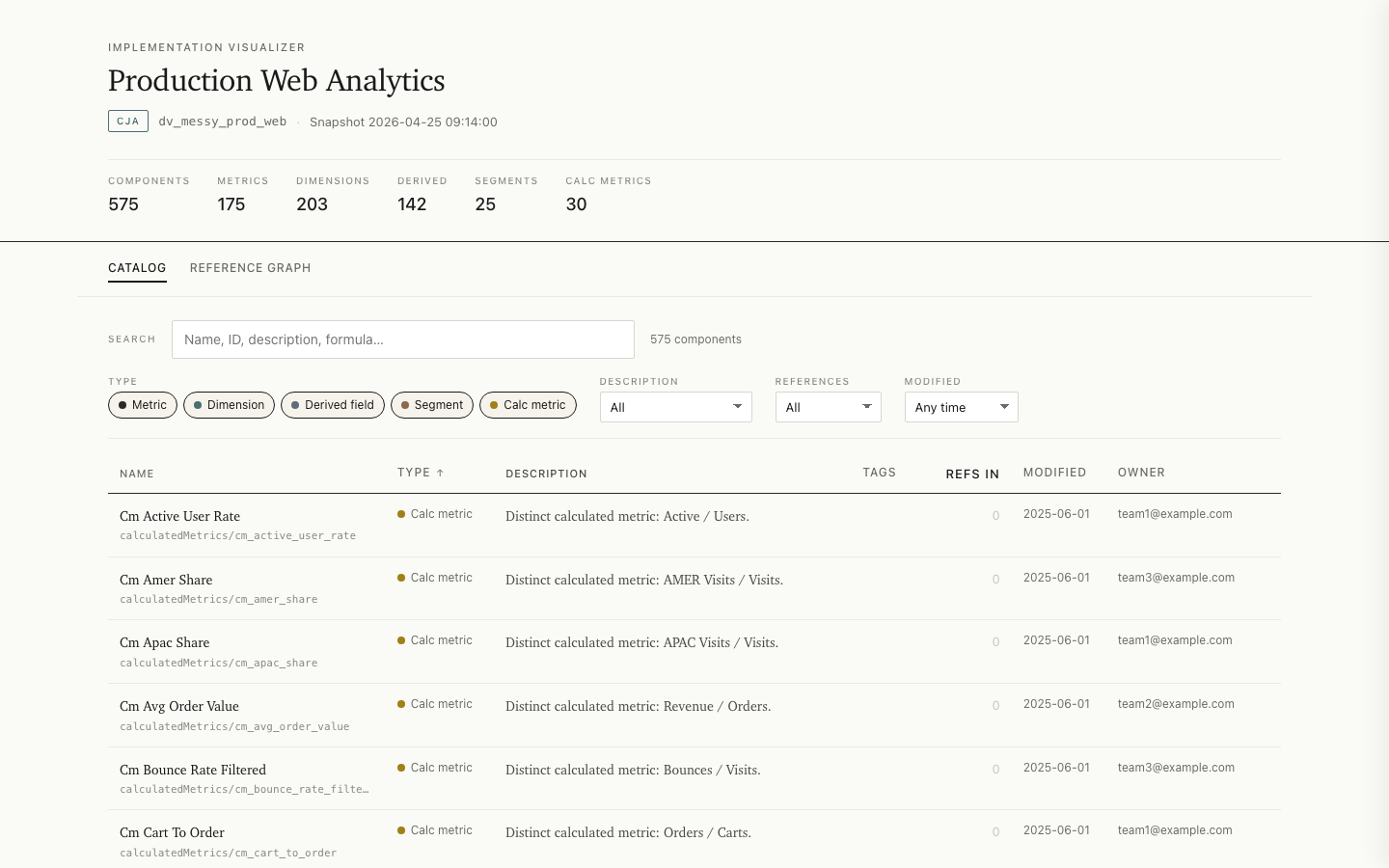
Live examples: CJA report · AA report
The output is one HTML file: no server, no consumer-side build step, and no CDN dependencies. Its JSON, CSS, JavaScript, and D3 runtime are embedded, so it opens in a modern browser without an internet connection and makes no network requests.
Offline does not mean cleared for distribution. A report can contain implementation and component names, descriptions, segment and calculated-metric logic, owners, identifiers, timestamps, and source paths. Treat it as derived from the source snapshot. Move, email, post, or attach it only in authorized locations and in accordance with your organization's confidentiality and data-handling policy.
Install
Install from PyPI with uv:
uv tool install sdr-visualizer
Or with pip:
pip install sdr-visualizer
For development, run from a clone:
git clone https://github.com/brian-a-au/sdr-visualizer
cd sdr-visualizer
uv sync
uv run sdr-visualizer --help
Quickstart with a saved snapshot
Saved snapshots are the simplest and most reproducible input. You do not need either upstream generator installed to visualize a JSON file you already have.
# From a snapshot file
sdr-visualizer path/to/snapshot.json

# From a directory of snapshots (uses the most recent)
sdr-visualizer path/to/snapshots/

# Compare against an earlier snapshot: adds a Changes view to the report
sdr-visualizer snapshot_new.json --compare-to snapshot_old.json

# Chart evolution across a directory of snapshots: adds a Trend view
sdr-visualizer ./snapshots/ --trend
The output lands at ./visualize-{instance_id}-{timestamp}.html by default. Open it in a browser — that's the whole experience.
Standard input is also supported when another process already emits a complete compatible snapshot:
some-snapshot-command | sdr-visualizer -
Live CJA
Live CJA mode requires the separate
cja_auto_sdr executable. Follow
that project's current installation, configuration, and authentication
instructions, then confirm cja_auto_sdr is on your PATH. Its generator may
require a newer Python version than sdr-visualizer's Python 3.11 minimum.
sdr-visualizer --dataview dv_prod_web
sdr-visualizer runs the generator with JSON output, a temporary output
directory, and --include-all-inventory, then selects the generated snapshot.
The temporary source data is removed after the report is built. This is not a
stdin pipeline: CJA's complete inventory is directory-backed.
Live AA
Live AA mode likewise requires the separate
aa_auto_sdr executable. Complete
its current setup and authentication steps, and confirm aa_auto_sdr is on your
PATH. The generator may require a newer Python version than sdr-visualizer.
sdr-visualizer --rsid prod_us
AA live mode reads the generator JSON snapshot from stdout and embeds the supported normalized component catalog in the report. Retain the original generator snapshot when you need platform-specific details that the visualizer does not embed. For both live modes, the upstream repository is authoritative for credentials, permissions, and generator compatibility.
Optional Workspace project usage
Add project-usage evidence while generating the HTML. Install the independent extra for your platform with uv, then opt in to collection using an existing credential source. The CJA and AA extras are independent; use the one that matches your snapshot:
uv tool install 'sdr-visualizer[workspace-cja]'
sdr-visualizer snapshots/cja.json --collect-workspace-usage \
  --workspace-usage-org 'EXAMPLE@AdobeOrg' \
  --workspace-usage-config ../credentials/adobe.json --output cja.html
uv tool install 'sdr-visualizer[workspace-aa]'
sdr-visualizer snapshots/aa.json --collect-workspace-usage \
  --workspace-usage-org 'EXAMPLE@AdobeOrg' --workspace-usage-company example-company \
  --workspace-usage-config ../credentials/adobe.json --output aa.html
Each command automatically writes HTML and <html-stem>.workspace-usage.json.
Existing snapshots and live exporter modes work without exporter changes.
The catalog shows possible project references separately from component
dependencies, with check time and coverage limits. SDK matches remain
unverified candidates; empty results never mean unused or safe to delete.
Opening the HTML and replaying the saved usage file need no credentials or
network access. See the
Workspace usage guide
for collection scopes, offline replay, identity binding, limits, and privacy.
Useful flags
| Flag | What it does |
|---|---|
--output PATH |
Write HTML somewhere specific. |
--json PATH |
Also emit the embedded payload as a separate JSON file (useful for downstream tooling). |
--collect-workspace-usage |
Collect optional Workspace project-usage evidence; see the Workspace usage guide. |
--workspace-usage PATH |
Replay saved Workspace usage evidence with the original snapshot. |
--title TEXT |
Override the document title. |
--color-pack CODE |
Select default, ADBE, OMTR, or BLUE for HTML presentation (case-sensitive). |
--exclude-orphans |
Default the catalog's references filter to "Referenced" — hides components nothing depends on. |
--max-graph-nodes N |
Override the 1,000-node graph-rendering threshold. |
--platform cja|aa |
Override platform auto-detection. |
--at TIMESTAMP |
When path is a directory, pick the snapshot closest to (and not after) this timestamp. |
--quiet |
Suppress informational stderr output. |
Color packs
Every report uses one built-in color pack. The exact catalog, in CLI order, is
default, ADBE, OMTR, and BLUE; identifiers are case-sensitive. Select a
pack on the command line:
sdr-visualizer snapshot.json --color-pack ADBE
Or pass the same identifier through the Python rendering API:
from sdr_visualizer.core.visualizer import visualize

html = visualize(snapshot, source="snapshot.json", color_pack="BLUE")
Color-pack selection changes HTML presentation only. It does not add to or
alter the embedded JSON or a --json sidecar. The pack CSS, report data, and
runtime remain embedded in the single offline HTML file.
The named packs are palette-inspired alternatives, not official brand assets or claims of affiliation or endorsement, and they contain no company or product logos. Each pack is checked against the project's declared WCAG text and essential-graphics contrast pairs. Text labels and other non-color cues continue to communicate state, and reviewed print colors keep reports legible when printed.
What's in the output
Every report has two base top-level views:
- Catalog — a searchable, filterable, sortable table of every component. Click a row to slide out a detail panel with description, properties, references, and anatomy.
- Reference graph — a force-directed view of every component and the edges between them; small implementations (under 20 components) use a static radial layout instead. Hover dims unrelated nodes; click opens the same detail panel; drag pins; pan/zoom.
Segment anatomy and calculated-metric anatomy are contextual detail content, not separate navigation destinations. They open from the Catalog detail panel. Segment anatomy renders nested containers and references; calculated-metric anatomy renders operations, operands, and metric references.
At most one conditional top-level view is added. With --compare-to, a
Changes view appears, listing components
added, removed, and modified relative to a baseline snapshot, with
field-level before/after detail.
With --trend on a snapshot directory, a Trend view appears: sparkline
charts of descriptive aggregates (component counts, orphans, undocumented
components, reference edges) across the directory's snapshots, plus a
per-interval change log. The window is capped at the 60 most recent
snapshots.
A trend directory must hold snapshots of a single implementation. If it mixes
CJA and AA snapshots, pass --platform cja|aa to select one (or point at a
single-platform directory); without it the run stops rather than guess. If it
mixes data views or report suites, the run stops as well. This mirrors
--compare-to, which refuses both a platform and an instance mismatch, so
neither view ever diffs unrelated inventories. To compare or chart across
different data views or report suites on purpose (for example staging versus
prod drift), pass --allow-instance-mismatch; the run then proceeds with a
warning. Platform mismatches are always rejected. The report shown alongside
the trend is the newest usable snapshot in the directory.
- Restorable report links — the catalog's filters, sort, view, and open detail panel are encoded in the URL hash. Within an authorized report location, copy the address bar to restore the same filtered view.
Performance budget
The output is CI-gated against the budgets in
docs/PERFORMANCE.md.
Build time and HTML size are enforced at every published tier (100 / 500 / 1,000 / 2,000
components). Browser-measured budgets are enforced at the 1,000-component tier
(initial render < 1s, filter/search < 150ms) and the 2,000-component tier
(< 2s, < 300ms), plus a 700ms cap on the graph view's main-thread block.
These guarantees cover up to 8,000 reference edges; denser valid reports use
an explicit graph opt-in and sit outside the published size/latency envelope.
Functional browser tests cover Chromium and WebKit. A separate Chromium-only
performance gate measures all four component tiers; this is not a timing
guarantee for every branded browser.
Troubleshooting
| Symptom | What to do |
|---|---|
cja_auto_sdr or aa_auto_sdr is not found |
Install the matching upstream generator and make sure its executable is on PATH, or use a saved snapshot instead. |
| The generator reports an authentication or access failure | Follow its upstream configuration instructions and verify the account can read the requested data view or report suite. sdr-visualizer does not manage generator credentials. |
| Live generation reaches the 600-second timeout | Run the generator directly to diagnose service or inventory latency, save a completed snapshot, then pass that file to sdr-visualizer. |
| A file is reported as an unknown or ambiguous platform | Pass a known CJA or AA snapshot, or use --platform cja / --platform aa when the file is valid but detection is ambiguous. |
| A trend run rejects a mixed directory | Separate CJA from AA and different implementation IDs. --platform can select one platform; --allow-instance-mismatch is only for an intentional cross-instance comparison. |
| A large report withholds the graph | Use the report's explicit graph opt-in after considering the browser cost, or set an intentional --max-graph-nodes threshold when generating it. |
| The HTML does not open automatically | sdr-visualizer writes the file but does not launch a browser. Open the reported output path in a current browser. |
Exit 0 means the report was generated. Exit 1 means a runtime failure such
as an output-write error. Exit 3 means the input or invocation was invalid,
including generator failures and timeouts. Exit 2 is not used.
Before sharing a snapshot, JSON sidecar, report, terminal output, or bug reproduction, redact customer names, component content, IDs, owners, source paths, credentials, and other organization-sensitive data. Prefer a minimal synthetic reproduction in a public issue.
Stability
From 1.0.0, semantic versioning covers the surface below. Anything not listed is internal and may change in any release.
Catalog CLI (sdr-visualizer). The argument set: the positional path (snapshot file, snapshot directory, or - for stdin), --dataview, --rsid, --platform, --at, --compare-to, --trend, --allow-instance-mismatch, --output, --title, --color-pack, --exclude-orphans, --max-graph-nodes, --json, --quiet, --version. Removing or repurposing any of these is a major bump; adding flags is a minor one.
Catalog exit codes. 0 success, 1 runtime error, 3 invalid input. 2 is never used.
The catalog data payload. The JSON embedded in every catalog report and the --json
sidecar share one schema, published at
docs/payload-schema.json (JSON Schema 2020-12)
and validated in CI against every payload shape produced by the bundled
fixtures. Removing or retyping a field is major; adding optional fields is
minor. The segment_trees / formula_trees node internals are documented in
the schema as loosely specified. Current-generator and private-corpus
validation is a separate, recorded release gate; see
docs/RELEASING.md.
CJA lineage. cja-lineage adds a separate CJA-only command. Its documented
arguments and exit codes are described in the
lineage guide.
Its embedded payload and Python modules are internal and do not extend the
catalog schema or JSON sidecar contract.
Performance budgets. The tier table above is a guarantee, not a goal: loosening a budget is a breaking change; tightening one is minor.
Warnings (snapshot generator newer than the tested version; 5,000+ component reports) are informational and never make a valid snapshot fail.
Develop
Requires Python 3.11+ and uv.
uv sync --all-extras --dev --group browser  # Full test environment, including SDK tests
uv run playwright install chromium webkit
uv run pytest                               # Run tests (auto-generates the large fixture on first run)
uv run ruff check      # Lint
uv run ruff format     # Auto-format

uv run python scripts/generate_examples.py   # Regenerate examples/
uv run python scripts/check_color_pack_parity.py \\
  --visualizer-sha <candidate-commit-sha> \\
  --grader-root ../sdr-grader --grader-sha <linked-grader-commit-sha>
uv run python scripts/perf_check.py          # Run the perf gate
uv run python scripts/check_markdown_links.py
uv run python scripts/check_workflow_policy.py
uv build --out-dir dist/packages
uv run python scripts/package_smoke_check.py dist/packages/
CJA dataset lineage
See which Adobe Experience Platform (AEP) datasets feed your CJA Connections
and which Data Views use those Connections. The cja-lineage command is
included when you install sdr-visualizer.
Start with a saved dataset discovery JSON file from
cja_auto_sdr --list-datasets --format json --output -. This file lists datasets
and their Connections and Data Views; it is different from the component
snapshots used by the catalog command.
Generate a report from your saved file:
cja-lineage --saved discovery.json --output lineage.html
cja-lineage --help
Open lineage.html in your browser to search datasets, Connections, and Data
Views, inspect how they connect, and filter datasets by their role in a
Connection. Choose Draw full topology to see a diagram of all connections;
large reports show a size warning. The report works offline, and generating it
from a saved file requires no credentials.
To fetch current data from CJA, use --live with your cja_auto_sdr credentials.
See the CJA lineage guide
for setup, supported generator versions, report navigation, and troubleshooting.
Dataset lineage supports CJA only. Use the sdr-visualizer command to generate
component catalogs for either CJA or Adobe Analytics (AA).
See also
sdr-grader— deterministic, rule-based linter for the same input format.cja_auto_sdr— generates CJA snapshots.aa_auto_sdr— generates AA snapshots.
Documentation
-
docs/WORKSPACE_USAGE.md— optional AA/CJA collection, generated usage files, offline replay, and evidence limits. -
docs/LINEAGE.md— CJA-only lineage generation, navigation, compatibility, and limits. -
docs/ARCHITECTURE.md— module layout, one-way data flow, design principles. -
docs/ADAPTER_GUIDE.md— how the CJA and AA adapters work, and how to add a new platform. -
docs/PERFORMANCE.md— performance budgets and how they're enforced. -
docs/EMBEDDED_DATA_FORMAT.md— the JSON payload format embedded in the HTML output. -
docs/PRODUCT_CONTRACT.md— supported inputs, stable surfaces, limits, and compatibility policy. -
docs/RELEASING.md— candidate, corpus, repository-control, publication, and announcement gates.
Community
Contributions are welcome within the project's intentionally narrow scope.
Read CONTRIBUTING.md before opening a pull request. Report
security issues privately as described in SECURITY.md; do not
put vulnerabilities or customer snapshot data in a public issue. Participation
is governed by the CODE_OF_CONDUCT.md.
License
MIT — see LICENSE. The output bundles D3 v7,
vendored under the ISC license; see
THIRD_PARTY_LICENSES for the full notice.
1 maintainer

Metadata
1 maintainer
Release files for sdr-visualizer 1.2.1
For a detailed explanation of source distributions (sdists) and built distributions (wheels), please see the package formats documentation.
Source distribution (sdist)
| File | Size | Uploaded | |
|---|---|---|---|
| sdr_visualizer-1.2.1.tar.gz | 508.2 kB | Details |
Built distribution (wheel)
| File | Interpreter | ABI | Platform | Reset |
|---|---|---|---|---|
| sdr_visualizer-1.2.1-py3-none-any.whl | Python 3 | none | any | Details |
Total release size: 778.1 kB
Release files / sdr_visualizer-1.2.1.tar.gz
| Download URL | sdr_visualizer-1.2.1.tar.gz |
|---|---|
| Size | 508.2 kB |
| Tags | Source |
|
SHA-256 checksum How to use checksums |
404849a15b722f4aa6b278903b2ef7f2e596d23acfa6e9f078a42d662aef58ab
|
|
BLAKE2b-256 checksum How to use checksums |
02ac33128a9f09a2bd2e5d5461b8884b29b5231f3e00d0f4b10345a37d5ed0f7
|
| Upload date | |
|
Uploaded using Trusted Publishing? What is trusted publishing? |
Yes |
| Uploaded via |
twine/7.0.0 CPython/3.13.14
|
Provenance
Provenance describes where a file came from. On PyPI, provenance is shared via attestations, which provide a verifiable record of the build or publishing details. View details, limitations and caveats.


PyPI Publish Attestation
PyPI verified that this artifact, at this checksum, originated from the publisher listed below.
Signed by GitHub Actions, verified by PyPI on Sep 21, 2026.
Transparency logRelease files / sdr_visualizer-1.2.1-py3-none-any.whl
| Download URL | sdr_visualizer-1.2.1-py3-none-any.whl |
|---|---|
| Size | 269.9 kB |
| Tags | Python 3 |
|
SHA-256 checksum How to use checksums |
0e430848aea19b3f29adf4379168b9b124aaf10c1801690a304fd06d147f6039
|
|
BLAKE2b-256 checksum How to use checksums |
b2c2ce78220480be32ba8aaea0866898ab0b5505f72675e2602d30f1638deb8e
|
| Upload date | |
|
Uploaded using Trusted Publishing? What is trusted publishing? |
Yes |
| Uploaded via |
twine/7.0.0 CPython/3.13.14
|
Provenance
Provenance describes where a file came from. On PyPI, provenance is shared via attestations, which provide a verifiable record of the build or publishing details. View details, limitations and caveats.
PyPI Publish Attestation
PyPI verified that this artifact, at this checksum, originated from the publisher listed below.
Signed by GitHub Actions, verified by PyPI on Sep 21, 2026.
Transparency log













