
A text-based application running in terminals to search into text files

Project description
searchf

Utility program to interactively search keywords in text files. Works in terminals thanks to curses.
Installation
pip install searchf
Requirements:
- Python 3.6 or greater
- Terminal with color support (ie.
TERM=screen-256colororTERM=xterm-256color).
Features
- Filters can either include or exclude file content
- Filters can persist to disk
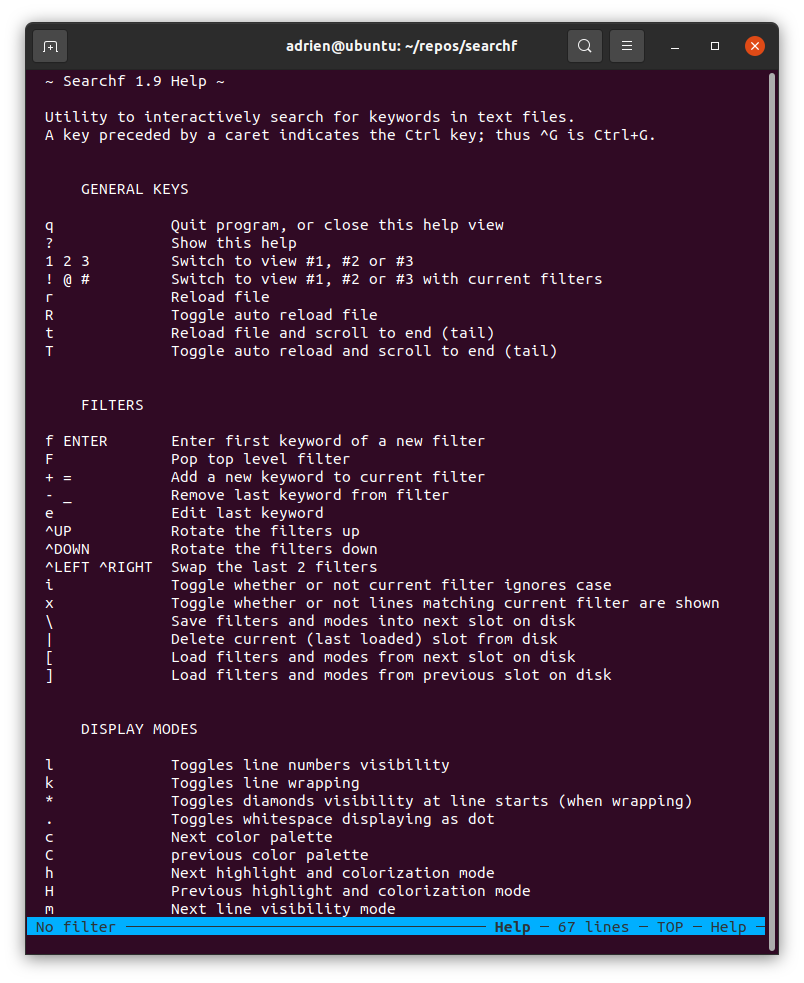
- Multiple highlight and colorization modes (press
hto cycle through all modes) - Color palettes (press
cto cycle through all palettes) - Various other display modes (
ltoggles line numbers visibility,ktoggles line wrapping, ...) - Multiple views (press
1,2,3to switch) with possibility to pass filters of one view to another view (try!,@,#) - Common search key bindings (
/, thennfor next,pfor previous) - Common key bindings to scroll up/down pages or goto line
- Terminal resizing
Usage
searchf <FILE>
- Press
fto enter keyword in a new filter - Press
?for help
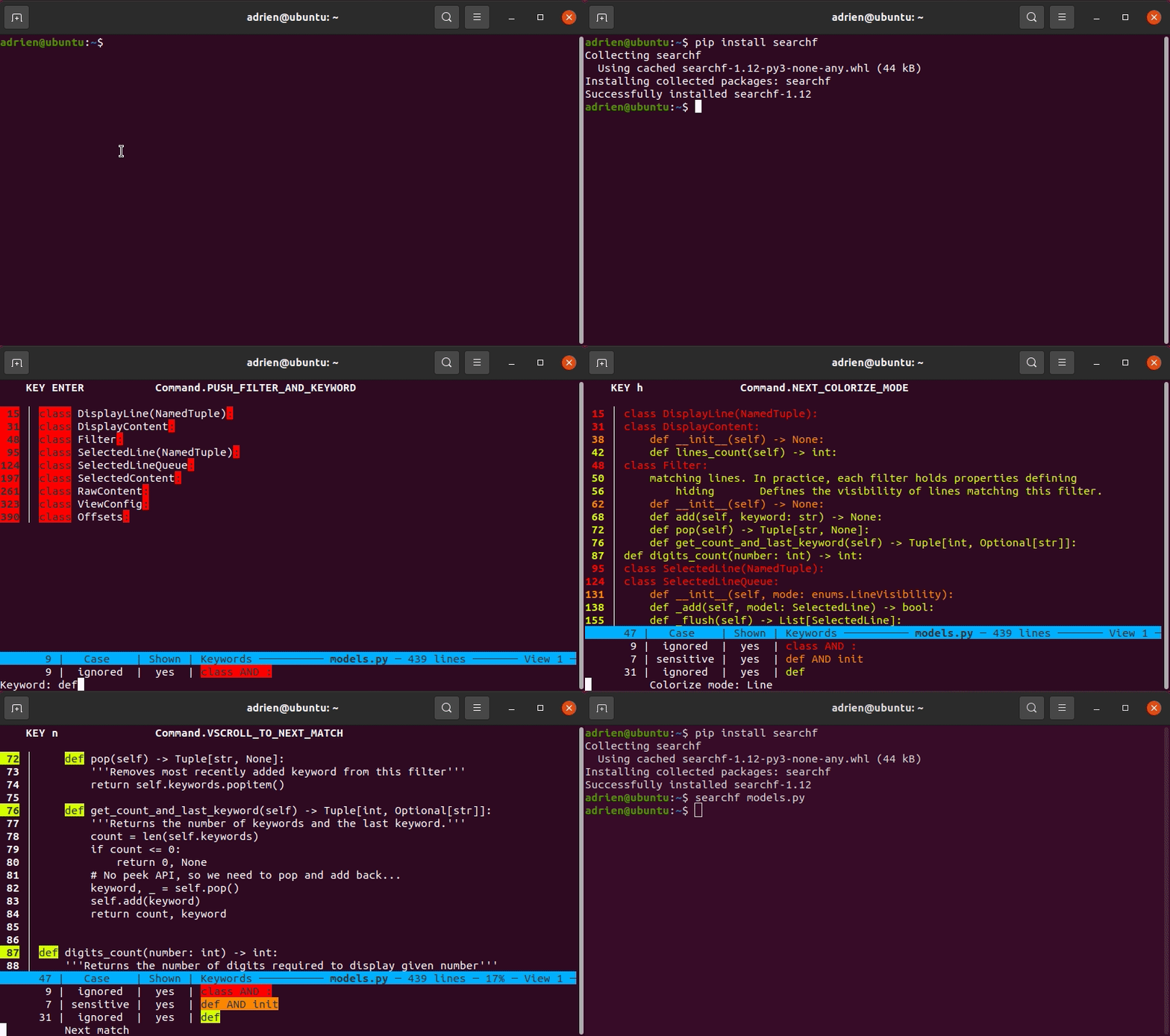
Press ENTER to define the first keyword of a filter and reveal only the lines containing that keyword. Press + to add another keyword to the current filter in order to further narrow down the lines currently displayed.
A filter is a list of keywords that a line must contain to match and get highlighted in a specific color. By defining multiple filters, you can reveal more content of the file. By default, lines not matching any filter are hidden, but you can progressively reveal context surrounding matching lines by pressing m multiple times, all the way to the whole content of the file. Filters can also be used to filter out content you do not want to see (press x to toggle this mode).
Why?
This tool is born from my need to interactively search into log files, with the ability to backtrack when hitting dead ends (hence the use of push/pop of filter and keyword), and to go down some exploratory paths on the side (hence the support of views). I use it most when I'm not fully aware of what I am searching for...
To be more specific, I often have to dig into build log files, which are a raw aggregate of many heterogenous sources (numerous compiler output, deployment scripts, test run and results, ...) resulting in rather unstructured output. The only commonality being that everything is more or less line-oriented. When a build failure occurs, searchf helps me find hints of the root cause which can be hiding about anywhere.
So this tool ends up making little or no assumption on the input file, which can be anything, unstructured and heterogenous, as long as it is line oriented.
Development
Please refer to DEV.md for further information.
Release history Release notifications | RSS feed


Download files
Download the file for your platform. If you're not sure which to choose, learn more about installing packages.
Source Distribution
Built Distribution
Filter files by name, interpreter, ABI, and platform.
If you're not sure about the file name format, learn more about wheel file names.
Copy a direct link to the current filters
File details
Details for the file searchf-1.13.tar.gz.
File metadata
- Download URL: searchf-1.13.tar.gz
- Upload date:
- Size: 39.3 kB
- Tags: Source
- Uploaded using Trusted Publishing? No
- Uploaded via: twine/4.0.2 CPython/3.9.16
File hashes
| Algorithm | Hash digest | |
|---|---|---|
| SHA256 |
5f916b2b983f2d3347c43a1d6f74748949bbe174a94bca603115ab5987f0d38e
|
|
| MD5 |
6cdd31a54a787985c24e26ff863f7af2
|
|
| BLAKE2b-256 |
74364d0202b2d5043a7deef7e30765f6007848121dcf86b044e3a7f412aa8bcd
|
File details
Details for the file searchf-1.13-py3-none-any.whl.
File metadata
- Download URL: searchf-1.13-py3-none-any.whl
- Upload date:
- Size: 44.5 kB
- Tags: Python 3
- Uploaded using Trusted Publishing? No
- Uploaded via: twine/4.0.2 CPython/3.9.16
File hashes
| Algorithm | Hash digest | |
|---|---|---|
| SHA256 |
cddf4b3d953a64d8ff9536bf18fa281a483c9dbdb41be9ee8e07473b6a722455
|
|
| MD5 |
20f28af52295466b48a5cefc4ee5227c
|
|
| BLAKE2b-256 |
a69a64922d85d63d119f417f5d7e3c14cff8a206365057971f43699004f7fa65
|






