
A text-based application running in terminals to search into text files

Project description
searchf
Utility program to interactively search and colorize keywords in text files, select relevant lines, remove noise and help you discover the things you should care about. Works in terminals and uses stack-based interactions to minimize the number of key presses (think HP calculators).
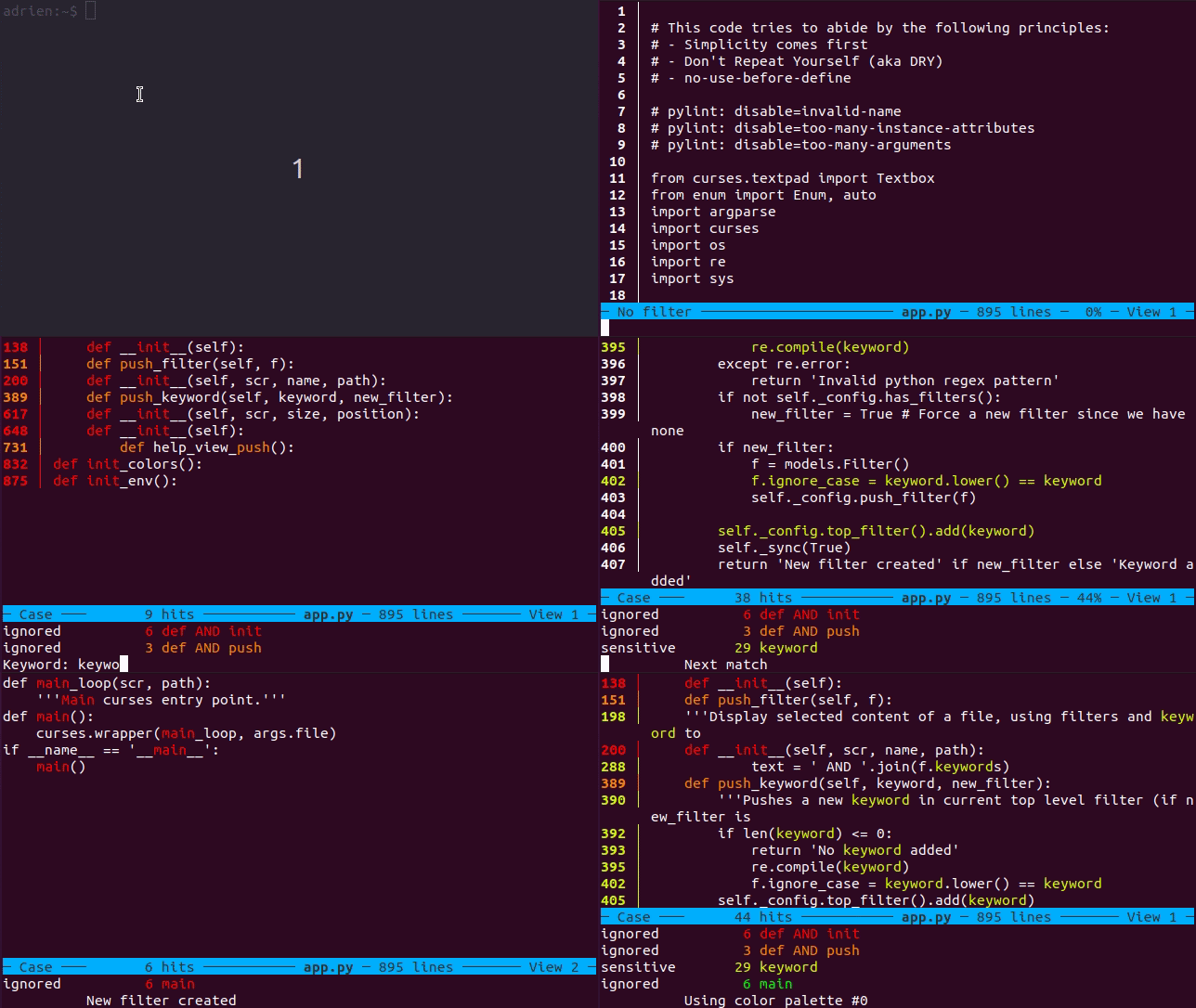
The above screenshot shows how the content of a text file can be filtered. In this example, 3 filters have been defined and are displayed in the filter stack, at the bottom and right below the blue bar:
def AND initreveals 6 lines in reddef AND pushreveals 3 lines in orangekeywordreveals 40 lines in yellow
New filters can be pushed to the stack by pressing ENTER or f, and poped by pressing backspace or delete. Keywords can be added to the most recent filter (the one at the bottom and associated to yellow in the above screenshot) by pressing + or =, and removed from the filter by pressing -.
A filter is a list of keywords that a line must contain to match and get highlighted in a specific color. All keywords in the same filter are ANDed together. By defining multiple filters, you can reveal more content of the file (filters are ORed...). By default, lines not matching any filter are hidden, but their visibility can be toggled by pressing m. Filters are evaluated in the order that they are defined, meaning lines are shown in the color of the first filter they match.
Features
- Supports multiple views (try pressing
1,2,3) - Supports multiple palettes (try pressing
cfor color) - Various display modes (
ltoggles line numbers,mtoggles visibility of non-matching line,ktoggles line wrapping, ...) - Common search key bindings (
/, thennfor next,pfor previous)
Installation
pip install searchf
then run
searchf-test
to run builtin application tests and verify your installation. Please note that your terminal must supports color (TERM=screen-256color or TERM=xterm-256color) and must be UTF-8 enabled (eg. start tmux with "tmux -u").
Usage
searchf <FILE>
- Press
fto enter keyword in a new filter - Press
?for help
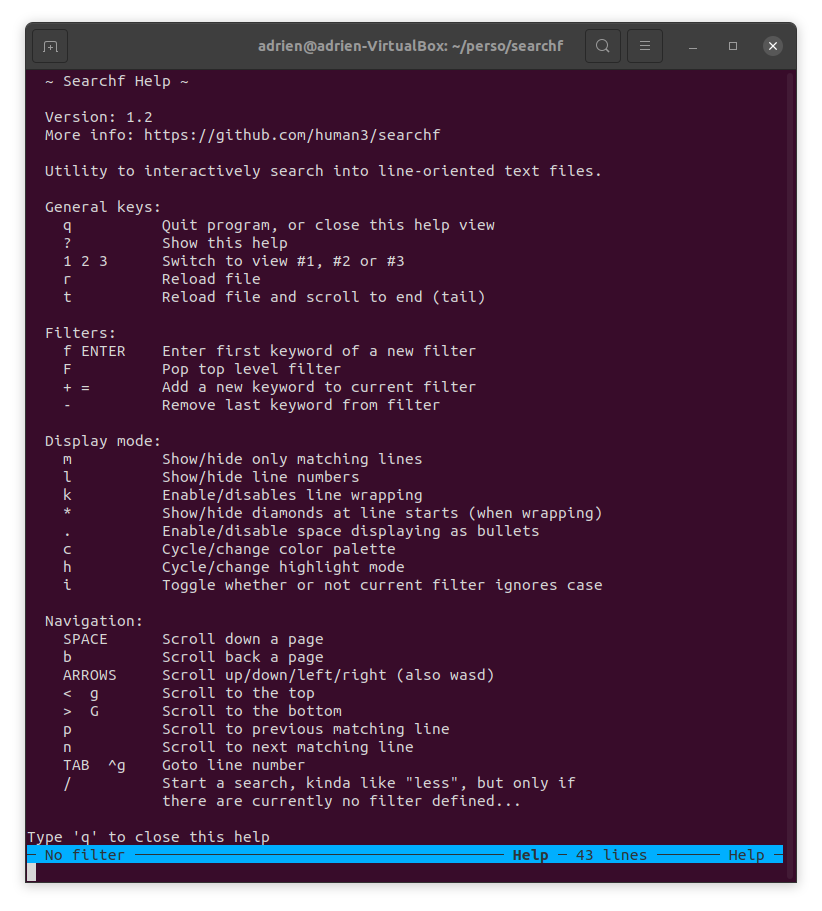
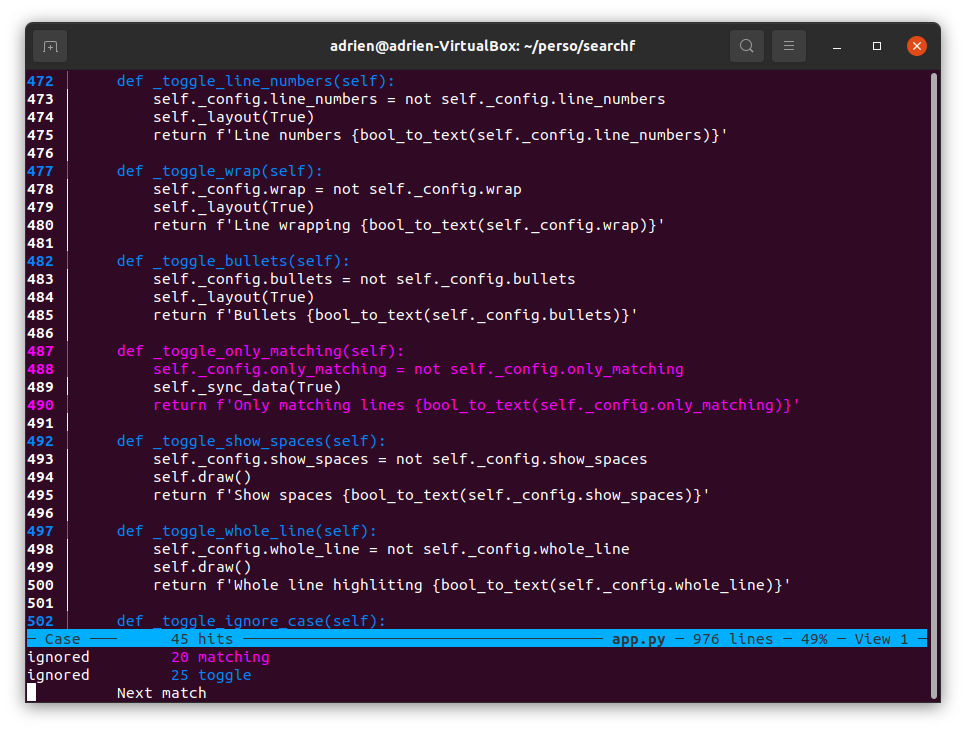
When all lines are shown, including the ones not matching any filter, it can be usefull to scroll to next match with n or previous one with p. When all lines are displayed, it can be hard to identify which ones that are matching which filter, so you can either show the line numbers by pressing l, which will show the matching lines with colorized output, or change the highlight mode by pressing h, to colorize lines as a whole (and not just keywords). Just try it, as it's likely more understandable by doing than by reading this...
Showing all lines, with wrapping and numbers enabled, colorizing lines as a whole instead of just keywords:
Why this utility?
This tool is born from my need to be able to efficiently explore log files in interactive fashion, searching for cues, hitting dead ends and backtracking (hence the use of push/pop of filter and keyword), but also going down some exploratory paths on the side (hence the support of views).
To be more specific, I had to dig into build log files, which were a raw aggregate of many heterogenous sources (numerous compiler output, deployment scripts, test run and results, ...) resulting in rather unstructured output. The only commonality being that everything was somehow and more or less line-oriented... When a build failure occured, hints of the root caused could be hiding about anywhere.
So this tool ended making little or no assumption on the input file, which can be anything, unstructured and heterogenous, as long as it is line oriented.
Development
If working from the sources (ie not an installed package), the application can be launched as a module:
python3 -m searchf.app <FILE>
To run all tests:
python3 -m searchf.test.all
Some unit tests can get triggerred through pytest.
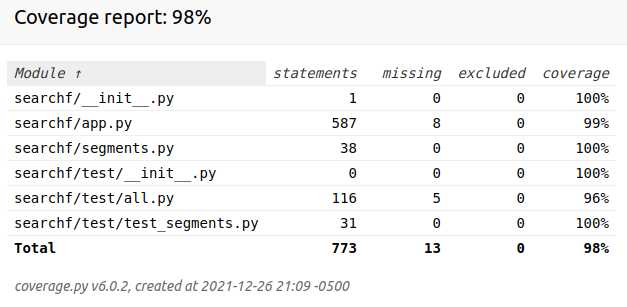
To get coverage report (requires coverage package):
coverage run -m searchf.test.all, then
coverage html
As of version 1.2:
Known Issues
- Does not work on Windows
Wish list
- More palettes (and move them into separate module)
- Ability to save/load filters
- Ability to pass current filters to another view
- Tail function that automatically reload (instead of having to press
t) - Screen dynamic resizing
- Bookmarks
- Ability to save filtered file
- Cleanup: remove COLOR_BAR hack in source (inner beauty's sake)
Release history Release notifications | RSS feed


Download files
Download the file for your platform. If you're not sure which to choose, learn more about installing packages.
Source Distribution
Built Distribution
Filter files by name, interpreter, ABI, and platform.
If you're not sure about the file name format, learn more about wheel file names.
Copy a direct link to the current filters
File details
Details for the file searchf-1.3.tar.gz.
File metadata
- Download URL: searchf-1.3.tar.gz
- Upload date:
- Size: 24.8 kB
- Tags: Source
- Uploaded using Trusted Publishing? No
- Uploaded via: twine/3.7.1 importlib_metadata/4.10.0 pkginfo/1.8.2 requests/2.26.0 requests-toolbelt/0.9.1 tqdm/4.62.3 CPython/3.9.9
File hashes
| Algorithm | Hash digest | |
|---|---|---|
| SHA256 |
500412eaa72985f9eb18d12d878a29b5ecfe224022d0d3dcd3b59ffc87ac014e
|
|
| MD5 |
79330da2030896c6bec33619bfe76b33
|
|
| BLAKE2b-256 |
608d28530aec3fa5359c53e0d5941d316ea50e60d774378598000dfeb29fa467
|
File details
Details for the file searchf-1.3-py3-none-any.whl.
File metadata
- Download URL: searchf-1.3-py3-none-any.whl
- Upload date:
- Size: 27.7 kB
- Tags: Python 3
- Uploaded using Trusted Publishing? No
- Uploaded via: twine/3.7.1 importlib_metadata/4.10.0 pkginfo/1.8.2 requests/2.26.0 requests-toolbelt/0.9.1 tqdm/4.62.3 CPython/3.9.9
File hashes
| Algorithm | Hash digest | |
|---|---|---|
| SHA256 |
3c991728a9ccfe133c5413e6817efe80aca014127d3668a913a75beb7d739ba6
|
|
| MD5 |
ce469740fa2ae0a632c324198be135a4
|
|
| BLAKE2b-256 |
71b0f282429537de4fb2ed9495cd645502aa42d0fbd79a7aa8fb5c087ba5bb2b
|






