
secscan



Automated web security scanner. Runs a configurable battery of scans against a target, warns you about anything risky before running it, and produces HTML, Markdown, and JSON reports.
Quick start
The PyPI package is secscan-tool; the CLI command it installs is secscan.
On macOS or any PEP-668 system, install with pipx so the CLI is isolated and on PATH:
brew install pipx
pipx ensurepath
pipx install secscan-tool
On Linux without pipx, a user-level pip install works:
python3 -m pip install --user secscan-tool
Verify the install:
secscan --version
secscan list-scanners
Run a safe scan:
secscan scan https://example.com
Reports land in ./reports/<target>-<timestamp>/ as HTML, Markdown, and JSON.
Live dashboard on port 8765:
secscan serve
# open http://localhost:8765
AI-tailored remediation (optional). Set ANTHROPIC_API_KEY before scanning:
export ANTHROPIC_API_KEY=sk-ant-...
secscan scan https://example.com --repo .
External tools
Most scanners shell out to a separate binary. The Python install above only gets you headers and tls. For everything else, install the tool the scanner uses:
# macOS (Homebrew)
brew install nuclei nmap subfinder httpx trivy gitleaks ffuf semgrep
docker pull zaproxy/zap-stable    # for zap-baseline / zap-full

# Debian / Ubuntu
sudo apt-get install -y nmap
# install nuclei, subfinder, httpx, trivy, gitleaks via their official releases
sudo apt-get install -y python3-pip && pip install --user semgrep
docker pull zaproxy/zap-stable
Or skip the host install entirely and use the Docker image, which bundles secscan plus nuclei, nmap, subfinder, httpx, trivy, semgrep, and gitleaks (ZAP and ffuf are not bundled; pull zaproxy/zap-stable separately if you need ZAP).
secscan list-scanners prints every scanner, its risk level, and which external tool it depends on. If a scanner's tool is missing from PATH, secscan will skip that scanner and note it in the report.
Docker
A Dockerfile and docker-compose.yml are included for self-hosting the dashboard. The image bundles secscan plus nuclei, nmap, subfinder, httpx, trivy, semgrep, and gitleaks. ZAP and ffuf are not included (they bloat the image significantly); install them on the host if you need those scanners.
Quick start with compose:
git clone https://github.com/Jitesh17/secscan.git
cd secscan
export ANTHROPIC_API_KEY=sk-ant-...    # optional, for AI-tailored fixes
docker compose up -d
Open http://localhost:8765. Reports are written to ./reports/ on the host (mounted into the container at /app/reports). Stop with docker compose down.
Without compose:
docker build -t secscan:latest .
docker run -d --name secscan -p 8765:8765 \
  -v "$PWD/reports:/app/reports" \
  -e ANTHROPIC_API_KEY="$ANTHROPIC_API_KEY" \
  secscan:latest
Notes:
- Image is roughly 1.5 GB on
linux/arm64. Most of the size isnucleiplussemgrep's embedded Rust binary. - Tool versions are pinned via Dockerfile
ARGs (NUCLEI_VERSION,SUBFINDER_VERSION,HTTPX_VERSION,TRIVY_VERSION,GITLEAKS_VERSION). Override at build time with--build-arg. - The container runs as root so
nmapcan perform SYN scans. Don't expose port 8765 to untrusted networks. - One-off scans from inside the container:
docker compose exec dashboard secscan scan https://example.com.
What it does
| Scanner | Risk | Tool used |
|---|---|---|
| Security headers | Safe | requests |
| TLS / SSL | Safe | sslyze |
| Subdomain enumeration | Safe | subfinder |
| Live host probing | Safe | httpx |
| Port and service scan | Safe | nmap |
| Aggressive port scan | Medium | nmap |
| Vulnerability templates | Low | nuclei |
| Spider + passive scan | Low | OWASP ZAP baseline |
| Active web attacks | Medium | OWASP ZAP full scan |
| Content discovery | Medium | ffuf |
| Code vulnerability scan | Safe | semgrep |
| Dependency scan | Safe | trivy |
| Secret scan | Safe | gitleaks |
The tool refuses to run Medium-risk scans without an explicit --i-accept-risk flag and prints a damage estimate first.
Install from source (for development)
If you want to hack on secscan itself, install editable from a clone:
git clone https://github.com/Jitesh17/secscan.git
cd secscan
python3 -m venv .venv
.venv/bin/pip install -e .
.venv/bin/secscan --help
The bundled ./install.sh script checks for external tools and prints install hints for what's missing.
Usage
CLI
List available scanners and which can run on your machine:
secscan list-scanners
Quick safe scan (runs all safe-rated scanners by default):
secscan scan https://example.com
Pick specific scanners by name:
secscan scan https://example.com --scans headers,tls,nuclei,zap-baseline
Include source-code scans by pointing at a local repo (enables code-trivy, code-semgrep, code-gitleaks):
secscan scan https://example.com --repo /path/to/repo
Use a profile (named bundle of scanners):
secscan scan https://example.com --profile safe        # default
secscan scan https://example.com --profile code --repo .
secscan scan https://example.com --profile full --i-accept-risk
safe, default, code, and full are the built-in profiles. --profile full includes medium-risk scans and requires --i-accept-risk.
Other useful flags:
--allow-ippermit scanning IP-address targets (off by default so you don't accidentally hit infrastructure you don't own)--workers Nhow many scanners run in parallel (default 4)--rate-limit Nrequests per second cap for nuclei--severity LEVELnuclei severity filter (info,low,medium,high,critical)-o, --output DIRwrite reports somewhere other than./reports/--no-enrichskip remediation enrichment entirely--no-aiuse the static remediation DB only; do not call Claude--no-codesend finding metadata to the AI but no code/config snippets (more private)--max-ai-findings Ncap how many findings get sent to Claude (default 50)
secscan scan --help lists every flag.
Reports are written to ./reports/<target>-<timestamp>/ as report.html, report.md, and report.json.
Web dashboard
secscan serve                                    # binds 127.0.0.1:8765
secscan serve --host 0.0.0.0 --port 8765         # bind on all interfaces (Docker/LAN)
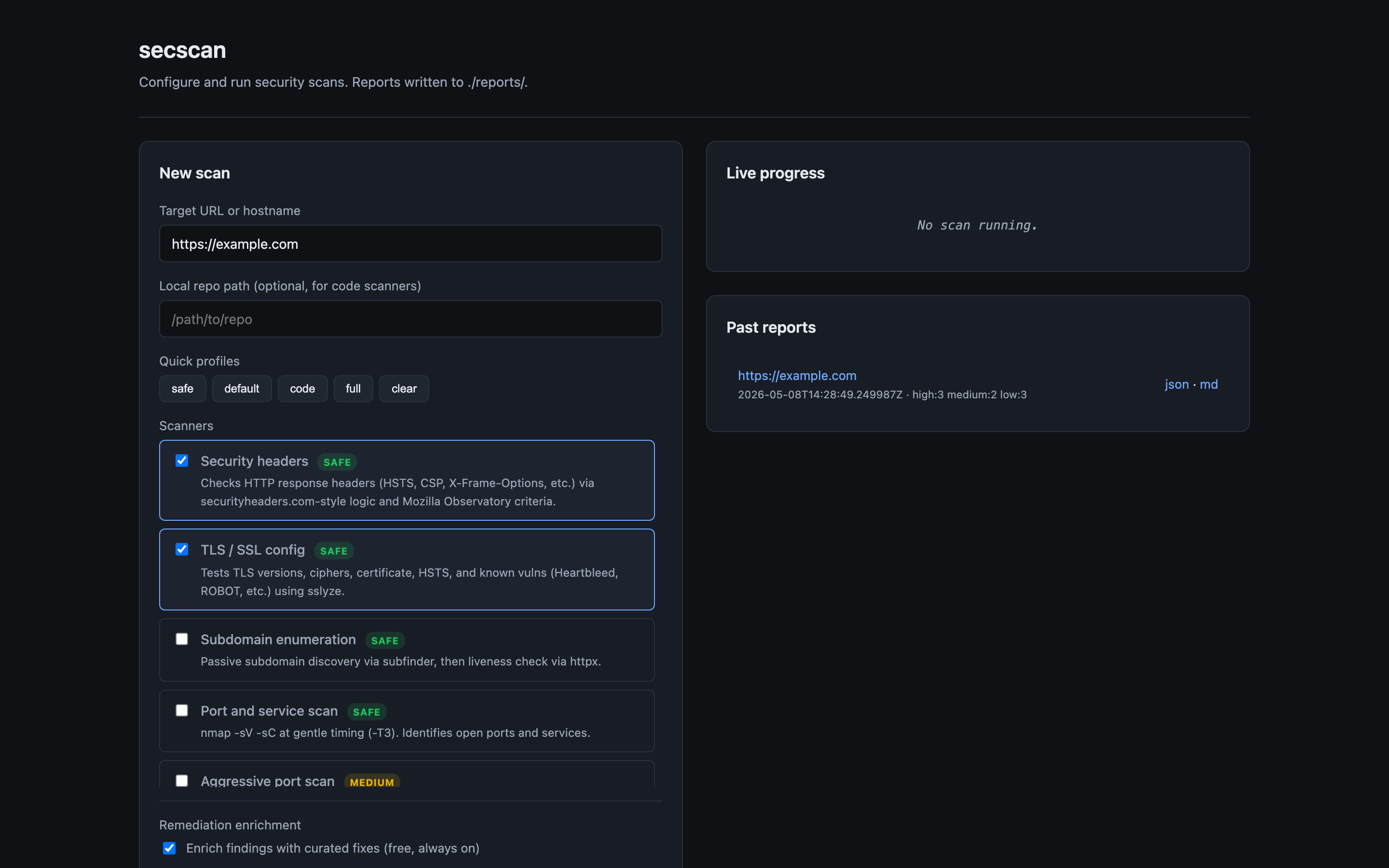
Open http://localhost:8765, enter a target, pick scans, click run. Watches scan progress live and renders the report inline when done. Past reports are listed in the right-hand panel and re-openable.
The dashboard has no auth and is single-tenant. Don't expose it to untrusted networks; put it behind a reverse proxy or VPN if it needs to be reachable from outside localhost.
Remediation enrichment
Every finding gets an enriched fix in two layers:
Layer 1: Static curated database (always on, free). A hand-written database of fixes for common findings. Includes the what to do, the why it matters, and a code/config example. Covers HSTS, CSP, missing headers, deprecated TLS, exposed services (Redis/MongoDB/SMB), default credentials, leaked secrets, and more.
Layer 2: AI-tailored fixes (optional). When ANTHROPIC_API_KEY is set, secscan sends each finding to Claude and gets back a context-aware fix. For code findings (semgrep, trivy, gitleaks) it also sends the relevant code snippet so the AI can give you exact line edits. For header findings, it sends your _headers/vercel.json/astro.config.* so the AI can tell you exactly what to add and where.
export ANTHROPIC_API_KEY=sk-ant-...
secscan scan https://example.com --repo .
Flags:
--no-enrichdisable enrichment entirely--no-aiuse static database only (skip API calls)--no-codesend only metadata to AI, no code or config snippets (more private, less specific)--max-ai-findings Ncap how many findings get sent to AI (default 50, for cost control)
Cost estimate: ~$0.002 to $0.01 per finding with Sonnet, so a typical scan costs cents. Results are cached per-finding-hash, so re-scanning the same target reuses the cached fix.
GitHub Actions
Copy .github/workflows/security-scan.yml to your repo. Configure the target as a repo variable. The workflow runs weekly and on demand, uploads reports as artifacts, and posts a summary as an issue if new High or Critical findings appear.
Safety
The tool will not run anything Medium-risk or above without explicit confirmation. By default:
- It scans only at gentle rate limits
- It refuses to run on IP addresses unless you pass
--allow-ip(forces you to think about whether you own it) - It respects
robots.txtfor spider-based scans unless you opt out
Read the per-scanner risk notes before flipping any safety flags.
1 maintainer

Metadata
1 maintainer
Release files for secscan-tool 0.1.2
For a detailed explanation of source distributions (sdists) and built distributions (wheels), please see the package formats documentation.
Source distribution (sdist)
| File | Size | Uploaded | |
|---|---|---|---|
| secscan_tool-0.1.2.tar.gz | 42.1 kB | Details |
Built distribution (wheel)
| File | Interpreter | ABI | Platform | Reset |
|---|---|---|---|---|
| secscan_tool-0.1.2-py3-none-any.whl | Python 3 | none | any | Details |
Total release size: 88.7 kB
Release files / secscan_tool-0.1.2.tar.gz
| Download URL | secscan_tool-0.1.2.tar.gz |
|---|---|
| Size | 42.1 kB |
| Tags | Source |
|
SHA-256 checksum How to use checksums |
2ccde859d4599fda72c203ce8d7ca368f90add4eaf454bd891e99ca8242f047c
|
|
BLAKE2b-256 checksum How to use checksums |
84273a789e835939895dfb13e2f90f8b32313973cb94a80b409bf9da7d19d3b6
|
| Upload date | |
|
Uploaded using Trusted Publishing? What is trusted publishing? |
No |
| Uploaded via |
twine/6.2.0 CPython/3.14.4
|
Release files / secscan_tool-0.1.2-py3-none-any.whl
| Download URL | secscan_tool-0.1.2-py3-none-any.whl |
|---|---|
| Size | 46.6 kB |
| Tags | Python 3 |
|
SHA-256 checksum How to use checksums |
51af27ff5104a18ed133dae91e16d51f58a50c577eb7844a8b6f54988964133e
|
|
BLAKE2b-256 checksum How to use checksums |
9040e99a7558f2b2804233505735edcde4e21023a95eee15a62de34a02d0442b
|
| Upload date | |
|
Uploaded using Trusted Publishing? What is trusted publishing? |
No |
| Uploaded via |
twine/6.2.0 CPython/3.14.4
|














