
Automated web security scanner with HTML/Markdown/JSON reports and AI-tailored remediation

Project description
secscan



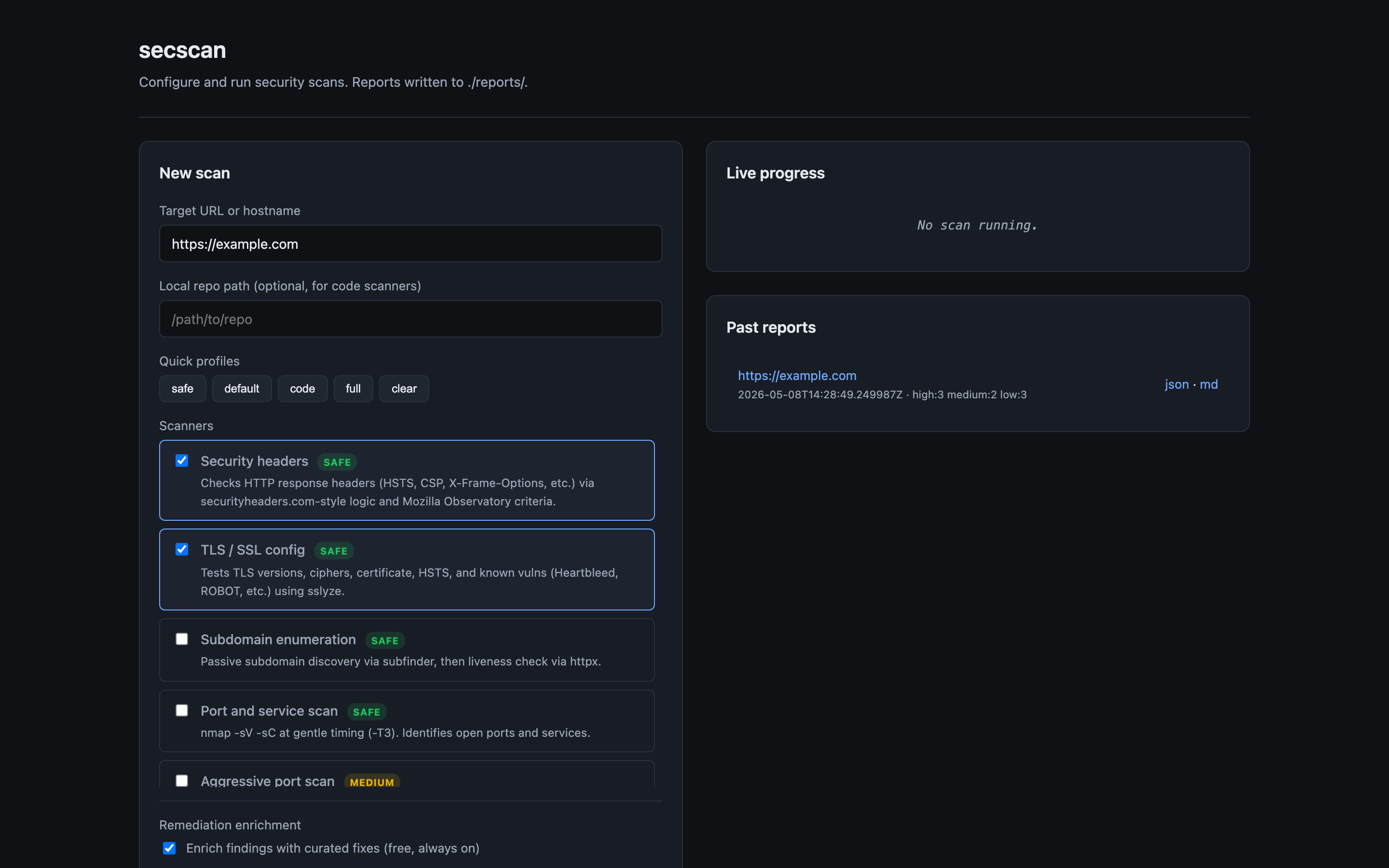
Automated web security scanner. Runs a configurable battery of scans against a target, warns you about anything risky before running it, and produces HTML, Markdown, and JSON reports.
Quick start
pip install secscan-tool
secscan scan https://example.com
(The PyPI package is secscan-tool; the CLI command it installs is secscan.)
Reports land in ./reports/<target>-<timestamp>/ as HTML, Markdown, and JSON.
For the live dashboard:
secscan serve
# open http://localhost:8765
For AI-tailored remediation, set ANTHROPIC_API_KEY before scanning:
export ANTHROPIC_API_KEY=sk-ant-...
secscan scan https://example.com --repo .
External tools (nuclei, nmap, subfinder, etc.) are used by some scanners. The bundled ./install.sh checks what's missing on your machine and points you at install instructions, or use the Docker image which bundles them.
Docker
A Dockerfile and docker-compose.yml are included for self-hosting the dashboard. The image bundles secscan plus nuclei, nmap, subfinder, httpx, trivy, semgrep, and gitleaks. ZAP and ffuf are not included (they bloat the image significantly); install them on the host if you need those scanners.
Quick start with compose:
git clone https://github.com/Jitesh17/secscan.git
cd secscan
export ANTHROPIC_API_KEY=sk-ant-...    # optional, for AI-tailored fixes
docker compose up -d
Open http://localhost:8765. Reports are written to ./reports/ on the host (mounted into the container at /app/reports). Stop with docker compose down.
Without compose:
docker build -t secscan:latest .
docker run -d --name secscan -p 8765:8765 \
  -v "$PWD/reports:/app/reports" \
  -e ANTHROPIC_API_KEY="$ANTHROPIC_API_KEY" \
  secscan:latest
Notes:
- Image is roughly 1.5 GB on
linux/arm64. Most of the size isnucleiplussemgrep's embedded Rust binary. - Tool versions are pinned via Dockerfile
ARGs (NUCLEI_VERSION,SUBFINDER_VERSION,HTTPX_VERSION,TRIVY_VERSION,GITLEAKS_VERSION). Override at build time with--build-arg. - The container runs as root so
nmapcan perform SYN scans. Don't expose port 8765 to untrusted networks. - One-off scans from inside the container:
docker compose exec dashboard secscan scan https://example.com.
What it does
| Scanner | Risk | Tool used |
|---|---|---|
| Security headers | Safe | requests |
| TLS / SSL | Safe | sslyze |
| Subdomain enumeration | Safe | subfinder |
| Live host probing | Safe | httpx |
| Port and service scan | Safe | nmap |
| Aggressive port scan | Medium | nmap |
| Vulnerability templates | Low | nuclei |
| Spider + passive scan | Low | OWASP ZAP baseline |
| Active web attacks | Medium | OWASP ZAP full scan |
| Content discovery | Medium | ffuf |
| Code vulnerability scan | Safe | semgrep |
| Dependency scan | Safe | trivy |
| Secret scan | Safe | gitleaks |
The tool refuses to run Medium-risk scans without an explicit --i-accept-risk flag and prints a damage estimate first.
Install
git clone <this-repo>
cd secscan-tool
./install.sh
The install script installs Python dependencies and checks for external tools (nuclei, zap, nmap, etc.). It tells you which are missing and how to install them.
Usage
CLI
Quick safe scan:
secscan scan https://example.com
Specify scans:
secscan scan https://example.com --scans headers,tls,nuclei,zap-baseline
Include code scans (point at a local repo):
secscan scan https://example.com --repo /path/to/repo
Aggressive scans (will prompt for confirmation):
secscan scan https://example.com --aggressive --i-accept-risk
Reports are written to ./reports/<target>-<timestamp>/ in HTML, Markdown, and JSON.
Web dashboard
secscan serve
Open http://localhost:8765, enter a target, pick scans, click run. Watches scan progress live and renders the report inline when done.
Remediation enrichment
Every finding gets an enriched fix in two layers:
Layer 1: Static curated database (always on, free). A hand-written database of fixes for common findings. Includes the what to do, the why it matters, and a code/config example. Covers HSTS, CSP, missing headers, deprecated TLS, exposed services (Redis/MongoDB/SMB), default credentials, leaked secrets, and more.
Layer 2: AI-tailored fixes (optional). When ANTHROPIC_API_KEY is set, secscan sends each finding to Claude and gets back a context-aware fix. For code findings (semgrep, trivy, gitleaks) it also sends the relevant code snippet so the AI can give you exact line edits. For header findings, it sends your _headers/vercel.json/astro.config.* so the AI can tell you exactly what to add and where.
export ANTHROPIC_API_KEY=sk-ant-...
secscan scan https://example.com --repo .
Flags:
--no-enrichdisable enrichment entirely--no-aiuse static database only (skip API calls)--no-codesend only metadata to AI, no code or config snippets (more private, less specific)--max-ai-findings Ncap how many findings get sent to AI (default 50, for cost control)
Cost estimate: ~$0.002 to $0.01 per finding with Sonnet, so a typical scan costs cents. Results are cached per-finding-hash, so re-scanning the same target reuses the cached fix.
GitHub Actions
Copy .github/workflows/security-scan.yml to your repo. Configure the target as a repo variable. The workflow runs weekly and on demand, uploads reports as artifacts, and posts a summary as an issue if new High or Critical findings appear.
Safety
The tool will not run anything Medium-risk or above without explicit confirmation. By default:
- It scans only at gentle rate limits
- It refuses to run on IP addresses unless you pass
--allow-ip(forces you to think about whether you own it) - It respects
robots.txtfor spider-based scans unless you opt out
Read the per-scanner risk notes before flipping any safety flags.
Release history Release notifications | RSS feed


Download files
Download the file for your platform. If you're not sure which to choose, learn more about installing packages.
Source Distribution
Built Distribution
Filter files by name, interpreter, ABI, and platform.
If you're not sure about the file name format, learn more about wheel file names.
Copy a direct link to the current filters
File details
Details for the file secscan_tool-0.1.1.tar.gz.
File metadata
- Download URL: secscan_tool-0.1.1.tar.gz
- Upload date:
- Size: 39.9 kB
- Tags: Source
- Uploaded using Trusted Publishing? No
- Uploaded via: twine/6.2.0 CPython/3.14.3
File hashes
| Algorithm | Hash digest | |
|---|---|---|
| SHA256 |
a1bc730836adf93f637aaec9c1a80c1c7e7e9bb4de273a5b97f448ba4bb664f4
|
|
| MD5 |
952ea202ad28316618fdcb6a2e4e691f
|
|
| BLAKE2b-256 |
b3b80de7bd47918d2c2b9264803b495fe287aa840098a1add55abb8ece9ed9e7
|
File details
Details for the file secscan_tool-0.1.1-py3-none-any.whl.
File metadata
- Download URL: secscan_tool-0.1.1-py3-none-any.whl
- Upload date:
- Size: 45.4 kB
- Tags: Python 3
- Uploaded using Trusted Publishing? No
- Uploaded via: twine/6.2.0 CPython/3.14.3
File hashes
| Algorithm | Hash digest | |
|---|---|---|
| SHA256 |
72fa96b66ce5a0db656cc107ccdfc9139dca287d34041101391e0851aa914009
|
|
| MD5 |
d3a349fbe8cb019783603835d14851a0
|
|
| BLAKE2b-256 |
89789a3f25dca9481ef68988c60ecfc3359b6e3df2149dbf84d7eed1f5eafbfa
|






