
🔐 sekrt



This README has been written by a real human and has not been generated by an LLM
A moden secret manager for ALL your secrets. With sekrt you store and retrieve your passwords, API keys and .env files from all your machines, seamlessly.
sekrt working principle is inspired by pass: all your secrets are stored encrypted in a github repo, we simplified everything else about it.
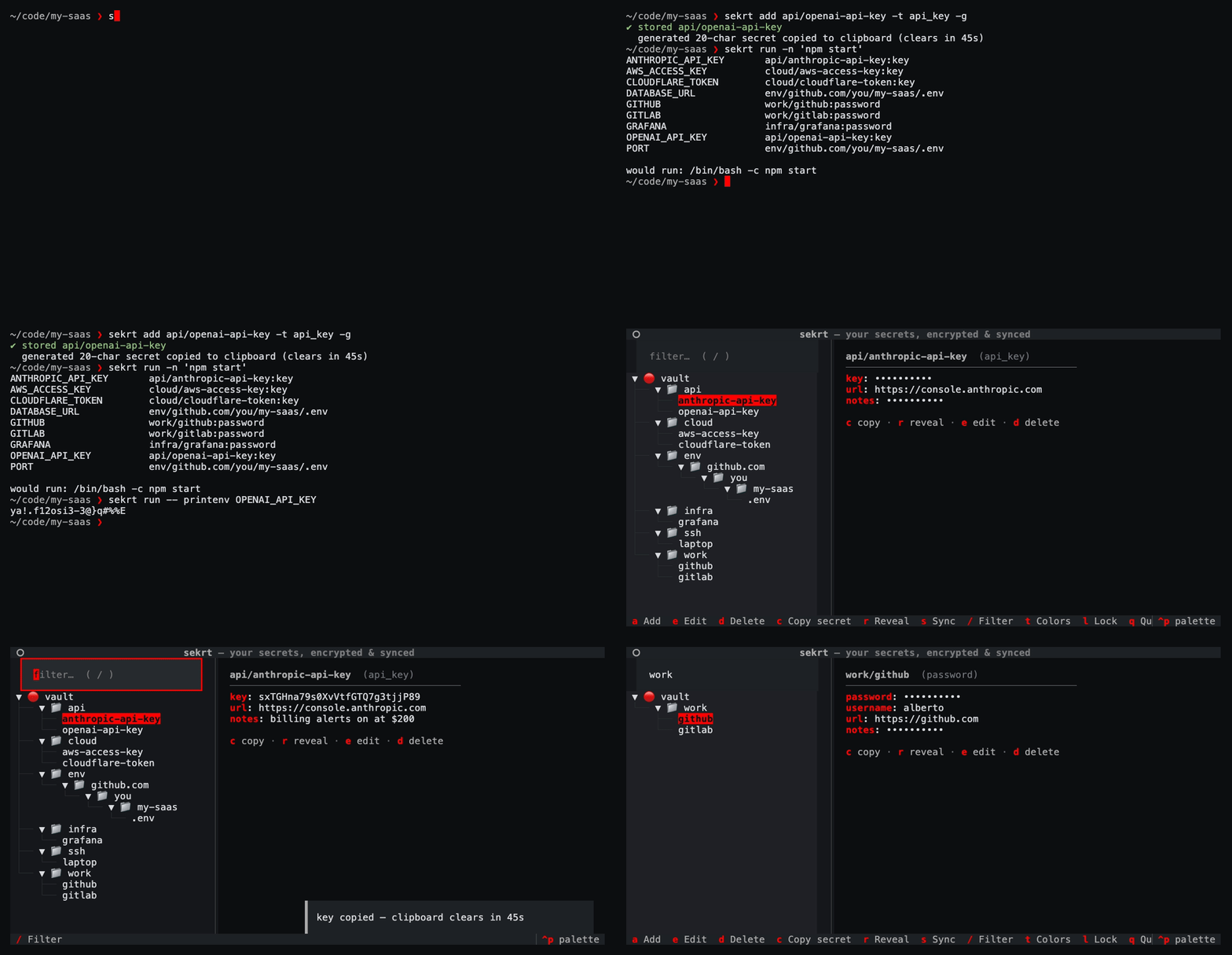
sekrt features
Password Management
sektr can be a simple password manager. You easily store a password, then sekrt encrypts it and stores it into a private repo. You`ll retrieve it with your main passphrase whenever you want.
We push your .env
They told you not to push your .env files. We agree, but you can still push it to your safe encrypted vault! sekrt env push will register your .env file with the current repo. From any other machine you will then sekrt env pull: your precious environment variables will be automatically encrypted and stored, and then safely pulled into your new directory.
Run commands that need secrets securely
sekrt run unlocks the vault and gives one process decrypted secrets as environment variables; when your process ends, they are gone. Vault password and api_key entries work on their own (the last path segment becomes the variable: tokens/uv-publish-token is $UV_PUBLISH_TOKEN); stored .env files from sekrt env push are an extra source. With nothing named, that command gets every such vault entry plus this repo's .env; -e UV_PUBLISH_TOKEN is just that one (--no-env-files if you don't want the .env too). sekrt shell opens a subshell until you exit, but it is stricter: no flags means this repo's .env only, -e names what you want, --all is the whole vault.
Installation
sekrt ships as a Python package. The suggested route in as a uv tool
uv tool install sekrt
# or: pip install --user sekrt
Setting up
sekrt stores everything in a local vault at $HOME/.local/share/sekrt, which gets git-synced to a remote repo if you want all your secrets on all your machine.
To set everything up:
sekrt init
will create the vault for your and will allow you to paste the URL of a remote repo that you wanna use to sync your secrets across machines.
The vault is a plain git repository: you need an empty private repo to point it at (GitHub, GitLab, Gitea, a bare repo over SSH, anything git can push to).
sekrt init will ask you for the URL of your remote, but you can override it anytime with
sekrt remote git@github.com:you/secrets.git # or: sekrt init --remote <url> on a fresh vault
Every addition, modification or deletion of your secrets auto-commits locally; sekrt sync is what actually talks to the remote (basically runs git pull --rebase then git push against origin). Want every change pushed immediately instead?
sekrt autosync on
This behavior is disabled by default.
sekrt status prints the vault path, how many entries it has, the remote, whether autosync is on, and whether you currently have it unlocked. sekrt passwd changes the passphrase, re-encrypts every entry, and locks the session. sekrt git runs git inside the vault, so sekrt git log is the commit history of your secrets.
sekrt status
sekrt passwd
sekrt git log --oneline
Quickstart
sekrt add

Encrypt and save a secret in the vault with this command. By default a small TUI opens, but you can type in all your entries safely with the CLI command, an example follows.skert add work/openai -t api_key -u USER
There is not --password or --secret argument so that the secret itself is not passed as argv (we don't want it picked up by ps or saved in the bash history).
sekrt list # alias: ls

sekrt get

sekrt get QUERY searches for exact matches or for partial matches (you will be promped if more than one match is found).
Working with an entry
sekrt get prints the secret. sekrt show prints the rest of the entry as well: type, username, url, notes, with the secret masked. --reveal (or -r) prints the secret in the clear, and at a terminal c copies it.
sekrt show work/openai
sekrt show work/openai --reveal
sekrt get work/openai -c            # copy the secret, don't print it
sekrt get work/openai -f username   # some other field
sekrt find QUERY prints every name that contains QUERY. Names are stored in the clear, so this one does not ask for the passphrase. sekrt get QUERY runs the same search and then asks you to pick when more than one entry matches. Leave the name off (sekrt show, sekrt edit, sekrt rm) and that same picker lists the whole vault. sekrt ls FOLDER lists just that folder (alias: list).
To change an entry, sekrt edit opens it in $VISUAL or $EDITOR, and falls back to nano or vi. A note is the raw text. A password or an API key is the JSON of its fields, a flat object of strings. Quit the editor without changing anything and nothing is written back.
sekrt edit work/openai
sekrt mv renames an entry (alias: rename). The name is bound into the encryption, so the entry is re-encrypted under the new name. sekrt rm deletes one (aliases: remove, delete) and asks first; -f skips the question. The entry is gone from the vault, and older copies stay in the git history.
sekrt mv work/openai work/openai-old
sekrt rm work/openai-old
sekrt git log --oneline             # the history `rm` does not erase
sekrt generate prints a random password and does not store it (alias: gen). Pass a length, or leave it to sekrt config --length. --token makes a URL-safe token, and -c copies instead of printing. To generate and store in one step, sekrt add NAME -g.
sekrt generate
sekrt generate 32 --token
Unlocking the vault
By default, your vault stays locked at all times. Every command you run will ask you for a passphrase to decrypt your secrets. If you need to use a few sekrt commands in sequence, you might not want to retype your passphrase every time.
sekrt unlock
sekrt add work/openai -t api_key
sekrt get work/openai
sekrt lock

sekrt unlock command to temporarily disable the passphrase request: you session gets cached on the system RAM for 60 minutes or until you type the sekrt lock command. Commands ran while the vault is unlocked will still undergo the same security and cryptography steps even though the passphrase is not specified: unlock stores the derived AES-256 key, never the passphrase itself. Entry files on disk stay AES-256-GCM ciphertext; each add or get still encrypts or decrypts with that key (the entry name is bound as GCM associated data).
A side-utility of sekrt unlock is that it also activates tab completion for the shell that ran it (current shells supported are bash, zsh and fish). Entry names are fetched from the list of secrets and are then offered on the sekrt commands that take one (get, show, rm, ssh restore, and the rest). The shell is offered entry names only, never the actual secrets.
The .env workflow
.env files never land in your project repos: every time you clone your repo you are probably bringing in your .env files in other ways. sekrt has a way of fixing this:
sekrt env push
When inside a git repository, running sekrt env push will detect your .env file, encrypt it and then add it to your vault while keying it to the repository url.
sekrt env pull
When you clone your repo elsewhere, sekrt env pull will use the repository origin url to fetch the corresponding .env file, decrypt it and bring it into your directory.
sekrt env show prints the copy stored for the repo you are in. sekrt env ls lists every stored env file and marks this repo's with *. sekrt env rm deletes that stored copy from the vault and asks first; -f skips the question.

How are repositoties detected correctly for .env syncronization?
The key is the repo's origin URL, so a clone anywhere finds its own file. HTTPS and SSH remotes (and URLs with embedded credentials) collapse to the same host/owner/repo slug. If you don't sync to a remote, a repo with no origin falls back to local/<directory-name>, which is per-machine.
It handles several env files per repo (sekrt env push .env apps/*/.env.*) — the path relative to the repo root is part of the key, so a monorepo with one file per service round-trips as a set, a bare sekrt env pull restores every file stored for this repo.
Can I rename my repo after I synced its .env?
There are two common scenarios:
- You run
sekrt env pushbefore and after you renamed the origin - You run
sekrt env pullafter you renamed your origin
In both cases sekrt sees that the old URL is still this repository, moves the stored files onto the new origin, and continues without anything else to type. A clone that still has the old origin URL keeps working too. A fork is not a rename, see forks and worktrees.
What if I need a different .env per clone?
Both push and pull compare content first: push reports added / updated / unchanged, and pull never overwrites a local file you've edited unless you pass --force. Push treats the working copy as truth; old content stays in the vault's git history.
How do I deal with forks and worktrees?
To pull a fork or a worktree whose origin differs, name the stored slug: sekrt env pull --repo github.com/you/my-saas. Ciphertext is opaque, but entry names are not encrypted (they contain the repo host, owner, name, and the file's path within it). If sekrt env pull says that nothing is stored, check git remote -v (you may be on a local/ key) or sekrt env ls and pull with --repo.
Running commands that need secrets
sekrt unlock && service log --token="$MY_TOKEN" won't work, as a child process can't set variables in the shell that started it. The approach we take is to wrap the command instead, and the secrets live in its environment, for exactly as long as it runs:
sekrt run 'npm start'                             # exposes everything to 'npm start'
sekrt run -e UV_PUBLISH_TOKEN 'uv publish'        # or just one secret

-e CLI arg; -n shows what sekrets whould get exposed and under what enironment variable name, acting like a dry-run as the command does not get executed.
An alternative way of running commands is to open a subshell where all secrets are already exposed. You can do so with:
sekrt shell

With this command you open a subshell where your secrets get automatically sourced as environment variables. This becomes particularly useful if you name your secrets as the environment variables that your commands usually expect.
Type exit to go back to the default shell. The (sekrt) prompt is helpful in indicating if your shell is currently expoing secrets.
SSH keys management
sekrt also has features that helps you store, manage and transfer all your SSH keys, with the same security paradigm as everything else.
sekrt ssh add DEVICE_NAME --key ~/.ssh/id_ed25519        # import an existing keypair
sekrt ssh add SERVER_NAME --generate                     # or generate a fresh ed25519 ke
sekrt ssh ls                                             # stored keys
sekrt ssh pub DEVICE_NAME                                # print the public key for GitHub
sekrt ssh restore DEVICE_NAME --dir ~/.ssh               # new machine
You are able to store your SSH keypairs and retrieve them whenever you need them, even on different machines. Because your vault is synced on a remote repo, you can also use sekrt as a way to share your public keys and allow your other machines to accept incoming connections.
In simpler words: sekrt ssh authorize appends the public key to .ssh/authorized_keys and leaves the private key in the vault. sekrt ssh restore DEVICE_NAME --authorize does that and writes the keypair to disk in the same step. See the example below.
sekrt ssh authorize DEVICE_NAME

Using sekrt to encrypt and store any file
Secrets come in all shapes and sizes: a list of MFA recovery codes, a keystore, a PDF, OAuth2 credential, etc. sekrt is able to tread every file with the same roundtrip designed for the .env, just without keying it to a specific git repo origin slug.
To this end, sekrt file add encrypts any file, byte-for-byte, and stores it in the vault under the name you provide.
Retrieve it anytime with sekrt file get.
sekrt file add mfa/github-recovery recovery-codes.txt  # encrypts and adds the recovery codes
sekrt file get mfa/github-recovery                     # restores with original filename, cwd
sekrt file get mfa/github-recovery -o ./codes.txt      # or pick the destination
sekrt file ls                                          # List stored files
The TUI [WIP]
sekrt with no arguments (or sekrt tui) opens a TUI interface: a folder tree of your vault, fuzzy filtering, a masked detail view, add/edit forms with a built-in password generator, and one-key sync.

| Key | Action |
|---|---|
/ |
filter entries |
c |
copy the entry's secret (clipboard clears; 45s by default) |
u |
copy the entry's username |
r |
reveal / mask fields |
a / e / d |
add / edit / delete |
s |
sync with the git remote |
t |
colors, unlock time, clipboard clear, generated length |
l |
lock the vault (prompts for the passphrase again) |
q |
quit |
.env, SSH and file entries show up in the tree read-only: add, restore and inspect those from the CLI (sekrt env, sekrt ssh, sekrt file) instead.
Configuration
You can configure a few parameters with a small TUI form that you can call with
skert config

Enter, exit without saving with esc.
The CLI version is available aswell: --unlock is how long sekrt unlock stays open (60 minutes default). --clipboard is how long a copied secret stays (45 seconds, for every copy). --length is the character lenght of the randomly generated secrets.
sekrt config --preset matrix                     # any of the eleven, by name
sekrt config --preset amber --accent '#ff0088'   # a preset, then tune it
sekrt config --unlock 120                        # `sekrt unlock` stays open for 2 hours
sekrt config --clipboard 15                      # copied secrets clear after 15 seconds
sekrt config --length 32                         # generated secrets are 32 characters
sekrt config --show                              # what's set right now, plus the presets
sekrt config --reset                             # colors back to metal & red
sekrt config --clipboard will not affect your clipboard history
Vault location & configuration
| What | Default | Override |
|---|---|---|
| Vault directory | ~/.local/share/sekrt |
$SEKRT_VAULT |
| Passphrase (CI/scripts) | interactive prompt | $SEKRT_PASSPHRASE |
Editor for sekrt edit |
$EDITOR |
$VISUAL |
Preferences (sekrt config) |
~/.config/sekrt/config.json |
$SEKRT_CONFIG |
CLI reference
sekrt init [--remote URL]      create a vault, or clone one if you have it already
sekrt clone URL                set up from an existing vault repo, no questions asked
sekrt add [NAME] [-u USER] [-g] add password/api_key/note  (alias: insert)
sekrt get [NAME] [-c] [-f F]   print or copy a secret
sekrt show [NAME] [--reveal]   show all fields (-r: reveal secrets, c to copy)
sekrt ls [PREFIX]              list entry names            (alias: list)
sekrt find QUERY               search names                (alias: search)
sekrt edit [NAME]              edit fields in $EDITOR (notes: raw multiline text)
sekrt mv OLD NEW               rename                      (alias: rename)
sekrt rm [NAME] [-f]           delete                      (alias: remove)
sekrt generate [LEN] [--token] generate without storing
sekrt env push|pull|ls|show|rm .env files per repository    (guide: docs/env.md)
sekrt run 'CMD'                run CMD with your secrets in its env (alias: exec)
sekrt run -e VAR 'CMD'         ...narrowed to VAR   (-n: show, don't run)
sekrt run 'CMD $VAR'           quoted: a shell reads it, so it expands $VAR
sekrt run -- CMD ARGS...       ...or hand over an argv, with no shell at all
sekrt shell -e VAR             a subshell holding VAR; exit revokes (alias: sh)
sekrt shell                    ...or this repo's stored .env files, and no more
sekrt shell --all              ...or the whole vault, after confirming (-y: skip)
sekrt ssh add|restore|ls|pub|authorize   SSH keypairs
sekrt file add|get|ls          whole files, binary-safe
sekrt remote URL               set the sync remote
sekrt remote -v                print the sync remote URL
sekrt sync                     pull --rebase + push
sekrt autosync on|off          push automatically on every change
sekrt git <args...>            raw git inside the vault
sekrt unlock [-t MIN] / lock   cache / forget the vault key (default: `sekrt config`)
sekrt completion bash|zsh|fish  print the tab-completion snippet
sekrt passwd                   change passphrase (re-encrypts everything)
sekrt status                   vault, remote, session info
sekrt config                   colors, unlock, clipboard, length (aliases: colors, theme)
sekrt tui                      open the interactive TUI
Every command has --help (e.g. sekrt add --help) with the full option list and examples. Where NAME is optional above, omitting the name usually opens an inline TUI.
Why not just pass?
pass is excellent, and sekrt borrows its best idea (one encrypted file per secret, git-friendly). Differences: no GPG key management — a single passphrase with scrypt+AES-GCM; a real TUI; structured entries (username, URL, notes — not just a text blob); and purpose-built .env and SSH-key workflows.
License
1 maintainer

Metadata
1 maintainer
Release files for sekrt 0.4.0
For a detailed explanation of source distributions (sdists) and built distributions (wheels), please see the package formats documentation.
Source distribution (sdist)
| File | Size | Uploaded | |
|---|---|---|---|
| sekrt-0.4.0.tar.gz | 2.6 MB | Details |
Built distribution (wheel)
| File | Interpreter | ABI | Platform | Reset |
|---|---|---|---|---|
| sekrt-0.4.0-py3-none-any.whl | Python 3 | none | any | Details |
Total release size: 2.7 MB
Release files / sekrt-0.4.0.tar.gz
| Download URL | sekrt-0.4.0.tar.gz |
|---|---|
| Size | 2.6 MB |
| Tags | Source |
|
SHA-256 checksum How to use checksums |
f766e83bab0756eca3d2c239f746cd610a704cdd9c14cee5fcc35d1a44880160
|
|
BLAKE2b-256 checksum How to use checksums |
7b9ddbed11634dec6bdbd230125481c398648113a52921762d99e502dfd6b483
|
| Upload date | |
|
Uploaded using Trusted Publishing? What is trusted publishing? |
No |
| Uploaded via |
uv/0.12.3 {"installer":{"name":"uv","version":"0.12.3","subcommand":["publish"]},"python":null,"implementation":{"name":null,"version":null},"distro":{"name":"macOS","version":null,"id":null,"libc":null},"system":{"name":null,"release":null},"cpu":null,"openssl_version":null,"setuptools_version":null,"rustc_version":null,"ci":null}
|
Release files / sekrt-0.4.0-py3-none-any.whl
| Download URL | sekrt-0.4.0-py3-none-any.whl |
|---|---|
| Size | 89.4 kB |
| Tags | Python 3 |
|
SHA-256 checksum How to use checksums |
777579b14af89236c9322051490fe86eb18e1e9e175cc62c41a43de9dba33437
|
|
BLAKE2b-256 checksum How to use checksums |
a9beb35e52fbe7518fa2ad486c60885e100e1e7c0aeffdfd7c76aee07acc7d85
|
| Upload date | |
|
Uploaded using Trusted Publishing? What is trusted publishing? |
No |
| Uploaded via |
uv/0.12.3 {"installer":{"name":"uv","version":"0.12.3","subcommand":["publish"]},"python":null,"implementation":{"name":null,"version":null},"distro":{"name":"macOS","version":null,"id":null,"libc":null},"system":{"name":null,"release":null},"cpu":null,"openssl_version":null,"setuptools_version":null,"rustc_version":null,"ci":null}
|














