


SelSearch - Internet search based on selected text

SelSearch grabs text selected in any application and opens a web browser to search for.
By default, it will search on Google, but you can custimize your search to, for example, look for a DeepL translation of your text (as in the demo below).
Installation
SelSearch can be installed using pip:
pip install selsearch
For more infomations about installation guidelines and known issues, see INSTALL.md.
Live Demo
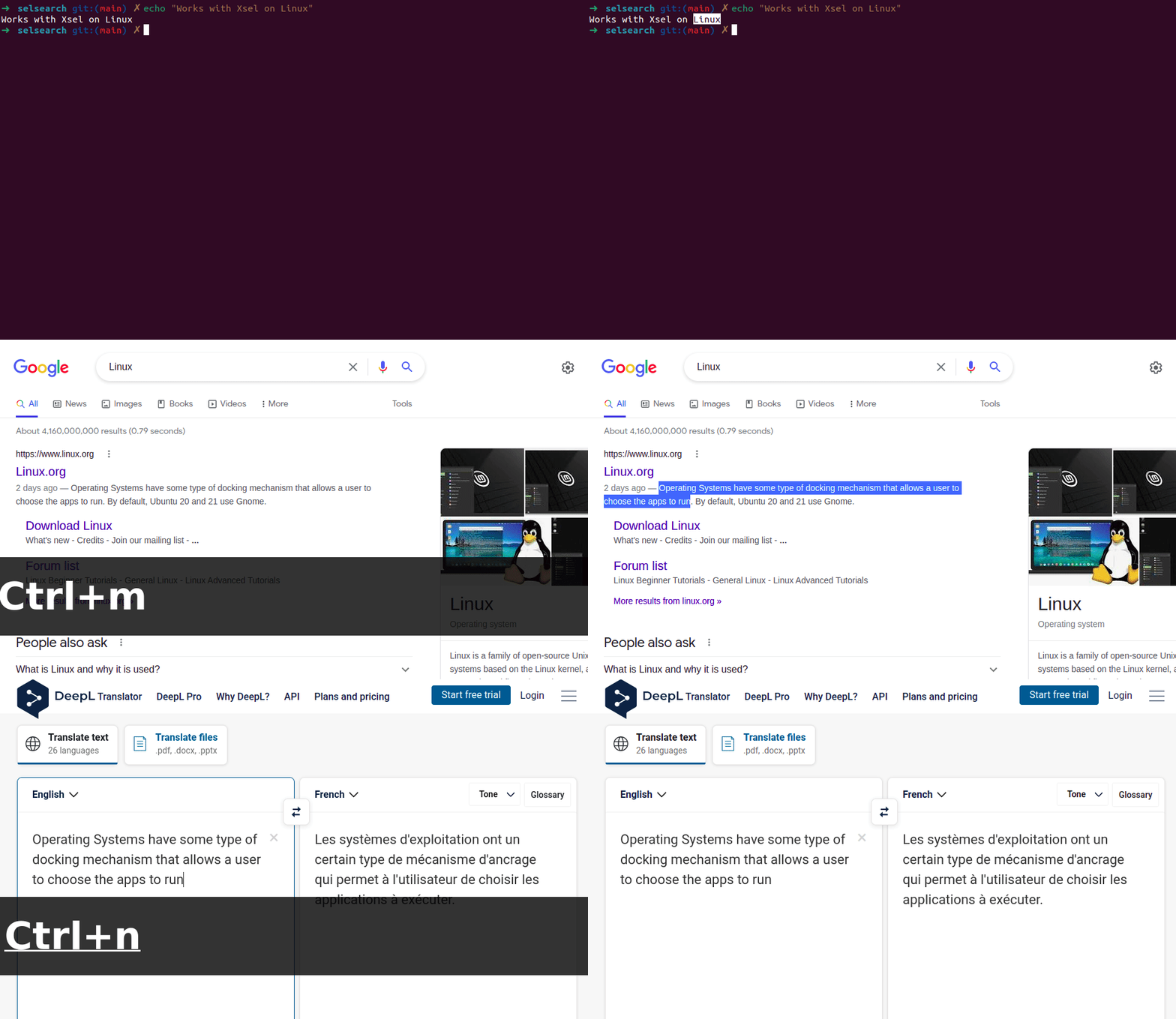
The demo hereunder shows how you can select text, Linux, in a terminal, search for it in Google. Then, search for an English to French translation of some text on DeepL.
Usage
While SeaSearch can be used in command line, it is recommended to use its background mode via:
selsearch run &
The & at the end will allow SelSearch to run in background.
SelSearch will continuously listen for (customizable) keyboard shortcuts and trigger various internet researches in response. For example, in the demo, Google search is mapped to <ctrl>+<m> and DeepL translation to <ctrl>+<n>.
It is also recommended to set up selsearch run to launch at startup. How to do that depends on your platform and is currently not handled by this project.
Customize
SelSearch can be configured via a config file. You can generate a default one with:
selsearch init
The path will be displayed and modifications to this file will be taken into account everytime you run selsearch or any of its subcommands. The file will look something like this:
xsel = true  # Whether to use or not XSel
exit_shortcut = "<ctrl>+<alt>+e"  # Exit shortcut (optional)

[urls]
# List of urls
# You can add / remove / edit any number of lines
google = "https://www.google.com/search?q="
wordreference = "https://www.wordreference.com/enfr/"
deepl = "https://www.deepl.com/translator#en/fr/"
googlescholar = "https://scholar.google.com/scholar?q="

[shortcuts]
# List of shotcuts
# You can add / remove / edit any number of lines
"<ctrl>+0" = "google"
"<ctrl>+1" = "deepl"
"<ctrl>+2" = "wordreference"
You can validate your keyboard shortcuts with:
selsearch keys
Other functionnalities can be listed with:
selsearch --help
Future Features
Here are a list of future features that I would like to add to SelSearch:
- App Icon
- Installation that defaults to launch on startup
- Ability to customize keyboard shortcuts
- GUI so customize app
- Use of a config folder (instead of environ variable?)
- Fix keyboard shortcuts on Windows (bugs...)
- Document how to use config file
Contributing
Feel free to contribute or propose ideas using the Issues and Pull requests tabs.
1 maintainer

Metadata
1 maintainer
Release files for selsearch 0.4.2
For a detailed explanation of source distributions (sdists) and built distributions (wheels), please see the package formats documentation.
Source distribution (sdist)
| File | Size | Uploaded | Provenance | Actions |
|---|---|---|---|---|
| selsearch-0.4.2.tar.gz | 6.4 kB | Without provenance | Details for selsearch-0.4.2.tar.gz |
Release files / selsearch-0.4.2.tar.gz
| Download URL | selsearch-0.4.2.tar.gz |
|---|---|
| Size | 6.4 kB |
| Tags | Source |
|
SHA-256 checksum How to use checksums |
227948327260a4f2d5e0d2e675b97136bdcbcf9bf3eab30860604b931a7b3857
|
|
BLAKE2b-256 checksum How to use checksums |
0680abb61e2716b6060e3d6611b6b498b62fc36ac27bc32d925906ddf5c1ea4a
|
| Upload date | |
|
Uploaded using Trusted Publishing? What is trusted publishing? |
No |
| Uploaded via |
twine/4.0.2 CPython/3.11.4
|
Security for selsearch 0.4.2
Provenance
Provenance describes where a file came from. On PyPI, provenance is shared via attestations, which provide a verifiable record of the build or publishing details. View details, limitations and caveats.
No provenance found
None of the files in this release were uploaded with provenance metadata.
A note on package security
PyPI is a repository for distributing packages, not a service for auditing them. While third-party security researchers and our staff do their best to detect and remove malicious packages, PyPI cannot guarantee the quality, security or suitability of any given package.
To learn more about protecting yourself from malicious actors, visit our package security documentation.














