
Internet search based on selected text

Project description



SelSearch - Internet search based on selected text
SelSearch graps text selected in any application and opens a web browser to search for.
By default, it will search on Google, but you can custimize your search to, for example, look for a DeepL translation of your text (as in the demo below).
Installation
SelSearch can be installed using pip:
pip install selsearch
SelSearch best works with XSel, a program that grabs current selection using X. If XSel is not available on your system, SelSearch will use the clipboard to grab current selection.
Live Demo
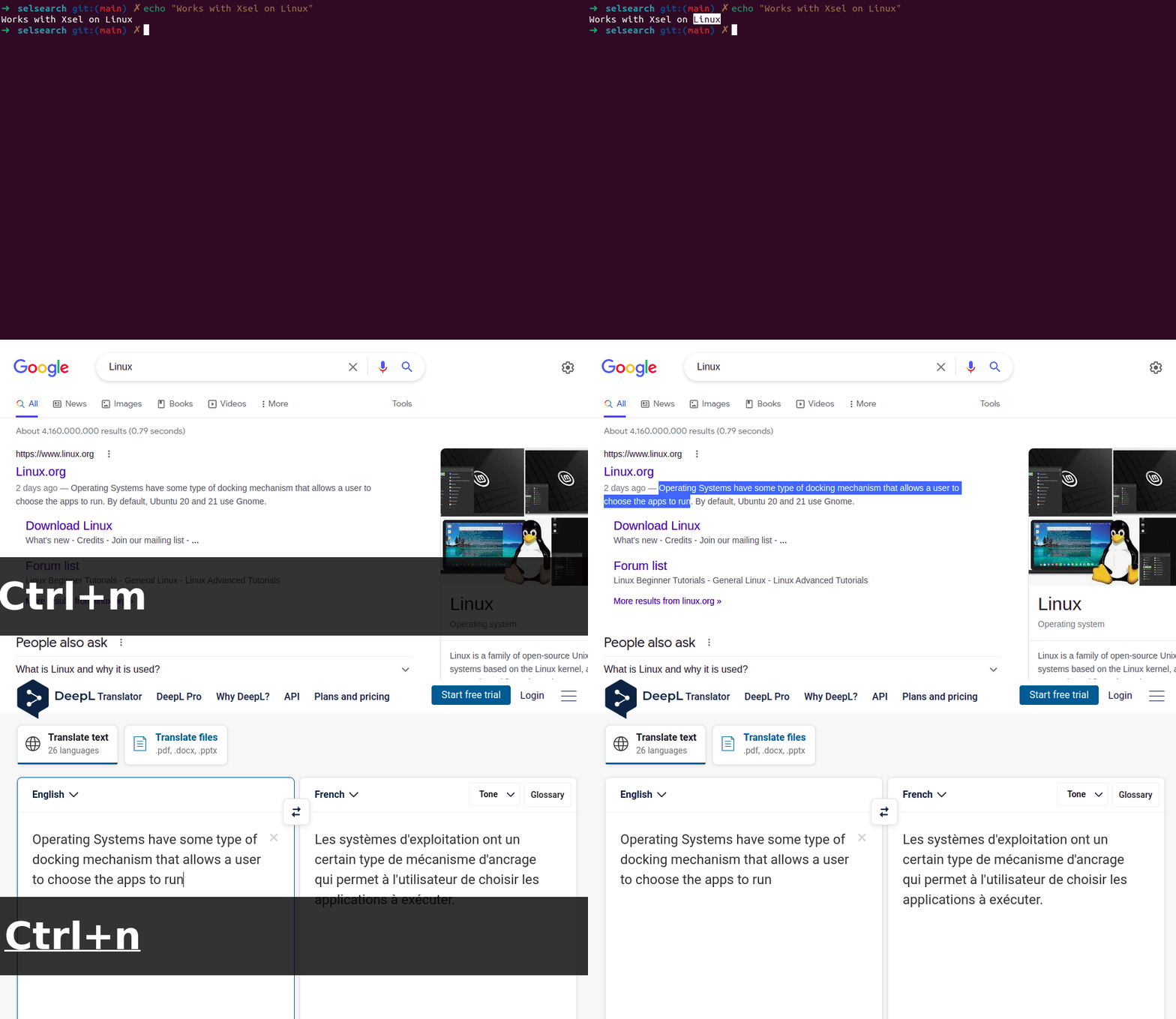
The demo hereunder shows how you can select text, Linux, in a terminal, search for it in Google. Then, search for an English to French translation of some text on DeepL.
Usage
The most basic usage of SelSearch is the following:
selsearch
Optionally, you can specify the place where text is gonna be searched on:
selsearch -w DeepL
You can obtain a list of search urls with:
selsearch -l
Recommended Usage
However, SelSearch is best used when set as a keyboard shortcut. For example, in the demo, selsearch is mapped to <ctrl>+<m> and selsearch -w DeepL to <ctrl>+<n>. How to set up keyboard shortcuts depends on your platform.
As it may be hard to setup keyboard shortcuts on Windows, it is also possible to run the app in background with selsearch gui. It will continuously listen for keyboard inputs and launch appropriate commands when needed. Shortcuts customization is not available yet.
Customize
Other functionnalities can be listed with:
selsearch --help
If you desire to change the default search url, or set a custom one, you can set to environment variable SELSEARCH_DEFAULT_SEARCH_URL to any key listed by selsearch -l or any url.
Example in ~/.bashrc:
export SELSEARCH_DEFAULT_SEARCH_URL="https://translate.google.be/?text="
Future Features
Here are a list of future features that I would like to add to SelSearch:
- App Icon
- Installation that defaults to launch on startup
- Ability to customize keyboard shortcuts
- GUI so customize app
- Use of a config folder (instead of environ variable?)
- Fix keyboard shortcuts on Windows (bugs...)
Contributing
Feel free to contribute or propose ideas using the Issues and Pull requests tabs.
Release history Release notifications | RSS feed


Download files
Download the file for your platform. If you're not sure which to choose, learn more about installing packages.
Source Distribution
File details
Details for the file selsearch-0.1.6.tar.gz.
File metadata
- Download URL: selsearch-0.1.6.tar.gz
- Upload date:
- Size: 5.2 kB
- Tags: Source
- Uploaded using Trusted Publishing? No
- Uploaded via: twine/3.8.0 pkginfo/1.8.2 readme-renderer/32.0 requests/2.27.1 requests-toolbelt/0.9.1 urllib3/1.26.8 tqdm/4.62.3 importlib-metadata/4.11.0 keyring/23.5.0 rfc3986/2.0.0 colorama/0.4.4 CPython/3.9.10
File hashes
| Algorithm | Hash digest | |
|---|---|---|
| SHA256 |
4d25131ba7778df6e6259388bdcdde30024d3223151e5c2c292fc38fbbc5e456
|
|
| MD5 |
f27643c3bbe0ebd993b5140f87a6d2a8
|
|
| BLAKE2b-256 |
30684de3367bdb70583b3b2e6c557ef82d2042043dd761d4b89ef6cafa727a26
|






