
Synchronized audio player for Sendspin servers
Project description
sendspin

Connect to any Sendspin server and instantly turn your computer into an audio target that can participate in multi-room audio.
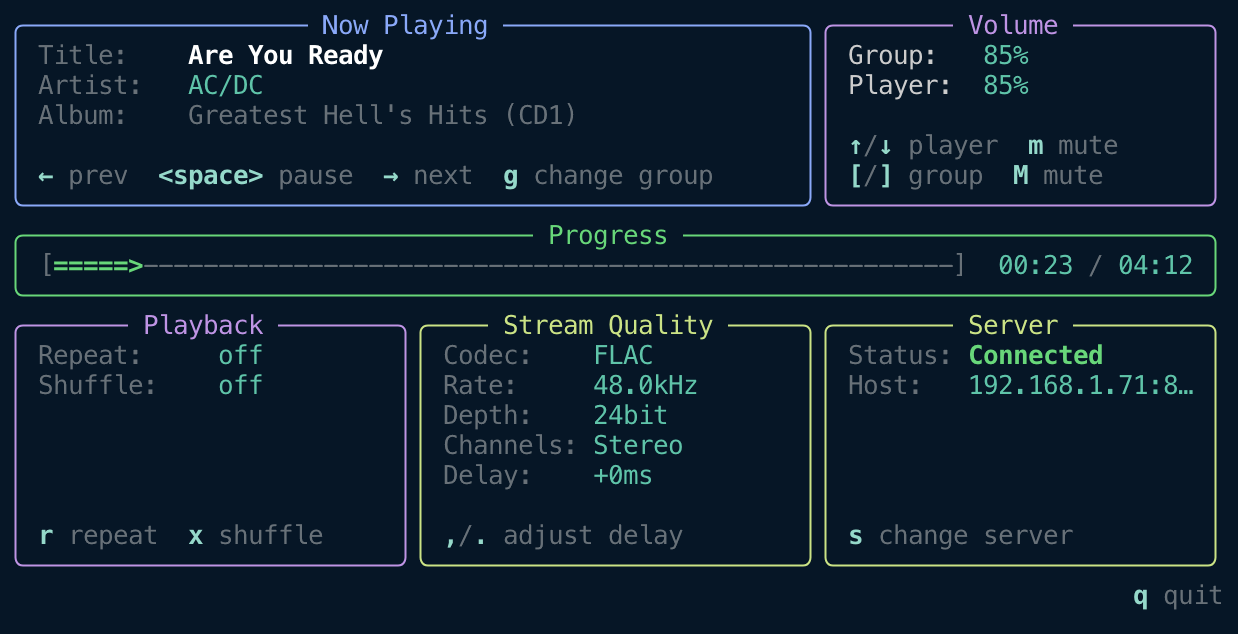
Sendspin CLI includes three apps:
sendspin- Terminal client for interactive usesendspin daemon- Background daemon for headless devicessendspin serve- Host a Sendspin party to demo Sendspin
When using an explicit app (daemon, serve, or player), put it immediately after
sendspin. For example, use sendspin daemon --name Kitchen, not
sendspin --name Kitchen daemon.

Installation
Install as daemon (Linux):
curl -fsSL https://raw.githubusercontent.com/Sendspin/sendspin-cli/refs/heads/main/scripts/systemd/install-systemd.sh | sudo bash
With uv:
uv tool install sendspin
Support for Chromecast devices requires installation of extra dependencies:
uv tool install 'sendspin[cast]'
With pip:
pip install sendspin
Try it without installation
Run directly with uv:
Start client
uvx sendspin
Host a Sendspin party
uvx sendspin serve --demo
uvx sendspin serve /path/to/media.mp3
uvx sendspin serve https://retro.dancewave.online/retrodance.mp3
Updating
To update to the latest version of Sendspin:
If installed with uv:
uv tool upgrade sendspin
If installed with pip:
pip install --upgrade sendspin
If installed as systemd daemon:
The systemd daemon preserves your configuration during updates. Simply upgrade the package:
# Upgrade sendspin (the daemon installer uses uv by default)
uv tool upgrade sendspin

# Restart the service to use the new version
sudo systemctl restart sendspin
Your client name, audio device selection, and other settings in ~/.config/sendspin/settings-daemon.json are preserved during the update.
Note: You do not need to uninstall and reinstall when updating. Your configuration (client name, audio device, delay settings) is stored separately and will be preserved.
Configuration Options
Sendspin stores settings in JSON configuration files that persist between sessions. All command-line arguments can also be set in the config file, with CLI arguments taking precedence over stored settings.
Configuration File
Settings are stored in ~/.config/sendspin/:
settings-tui.json- Settings for the interactive TUI clientsettings-daemon.json- Settings for daemon modesettings-serve.json- Settings for serve mode
Example configuration file (TUI/daemon):
{
  "player_volume": 50,
  "player_muted": false,
  "static_delay_ms": 0,
  "last_server_url": "ws://192.168.1.100:8927/sendspin",
  "name": "Living Room",
  "client_id": "sendspin-living-room",
  "audio_device": "2",
  "audio_format": "flac:48000:24:2",
  "log_level": "INFO",
  "listen_port": 8927,
  "use_mpris": true,
  "use_hardware_volume": true,
  "hook_set_volume": "/usr/local/bin/set-avr-volume",
  "manufacturer": "Acme Corp",
  "product_name": "Living Room Speaker",
  "interface": "192.168.1.5"
}
Example configuration file (serve):
{
  "log_level": "INFO",
  "listen_port": 8927,
  "name": "My Sendspin Server",
  "source": "/path/to/music.mp3",
  "clients": ["ws://192.168.1.50:8927/sendspin", "ws://192.168.1.51:8927/sendspin"]
}
Available settings:
| Setting | Type | Mode | Description |
|---|---|---|---|
player_volume |
integer (0-100) | TUI/daemon | Player output volume percentage |
player_muted |
boolean | TUI/daemon | Whether the player is muted |
static_delay_ms |
float | TUI/daemon | Extra playback delay in milliseconds |
last_server_url |
string | TUI/daemon | Server URL (used as default for --url) |
name |
string | All | Friendly name for client or server (--name) |
client_id |
string | TUI/daemon | Unique client identifier (--id) |
audio_device |
string | TUI/daemon | Audio device index, name prefix, or ALSA device name (--audio-device) |
audio_format |
string | TUI/daemon | Preferred audio format (--audio-format, e.g., flac:48000:24:2) |
log_level |
string | All | Logging level: DEBUG, INFO, WARNING, ERROR, CRITICAL |
listen_port |
integer | daemon/serve | Listen port (--port, default: 8927) |
use_mpris |
boolean | TUI/daemon | Enable MPRIS integration (default: true) |
use_hardware_volume |
boolean | TUI/daemon | Control hardware/system output volume instead of software volume (--hardware-volume true/false). Default: on for daemon (if available), off for TUI |
hook_set_volume |
string | TUI/daemon | Script to run for external volume control (--hook-set-volume). Receives the effective volume 0-100 as the last argument |
hook_start |
string | TUI/daemon | Command to run when audio stream starts |
hook_stop |
string | TUI/daemon | Command to run when audio stream stops |
manufacturer |
string | TUI/daemon | Manufacturer name reported in the client hello (--manufacturer) |
product_name |
string | TUI/daemon | Product name reported in the client hello (--product-name); defaults to auto-detected OS/platform name |
interface |
string | TUI/daemon | IP address of the network interface to use (--interface) |
source |
string | serve | Default audio source (file path or URL, ffmpeg input) |
source_format |
string | serve | ffmpeg container format for audio source |
clients |
array | serve | Client URLs to connect to (--client) |
Settings are automatically saved when changed through the TUI. You can also edit the JSON file directly while the client is not running.
Server Connection
By default, the player automatically discovers Sendspin servers on your local network using mDNS. You can also connect directly to a specific server:
sendspin --url ws://192.168.1.100:8080/sendspin
List available servers on the network:
sendspin servers list
Client Identification
If you want to run multiple players on the same computer, you can specify unique identifiers:
sendspin --id my-client-1 --name "Kitchen"
sendspin --id my-client-2 --name "Bedroom"
--id: A unique identifier for this client (optional; defaults tosendspin-<hostname>, useful for running multiple instances on one computer)--name: A friendly name displayed on the server (optional; defaults to hostname)
Audio Output Device Selection
By default, the player uses your system's default audio output device. You can list available devices or select a specific device:
List available audio devices:
sendspin audio-devices list
This displays all audio output devices with their IDs, channel configurations, and sample rates. The default device is marked.
Select a specific audio device by index:
sendspin --audio-device 2
Or by name prefix:
sendspin --audio-device "MacBook"
Or by raw ALSA device name (Linux):
sendspin --audio-device dmixer
This is useful for ALSA plugin devices (dmix, plug, etc.) that may not appear in the numbered PortAudio device list (though they may be shown in the ALSA devices section on Linux). For example, in a dual mono setup where two daemons share a single sound card via dmix, each daemon can target a different ALSA device that routes to a specific channel:
# Room 1: left channel via dmix
sendspin daemon --name "Living Room" --audio-device living_room

# Room 2: right channel via dmix
sendspin daemon --name "Kitchen" --audio-device kitchen
This requires an /etc/asound.conf with dmix and plug devices that route to the appropriate channels. See your ALSA documentation for details on configuring dmix.
This is particularly useful when running sendspin daemon on headless devices or when you want to route audio to a specific output.
Preferred Audio Format
By default, the player negotiates the best audio format with the server from the list of formats supported by your audio device (preferring FLAC over PCM). You can specify a preferred format to prioritize:
sendspin --audio-format flac:48000:24:2
The format string uses the pattern codec:sample_rate:bit_depth:channels:
- codec:
flac(compressed, preferred) orpcm(uncompressed) - sample_rate: Sample rate in Hz (e.g.,
44100,48000,96000) - bit_depth: Bits per sample (
16or24) - channels: Channel count (
1for mono,2for stereo)
The specified format is validated against the audio device on startup. If the device doesn't support it, the player will exit with an error.
System Volume Control
On Linux with PulseAudio/PipeWire, Sendspin can control your system output volume directly. Volume adjustments (keyboard shortcuts, server commands) change the system volume. The current system volume is read on startup — the player_volume and player_muted settings are only used when hardware volume is disabled.
Hardware volume is on by default in daemon mode and off by default in TUI mode. To override:
sendspin --hardware-volume true             # Enable for TUI
sendspin daemon --hardware-volume false     # Disable for daemon
If your real volume control lives on another device, you can hand volume changes off to a script instead:
sendspin daemon --hook-set-volume /usr/local/bin/set-avr-volume
The script receives the effective output volume as its last argument in the range 0-100. When the player is muted, Sendspin calls the script with 0 and keeps the last logical player_volume persisted separately so unmuting restores the previous level.
Because Sendspin cannot read back external device state from the hook, startup volume comes from the persisted player_volume and player_muted settings. Those settings are updated whenever Sendspin successfully applies a new volume through the hook. When hook_set_volume is configured, it takes precedence over PulseAudio/PipeWire hardware volume control.
Adjusting Playback Delay
The player supports adjusting playback delay to compensate for audio hardware latency or achieve better synchronization across devices.
sendspin --static-delay-ms 50
Note: A delay of 0ms works well in most cases. If audio is playing slightly too late, a small positive delay (e.g., 50ms) can help compensate for audio hardware latency. On compatible servers, delay can be configured remotely per player, so you shouldn't need to set this locally.
Daemon Mode
To run the player as a background daemon without the interactive TUI (useful for headless devices or scripts):
sendspin daemon
The daemon runs in the background and logs status messages to stdout. It accepts the same connection and audio options as the TUI client:
sendspin daemon --name "Kitchen" --audio-device 2
In daemon mode without --url, the client listens for incoming server connections and advertises itself via mDNS. The --name option (or name setting) is used as the friendly name in the mDNS advertisement, making it easy for servers to identify this client on the network.
Use --manufacturer and --product-name to override the device identity reported to the server in the client hello. This is useful when running the daemon in a container or on a custom device where the auto-detected OS name is not meaningful:
sendspin daemon --name "Living Room" --manufacturer "Acme" --product-name "Living Room Speaker"
Hooks
You can run external commands when audio streams start or stop. This is useful for controlling amplifiers, lighting, or other home automation:
sendspin --hook-start "./turn_on_amp.sh" --hook-stop "./turn_off_amp.sh"
Or with inline commands:
sendspin daemon --hook-start "amixer set Master unmute" --hook-stop "amixer set Master mute"
--hook-set-volume is separate from these stream lifecycle hooks. It is intended for external volume controllers and receives the effective output volume as its last argument.
Hooks receive these environment variables:
SENDSPIN_EVENT- Event type: "start" or "stop"SENDSPIN_SERVER_ID- Connected server identifierSENDSPIN_SERVER_NAME- Connected server friendly nameSENDSPIN_SERVER_URL- Connected server URL. Only available if client initiated the connection to the server.SENDSPIN_CLIENT_ID- Client identifierSENDSPIN_CLIENT_NAME- Client friendly name
Visualizer
The TUI includes a real-time audio spectrum visualizer that displays frequency data received from the server. This uses the experimental visualizer@_draft_r1 role. The spectrum data is computed on the server and sent via sendspin to the TUI.
Toggle it by pressing v in the TUI. Your preference is saved in settings and remembered on next launch.
Debugging & Troubleshooting
If you experience synchronization issues or audio glitches, you can enable detailed logging to help diagnose the problem:
sendspin --log-level DEBUG
This provides detailed information about time synchronization. The output can be helpful when reporting issues.
Network Interface Binding
On machines with multiple network interfaces (e.g., a home server with both a LAN and a WAN/internet interface), you can restrict Sendspin to a specific interface using --interface:
sendspin --interface 192.168.1.5
sendspin daemon --interface 192.168.1.5
The --interface option takes the IP address of the interface to use. This affects:
- mDNS discovery: only servers advertising on that interface will be found.
- Daemon listening mode (no
--url): the incoming-connection server binds only to that IP, so servers on other interfaces (e.g., the WAN) cannot connect.
This is useful when you want Sendspin to be accessible only on your LAN, not on the internet-facing interface.
Install as Daemon (systemd, Linux)
For headless devices like Raspberry Pi, you can install sendspin daemon as a systemd service that starts automatically on boot.
Install:
curl -fsSL https://raw.githubusercontent.com/Sendspin/sendspin-cli/refs/heads/main/scripts/systemd/install-systemd.sh | sudo bash
The installer will:
- Check and offer to install dependencies (libportaudio2, uv)
- Install sendspin via
uv tool install - Prompt for client name and audio device selection
- Create systemd service and configuration
Manage the service:
sudo systemctl start sendspin    # Start the service
sudo systemctl stop sendspin     # Stop the service
sudo systemctl status sendspin   # Check status
journalctl -u sendspin -f        # View logs
Configuration: Edit ~/.config/sendspin/settings-daemon.json to change client name, audio device, or other settings.
Uninstall:
curl -fsSL https://raw.githubusercontent.com/Sendspin/sendspin-cli/refs/heads/main/scripts/systemd/uninstall-systemd.sh | sudo bash
Sendspin Party
The Sendspin client includes a mode to enable hosting a Sendspin Party. This will start a Sendspin server playing a specified audio file or URL in a loop, allowing nearby Sendspin clients to connect and listen together. It also hosts a web interface for easy playing and sharing. Fire up that home or office 🔥
# Demo mode
sendspin serve --demo
# Local file
sendspin serve /path/to/media.mp3
# Remote URL
sendspin serve https://retro.dancewave.online/retrodance.mp3
# Without pre-installing Sendspin
uvx sendspin serve /path/to/media.mp3
# Connect to specific clients
sendspin serve --demo --client ws://192.168.1.50:8927/sendspin --client ws://192.168.1.51:8927/sendspin
Multi-Worker Mode
For serving many concurrent listeners, use --workers to run multiple server processes behind a reverse proxy:
sendspin serve --demo --workers 4
This spawns 4 worker processes on consecutive ports starting from --port (default 8927), so ports 8927-8930. Place a reverse proxy (e.g., nginx, Caddy) in front with load balancing across these ports.
Note: --client is not supported with --workers.
Project details
Release history Release notifications | RSS feed


Download files
Download the file for your platform. If you're not sure which to choose, learn more about installing packages.
Source Distribution
Built Distributions
Filter files by name, interpreter, ABI, and platform.
If you're not sure about the file name format, learn more about wheel file names.
Copy a direct link to the current filters
File details
Details for the file sendspin-7.3.1.tar.gz.
File metadata
- Download URL: sendspin-7.3.1.tar.gz
- Upload date:
- Size: 118.1 kB
- Tags: Source
- Uploaded using Trusted Publishing? Yes
- Uploaded via: twine/6.1.0 CPython/3.13.12
File hashes
| Algorithm | Hash digest | |
|---|---|---|
| SHA256 |
07701e01879077c786f1e3d777a0359145996cb0c2840cd4a659ab203b2ccaa5
|
|
| MD5 |
586f635f22c1f3a516564d9a6d5205d8
|
|
| BLAKE2b-256 |
819343559f6d430a86effaa1bf57fa0ce1ff532a4974db8fb78bdbfca42cada5
|
Provenance
The following attestation bundles were made for sendspin-7.3.1.tar.gz:
Publisher:
release.yml on Sendspin/sendspin-cli
-
Statement:
-
Statement type:
https://in-toto.io/Statement/v1 -
Predicate type:
https://docs.pypi.org/attestations/publish/v1 -
Subject name:
sendspin-7.3.1.tar.gz -
Subject digest:
07701e01879077c786f1e3d777a0359145996cb0c2840cd4a659ab203b2ccaa5 - Sigstore transparency entry: 1528114756
- Sigstore integration time:
-
Permalink:
Sendspin/sendspin-cli@cdbc0100da9b96970d19ef566402ec3056b28fd0 -
Branch / Tag:
refs/tags/7.3.1 - Owner: https://github.com/Sendspin
-
Access:
public
-
Token Issuer:
https://token.actions.githubusercontent.com -
Runner Environment:
github-hosted -
Publication workflow:
release.yml@cdbc0100da9b96970d19ef566402ec3056b28fd0 -
Trigger Event:
release
-
Statement type:
File details
Details for the file sendspin-7.3.1-cp313-cp313-win_amd64.whl.
File metadata
- Download URL: sendspin-7.3.1-cp313-cp313-win_amd64.whl
- Upload date:
- Size: 121.6 kB
- Tags: CPython 3.13, Windows x86-64
- Uploaded using Trusted Publishing? Yes
- Uploaded via: twine/6.1.0 CPython/3.13.12
File hashes
| Algorithm | Hash digest | |
|---|---|---|
| SHA256 |
a052ab35f29a89a41fba9dc5993b98973704d73fb7750c6fb3d4618afd7d5b58
|
|
| MD5 |
a3e097dd2419d6f90cae6fcbece0c147
|
|
| BLAKE2b-256 |
48912d23959afba695a8219763afd9be7e9d5fce8d4a2c280416c730d84bb2b8
|
Provenance
The following attestation bundles were made for sendspin-7.3.1-cp313-cp313-win_amd64.whl:
Publisher:
release.yml on Sendspin/sendspin-cli
-
Statement:
-
Statement type:
https://in-toto.io/Statement/v1 -
Predicate type:
https://docs.pypi.org/attestations/publish/v1 -
Subject name:
sendspin-7.3.1-cp313-cp313-win_amd64.whl -
Subject digest:
a052ab35f29a89a41fba9dc5993b98973704d73fb7750c6fb3d4618afd7d5b58 - Sigstore transparency entry: 1528115407
- Sigstore integration time:
-
Permalink:
Sendspin/sendspin-cli@cdbc0100da9b96970d19ef566402ec3056b28fd0 -
Branch / Tag:
refs/tags/7.3.1 - Owner: https://github.com/Sendspin
-
Access:
public
-
Token Issuer:
https://token.actions.githubusercontent.com -
Runner Environment:
github-hosted -
Publication workflow:
release.yml@cdbc0100da9b96970d19ef566402ec3056b28fd0 -
Trigger Event:
release
-
Statement type:
File details
Details for the file sendspin-7.3.1-cp313-cp313-manylinux2014_aarch64.manylinux_2_17_aarch64.manylinux_2_28_aarch64.whl.
File metadata
- Download URL: sendspin-7.3.1-cp313-cp313-manylinux2014_aarch64.manylinux_2_17_aarch64.manylinux_2_28_aarch64.whl
- Upload date:
- Size: 125.9 kB
- Tags: CPython 3.13, manylinux: glibc 2.17+ ARM64, manylinux: glibc 2.28+ ARM64
- Uploaded using Trusted Publishing? Yes
- Uploaded via: twine/6.1.0 CPython/3.13.12
File hashes
| Algorithm | Hash digest | |
|---|---|---|
| SHA256 |
a901da9770b81a9d07c5c59d04f1a00f03a79f47d0b8251dafc7ae9a428cb9c9
|
|
| MD5 |
383f35cbb8ad1f937bcc6843db97dfbb
|
|
| BLAKE2b-256 |
88015c26b52c211d082c6658551a9b74ca0263f7cd6ce7b7a063758ce374cc57
|
Provenance
The following attestation bundles were made for sendspin-7.3.1-cp313-cp313-manylinux2014_aarch64.manylinux_2_17_aarch64.manylinux_2_28_aarch64.whl:
Publisher:
release.yml on Sendspin/sendspin-cli
-
Statement:
-
Statement type:
https://in-toto.io/Statement/v1 -
Predicate type:
https://docs.pypi.org/attestations/publish/v1 -
Subject name:
sendspin-7.3.1-cp313-cp313-manylinux2014_aarch64.manylinux_2_17_aarch64.manylinux_2_28_aarch64.whl -
Subject digest:
a901da9770b81a9d07c5c59d04f1a00f03a79f47d0b8251dafc7ae9a428cb9c9 - Sigstore transparency entry: 1528115650
- Sigstore integration time:
-
Permalink:
Sendspin/sendspin-cli@cdbc0100da9b96970d19ef566402ec3056b28fd0 -
Branch / Tag:
refs/tags/7.3.1 - Owner: https://github.com/Sendspin
-
Access:
public
-
Token Issuer:
https://token.actions.githubusercontent.com -
Runner Environment:
github-hosted -
Publication workflow:
release.yml@cdbc0100da9b96970d19ef566402ec3056b28fd0 -
Trigger Event:
release
-
Statement type:
File details
Details for the file sendspin-7.3.1-cp313-cp313-manylinux1_x86_64.manylinux_2_28_x86_64.manylinux_2_5_x86_64.whl.
File metadata
- Download URL: sendspin-7.3.1-cp313-cp313-manylinux1_x86_64.manylinux_2_28_x86_64.manylinux_2_5_x86_64.whl
- Upload date:
- Size: 127.6 kB
- Tags: CPython 3.13, manylinux: glibc 2.28+ x86-64, manylinux: glibc 2.5+ x86-64
- Uploaded using Trusted Publishing? Yes
- Uploaded via: twine/6.1.0 CPython/3.13.12
File hashes
| Algorithm | Hash digest | |
|---|---|---|
| SHA256 |
e67f46d0c26045b0665dd7acc9ce10a9f017dace1ea0464d224ebc7669d82c85
|
|
| MD5 |
d8b18404ebc5f3403ff8b08c7e0910d1
|
|
| BLAKE2b-256 |
d101101bc182008fcd0e809c077a971070da7a55e48d7a3ca801d13463b4bc44
|
Provenance
The following attestation bundles were made for sendspin-7.3.1-cp313-cp313-manylinux1_x86_64.manylinux_2_28_x86_64.manylinux_2_5_x86_64.whl:
Publisher:
release.yml on Sendspin/sendspin-cli
-
Statement:
-
Statement type:
https://in-toto.io/Statement/v1 -
Predicate type:
https://docs.pypi.org/attestations/publish/v1 -
Subject name:
sendspin-7.3.1-cp313-cp313-manylinux1_x86_64.manylinux_2_28_x86_64.manylinux_2_5_x86_64.whl -
Subject digest:
e67f46d0c26045b0665dd7acc9ce10a9f017dace1ea0464d224ebc7669d82c85 - Sigstore transparency entry: 1528114984
- Sigstore integration time:
-
Permalink:
Sendspin/sendspin-cli@cdbc0100da9b96970d19ef566402ec3056b28fd0 -
Branch / Tag:
refs/tags/7.3.1 - Owner: https://github.com/Sendspin
-
Access:
public
-
Token Issuer:
https://token.actions.githubusercontent.com -
Runner Environment:
github-hosted -
Publication workflow:
release.yml@cdbc0100da9b96970d19ef566402ec3056b28fd0 -
Trigger Event:
release
-
Statement type:
File details
Details for the file sendspin-7.3.1-cp313-cp313-macosx_11_0_arm64.whl.
File metadata
- Download URL: sendspin-7.3.1-cp313-cp313-macosx_11_0_arm64.whl
- Upload date:
- Size: 119.7 kB
- Tags: CPython 3.13, macOS 11.0+ ARM64
- Uploaded using Trusted Publishing? Yes
- Uploaded via: twine/6.1.0 CPython/3.13.12
File hashes
| Algorithm | Hash digest | |
|---|---|---|
| SHA256 |
554eecd68e51245d6251b71402b6137b91893225dbb44936b0a1607bbbf0d6e2
|
|
| MD5 |
901ada411e3c40df34c091b8ec9d9717
|
|
| BLAKE2b-256 |
df2003739cb278e368118369bfb86a970c4eb5afdb40e5ba22aec78fccfaab2b
|
Provenance
The following attestation bundles were made for sendspin-7.3.1-cp313-cp313-macosx_11_0_arm64.whl:
Publisher:
release.yml on Sendspin/sendspin-cli
-
Statement:
-
Statement type:
https://in-toto.io/Statement/v1 -
Predicate type:
https://docs.pypi.org/attestations/publish/v1 -
Subject name:
sendspin-7.3.1-cp313-cp313-macosx_11_0_arm64.whl -
Subject digest:
554eecd68e51245d6251b71402b6137b91893225dbb44936b0a1607bbbf0d6e2 - Sigstore transparency entry: 1528115139
- Sigstore integration time:
-
Permalink:
Sendspin/sendspin-cli@cdbc0100da9b96970d19ef566402ec3056b28fd0 -
Branch / Tag:
refs/tags/7.3.1 - Owner: https://github.com/Sendspin
-
Access:
public
-
Token Issuer:
https://token.actions.githubusercontent.com -
Runner Environment:
github-hosted -
Publication workflow:
release.yml@cdbc0100da9b96970d19ef566402ec3056b28fd0 -
Trigger Event:
release
-
Statement type:
File details
Details for the file sendspin-7.3.1-cp313-cp313-macosx_10_13_x86_64.whl.
File metadata
- Download URL: sendspin-7.3.1-cp313-cp313-macosx_10_13_x86_64.whl
- Upload date:
- Size: 118.7 kB
- Tags: CPython 3.13, macOS 10.13+ x86-64
- Uploaded using Trusted Publishing? Yes
- Uploaded via: twine/6.1.0 CPython/3.13.12
File hashes
| Algorithm | Hash digest | |
|---|---|---|
| SHA256 |
fca52141d4bbbc5d62b3c63bdf273ab685a583cff1378709aac598f6508e2d67
|
|
| MD5 |
bf6e2b69214fdac359604c06a8851601
|
|
| BLAKE2b-256 |
f0c50dcf1929e231699cd8aee58332ea55e0c3b831108bc6d2fddee349cf0e55
|
Provenance
The following attestation bundles were made for sendspin-7.3.1-cp313-cp313-macosx_10_13_x86_64.whl:
Publisher:
release.yml on Sendspin/sendspin-cli
-
Statement:
-
Statement type:
https://in-toto.io/Statement/v1 -
Predicate type:
https://docs.pypi.org/attestations/publish/v1 -
Subject name:
sendspin-7.3.1-cp313-cp313-macosx_10_13_x86_64.whl -
Subject digest:
fca52141d4bbbc5d62b3c63bdf273ab685a583cff1378709aac598f6508e2d67 - Sigstore transparency entry: 1528115527
- Sigstore integration time:
-
Permalink:
Sendspin/sendspin-cli@cdbc0100da9b96970d19ef566402ec3056b28fd0 -
Branch / Tag:
refs/tags/7.3.1 - Owner: https://github.com/Sendspin
-
Access:
public
-
Token Issuer:
https://token.actions.githubusercontent.com -
Runner Environment:
github-hosted -
Publication workflow:
release.yml@cdbc0100da9b96970d19ef566402ec3056b28fd0 -
Trigger Event:
release
-
Statement type:
File details
Details for the file sendspin-7.3.1-cp312-cp312-win_amd64.whl.
File metadata
- Download URL: sendspin-7.3.1-cp312-cp312-win_amd64.whl
- Upload date:
- Size: 121.6 kB
- Tags: CPython 3.12, Windows x86-64
- Uploaded using Trusted Publishing? Yes
- Uploaded via: twine/6.1.0 CPython/3.13.12
File hashes
| Algorithm | Hash digest | |
|---|---|---|
| SHA256 |
e4b0b660e7c43117318f57d999260296514962356167b8d1494dc7895125f33f
|
|
| MD5 |
349e17364a8fd90c9fed5a4ca6b44d3f
|
|
| BLAKE2b-256 |
83b20e11bccec7515a0de91567e4b3fd3eebcfc9859dfed667aa0001d81c55d5
|
Provenance
The following attestation bundles were made for sendspin-7.3.1-cp312-cp312-win_amd64.whl:
Publisher:
release.yml on Sendspin/sendspin-cli
-
Statement:
-
Statement type:
https://in-toto.io/Statement/v1 -
Predicate type:
https://docs.pypi.org/attestations/publish/v1 -
Subject name:
sendspin-7.3.1-cp312-cp312-win_amd64.whl -
Subject digest:
e4b0b660e7c43117318f57d999260296514962356167b8d1494dc7895125f33f - Sigstore transparency entry: 1528115275
- Sigstore integration time:
-
Permalink:
Sendspin/sendspin-cli@cdbc0100da9b96970d19ef566402ec3056b28fd0 -
Branch / Tag:
refs/tags/7.3.1 - Owner: https://github.com/Sendspin
-
Access:
public
-
Token Issuer:
https://token.actions.githubusercontent.com -
Runner Environment:
github-hosted -
Publication workflow:
release.yml@cdbc0100da9b96970d19ef566402ec3056b28fd0 -
Trigger Event:
release
-
Statement type:
File details
Details for the file sendspin-7.3.1-cp312-cp312-manylinux2014_aarch64.manylinux_2_17_aarch64.manylinux_2_28_aarch64.whl.
File metadata
- Download URL: sendspin-7.3.1-cp312-cp312-manylinux2014_aarch64.manylinux_2_17_aarch64.manylinux_2_28_aarch64.whl
- Upload date:
- Size: 125.8 kB
- Tags: CPython 3.12, manylinux: glibc 2.17+ ARM64, manylinux: glibc 2.28+ ARM64
- Uploaded using Trusted Publishing? Yes
- Uploaded via: twine/6.1.0 CPython/3.13.12
File hashes
| Algorithm | Hash digest | |
|---|---|---|
| SHA256 |
890d9c133333a4b18d0453c0dbe6ef802d96ff8ec4d3184b95373805b6dbb1ba
|
|
| MD5 |
4df4151ae62e93736214e4a60b8f3d1c
|
|
| BLAKE2b-256 |
53e047cb819ffdd87f10776437fa17ed5fa8b143d3c33bdedd7c9219ea4a8cba
|
Provenance
The following attestation bundles were made for sendspin-7.3.1-cp312-cp312-manylinux2014_aarch64.manylinux_2_17_aarch64.manylinux_2_28_aarch64.whl:
Publisher:
release.yml on Sendspin/sendspin-cli
-
Statement:
-
Statement type:
https://in-toto.io/Statement/v1 -
Predicate type:
https://docs.pypi.org/attestations/publish/v1 -
Subject name:
sendspin-7.3.1-cp312-cp312-manylinux2014_aarch64.manylinux_2_17_aarch64.manylinux_2_28_aarch64.whl -
Subject digest:
890d9c133333a4b18d0453c0dbe6ef802d96ff8ec4d3184b95373805b6dbb1ba - Sigstore transparency entry: 1528115811
- Sigstore integration time:
-
Permalink:
Sendspin/sendspin-cli@cdbc0100da9b96970d19ef566402ec3056b28fd0 -
Branch / Tag:
refs/tags/7.3.1 - Owner: https://github.com/Sendspin
-
Access:
public
-
Token Issuer:
https://token.actions.githubusercontent.com -
Runner Environment:
github-hosted -
Publication workflow:
release.yml@cdbc0100da9b96970d19ef566402ec3056b28fd0 -
Trigger Event:
release
-
Statement type:
File details
Details for the file sendspin-7.3.1-cp312-cp312-manylinux1_x86_64.manylinux_2_28_x86_64.manylinux_2_5_x86_64.whl.
File metadata
- Download URL: sendspin-7.3.1-cp312-cp312-manylinux1_x86_64.manylinux_2_28_x86_64.manylinux_2_5_x86_64.whl
- Upload date:
- Size: 127.6 kB
- Tags: CPython 3.12, manylinux: glibc 2.28+ x86-64, manylinux: glibc 2.5+ x86-64
- Uploaded using Trusted Publishing? Yes
- Uploaded via: twine/6.1.0 CPython/3.13.12
File hashes
| Algorithm | Hash digest | |
|---|---|---|
| SHA256 |
8e8bbdb75090ed5c4e7a3f584880545dcfed98fb9ca8c7fc83bb14f521006945
|
|
| MD5 |
57ade82c921d53a423cd6ff9ee12badc
|
|
| BLAKE2b-256 |
e5c00a212bc96208e66807a58f5208c0038fbc7b4fc4cb8bd4daa1e3060bc82b
|
Provenance
The following attestation bundles were made for sendspin-7.3.1-cp312-cp312-manylinux1_x86_64.manylinux_2_28_x86_64.manylinux_2_5_x86_64.whl:
Publisher:
release.yml on Sendspin/sendspin-cli
-
Statement:
-
Statement type:
https://in-toto.io/Statement/v1 -
Predicate type:
https://docs.pypi.org/attestations/publish/v1 -
Subject name:
sendspin-7.3.1-cp312-cp312-manylinux1_x86_64.manylinux_2_28_x86_64.manylinux_2_5_x86_64.whl -
Subject digest:
8e8bbdb75090ed5c4e7a3f584880545dcfed98fb9ca8c7fc83bb14f521006945 - Sigstore transparency entry: 1528114894
- Sigstore integration time:
-
Permalink:
Sendspin/sendspin-cli@cdbc0100da9b96970d19ef566402ec3056b28fd0 -
Branch / Tag:
refs/tags/7.3.1 - Owner: https://github.com/Sendspin
-
Access:
public
-
Token Issuer:
https://token.actions.githubusercontent.com -
Runner Environment:
github-hosted -
Publication workflow:
release.yml@cdbc0100da9b96970d19ef566402ec3056b28fd0 -
Trigger Event:
release
-
Statement type:
File details
Details for the file sendspin-7.3.1-cp312-cp312-macosx_11_0_arm64.whl.
File metadata
- Download URL: sendspin-7.3.1-cp312-cp312-macosx_11_0_arm64.whl
- Upload date:
- Size: 119.7 kB
- Tags: CPython 3.12, macOS 11.0+ ARM64
- Uploaded using Trusted Publishing? Yes
- Uploaded via: twine/6.1.0 CPython/3.13.12
File hashes
| Algorithm | Hash digest | |
|---|---|---|
| SHA256 |
cc22bc11056c4c3a929d5c0ccaf9e4aa29bd2126841cc2758355758466baaf24
|
|
| MD5 |
a47951d1b04be7602d96847bf895525d
|
|
| BLAKE2b-256 |
6b387b551b0575ee4beb820fc30e65896fa18271e66e7fddb924d8cf3edbc62a
|
Provenance
The following attestation bundles were made for sendspin-7.3.1-cp312-cp312-macosx_11_0_arm64.whl:
Publisher:
release.yml on Sendspin/sendspin-cli
-
Statement:
-
Statement type:
https://in-toto.io/Statement/v1 -
Predicate type:
https://docs.pypi.org/attestations/publish/v1 -
Subject name:
sendspin-7.3.1-cp312-cp312-macosx_11_0_arm64.whl -
Subject digest:
cc22bc11056c4c3a929d5c0ccaf9e4aa29bd2126841cc2758355758466baaf24 - Sigstore transparency entry: 1528115739
- Sigstore integration time:
-
Permalink:
Sendspin/sendspin-cli@cdbc0100da9b96970d19ef566402ec3056b28fd0 -
Branch / Tag:
refs/tags/7.3.1 - Owner: https://github.com/Sendspin
-
Access:
public
-
Token Issuer:
https://token.actions.githubusercontent.com -
Runner Environment:
github-hosted -
Publication workflow:
release.yml@cdbc0100da9b96970d19ef566402ec3056b28fd0 -
Trigger Event:
release
-
Statement type:
File details
Details for the file sendspin-7.3.1-cp312-cp312-macosx_10_13_x86_64.whl.
File metadata
- Download URL: sendspin-7.3.1-cp312-cp312-macosx_10_13_x86_64.whl
- Upload date:
- Size: 118.7 kB
- Tags: CPython 3.12, macOS 10.13+ x86-64
- Uploaded using Trusted Publishing? Yes
- Uploaded via: twine/6.1.0 CPython/3.13.12
File hashes
| Algorithm | Hash digest | |
|---|---|---|
| SHA256 |
146b0a1078b3f5e844ed9835c7da7852f08f63ec21d0d394e9588f3a682dd672
|
|
| MD5 |
32ab731ea269427599b252571af7e3da
|
|
| BLAKE2b-256 |
3324479c7861540f5b619979cacb2c9b9473ad427bdd93be412168e2557d1575
|
Provenance
The following attestation bundles were made for sendspin-7.3.1-cp312-cp312-macosx_10_13_x86_64.whl:
Publisher:
release.yml on Sendspin/sendspin-cli
-
Statement:
-
Statement type:
https://in-toto.io/Statement/v1 -
Predicate type:
https://docs.pypi.org/attestations/publish/v1 -
Subject name:
sendspin-7.3.1-cp312-cp312-macosx_10_13_x86_64.whl -
Subject digest:
146b0a1078b3f5e844ed9835c7da7852f08f63ec21d0d394e9588f3a682dd672 - Sigstore transparency entry: 1528115911
- Sigstore integration time:
-
Permalink:
Sendspin/sendspin-cli@cdbc0100da9b96970d19ef566402ec3056b28fd0 -
Branch / Tag:
refs/tags/7.3.1 - Owner: https://github.com/Sendspin
-
Access:
public
-
Token Issuer:
https://token.actions.githubusercontent.com -
Runner Environment:
github-hosted -
Publication workflow:
release.yml@cdbc0100da9b96970d19ef566402ec3056b28fd0 -
Trigger Event:
release
-
Statement type:






