
sepia
Describe a picture and watch it appear as colored text in a second terminal window.




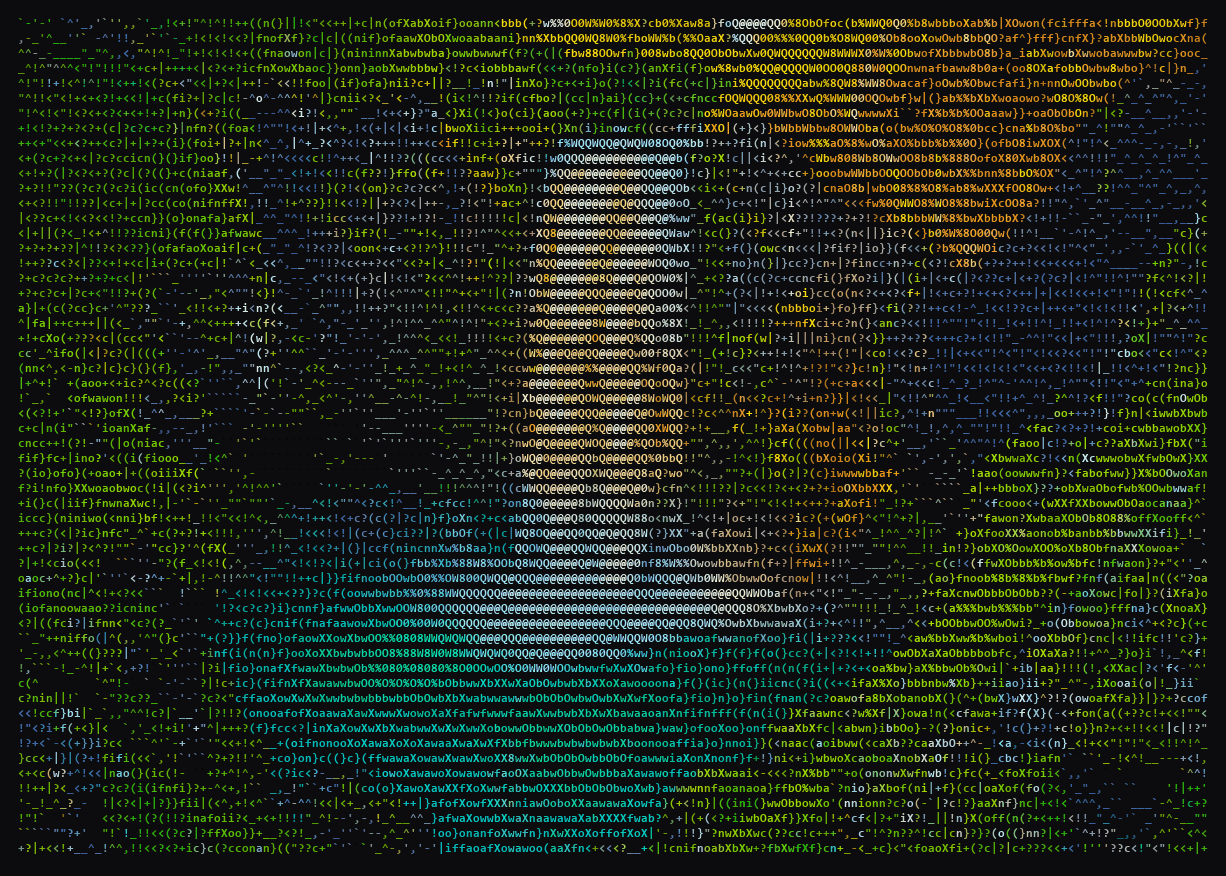
› waterfall, drawn by the viewer as 9,520 characters, each chosen and colored to match the patch of the picture under it.
Website · Quick start · Usage · Configuration · How it works · Privacy
Overview
sepia is a command-line tool that turns short requests into pictures made of text. You type what you want to see in one terminal window; Claude writes a photo prompt for it, an image model paints it, and a second window draws the result as colored characters.
› waterfall
 ⏺ Painting a tall waterfall in a mossy gorge.
   cloudflare · 6.2s
› /add mountains
 ⏺ Adding snowy mountains behind the waterfall.
   cloudflare · 5.8s
Every request starts a new picture; /add builds on the current one. sepia only makes pictures; it is not a chat assistant.
Features
- An art director, not a prompt box. Claude paints what you asked for, as a search would show it, and finds its own twist only when you ask for one. It writes a detailed English photo prompt tuned for text rendering, and decides whether a request edits the current picture or starts a new one.
- Free to paint, local when you need it. FLUX.2 [klein] 4B paints every picture: on Cloudflare Workers AI with a free account (about 100 pictures a day), or, with the optional
localextra, on your own GPU (CUDA or Apple Silicon) whenever the API fails or rate limits./localkeeps it on your GPU. - Real subjects stay recognizable. Name a character, a famous person, a creature, product or landmark, or paste a link to a picture, and sepia paints from a reference picture instead of inventing a stranger.
- Made for the terminal. 24-bit color, two styles and two character sets, a redraw on every resize without new API calls, and a sepia trail that follows the mouse pointer over the picture.
- Your camera, as text.
/camshows the webcam live in the picture window;/camagain keeps the frame, and/addpaints over it. - Short videos, as text.
/play <link>plays a video of up to a minute from YouTube or another site in the picture window, then deletes it. - Costs you can see.
/usageshows Claude's tokens, searches and estimated cost, for the session and for all time. - Nothing hidden. The two windows talk over an authenticated loopback socket, and sepia has no telemetry.
Quick start
You need Windows 10/11 or macOS, uv, an Anthropic API key, and somewhere to paint: a free Cloudflare account or the local model on your GPU. uv provides Python 3.12 if you do not have it.
uv tool install sepia-cli
sepia
On the first run sepia asks for its keys one by one, with hidden input and a link to where each comes from: the Anthropic API key, which it needs, then the Cloudflare account ID and API token, which Enter skips. They are saved to the .env file in the user config folder, and /keys changes any of them later (see Cloudflare Workers AI). Type waterfall and press Enter: the viewer window opens with the picture. Keep it next to the prompt window, then try /add mountains.
Install
Cloudflare painting only. A small install that needs no GPU:
uv tool install sepia-cli
With the local fallback model. About 3 GB of packages; the 16 GB model comes later, only if you ask for it:
# macOS (Apple Silicon)
uv tool install "sepia-cli[local]"

# Windows: CUDA builds of torch are not on PyPI, so point uv at the PyTorch index
uv tool install "sepia-cli[local]" --index https://download.pytorch.org/whl/cu130 --index-strategy unsafe-best-match
With the camera. OpenCV for /cam, about 45 MB:
uv tool install "sepia-cli[cam]"
With videos. yt-dlp, Deno (which YouTube needs) and OpenCV for /play, about 100 MB:
uv tool install "sepia-cli[video]"
Extras combine: "sepia-cli[local,cam,video]".
Update. sepia update upgrades sepia with the installer that installed it (uv tool upgrade sepia-cli, pipx upgrade sepia-cli, or python -m pip install --upgrade sepia-cli), uv keeps extras such as [local] and the CUDA index, and pipx keeps extras; pip upgrades only sepia-cli itself. It asks PyPI first and says so when sepia is already the latest. On Windows, close sepia's other windows first; sepia update says so if one is open. An install from a folder or a git checkout is updated there (git pull); one from a git or web address is installed again from there.
Nothing is downloaded at install. The first /local names the model and its size (FLUX.2 [klein] 4B, about 16 GB from Hugging Face) and downloads it once you say yes. sepia --download fetches it ahead of time instead.
Usage
Start sepia with sepia. The first request opens the viewer window; if you close it, the next request opens it again.
Commands
| Command | What it does |
|---|---|
/add <text> |
Add to the current picture instead of starting a new one. |
/again |
Paint the current picture again from the same prompt with fresh noise, without asking Claude; after /add, over the same picture. A picture shown as found has no prompt to paint again. |
/undo |
Go back to the picture before, with its scene, so the next /add builds on it. /clear can be undone too; there is no redo. |
/cam [off] |
Show the webcam live in the viewer window, mirrored. /cam again keeps the frame as the picture, cut to the window's shape; /add and /save while it is live keep the frame first. A request, /again, /undo and /clear stop the camera, as does /cam off. Needs sepia-cli[cam]. |
/play <link|off> |
Download a video of up to 60 seconds (YouTube or any other site yt-dlp knows; https links only) into a temporary folder and play it once in the viewer window, picture only, at up to 15 frames a second. Longer videos, live streams and playlists are refused before anything is downloaded; it takes at most 480p and 100 MB. The file is deleted when the video ends, on /play off, and when sepia closes. A request, /again, /undo, /clear and /cam stop the video. Needs sepia-cli[video]. |
/clear |
Clear the screen and start a fresh picture. |
/style [ink|fill] |
ink colors the characters on the terminal's own background and suits dark themes; fill also paints each cell's background and works on any theme. |
/charset [classic|symbols] |
classic uses 31 density levels of the ASCII-art alphabet (letters, digits, punctuation); symbols uses punctuation only. |
/save |
Save the picture in the viewer window as a PNG in the sepia folder of your Pictures folder: its colored characters as the window shows them, without the tab bar or frame, named after the time. |
/model [haiku|sonnet|opus|fable] |
Which Claude writes the prompts, from the next request on: Haiku 5.5 (the default), Sonnet 5.5, Opus 5.5 or Fable 5.1. |
/effort [low|medium|high|xhigh|max] |
How long Claude thinks about each picture, from the next request on. |
/config |
Turn clarifying questions, mature pictures and update notices on or off in one list. |
/mature [on|off] |
Mature pictures; see Mature mode. Off by default. |
/api |
Paint with Cloudflare Workers AI, and with the local model when it fails. Also makes sepia try Cloudflare again after a rate-limit pause or a used-up day; see Painting backends. |
/local |
Paint only on this machine's GPU. The first time, it names the model and its size and downloads it once you say yes. Needs sepia-cli[local]. |
/keys [anthropic|cloudflare] |
Set a key, hidden as you type: without a name it opens a menu that shows which keys are set. The key is saved to the user config .env and used from the next request on, no restart needed. Keys are never shown. |
/usage |
What Claude used in this session and in all sessions: tokens, web searches and estimated cost. Esc closes it. |
/help |
List the commands. |
/exit |
Close sepia and the viewer window. /quit, /q, Ctrl+D and Ctrl+C twice do the same. |
/style, /charset, /model, /effort, /mature and /keys without an argument open a menu: the arrow keys and Enter (or the option's number) pick, Esc cancels. /config lists the on/off settings: the arrow keys move, Enter or Space switches one, Esc closes. /usage opens a panel that Esc (or Enter) closes without leaving it in the transcript. Its session bar is drawn against the all-time total, so its gray rest is earlier use; use from before tracking began is estimated once from the prompt history and the saved sessions.
Update notice
On start sepia says when a newer release is out, under the tip. It never waits for PyPI: it shows the answer kept from an earlier check, and checks again at most once a day in the background, so a new answer shows on the next start. /config → Update notices, or SEPIA_UPDATE_CHECK=off, turns it off.
Clarifying questions
When a request could mean very different pictures ("universe", "something cool"), Claude asks one to three short questions first. Each picks one option or several (Space), and the last row takes your own words. With several questions, ←→ switches between them and the Paint page sends the answers. Esc skips them and paints Claude's guess; Ctrl+C cancels the request. A clear request is painted at once. Asking costs a second Claude call, about twice the tokens of that request; turn it off in /config or with SEPIA_ASK=off.
Keys and the viewer
- Up and down arrows walk the request history. Typing
/opens a menu of the matching commands, with their descriptions, above the chat bar: the up and down arrows move through it, Tab completes the highlighted command, and Enter runs it. - The status line under the chat bar shows the painter, the model and its effort (and
maturewhen it is on), the current style and charset, and whether the viewer window is connected (●) or not (○). - Moving the mouse over the viewer window leaves a sepia trail behind the pointer: where it passes, the picture turns the brown of an old photograph and fades back to its colors in about a second. Nothing on the picture moves. Windows Terminal and iTerm2 report pointer movement; macOS Terminal.app may not.
Named subjects and reference pictures
The image models know no names, so when a request names a specific character, famous person, creature, product or landmark ("yunara lol", "keanu reeves"), Claude names the subject and sepia finds its picture: the top result of an image search when a Brave Search key is set, otherwise the preview picture of the wiki page Claude links (for a person, their Wikipedia photo). Famous people are shown with respect: no sexual, humiliating or gory pictures of them and no made-up news photos; such a request gets the nearest respectful picture. A name that is not a public figure's gets an ordinary person.
- A bare name ("yunara lol") shows that picture as it is, whole and on black.
- A name in a scene ("yunara on a beach") lets Claude see the picture and describe the subject from it, and the image model paints from it, so the subject keeps its real look.
- A pasted link to a picture, or to a page with a preview picture ("yunara https://…"), becomes the reference directly: Claude sees it and no search is made.
Reference pictures work with both painters: Cloudflare receives the picture as an input image, downscaled to at most 512 px a side, and the local model paints from it the same way.
Mature mode
With /mature on (or SEPIA_MATURE=on), Claude paints sexy, hot, dark and violent scenes of adults as asked instead of toning them down: glamour, boudoir, lingerie, artistic or implied nudity. It is never explicit (no sex acts, no visible genitals), never shows anyone who is or looks under 18, and never shows a real person undressed; such a request gets the nearest acceptable picture instead of a refusal. With BRAVE_SEARCH_API_KEY, it also turns off the image search's adult filter (safesearch=off; it is strict otherwise).
Command-line flags
| Flag | What it does |
|---|---|
--download |
Download the local model (about 16 GB) from Hugging Face. Needs sepia-cli[local]. |
--version |
Print the version. |
--help |
Print usage. |
Configuration
sepia reads settings from the environment, then from .env in the current directory, then from .env in the user config folder. A value that is already set is never overridden by a later source. See .env.example.
| Variable | Default | Meaning |
|---|---|---|
ANTHROPIC_API_KEY |
none | Required. Asked for on the first run if missing and saved to the user config .env; /keys anthropic changes it. |
BRAVE_SEARCH_API_KEY |
none | Optional key from brave.com/search/api (monthly free credits, about 1,000 searches). Named subjects come from the top pictures of an image search instead of wiki pages. |
CLOUDFLARE_ACCOUNT_ID |
none | Your Cloudflare account ID, for painting on Cloudflare Workers AI. Goes together with CLOUDFLARE_API_TOKEN. |
CLOUDFLARE_API_TOKEN |
none | A Workers AI API token. Without the two Cloudflare settings, sepia paints only with the local model. |
SEPIA_MODEL |
claude-haiku-5-5 |
The starting art director model. /model switches between claude-haiku-5-5, claude-sonnet-5-5 (about 20 times the price), claude-opus-5-5 (about 40 times) and claude-fable-5-1 (about 100 times) while sepia runs. |
SEPIA_EFFORT |
high |
Starting Claude effort: low, medium, high, xhigh or max. /effort changes it while sepia runs. |
SEPIA_STYLE |
ink |
Starting style: ink or fill. |
SEPIA_CHARSET |
classic |
Starting character set: classic or symbols. |
SEPIA_MATURE |
off |
Start with mature pictures on or off. /mature changes it while sepia runs. |
SEPIA_ASK |
on |
Let Claude ask about a vague request before painting (on or off). /config changes it while sepia runs. |
SEPIA_UPDATE_CHECK |
on |
Say on start when a newer sepia is out (on or off). /config changes it. |
SEPIA_IMAGE_MODEL |
black-forest-labs/FLUX.2-klein-4B |
Hugging Face id of the local model. |
An invalid value for SEPIA_EFFORT, SEPIA_STYLE, SEPIA_CHARSET, SEPIA_MATURE, SEPIA_ASK or SEPIA_UPDATE_CHECK stops sepia at startup. So does setting only one of CLOUDFLARE_ACCOUNT_ID and CLOUDFLARE_API_TOKEN.
What you pick with /model, /effort, /style, /charset, /mature, /config, /api or /local (update notices included) is kept in choices.json in the user config folder, and the next sepia starts with it. A kept choice wins over its SEPIA_* variable, which only sets what you have never picked; delete the file to start from the variables again. sepia starts with Cloudflare until you pick /local.
The user config folder is %LOCALAPPDATA%\sepia on Windows and ~/Library/Application Support/sepia on macOS. It holds the key file, the request history, the all-time usage totals (usage.json), the choices kept between sessions (choices.json), and one folder per session with that session's pictures (01.png, 02.png, ...). The newest 10 session folders are kept.
Cloudflare Workers AI
A free Cloudflare account is enough, with no credit card:
- In the Cloudflare dashboard, open Workers AI and choose Use REST API.
- Choose Create a Workers AI API Token, review the prefilled permissions, choose Create, and copy the token into
CLOUDFLARE_API_TOKEN. - Copy the Account ID shown on the same page into
CLOUDFLARE_ACCOUNT_ID.
Your tokens are listed at dash.cloudflare.com/profile/api-tokens.
The free tier gives 10,000 neurons a day, reset at 00:00 UTC. At sepia's picture size (about 1024x640) one picture costs roughly 80 to 105 neurons, so the free tier paints about 100 pictures a day. That is an estimate from Cloudflare's per-tile price; see Workers AI pricing.
How it works
prompt window                                                  viewer window
-------------                                                  -------------
"mountains" + earlier requests
        |
        v
Claude (art director) -> English photo prompt, edit or new, one-line reply
        |
        v
Cloudflare Workers AI --- fails or rate limited ----> FLUX.2 [klein] 4B on your GPU
        |                                                      |
        +------------------------> PNG <-----------------------+
                                    |
                                    +--- path over a loopback socket --->  photo -> colored characters
- Direct. Claude (
claude-haiku-5-5at high effort by default) looks for an idea, then turns the request and the scene so far into a detailed English photo prompt written for symbol rendering: one dominant shape, strong light, saturated color, no text. It also decides whether the request edits the current picture or starts a new one, and writes a one-sentence reply. The reply is structured output: JSON with a fixed schema. - Paint. The prompt goes to Cloudflare Workers AI first, which runs FLUX.2 [klein] 4B (Apache 2.0). If the API fails or rate limits, sepia paints the picture locally with the same model, if you installed the local extra.
/localpaints only locally;/apigoes back to Cloudflare first. The picture is painted at the viewer window's aspect ratio. - Show. The picture is saved as a PNG and the viewer window is told where it is. The viewer stretches contrast, boosts saturation, crops the picture to the window, and draws every cell as one character whose density matches the brightness, in 24-bit color where the terminal supports it (256 colors otherwise).
The two windows are two processes that talk over an authenticated loopback socket; see SECURITY.md.
Painting backends
| Backend | When it runs | Notes |
|---|---|---|
Cloudflare Workers AI (@cf/black-forest-labs/flux-2-klein-4b) |
First, when CLOUDFLARE_ACCOUNT_ID and CLOUDFLARE_API_TOKEN are set; never under /local |
FLUX.2 [klein] 4B. Free up to 10,000 neurons a day, about 100 pictures. Takes the previous picture and reference pictures as input images, at most 512 px a side. |
| FLUX.2 [klein] 4B, local | When Cloudflare fails or rate limits; the only painter without the Cloudflare settings or under /local |
Needs sepia-cli[local]; the first /local offers to download the model. The same model as on Cloudflare. |
After a rate-limit answer (HTTP 429), sepia skips Cloudflare for 120 seconds and paints locally instead of retrying it on every picture. Once the day's free allocation is used up (Cloudflare error 4006), it skips Cloudflare for the rest of the session, since a short wait does not bring it back. /api or a restart makes sepia try Cloudflare again after either. A rejected token (HTTP 401 or 403) gets a message that says so. Cloudflare's safety filter sometimes flags a harmless picture, and not every time for the same prompt; that picture is painted locally and the next one goes to Cloudflare again. Whenever the local model paints because Cloudflare failed, the reply's detail line says why.
The local model runs on CUDA, then Apple Silicon (MPS), then CPU, whichever is found first:
- CUDA: the transformer and text encoder load in 4-bit (bitsandbytes nf4), about 5 GB of VRAM. On an RTX 4070 laptop GPU a 768x512 picture takes about 3 seconds.
- MPS: bf16 weights without quantization, so it needs more memory than the CUDA path.
- CPU: float32. It works, but slowly.
Once the model is downloaded, it starts loading in the background as soon as sepia opens, so the first local picture rarely waits for it; it holds about 5 GB of VRAM from then on, until sepia closes. Edits work the same on both backends: /add hands the previous picture to the model, which edits it with the scene's fixed seed, so the composition stays close.
Cost
| Part | Cost |
|---|---|
| Claude Haiku as art director | About $0.001 per request with the default model and effort, plus $0.01 per web search |
| Brave image search | About $0.005 per named subject, covered by Brave's monthly free credits |
| Cloudflare Workers AI | Free up to 10,000 neurons a day (about 100 pictures), reset at 00:00 UTC; after that the local model paints |
| Local model | Free, runs on your hardware |
A larger model (/model, SEPIA_MODEL) or a higher effort costs more per request: about $0.03 on Sonnet 5.5, $0.05 on Opus 5.5 and $0.12 on Fable 5.1.
Platform support
| Platform | Viewer window | Notes |
|---|---|---|
| Windows 10/11 | Windows Terminal, plain console as a fallback | Full support. |
| macOS | Terminal.app, opened through osascript |
Full support. |
| Linux | Not available | Not supported: the viewer window cannot be opened there. |
Windows. The viewer opens as a new Windows Terminal window with a tab named sepia in the theme's pinkish purple; drag the tab row to move the window. It uses a sepia profile (6 pt Cascadia Mono, black background, no padding) that sepia writes as a Windows Terminal fragment to %LOCALAPPDATA%\Microsoft\Windows Terminal\Fragments\sepia\sepia.json. Your own settings.json is not touched; delete that folder to remove the profile. The small font fits several times more cells into the window, which gives the picture more detail. Without Windows Terminal, the viewer falls back to a plain console window.
macOS. The first time, macOS asks whether your terminal may control Terminal.app (Automation permission); allow it. Terminal.app cannot hide its title bar. Press ⌘- in the viewer window to shrink the font: the picture redraws with more cells and more detail.
Privacy
What leaves your machine:
- To Anthropic: your request, the earlier requests of the current scene, the last generated prompt, and a reference picture when one is used.
- To Brave Search: a short image search query for a named subject, written by Claude, only when
BRAVE_SEARCH_API_KEYis set. - To the site of a reference picture: a plain download of the linked page or picture, when a request names a subject or contains a link.
- To Cloudflare: the generated English prompt, the picture size, the seed and, as input pictures of at most 512 px a side, the reference picture and, for
/add, the previous picture. Your original request is not sent. Nothing goes to Cloudflare when the picture is painted locally. - The camera: nowhere. Its frames are drawn in the viewer window and never sent; a frame you keep is a picture like any other, so an
/addon it sends it to the painter as the previous picture. - To the site of a video: the link you give
/play, which yt-dlp asks for the video and downloads; the file stays on your machine until it has played, then is deleted. Nothing about it goes to Anthropic or Cloudflare. - To Hugging Face: only the model download, after you say yes to it under
/localor runsepia --download.
Pictures, the request history and the API key file stay in the user config folder on your machine; a picture you keep with /save goes to the sepia folder of your Pictures folder. sepia has no telemetry of its own.
Development
See CONTRIBUTING.md for the setup on Windows and macOS, the checks, and the commit and test conventions. The design is described in docs/superpowers/specs/2026-10-28-sepia-design.md, releases in docs/releasing.md, and changes in CHANGELOG.md. To report a vulnerability, see SECURITY.md.
License
MIT. The optional local model, FLUX.2 [klein] 4B, is published by Black Forest Labs under Apache 2.0 and is downloaded separately from Hugging Face.
1 maintainer

Metadata
1 maintainer
Release files for sepia-cli 0.5.1
For a detailed explanation of source distributions (sdists) and built distributions (wheels), please see the package formats documentation.
Source distribution (sdist)
| File | Size | Uploaded | Provenance | Actions |
|---|---|---|---|---|
| sepia_cli-0.5.1.tar.gz | 107.3 kB | With provenance | Details for sepia_cli-0.5.1.tar.gz |
Built distribution (wheel)
| File | Interpreter | ABI | Platform | Actions Reset |
|---|---|---|---|---|
| sepia_cli-0.5.1-py3-none-any.whl | Python 3 | none | any | Details for sepia_cli-0.5.1-py3-none-any.whl |
Total release size: 216.7 kB
Release files / sepia_cli-0.5.1.tar.gz
| Download URL | sepia_cli-0.5.1.tar.gz |
|---|---|
| Size | 107.3 kB |
| Tags | Source |
|
SHA-256 checksum How to use checksums |
23fcf128575c50cddfcf3ae2a54dd8364511198f173120a21ea52bb6a8de9466
|
|
BLAKE2b-256 checksum How to use checksums |
979f8808fd2b57e886e5994e2156ac9b7a3f8fb68557a4260e3061a2da9feccb
|
| Upload date | |
|
Uploaded using Trusted Publishing? What is trusted publishing? |
Yes |
| Uploaded via |
twine/7.0.0 CPython/3.13.16
|
Provenance
Provenance describes where a file came from. On PyPI, provenance is shared via attestations, which provide a verifiable record of the build or publishing details. View details, limitations and caveats.


PyPI Publish Attestation
PyPI verified that this artifact, at this checksum, originated from the publisher listed below.
Signed by GitHub Actions, verified by PyPI on Nov 3, 2026.
Transparency logRelease files / sepia_cli-0.5.1-py3-none-any.whl
| Download URL | sepia_cli-0.5.1-py3-none-any.whl |
|---|---|
| Size | 109.4 kB |
| Tags | Python 3 |
|
SHA-256 checksum How to use checksums |
14f90d90891ec8112e395286a09057afbcee187a218c995faea4592f7cee3b5b
|
|
BLAKE2b-256 checksum How to use checksums |
85884974680bdc80e9e6794a488f2a27324b982ebf7f86a30ee65a34e265b91a
|
| Upload date | |
|
Uploaded using Trusted Publishing? What is trusted publishing? |
Yes |
| Uploaded via |
twine/7.0.0 CPython/3.13.16
|
Provenance
Provenance describes where a file came from. On PyPI, provenance is shared via attestations, which provide a verifiable record of the build or publishing details. View details, limitations and caveats.
PyPI Publish Attestation
PyPI verified that this artifact, at this checksum, originated from the publisher listed below.
Signed by GitHub Actions, verified by PyPI on Nov 3, 2026.
Transparency logSecurity for sepia-cli 0.5.1
Provenance
Provenance describes where a file came from. On PyPI, provenance is shared via attestations, which provide a verifiable record of the build or publishing details. View details, limitations and caveats.
Full provenance
All 2 files in this release have been uploaded with provenance metadata.
Attestation for sepia_cli-0.5.1.tar.gz
PyPI Publish Attestation
PyPI verified that this artifact, at this checksum, originated from the publisher listed below.
Signed by GitHub Actions, verified by PyPI on Nov 3, 2026.
Transparency logA note on package security
PyPI is a repository for distributing packages, not a service for auditing them. While third-party security researchers and our staff do their best to detect and remove malicious packages, PyPI cannot guarantee the quality, security or suitability of any given package.
To learn more about protecting yourself from malicious actors, visit our package security documentation.














