





LORA — Long Read Assembly pipeline
- Overview:
Assemble long reads (PacBio HiFi, PacBio subreads, Nanopore) into high-quality genome assemblies with optional polishing, annotation, and quality assessment.
- Input:
BAM files from PacBio sequencers, or FastQ files from Nanopore or PacBio HiFi sequencers.
- Output:
HTML reports with per-sample assembly statistics, coverage, BLAST identification, BUSCO scores, and optional annotation.
- Status:
Production
- Citation:
- Cokelaer et al, (2017), ‘Sequana’: a Set of Snakemake NGS pipelines,
Journal of Open Source Software, 2(16), 352, doi:10.21105/joss.00352
- Zenodo DOI:
-
- Biorxiv:
https://www.biorxiv.org/content/10.64898/2026.01.06.697901v1

Installation
pip install sequana-lora
To upgrade an existing installation:
pip install sequana-lora --upgrade
Quick Start
Step 1 — prepare the working directory:
sequana_lora \
    --input-directory /path/to/reads \
    --data-type pacbio-hifi \
    --assembler flye \
    --genome-size 3m \
    --apptainer-prefix /path/to/containers
This creates a lora/ working directory containing config.yaml and a lora.sh launch script.
Step 2 — review the configuration (optional but recommended):
cd lora
cat config.yaml   # adjust parameters as needed
Step 3 — run the pipeline:
sh lora.sh
Or launch directly from step 1 with --execute (skips the review step):
sequana_lora ... --execute
To watch live progress in the terminal, add --monitor:
sequana_lora ... --execute --monitor
Required options
Three options are always required:
- --assembler
Assembler to use. Choices: flye (recommended for HiFi), canu, hifiasm, unicycler, necat, pecat.
- --data-type
Technology and quality of the input reads:
Value
Description
pacbio-hifi
PacBio HiFi / CCS reads (Q20+)
pacbio-raw
PacBio CLR / subreads (raw)
pacbio-corr
PacBio corrected reads
nano-hq
Nanopore Q20+ reads (e.g. R10.4 with SUP basecalling)
nano-raw
Nanopore standard reads
nano-corr
Nanopore corrected reads
- --genome-size
Estimated genome size, e.g. 3m (3 Mb), 2.5g (2.5 Gb). Required by Flye; used by Canu for coverage reporting.
Common Examples
PacBio HiFi (recommended setup)
sequana_lora \
    --input-directory /data/hifi \
    --data-type pacbio-hifi \
    --assembler flye \
    --genome-size 3m \
    --apptainer-prefix /shared/containers \
    --do-coverage
Nanopore (bacteria, full quality pipeline)
Use --mode bacteria to enable sequana_coverage, prokka, busco, and checkm in one shot:
sequana_lora \
    --input-directory /data/nanopore \
    --data-type nano-hq \
    --assembler flye \
    --genome-size 3m \
    --apptainer-prefix /shared/containers \
    --mode bacteria \
    --busco-lineage bacteria \
    --checkm-rank genus \
    --checkm-name Streptococcus
PacBio subreads (with CCS construction)
If your input is raw PacBio BAM files (subreads), LORA can build CCS/HiFi reads first:
sequana_lora \
    --input-directory /data/subreads \
    --data-type pacbio-raw \
    --assembler flye \
    --genome-size 3m \
    --pacbio-build-ccs \
    --pacbio-ccs-min-passes 10 \
    --pacbio-ccs-min-rq 0.99
Or, if you have multiple BAM files per sample, provide a CSV:
sequana_lora \
    --pacbio-input-csv samples.csv \
    --data-type pacbio-raw \
    --assembler flye \
    --genome-size 3m
The CSV format is: one row per sample with columns sample,file1[,file2,...].
Optional Steps
Coverage analysis
Computes depth of coverage and breadth of coverage for each contig using sequana_coverage. Highly recommended to check assembly quality:
--do-coverage
BUSCO completeness
Assess genome completeness against a lineage-specific marker gene set:
--busco-lineage bacteria          # auto-download bacteria lineage
--busco-lineage streptococcales   # specific clade
--busco-print-lineages            # list all available lineages
Prokka annotation
Annotate contigs (bacterial genomes):
--do-prokka
CheckM genome quality
Estimate completeness and contamination for bacterial genomes:
--checkm-rank genus --checkm-name Streptococcus
Use an invalid --checkm-name value to get a list of valid names for a given rank, e.g. --checkm-rank genus --checkm-name HELP.
Polypolish (Illumina polishing)
Polish long-read contigs with paired-end Illumina data:
--do-polypolish \
--polypolish-input-directory /data/illumina \
--polypolish-input-pattern "*.fastq.gz" \
--polypolish-input-readtag "_R[12]_"
Circularisation
Explicit circularisation with Circlator (Flye performs this automatically):
--do-circlator
BLAST identification
BLAST aligns each contig against a nucleotide database to identify the assembled sequences. The top hits appear in the HTML report.
Local BLAST
Requires a locally installed BLAST+ and a downloaded nt database (~270 GB). Fastest option with no network dependency:
--blastdb /path/to/blast/databases
Remote BLAST (NCBI)
No local database required — jobs are submitted to NCBI’s BLAST servers. Enable by providing an email address:
--blast-email your@email.com
Jobs are submitted sequentially (one contig at a time) to avoid IP-level CPU throttling by NCBI. The default database is nt; use --blast-remote-db to change it:
--blast-email your@email.com --blast-remote-db refseq_genomic
Restricting the search to an organism group (strongly recommended)
Searching all of nt for a large contig is slow and prone to NCBI CPU throttling. Restrict the search by editing config.yaml after running sequana_lora. The entrez_query parameter is equivalent to filling the “Organism” box on the NCBI BLAST web form.
Option 1 — curated bacterial reference genomes (fastest, recommended for bacteria)
Use refseq_genomic as the database and restrict to bacteria. RefSeq contains only complete, curated reference genomes — a much smaller and higher-quality search space than nt:
blast:
    remote_db: 'refseq_genomic'
    entrez_query: 'Bacteria[Organism]'
Option 2 — all bacteria in nt, reference sequences only
Stay on nt but filter to RefSeq-quality entries:
blast:
    remote_db: 'nt'
    entrez_query: 'Bacteria[Organism] AND refseq[filter]'
Option 3 — single genus
Useful when the organism is known:
blast:
    remote_db: 'nt'
    entrez_query: 'Streptococcus[Organism]'
NCBI API key (optional but recommended)
Register for a free NCBI API key at https://www.ncbi.nlm.nih.gov/account/ (sign in → API Key Management). It raises the rate limit from 3 to 10 requests/second and reduces CPU throttling for large queries. Add it to config.yaml:
blast:
    api_key: 'YOUR_KEY_HERE'
HPC / SLURM cluster
On a cluster with SLURM, pass --profile slurm:
sequana_lora \
    --input-directory /data/hifi \
    --data-type pacbio-hifi \
    --assembler flye \
    --genome-size 3m \
    --profile slurm \
    --slurm-queue fast \
    --jobs 40 \
    --apptainer-prefix /shared/containers
Per-rule memory and thread settings are controlled via the resources blocks in config.yaml.
Apptainer / Singularity (no system installs needed)
Every tool runs inside a pre-built container. Point --apptainer-prefix to a shared directory so images are downloaded once and reused across projects:
--apptainer-prefix /shared/containers
Images are downloaded automatically on first run from Zenodo. Pass extra bind mounts with --apptainer-args if your data lives outside $HOME:
--apptainer-args "-B /data:/data"
Configuration file
After running sequana_lora, a config.yaml is created in the working directory. All pipeline parameters can be tuned there. Key sections:
assembler — which assembler to use
flye / canu / hifiasm — assembler-specific options
fastp — read filtering (minimum length, etc.)
blast — BLAST settings including entrez_query and api_key
busco / prokka / checkm — optional QC tools
sequana_coverage — coverage analysis parameters
multiqc — aggregated report settings
Full reference: config.yaml
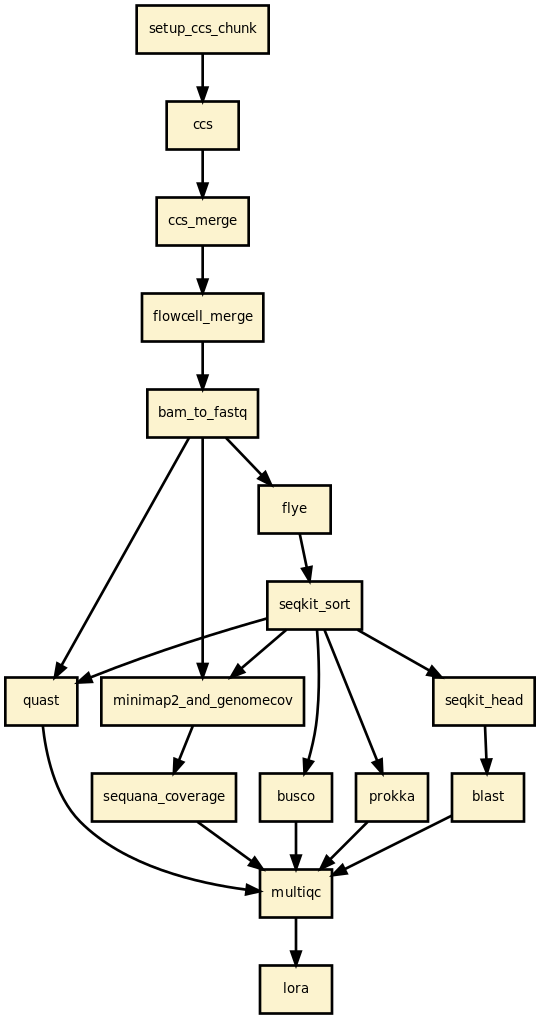
Pipeline overview
Read filtering — fastp removes reads below the minimum length threshold.
[Optional] CCS — build HiFi reads from PacBio subreads (ccs tool).
Assembly — Flye / Canu / Hifiasm / Unicycler / NECAT / PECAT.
[Optional] Circularisation — Circlator (or built into Flye).
[Optional] Polishing — Polypolish with paired-end Illumina reads.
Contig sorting — SeqKit sorts contigs by length (largest first).
Read mapping — Minimap2 maps reads back to contigs; Mosdepth computes coverage.
[Optional] Coverage analysis — sequana_coverage per contig.
Quality assessment — QUAST assembly statistics.
[Optional] BLAST — top hits per contig (local or remote NCBI).
[Optional] BUSCO — genome completeness.
[Optional] Prokka — genome annotation.
[Optional] CheckM — contamination and completeness for bacteria.
Reports — per-sample HTML report and a multi-sample summary.
Changelog
Version |
Description |
|---|---|
1.2.0 |
|
1.1.0 |
|
1.0.0 |
|
0.3.0 |
|
0.2.0 |
|
0.1.0 |
First release. |
1 maintainer

Metadata
1 maintainer
Release files for sequana-lora 1.2.0
For a detailed explanation of source distributions (sdists) and built distributions (wheels), please see the package formats documentation.
Source distribution (sdist)
| File | Size | Uploaded | |
|---|---|---|---|
| sequana_lora-1.2.0.tar.gz | 193.7 kB | Details |
Built distribution (wheel)
| File | Interpreter | ABI | Platform | Reset |
|---|---|---|---|---|
| sequana_lora-1.2.0-py3-none-any.whl | Python 3 | none | any | Details |
Total release size: 387.5 kB
Release files / sequana_lora-1.2.0.tar.gz
| Download URL | sequana_lora-1.2.0.tar.gz |
|---|---|
| Size | 193.7 kB |
| Tags | Source |
|
SHA-256 checksum How to use checksums |
057d2a37dea7e503b54ea32128e669a301b9188e7ff119f297b53344dd8d88e8
|
|
BLAKE2b-256 checksum How to use checksums |
7a5e087e58e991295ba1ff9019365add15c4a6dd1691af903532aad34f93ddb1
|
| Upload date | |
|
Uploaded using Trusted Publishing? What is trusted publishing? |
No |
| Uploaded via |
poetry/2.3.4 CPython/3.11.15 Linux/6.14.5-100.fc40.x86_64
|
Release files / sequana_lora-1.2.0-py3-none-any.whl
| Download URL | sequana_lora-1.2.0-py3-none-any.whl |
|---|---|
| Size | 193.8 kB |
| Tags | Python 3 |
|
SHA-256 checksum How to use checksums |
c30287bec0e10833dcbb2d098aa8bab9def622ab6bcc62f9632565de380565c3
|
|
BLAKE2b-256 checksum How to use checksums |
787cf737d54d85528195e118631c5ca87e9c86481bafd38fd2f43fa3f77eeb70
|
| Upload date | |
|
Uploaded using Trusted Publishing? What is trusted publishing? |
No |
| Uploaded via |
poetry/2.3.4 CPython/3.11.15 Linux/6.14.5-100.fc40.x86_64
|














