


This is the variant_calling pipeline from the Sequana projet
- Overview:
Variant calling from FASTQ files
- Input:
FASTQ files from Illumina Sequencing instrument
- Output:
VCF and HTML files
- Status:
production
- Citation:
Cokelaer et al, (2017), ‘Sequana’: a Set of Snakemake NGS pipelines, Journal of Open Source Software, 2(16), 352, JOSS DOI https://doi:10.21105/joss.00352
Installation
If you already have all requirements, you can install the packages using pip:
pip install sequana_variant_calling --upgrade
Otherwise, you can create a sequana_variant_calling conda environment executing:
conda env create -f environment.yml
and later activate the environment:
conda activate sequana_variant_calling
A third option is to install the pipeline with pip method (see above) and use singularity as explained afterwards.
Usage
sequana_variant_calling --help
sequana_variant_calling --input-directory DATAPATH --reference-file measles.fa
This creates a directory variant_calling. You just need to execute the pipeline:
cd variant_calling
sh variant_calling.sh
This launch a snakemake pipeline. If you are familiar with snakemake, you can retrieve the pipeline itself and its configuration files and then execute the pipeline yourself with specific parameters:
snakemake -s variant_calling.rules -c config.yaml --cores 4 --stats stats.txt
Or use sequanix interface.
Usage with singularity::
With singularity, initiate the working directory as follows:
sequana_variant_calling --use-singularity
Images are downloaded in the working directory but you can store then in a directory globally (e.g.):
sequana_variant_calling --use-singularity --singularity-prefix ~/.sequana/apptainers
and then:
cd variant_calling
sh variant_calling.sh
if you decide to use snakemake manually, do not forget to add singularity options:
snakemake -s variant_calling.rules -c config.yaml --cores 4 --stats stats.txt --use-singularity --singularity-prefix ~/.sequana/apptainers --singularity-args "-B /home:/home"
Requirements
This pipelines requires the following executable(s):
bwa
freebayes
picard (picard-tools)
sambamba
samtools
snpEff
Details
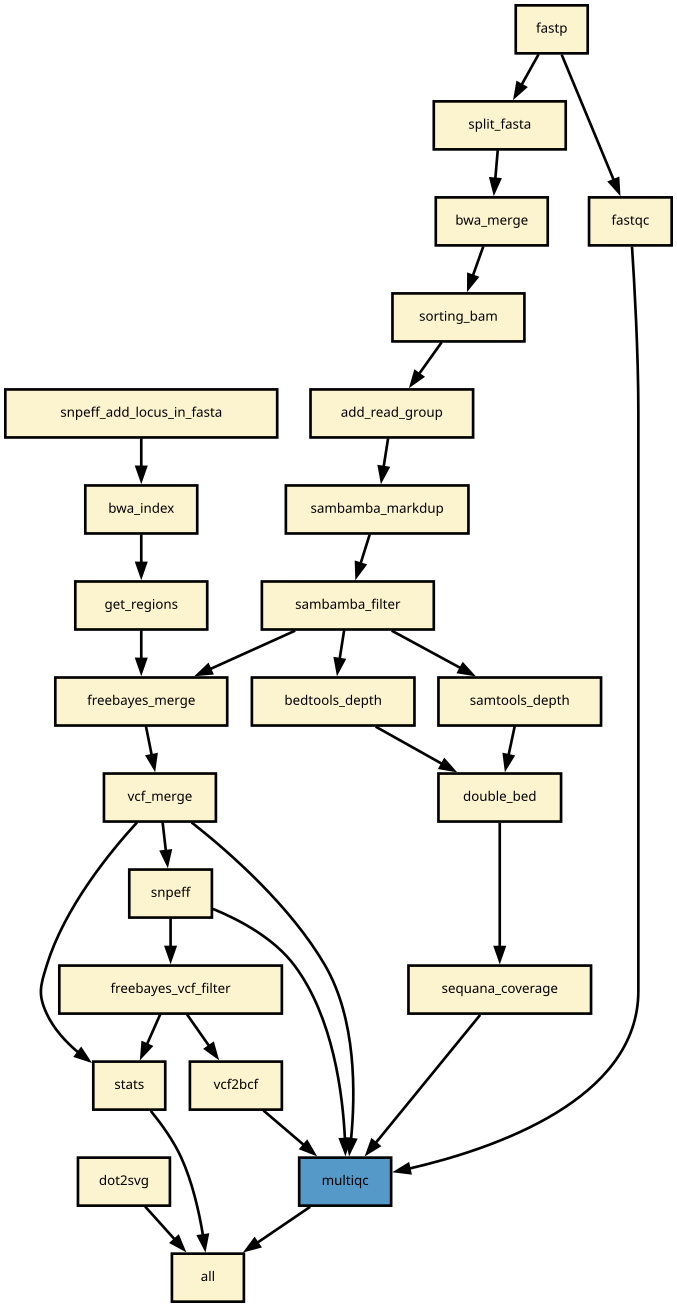
Snakemake variant calling pipeline is based on tutorial written by Erik Garrison. Input reads (paired or single) are mapped using bwa and sorted with sambamba-sort. PCR duplicates are marked with sambamba-markdup. Freebayes is used to detect SNPs and short INDELs. The INDEL realignment and base quality recalibration are not necessary with Freebayes. For more information, please refer to a post by Brad Chapman on minimal BAM preprocessing methods.
The pipeline provides an analysis of the mapping coverage using sequana coverage. It detects and characterises automatically low and high genome coverage regions.
Detected variants are annotated with SnpEff if a GenBank file is provided. The pipeline does the database building automatically. Although most of the species should be handled automatically, some special cases such as particular codon table will required edition of the snpeff configuration file.
Finally, joint calling is also available and can be switch on if desired.
Changelog
Version |
Description |
|---|---|
0.11.0 |
|
0.10.0 |
|
0.9.10 |
|
0.9.5 |
|
0.9.4 |
|
0.9.3 |
|
0.9.2 |
|
0.9.1 |
|
0.9.0 |
First release |
Contribute & Code of Conduct
To contribute to this project, please take a look at the Contributing Guidelines first. Please note that this project is released with a Code of Conduct. By contributing to this project, you agree to abide by its terms.
1 maintainer

Metadata
1 maintainer
Release files for sequana-variant-calling 0.11.0
For a detailed explanation of source distributions (sdists) and built distributions (wheels), please see the package formats documentation.
Source distribution (sdist)
| File | Size | Uploaded | Provenance | Actions |
|---|---|---|---|---|
| sequana_variant_calling-0.11.0.tar.gz | 117.5 kB | Without provenance | Details for sequana_variant_calling-0.11.0.tar.gz |
Release files / sequana_variant_calling-0.11.0.tar.gz
| Download URL | sequana_variant_calling-0.11.0.tar.gz |
|---|---|
| Size | 117.5 kB |
| Tags | Source |
|
SHA-256 checksum How to use checksums |
b1e04faaf63c0149ad7075cb3142f80e597422e4f07669c572c689e54ee3fa7a
|
|
BLAKE2b-256 checksum How to use checksums |
c55ba371a1cfc200d9c486e8ed27936f06b63f4ded17918efc949317c3a90dc6
|
| Upload date | |
|
Uploaded using Trusted Publishing? What is trusted publishing? |
No |
| Uploaded via |
twine/4.0.1 CPython/3.7.3
|
Security for sequana-variant-calling 0.11.0
Provenance
Provenance describes where a file came from. On PyPI, provenance is shared via attestations, which provide a verifiable record of the build or publishing details. View details, limitations and caveats.
No provenance found
None of the files in this release were uploaded with provenance metadata.
A note on package security
PyPI is a repository for distributing packages, not a service for auditing them. While third-party security researchers and our staff do their best to detect and remove malicious packages, PyPI cannot guarantee the quality, security or suitability of any given package.
To learn more about protecting yourself from malicious actors, visit our package security documentation.














